Call intelligence: what it is and how sales teams use it
What call intelligence is, how it turns sales calls into CRM data, coaching and forecasts, and how to roll it out without a Big Brother effect.

![What is Call Intelligence? Ultimate Guide + Tools [2026]](https://cdn.sanity.io/images/gb4upfg4/staging/760f5e3e0c63eb387f7f42b06fb5065f2eb34019-1536x864.jpg?w=1080&h=608&fit=crop&auto=format&q=75)
Updated 12 October 2026.
Call intelligence overview
- Call intelligence is software that records sales calls, transcribes them and uses AI to pull out what matters. It flags objections, competitor mentions, pricing talk, next steps and deal risks, then sends them where the team works.
- Call recording stores the conversation; call intelligence reads it. A recording answers "what was said on this call". Call intelligence answers "what is happening across all our calls and deals".
- Call intelligence and conversation intelligence describe the same category. Vendors use "call intelligence" for phone and video calls and "conversation intelligence" when emails and chats are included too.
- Sales teams use call intelligence for four jobs: coaching reps on real calls, reviewing deals, filling the CRM and checking the forecast against what buyers said.
Why call intelligence matters to sales teams
87% of sales organizations now use some form of AI, according to Salesforce's 2026 State of Sales report, a survey of more than 4,000 sales professionals (Salesforce).
Most of that AI still works on what reps type into the CRM. The richest data a sales team owns sits elsewhere: in the calls themselves, where buyers name their budget, their timeline, their other vendors and the reasons they hesitate.
Call intelligence is the layer that turns those calls into data a manager, a CRM and an AI agent can use. This guide explains what call intelligence is, how it works step by step, what it picks up on a sales call and how sales teams roll it out. It ends with the kinds of tools on the market and what they cost.
Call intelligence at a glance
| Call intelligence | |
|---|---|
| What it is | Software that records sales calls, transcribes them and analyzes them with AI |
| What it extracts | Objections, competitors, budget, timeline, next steps and deal risks |
| Where insights go | CRM fields, coaching views, pipeline reviews and AI assistants |
| Who uses it | Reps, sales managers, RevOps, marketing and product |
| What it costs | From free plans to enterprise contracts, depending on the tool and the CRM |
What is call intelligence?
Call intelligence is software that captures sales conversations, turns them into a transcript and analyzes that transcript with AI. The output is structured: a list of objections, a deal risk, a next step, a score against your sales method, a value for a CRM field.
The analysis can run on one call or on thousands at once. On one call, it tells a rep what they promised and what the buyer asked. Across thousands, it tells a sales leader which objection is costing deals this quarter and which competitor shows up most often in late-stage calls.
Call intelligence vs call recording
Call recording keeps the audio, the video and the transcript. Someone still has to open the call and listen to it.
Call intelligence reads the call for you. It surfaces the moments that matter, fills the fields that matter and lets you ask questions across many calls at once ("Which deals mentioned a budget freeze this month?").
Call intelligence vs conversation intelligence and revenue intelligence
The labels overlap, and vendors pick the one that sells best for them:
- Call intelligence usually refers to phone and video calls.
- Conversation intelligence covers the same calls plus emails and chats. Gong and Salesforce both use this label for their call products.
- Revenue intelligence combines conversation data with CRM and pipeline data to score deals and forecast the quarter.
For a sales team, the question that matters is simpler: does the tool read what buyers said, and does it put that knowledge to work in the CRM, in coaching and in the forecast?
How call intelligence works, step by step
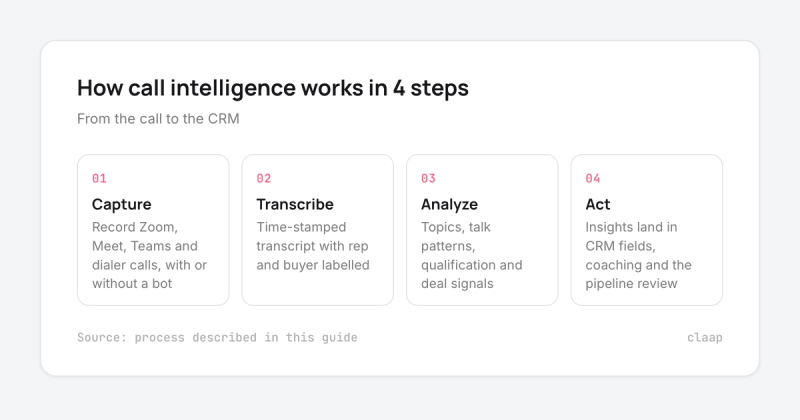
Every call intelligence platform runs the same four steps, from the call to the CRM.
Step 1: capture every sales conversation
The tool records calls on Zoom, Google Meet and Microsoft Teams, and phone calls through a dialer such as Aircall or Ringover. Some tools join as a visible bot; others record from a desktop app or a browser extension without a bot in the meeting. Coverage is the first thing to check: insights only exist for the calls that were recorded.
Step 2: transcribe and label the speakers
Speech-to-text turns the call into a time-stamped transcript, with each sentence attributed to the rep or the buyer. Speaker labels matter more than they seem: "the buyer mentioned a competitor" and "the rep mentioned a competitor" lead to very different coaching.
Step 3: analyze the call with AI
The AI reads the transcript and extracts what the team asked it to look for. Typical layers:
- Topics and trackers: competitor names, pricing, security questions, integrations.
- Talk patterns: talk-to-listen ratio, longest monologue, number of questions asked.
- Qualification: what the call revealed against MEDDIC, SPICED or BANT.
- Deal signals: next steps, objections, blockers and the buying timeline.
Step 4: act on the insights
The insight then goes where someone will use it. Call notes and qualification answers land in CRM fields. Scores go to a coaching view for the manager. Deal risks go to the pipeline review. Some tools also expose the data to AI assistants such as Claude or ChatGPT through an MCP server, so a manager can ask questions across every call in plain language.
What call intelligence picks up on a sales call
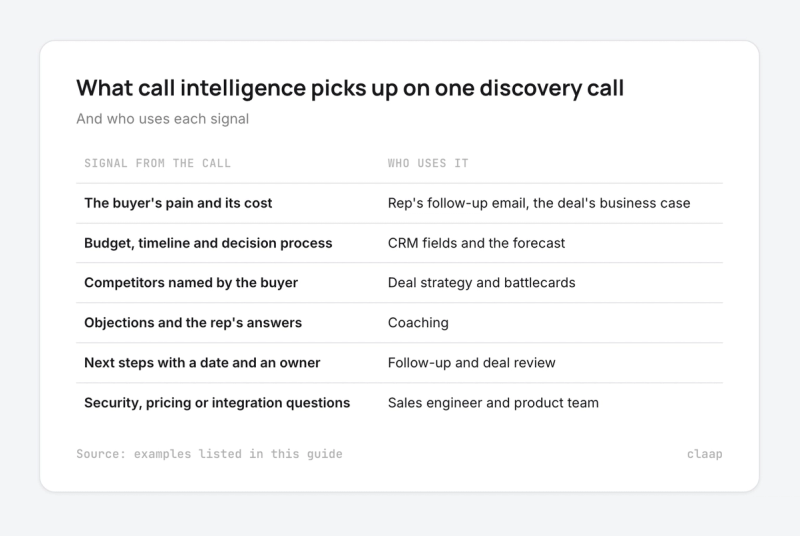
Here is what a call intelligence tool can extract from a single discovery call, and who uses it:
- The buyer's pain and its cost, for the rep's follow-up email and the deal's business case.
- Budget, timeline and decision process, for the CRM fields and the forecast.
- Competitors named by the buyer, for the deal strategy and the battlecards.
- Objections and how the rep answered them, for coaching.
- Next steps with a date and an owner, for the follow-up and the deal review.
- Questions about security, pricing or integrations, for the sales engineer and the product team.
How sales teams use call intelligence
Coaching reps on real calls
A manager can't sit in on every call. Call intelligence scores each call against the team's method and flags the moments worth a conversation: a skipped budget question, a discount offered too early, a strong objection answer worth sharing with new hires.
Reviewing deals with what the buyer said
In a pipeline review, the CRM tells a manager the stage and the amount. Call intelligence adds the evidence: whether the economic buyer has been on a call, which competitor the buyer is also talking to, and whether the next step has a date.
Keeping the CRM complete
Reps skip CRM updates because typing notes after every call takes time. Call intelligence fills qualification fields, next steps and call notes from the transcript, so the CRM matches what was said.
Forecasting from evidence
A forecast built on rep opinion moves late. A forecast that reads the calls sees risk earlier: a champion who went quiet, a procurement step nobody mentioned, a decision date that slipped on the last call.
Feeding marketing and product
Every objection and feature request is in the calls. Call intelligence lets marketing pull the buyer's own words for messaging and lets product count how often a missing integration came up in lost deals.
Where call recording falls short without call intelligence
Recording calls is the easy part. Here is how a revenue operations manager at a UK climate-data company selling to banks described the gap on a sales call with Claap:
- "Recording existing on its own. Doesn't really do anything. Like you. You want to go back and watch it and learn something from it. That's fine, but there's not enough being done in terms of signals and intelligence."
- "Individual deals sales directors going through call recordings on a one-to-one basis. Um, but it, it's not enough, it's too much effort required, it's too slow."
What this buyer describes:
- Recordings sit unwatched. Managers open a few calls a week, so most of what buyers say never reaches the CRM or the forecast.
- Deal reviews run on the rep's version of events. Without signals from the calls, the review depends on what the rep remembers and reports.
- The work doesn't scale. Listening call by call takes more manager time as the team grows, which is the opposite of what a growing team needs.
How to roll out call intelligence without a "Big Brother" effect
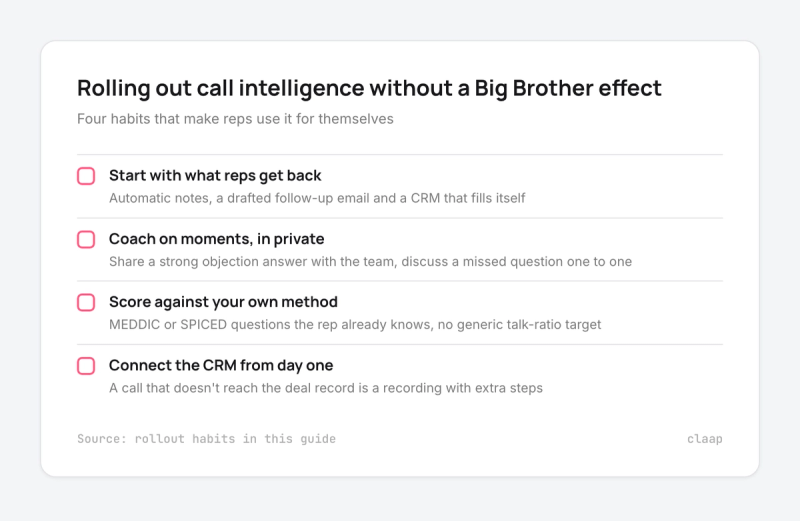
Call intelligence works when reps use it for themselves. It fails when they feel watched. Four habits make the difference:
- Start with what reps get back. Automatic notes, a drafted follow-up email and a CRM that fills itself win reps over in the first week.
- Coach on moments, in private. Share a strong objection answer with the team; discuss a missed question one to one.
- Score against your own method. A score on MEDDIC or SPICED questions the rep already knows is a coaching tool. A generic talk-ratio target turns into a metric to game.
- Connect the CRM from day one. A call that doesn't reach the deal record is a recording with extra steps.
Call intelligence tools and what they cost
Call intelligence tools fall into three groups. The right one depends on team size and on the CRM the team already pays for.
- CRM-native tools add call analysis inside the CRM. Salesforce Conversation Insights costs $50 per user per month, billed annually, on top of a Sales Cloud licence (Salesforce). HubSpot's conversation intelligence needs Sales Hub Professional, at $90 per seat per month billed annually plus $1,500 onboarding (HubSpot).
- Enterprise platforms such as Gong score deals on years of CRM, call and email history. Gong publishes no price; Vendr puts its median contract at $55,359 a year (Vendr).
- Sales call tools for mid-market teams, such as Jiminny and Claap, record calls, score them against a sales method and write the results into CRM fields, at lower prices than enterprise platforms.
How Claap does call intelligence
A quick note: Claap is our product.
Claap records every sales conversation, from Zoom, Google Meet and Teams to Aircall calls and in-person meetings, with or without a bot. Claap's conversation intelligence then scores each call against MEDDIC, SPICED or your own criteria, drafts the follow-up email and writes typed values into your CRM fields with CRM Auto-Complete. ClaapAgent answers questions across every call on a deal, and the Claap MCP server opens the same data to Claude and ChatGPT.
CRM sync and AI coaching are on the Business plan, at $60 per seat per month billed yearly, with HubSpot, Salesforce, Attio and Pipedrive.
Call intelligence: key takeaways
- Call intelligence turns recordings into data. Recording and transcription are table stakes; the value is in what the tool extracts and where it sends it.
- Check coverage before features. Insights only exist for recorded calls, so pick a tool that records Zoom, Meet, Teams and phone calls without friction.
- The CRM is where insights pay off. A tool that fills qualification fields and next steps saves rep time and gives managers evidence in deal reviews.
- Pick by team size and stack. CRM-native tools keep calls inside the CRM you already pay for. Enterprise platforms go deepest for large teams with long deal histories. Mid-market tools fill CRM fields at a lower price.
- Roll it out for reps first. Notes, follow-ups and CRM updates win reps over; coaching follows once they trust the tool.
To go further, see our comparison of conversation intelligence software and our guide to AI call analysis.
Frequently asked questions
What is call intelligence?
Call intelligence is software that records sales calls, transcribes them and uses AI to extract objections, competitor mentions, next steps and deal risks. It then sends those insights to the CRM, to coaching views and to the pipeline review.
What is the difference between call recording and call intelligence?
Call recording stores the audio, video and transcript of a call. Call intelligence analyzes them: it surfaces key moments, scores the call against your sales method and fills CRM fields, so nobody has to listen to every call.
Is call intelligence the same as conversation intelligence?
Mostly, yes. Call intelligence usually refers to phone and video calls, while conversation intelligence also covers emails and chats. Both analyze what buyers say to help sales teams coach, review deals and forecast.
What is the best call intelligence software for sales teams?
It depends on team size and CRM. Gong suits large teams with budget and a long deal history; Salesforce Conversation Insights and HubSpot suit teams that want to stay inside their CRM; Jiminny and Claap suit mid-market teams that want AI-filled CRM fields. Claap's Business plan costs $60 per seat per month billed yearly.
How much does call intelligence cost?
Prices range from free plans to enterprise contracts. Salesforce Conversation Insights costs $50 per user per month on top of Sales Cloud, HubSpot's starts with Sales Hub Professional at $90 per seat, Claap Business costs $60 per seat, and Vendr puts the median Gong contract at $55,359 a year.
Do you have to tell buyers that a sales call is recorded?
Yes, in most cases. Recording rules depend on the country and, in the US, the state: some require consent from every participant. Most call intelligence tools let you show a visible recorder in the meeting or send a recording notice, and your legal team should set the policy.