


Sales team management software: the 7 best tools in 2026
Compare the best sales tracking software for SMB, mid-market, and enterprise. Get side-by-side features, pricing, and FAQs.


Updated 10 October 2026 by Pierre Touzeau, Founder & COO at Claap.
Sales team management software overview
- HubSpot Sales Hub is best for small and mid-sized teams that want the pipeline, rep activity, forecasts and call recordings in one platform.
- Salesforce Sales Cloud is best for large sales organizations with a sales operations team and complex territories, roles and approval rules.
- Pipedrive is best for small teams that manage by pipeline, with a visual deal board and per-rep goals that take an afternoon to set up.
- Zoho CRM is best for budget-conscious teams that want AI deal scoring and sales gamification at a low price per seat.
- Claap is best for tracking what happens on sales calls: it scores every call, coaches reps and fills HubSpot or Salesforce fields for teams of 5 to 100 reps.
- Pipeline CRM is best for managers who run the team on goals and leaderboards, with a dashboard built around quota progress.
Gartner found that poor data quality is one of the top barriers to sales analytics, cited by 44% of the sales leaders it surveyed (Gartner, February 2024).
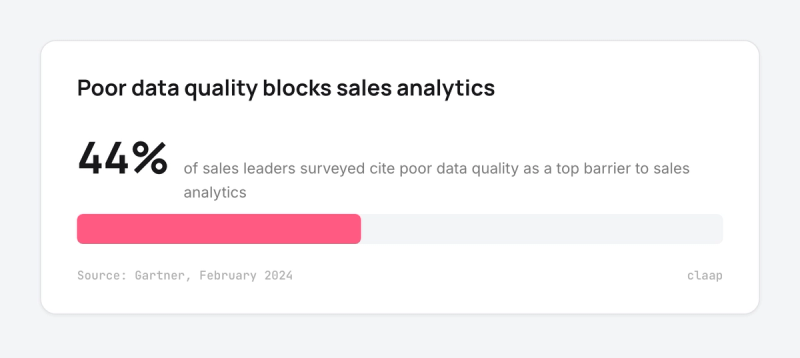
That figure is the real test for any sales team management software.
A quota dashboard, a leaderboard or a forecast can only show what reps put into the system, and reps skip data entry when the tool feels like extra work.
So this guide compares the 7 tools sales managers most often shortlist to run a team, from the CRM that holds the pipeline to the call layer that fills it, with what each one costs for a 10-rep team.
Sales team management software at a glance
Each price is the cheapest plan that covers team management: pipeline, rep activity, goals and team reporting. Prices are per seat per month on annual billing unless stated.
| Tool | Best for | Price for team management |
|---|---|---|
| HubSpot Sales Hub | Teams that want one platform for CRM, forecasts and calls | Professional $90 per seat + $1,500 one-time onboarding |
| Salesforce Sales Cloud | Large teams with a Salesforce admin | Pro Suite $100 per user |
| Pipedrive | Small teams that manage by pipeline | Growth $39 per seat (automations start here) |
| Zoho CRM | Teams on a tight budget | Free for up to 3 users; Professional $23 per user |
| Claap | Call scoring, coaching and CRM fields from every call | Free Basic plan; Business $60 per seat with AI coaching |
| Pipeline CRM | Goal and leaderboard-driven managers | Start $25 per user; Grow $49 per user |
| Outreach | Large outbound teams on Salesforce | Quote only, annual contract |
What sales team management software does
Sales team management software gives a sales manager one place to see the pipeline, what each rep is doing and how the team tracks against quota.
The tools in this list share five building blocks:
- Pipeline management. Every deal by stage, owner, amount and close date, so the pipeline review starts from the same numbers.
- Activity tracking. Calls, emails and meetings logged against each deal and each rep.
- Goals and quotas. Targets per rep and per team, with progress shown on a dashboard or leaderboard.
- Reporting and forecasting. Win rates, cycle length, quota attainment and a forecast rolled up by manager.
- Coaching. Call recordings, scores and feedback that show how each rep sells, beyond how many activities they log.
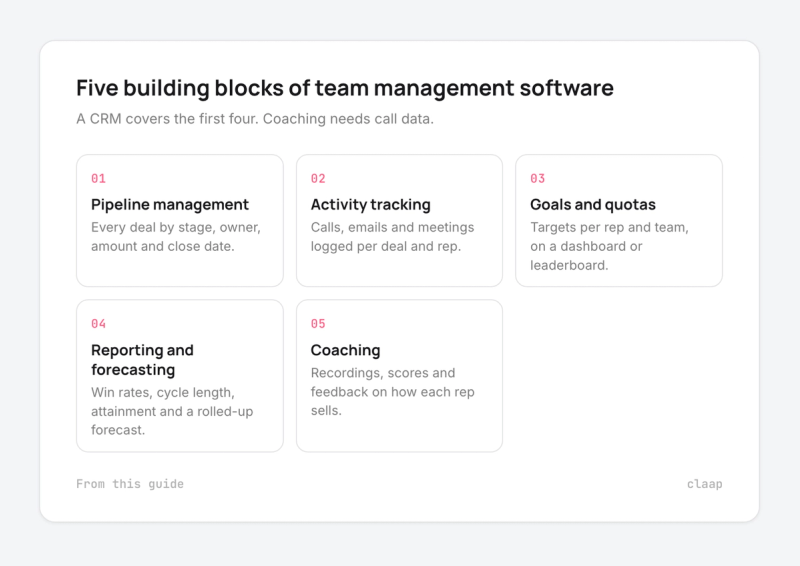
A CRM covers the first four. The fifth needs call data, which is why many teams pair a CRM with a conversation tool such as Claap. For the wider toolkit beyond management, see our guide to sales productivity tools.
Where sales team management software falls short
The weak spot is the same in every tool: the data depends on reps typing it in.
A June 2026 survey of 1,000 US sales and marketing professionals run by Pipedrive found that 38% spend most of their time logging calls, emails and meetings, and only 11% count closing deals among their most frequent weekly activities (Pipedrive, August 2026). Pipedrive sells a CRM, so read the numbers with that in mind.
Buyers on Claap sales calls describe the same gap from the manager's chair:
- "A CRM is very cumbersome, right? It's too much and utilization is little. Let's be honest, I've had CRMs for 30 years. Not everybody wants to use them." (Owner of a US employee benefits agency working with 30 independent agents)
- "Companies are paying their sales rep to put in info. Can you believe that they're paying them?" (Same buyer)
- "Some personalities were afraid of being policed by their manager." (Head of sales strategy and enablement at a European software company, on why reps stopped recording calls; translated from French)
- "In the end, I want to see sales efficiency go up: the share of a given pipeline we convert into revenue." (Same buyer, on the metric his team management stack has to prove; translated from French)
What this means for your choice:
- Adoption beats features. A tool reps avoid gives managers an empty dashboard, so ease of use weighs as much as the feature list.
- Automatic capture closes the gap. The less a rep has to type, the more complete the pipeline and activity data. Call recording that writes CRM fields on its own is the most direct fix.
- Say why you track. Reps accept tracking that helps them sell, such as call feedback and faster follow-ups. Frame it as coaching from day one.
How we built this comparison
We kept the tools that US sales managers most often shortlist to run a sales team, then compared them on five criteria:
- Team visibility. Pipeline, activity and goals by rep and by team.
- Forecasting and reporting. Which plan includes forecasts and team dashboards.
- Coaching. Whether the tool shows how reps sell on calls.
- Integrations. CRM, email, calendar and calling tools.
- Price and reviews. The plan that does the job for a 10-rep team, plus the G2 rating and review count.
Every price is the vendor's list price on annual billing, from the vendor's pricing page or a 2026 pricing guide when the vendor does not publish one. Ratings are from G2 in October 2026. Buyer quotes come from Claap sales calls, anonymised to the role and translated where needed.
Important note: Outreach does not publish prices. Its section gives the range reported by buyers and pricing guides, and its total depends on your quote.
1. HubSpot Sales Hub, best for small and mid-sized teams that want one platform
HubSpot Sales Hub is the safe pick for a team of 5 to 50 reps that wants pipeline, forecasting and call recording without a CRM admin; above that, the per-seat price and onboarding fees add up.
Who HubSpot Sales Hub works best for
- Sales teams already using HubSpot for marketing, so leads and deals share one database.
- Managers who want forecasts and call recordings in the same tool as the pipeline.
- Teams without a dedicated sales operations person.
HubSpot Sales Hub overview
Sales Hub sits on HubSpot's free CRM and adds sequences, playbooks, forecasting and conversation intelligence. Forecasting rolls up across team hierarchies, so a manager sees each rep's commit and the team total. Conversation intelligence, which records, transcribes and analyzes calls, requires a Professional or Enterprise seat (HubSpot Knowledge Base).
HubSpot Sales Hub pricing
- Starter: $15 per seat per month billed annually, $20 monthly.
- Professional: $90 per seat per month billed annually, $100 monthly, plus a one-time $1,500 onboarding fee.
- Enterprise: $150 per seat per month, plus a one-time $3,500 onboarding fee.
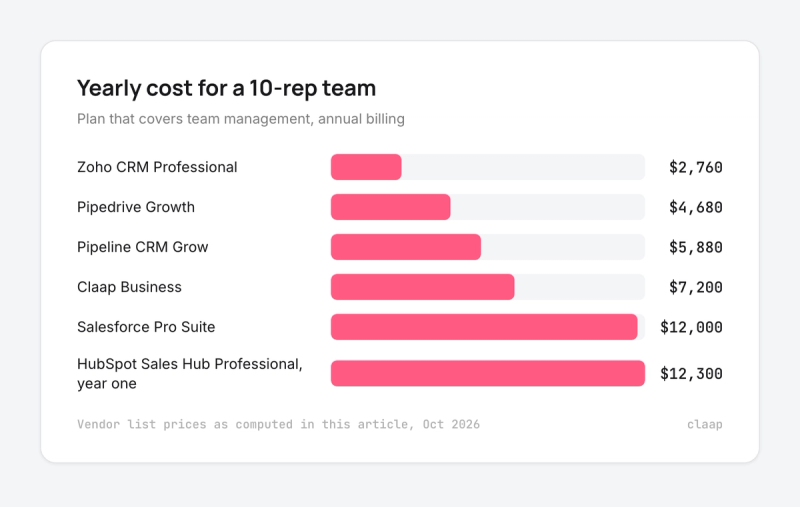
Team forecasting and call analysis need Professional. For 10 reps: $90 × 10 × 12 = $10,800 a year, plus $1,500 onboarding, so $12,300 in year one (HubSpot, Sales Hub pricing guide).
HubSpot Sales Hub integrations
HubSpot connects natively to Gmail, Outlook, Zoom and most calling tools, and its App Marketplace covers the rest of a sales stack. Professional and Enterprise let you mix sales seats with cheaper core seats for people who only view data.
HubSpot Sales Hub pros and cons
Pros:
- Easy to set up and use, the most common praise on G2.
- CRM, sequences, forecasts and call recordings in one place.
- Strong fit for teams that also run marketing on HubSpot.
Cons:
- Reporting on Starter is limited, so team management pushes you to Professional.
- Onboarding fees on Professional and Enterprise.
- Cost climbs fast as the team grows.
What G2 reviewers say about HubSpot Sales Hub
HubSpot Sales Hub is rated 4.4 out of 5 on G2 from about 13,460 reviews. Reviewers praise ease of use, automation and having everything centralized in one place. The most common complaints are cost for larger teams and advanced features held back for higher tiers.
2. Salesforce Sales Cloud, best for large sales organizations
Salesforce Sales Cloud is the right call for 50+ reps with complex territories, roles and approvals and an admin to run it; a 10-rep team pays for flexibility it will rarely use.
Who Salesforce Sales Cloud works best for
- Sales organizations with several teams, regions or product lines.
- Companies with a Salesforce admin or a sales operations team.
- Teams that need custom objects, approval flows and detailed permissions.
Salesforce Sales Cloud overview
Sales Cloud is the most configurable CRM in this list. Managers get pipeline inspection, opportunity scoring, forecasting and dashboards built on any field. G2 now lists it as Agentforce Sales, reflecting Salesforce's AI agent layer. The power comes with setup work: most teams need an admin or a partner to shape it to their process.
Salesforce Sales Cloud pricing
- Starter Suite: $25 per user per month, the same price on monthly or annual billing.
- Pro Suite: $100 per user per month, billed annually; adds customization, automation, quoting and forecasting.
- Enterprise: $175 per user per month since an August 2025 increase from about $165.
- Unlimited: $350 per user per month.
Pro Suite is the entry point for forecasting. For 10 reps: $100 × 10 × 12 = $12,000 a year, before implementation and add-ons (Redress Compliance, 2026 list prices). Salesforce offers a free 30-day trial of Starter Suite for up to 10 users.
Salesforce Sales Cloud integrations
Salesforce connects to almost every sales tool through AppExchange, its app marketplace, and most vendors in this list build for it first. Outreach, Claap and HubSpot all offer native Salesforce integrations.
Salesforce Sales Cloud pros and cons
Pros:
- Handles any team structure, territory model or approval rule.
- The widest integration ecosystem in sales software.
- Deep reporting and forecasting once configured.
Cons:
- Learning curve and setup work, the top complaint on G2.
- Forecasting starts at $100 per user.
- Add-ons and implementation partners raise the real cost.
What G2 reviewers say about Salesforce Sales Cloud
Salesforce Sales Cloud is rated 4.4 out of 5 on G2 from about 27,564 reviews, the largest review base in this list. Reviewers praise its features and lead management. The most common complaints are the learning curve, complexity and cost.
3. Pipedrive, best for small teams that manage by pipeline
Pipedrive is the fastest tool here to set up for a team under 20 reps that thinks in deal stages; teams that need advanced reporting or forecasting will feel its limits.
Who Pipedrive works best for
- Small sales teams with a simple, stage-based process.
- Founders and first sales managers who want visibility without an admin.
- Teams that sell mostly through calls and emails logged against deals.
Pipedrive overview
Pipedrive is built around a visual pipeline: deals move across stages by drag and drop. Managers set goals by deals or activities, filtered by rep, pipeline and period, and track them in Insights dashboards that can be shared with the team (Pipedrive, Insights and reports).
Pipedrive pricing
- Lite: $14 per seat per month billed annually, without automations.
- Growth: $39 per seat per month billed annually; automations start here.
- Premium: $59 per seat per month billed annually.
- Ultimate: $79 per seat per month billed annually.
Pipedrive has no free plan and offers a 14-day trial. For 10 reps on Growth: $39 × 10 × 12 = $4,680 a year, before add-ons such as LeadBooster (Pipedrive pricing guide, 2026).
Pipedrive integrations
Pipedrive's Marketplace listed more than 400 integrations in 2023, including Gmail, Outlook, Zoom and common calling tools. Some G2 reviewers report sync issues with Google Calendar.
Pipedrive pros and cons
Pros:
- Quick setup and a clean interface.
- A visual pipeline that reps actually update.
- Per-rep goals on activities or deals.
Cons:
- Reporting and automation are limited for advanced teams.
- Add-ons raise the price for small teams.
- No free plan.
What G2 reviewers say about Pipedrive
Pipedrive is rated 4.3 out of 5 on G2 from about 3,096 reviews. Reviewers praise ease of setup, the interface and customer support. Limited reporting and automation is the most common complaint, followed by add-on costs and limited customization.
4. Zoho CRM, best for budget-conscious teams
Zoho CRM gives a cost-sensitive team AI deal scoring and gamification for a fraction of HubSpot or Salesforce; expect more configuration work and slower support.
Who Zoho CRM works best for
- Small businesses that want a full CRM at a low price per user.
- Teams already using other Zoho apps.
- Managers who want to run sales contests inside the CRM.
Zoho CRM overview
Zoho CRM covers pipeline, activities, forecasting and reporting, with Zia, its AI assistant, on top. Zia gives each lead and deal a win probability based on prospect responses and sales cycle stage, and suggests targets per user and role (Zoho, Zia predictions). Gamescope turns routine activities into team competitions.
Zoho CRM pricing
- Free: up to 3 users.
- Standard: $14 per user per month billed annually.
- Professional: $23 per user per month billed annually.
- Enterprise: $40 per user per month billed annually.
- Ultimate: $52 per user per month billed annually.
For 10 reps on Professional: $23 × 10 × 12 = $2,760 a year, the lowest total in this list (Zoho CRM pricing guide, 2026). Zoho shows local-currency prices, so totals vary by region.
Zoho CRM integrations
Zoho CRM connects natively to the Zoho suite (Desk, Books, Campaigns) and to Google Workspace and Microsoft 365, with a marketplace for other tools.
Zoho CRM pros and cons
Pros:
- The lowest price per user in this list.
- Highly customizable, with automation on paid plans.
- AI win probability and gamification built in.
Cons:
- Configuration takes time to match your workflow.
- Support response times get mixed reviews.
- The interface feels busier than Pipedrive or HubSpot.
What G2 reviewers say about Zoho CRM
Zoho CRM is rated 4.1 out of 5 on G2 from about 2,940 reviews, most of them from small businesses. Reviewers praise customizability and automation. Complaints center on configuration effort and slower support.
5. Claap, best for tracking what happens on sales calls
A quick note: Claap is our product. To keep this comparison fair, we relied on third-party reviews and linked every major claim to its source.
Claap is the pick for a team of 5 to 100 reps that already has a CRM and wants to know how reps sell on calls, with the CRM filled in automatically; it does not replace the pipeline itself.
Who Claap works best for
- Teams on HubSpot or Salesforce whose CRM data is incomplete.
- Managers who want to coach from real calls and score every rep the same way.
- Revenue teams that want call data available to AI agents.
Claap overview
Claap records every sales conversation on Zoom, Google Meet, Teams, phone or in person, then turns it into CRM fields, call scores and follow-up emails. Managers score every call against the criteria they choose, such as MEDDIC or SPICED, and see where each rep needs coaching on our sales coaching software page. The fields reps used to type by hand go straight to HubSpot or Salesforce with CRM auto complete, which feeds the dashboards in the tools above. An MCP server opens the same call data to Claude and other AI agents.
Claap pricing
- Basic: free.
- Pro: $32 per seat per month billed yearly.
- Business: $60 per seat per month billed yearly, with AI coaching.
- Enterprise: on quote.
For 10 reps on Business: $60 × 10 × 12 = $7,200 a year.
Claap integrations
Claap integrates with HubSpot and Salesforce for CRM fields, with Zoom, Google Meet and Microsoft Teams for calls, with Aircall for phone calls, and with Claude through its MCP server. See how it fits a wider stack on our conversation intelligence page.
Claap pros and cons
Pros:
- Fills CRM fields from calls, so pipeline data no longer depends on rep typing.
- Scores every call on your own criteria for consistent coaching.
- Free plan and a lower price than enterprise call tools.
Cons:
- Needs a CRM for pipeline management and forecasting.
- AI coaching requires the Business plan.
- A smaller review base than the CRMs in this list.
What G2 reviewers say about Claap
Claap is rated 4.6 out of 5 on G2 from 480+ reviews.
- "I like how it summarizes the calls and highlights any key deal signals, helping with quick follow-ups." (Sales Manager, Enterprise, August 2026)
- "This is especially helpful for salespeople because they can learn from real customer conversations instead of relying only on training documents." (Revenue Operations Analyst, Mid-Market, August 2026)
- "While Claap is really good at recording and sharing sales conversations, I think it could do more to give sales leaders the information they need." (Sales Manager, Enterprise, August 2026)
6. Pipeline CRM, best for managers who run the team on goals
Pipeline CRM suits a manager who coaches by numbers: goals, leaderboards and quota progress on one dashboard; its integration list is shorter than the larger CRMs.
Who Pipeline CRM works best for
- Small and mid-sized B2B teams with clear activity and revenue goals.
- Managers who want leaderboards and friendly competition.
- Teams that invoice through QuickBooks.
Pipeline CRM overview
Pipeline CRM puts team management at the center: one dashboard tracks calls, emails and meetings across the team, with individual and team goals, live leaderboards and a Goal Dashboard that shows progress against quota (Pipeline CRM, sales team management).
Pipeline CRM pricing
- Start: $25 per user per month billed annually, $29 monthly; 1 pipeline and 250 active deals.
- Develop: $33 per user per month billed annually, $39 monthly; 2 pipelines and 2,500 deals.
- Grow: $49 per user per month billed annually, $59 monthly.
- Enterprise: custom pricing.
For 10 reps on Grow: $49 × 10 × 12 = $5,880 a year (Pipeline CRM pricing). Every plan starts with a 14-day trial of Grow.
Pipeline CRM integrations
Pipeline CRM connects to Gmail and QuickBooks and offers data enrichment and email validation as add-ons. G2 reviewers mention a limited range of third-party integrations.
Pipeline CRM pros and cons
Pros:
- Goals, leaderboards and quota tracking built in.
- Easy to use, with a clear visual pipeline.
- Predictable per-user pricing.
Cons:
- Fewer third-party integrations than HubSpot or Salesforce.
- The mobile app gets mixed reviews.
- Deal and pipeline caps on the lower plans.
What G2 reviewers say about Pipeline CRM
Pipeline CRM is rated 4.3 out of 5 on G2 from about 953 reviews. Reviewers praise ease of use and the visual pipeline. Complaints mention limited integrations, the mobile app and search.
7. Outreach, best for large outbound teams
Outreach fits a large SDR and Account Executive team on Salesforce that wants sequences, deal health and forecasting in one platform; for a small team, quote-only pricing and annual contracts are hard to justify.
Who Outreach works best for
- Outbound-heavy teams of 50+ reps.
- Companies on Salesforce or Microsoft Dynamics 365.
- Revenue leaders who want engagement data and forecasts together.
Outreach overview
Outreach started as a sales engagement platform and now covers deal management and forecasting. Each deal gets a health score, and Kaia, its meeting assistant, records calls and writes summaries with action items that sync to the CRM (ZoomInfo, Outreach review).
Outreach pricing
Outreach does not publish prices. Its plans are quote-based with annual contracts, and buyers and pricing guides report about $100 to $160 per user per month, plus implementation fees (Revenue Grid, Outreach pricing 2026). Forecasting sits in the higher tiers.
Outreach integrations
Outreach integrates natively with Salesforce, Microsoft Dynamics 365 and HubSpot, with two-way CRM sync.
Outreach pros and cons
Pros:
- Sequences, deal health and forecasting in one platform.
- Built for high-volume outbound teams.
- Native Dynamics 365 support, rarer in this list.
Cons:
- No public pricing and annual contracts only.
- High cost, the top complaint on G2.
- More platform than a small team needs.
What G2 reviewers say about Outreach
Outreach is rated 4.3 out of 5 on G2 from about 3,653 reviews. Reviewers value sequencing at scale; the cons summary leads with high cost.
Which sales team management software to choose
- Under 20 reps, simple process: Pipedrive or Zoho CRM give pipeline visibility and goals for under $5,000 a year at 10 reps.
- One platform for marketing and sales: HubSpot Sales Hub Professional, if the $12,300 first year fits the budget.
- 50+ reps, several teams or regions: Salesforce Sales Cloud, with an admin to run it.
- Managers who coach by goals and leaderboards: Pipeline CRM.
- Large outbound teams on Salesforce or Dynamics: Outreach, once you have a quote.
- Your CRM data is incomplete or you want to coach from calls: add Claap to the CRM you already have. Every call becomes CRM fields and a score, and our sales call recording guide covers the recording side in depth.
- Whatever you pick: judge it by adoption in the first 60 days. A tool reps update gives you a forecast you can trust; a tool they avoid gives you an empty dashboard.
Frequently asked questions
What is the best software for a sales team?
It depends on team size. HubSpot Sales Hub suits small and mid-sized teams that want one platform, Salesforce Sales Cloud suits large organizations with an admin, and Pipedrive suits small teams that manage by pipeline. Teams that want to coach from calls add a tool such as Claap on top. Pick the one your reps will update every day, because adoption decides how reliable the dashboards are.
What is the best CRM for sales teams?
HubSpot, Salesforce and Pipedrive are the CRMs sales teams shortlist most often. HubSpot is easiest to start with, Salesforce is the most configurable, and Pipedrive is the quickest to set up for a small team. Zoho CRM is the lowest-cost option.
What are the top 3 CRM tools?
Salesforce, HubSpot and Pipedrive. On G2, Salesforce and HubSpot are rated 4.4 out of 5 and Pipedrive 4.3, each with thousands of reviews.
What is the difference between a CRM and sales team management software?
A CRM stores contacts, deals and activities. Sales team management software uses that data to show a manager each rep's pipeline, activity and goal progress. Most CRMs in this list do both, and call tools add how reps sell on calls. If your CRM already holds the pipeline, adding a call layer is usually cheaper than switching CRMs.
How much does sales team management software cost?
Expect $14 to $175 per user per month on annual billing. For 10 reps, a year costs about $2,760 on Zoho CRM Professional, $4,680 on Pipedrive Growth, $12,000 on Salesforce Pro Suite and $12,300 in year one on HubSpot Professional with onboarding.
How do I get my sales team to use the software?
Cut the typing. Choose a tool reps find easy, capture calls and emails automatically, and show reps what they get back, such as call feedback and faster follow-ups. Adoption drops when tracking feels like surveillance.