


Best sales dashboard software: 6 tools compared
Compare the best sales dashboard software for sales teams: HubSpot, Salesforce, Tableau, Salesloft, Geckoboard and Claap, with prices and G2 reviews.


Updated 12 October 2026.
Sales dashboard software overview
- HubSpot Sales Hub is best for small and mid-sized teams whose pipeline already lives in HubSpot. Its custom report builder and deal scores come with the Professional plan.
- Salesforce Sales Cloud is best for larger sales organizations with an admin to build reports. Its dashboards sit on top of the most customizable CRM data model here.
- Tableau is best for RevOps and analytics teams that blend CRM data with finance, product or marketing data. It needs a Creator license to build and a trained analyst to get the most out of it.
- Salesloft is best for teams that already run their cadences and forecasts in Salesloft. Its performance dashboards read activity and pipeline from the same platform.
- Geckoboard is best for small teams that want a live KPI screen on the office TV. It connects to the CRM in minutes and prices per account.
- Claap is best for teams that want dashboards built from what buyers say on calls. It writes deal and coaching answers into HubSpot or Salesforce fields that existing dashboards already read.
Why sales dashboard software matters
The average seller spends 40% of their time selling, according to Salesforce's 2026 State of Sales report (Salesforce). The rest goes to everything around the deal, data entry included.
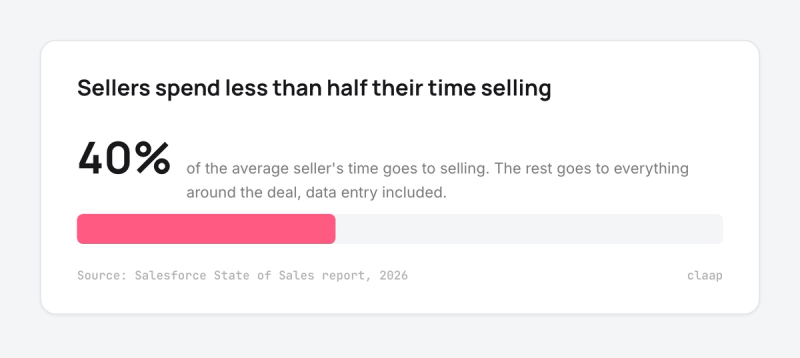
That number shapes how a sales dashboard should work. A dashboard is only as good as the data reps put into the CRM, and every field a rep has to fill by hand is time taken from selling. The best sales dashboard software shows managers the pipeline, the forecast and each rep's activity without adding work for the team.
With that in mind, we compared the six sales dashboard tools buyers most often shortlist, from CRM-native dashboards to BI platforms and conversation-based reporting. For each one you get who it suits, what it costs for a real team, its integrations, its pros and cons and what G2 reviewers say.
Sales dashboard software at a glance
Prices below are the cheapest plan that includes the dashboards described, billed annually, as published by each vendor.
| Tool | Best for | Entry price for sales dashboards |
|---|---|---|
| HubSpot Sales Hub | Small and mid-sized teams on HubSpot | $90 per seat per month (Professional) + $1,500 onboarding |
| Salesforce Sales Cloud | Larger teams with a Salesforce admin | $100 per user per month (Pro Suite) |
| Tableau | RevOps teams blending several data sources | $75 per Creator + $15 per Viewer per month |
| Salesloft | Teams running cadences and forecasts in Salesloft | Pricing on request |
| Geckoboard | Small teams that want a KPI screen | $79 per month for the account (2 dashboards) |
| Claap | Dashboards built from sales conversations | $60 per seat per month (Business) |
What a sales dashboard should show
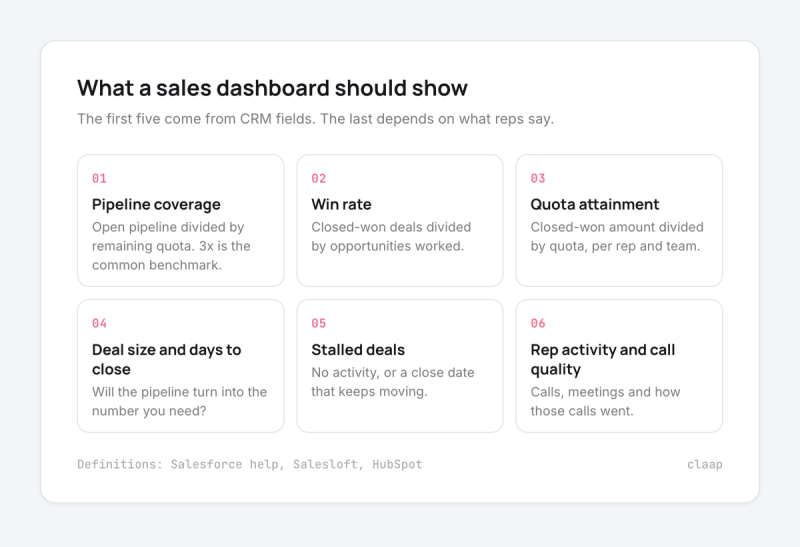
Before comparing tools, agree on what the dashboard is for. Most sales teams track the same core set:
- Pipeline coverage. Salesforce defines it as open pipeline divided by remaining quota for each owner in the period (Salesforce help). Three times coverage is the common benchmark for a committed quarter (Salesloft).
- Win rate. Closed-won deals divided by opportunities worked. HubSpot's example: 50 opportunities and 10 closed deals give a 20% win rate (HubSpot).
- Quota attainment. Closed-won amount divided by quota, per rep and per team.
- Average deal size and days to close. Both tell you whether the pipeline you have will turn into the number you need.
- Stalled deals. Deals with no activity or a close date that keeps moving. This is the view managers open before a pipeline review.
- Rep activity and call quality. Calls, meetings and how those calls went, so a manager knows who to coach.
The first five come from CRM fields. The last one depends on what reps actually say to buyers, which most CRM dashboards can't see unless someone types it in.
Where CRM sales dashboards fall short
On our own sales calls, revenue leaders describe the same gap: the dashboard is only as reliable as the data reps enter.
- A revenue operations manager at a UK climate-data company saw it in the pipeline view: "I'm seeing in a lot of dashboards lots of deals that are, uh, that they've been in the same stage for a very long time, there's no recent activity."
- The same manager explained why the dashboard alone didn't answer the question: "we don't have the leading indicators for that. So it's looking at the forecast, trying to dig into the details. Individual deals sales directors going through call recordings on a one-to-one basis. Um, but it, it's not enough, it's too much effort required, it's too slow."
- A sales lead at an Australian property-data software company described how the CRM gets filled: "populating the CRM, it's one of those tasks that's hard to get the sales guys over [...] You end up just doing it on a Friday, you know, when you're not wanting to get out of the office and just lacking kind of data in there."
- The founder of a US employee-benefits agency put it bluntly: "a CRM is very cumbersome, right? It's too much and utilization is little. Let's be honest, I've had CRMs for 30 years. Not everybody wants to use them."
The takeaway for buyers: pick the dashboard tool for how well it reads your data, and fix how the data gets into the CRM at the same time.
How we built this comparison
We kept the tools sales teams most often shortlist for sales dashboards and compared them on five criteria:
- Data sources. Whether the tool reads the CRM natively, and what else it can combine.
- Building without an analyst. Whether a sales manager can build and change a dashboard without help.
- Cost for a real team. The cheapest configuration that delivers custom sales dashboards, with seat minimums and onboarding fees.
- AI and forecasting. Deal scores, forecast views and alerts on stalled deals.
- Reviews. G2 ratings and the praise and complaints that come up most often.
Claap is our product, and it appears in this list. To keep the comparison fair, we linked every major claim to its source and placed Claap last.
1. HubSpot Sales Hub, best for small and mid-sized teams on HubSpot
If your pipeline already lives in HubSpot, Sales Hub Professional is the shortest path to custom sales dashboards; teams on another CRM should look elsewhere.
Who HubSpot Sales Hub works best for
Sales teams of roughly 5 to 50 reps that use HubSpot as their CRM and want managers to build reports without an admin. Small businesses make up 60.9% of its G2 reviewers (G2).
HubSpot Sales Hub overview
HubSpot's dashboards read deals, contacts, activities and calls straight from the CRM. The custom report builder, which lets you combine data sources in one report, is available on Professional and Enterprise (HubSpot knowledge base). Deal scores rate each deal from 0 to 100 as a probability of closing, based on amount, dates, stage and activity, on Sales Hub Professional and Enterprise (HubSpot knowledge base).
HubSpot Sales Hub pricing
- Professional: $90 per seat per month billed annually ($100 monthly), plus a $1,500 onboarding fee.
- Enterprise: $150 per seat per month, plus a $3,500 onboarding fee.
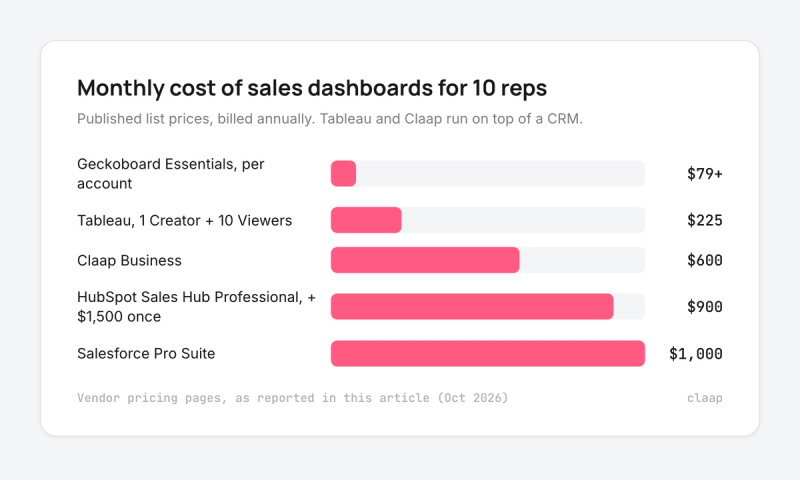
Source: HubSpot pricing. For 10 reps on Professional, that is $900 a month ($90 × 10) plus $1,500 once.
HubSpot Sales Hub integrations
Email, calendar and calling run inside HubSpot. Sales engagement, BI and conversation tools in this list connect to it natively, including Salesloft, Geckoboard and Claap.
HubSpot Sales Hub pros and cons
Pros:
- Managers build dashboards themselves, with no admin needed.
- Reports, deals and activity sit in one place.
- Deal scores give a first view of risk without extra tools.
Cons:
- Custom reports and deal scores need Professional, with an onboarding fee.
- Price climbs quickly as the team grows.
- Blending non-HubSpot data takes extra work.
What G2 reviewers say about HubSpot Sales Hub
HubSpot Sales Hub holds 4.4 out of 5 on G2 across more than 13,000 reviews. Reviewers praise its ease of use and automation; the most common complaints are cost for growing teams and features locked to higher plans (G2).
2. Salesforce Sales Cloud, best for larger teams with a Salesforce admin
Salesforce gives the deepest dashboards of any CRM here, as long as someone on the team owns the setup.
Who Salesforce Sales Cloud works best for
Sales organizations of 50 reps and more, with a sales operations or admin role that maintains fields, reports and permissions.
Salesforce Sales Cloud overview
Salesforce reports and dashboards read every standard and custom object in the CRM. Each dashboard holds up to 25 widgets, including up to 20 charts and tables (Salesforce help). Forecasting comes with Pro Suite and above. For heavier analysis, Salesforce sells CRM Analytics and Tableau on top.
Salesforce Sales Cloud pricing
- Starter Suite: $25 per user per month.
- Pro Suite: $100 per user per month billed annually, with forecasting.
- Enterprise: $175 per user per month.
- Unlimited: $350 per user per month.
Sources: Salesforce pricing, Redress Compliance. For 10 reps on Pro Suite, that is $1,000 a month ($100 × 10).
Salesforce Sales Cloud integrations
Tableau and Slack belong to Salesforce and connect natively. Sales engagement and conversation tools such as Salesloft, Geckoboard and Claap write to or read from Salesforce.
Salesforce Sales Cloud pros and cons
Pros:
- The most flexible data model, so dashboards can follow any sales process.
- Forecasting and pipeline views built into the CRM from Pro Suite.
- Large ecosystem of partners and admins.
Cons:
- Building good dashboards usually needs an admin.
- Licenses and implementation add up fast.
- Orgs get cluttered and slow as fields and reports pile up.
What G2 reviewers say about Salesforce Sales Cloud
Salesforce, now listed on G2 as Agentforce Sales, holds 4.4 out of 5 across more than 27,000 reviews. Reviewers praise its features and lead management; the recurring complaints are a steep learning curve, a system that gets cluttered with too many fields and reports, and high licensing and implementation costs (G2).
3. Tableau, best for RevOps teams blending several data sources
Tableau is the pick when sales dashboards need finance, product or marketing data next to the pipeline; for CRM-only reporting it is more tool than most teams need.
Who Tableau works best for
Revenue operations and analytics teams that build dashboards for leadership and want one place for CRM, billing and product data.
Tableau overview
Tableau connects to Salesforce natively, including Salesforce Data Cloud (Tableau help). Creators connect new data sources and build workbooks, Explorers edit existing ones and Viewers interact with published dashboards (Tableau pricing). Tableau has been named a Leader in Gartner's Magic Quadrant for Analytics and BI for 13 years (Tableau).
Tableau pricing
- Creator: $75 per user per month billed annually.
- Explorer: $42 per user per month.
- Viewer: $15 per user per month.
Every deployment needs at least one Creator (Tableau pricing). One Creator for RevOps plus 10 Viewers for the sales team costs $225 a month ($75 + $15 × 10), on top of the CRM.
Tableau integrations
Native connectors for Salesforce and Salesforce Data Cloud, plus databases, spreadsheets and cloud warehouses.
Tableau pros and cons
Pros:
- Combines CRM data with any other source.
- Viewer licenses keep the cost per rep low.
- Strong visualizations for leadership reporting.
Cons:
- Advanced features have a steep learning curve.
- Needs an analyst to build and maintain dashboards.
- Performance can lag on large datasets.
What G2 reviewers say about Tableau
Tableau holds 4.4 out of 5 on G2 across 4,229 reviews. Reviewers praise its visualizations; the main complaints are the learning curve for advanced features and slower performance on large datasets (G2).
4. Salesloft, best for teams running cadences and forecasts in Salesloft
Salesloft's dashboards make the most sense when reps already work their day in Salesloft; bought for dashboards alone, it is an expensive route.
Who Salesloft works best for
Mid-market and enterprise sales teams that use Salesloft for cadences, calls and forecasting, and want activity and pipeline reporting in the same place.
Salesloft overview
Salesloft's sales performance dashboard sorts reports by any sales metric and filters by individuals, groups and activity types, with a pipeline leaderboard and a Deal Summary per opportunity. Its AI forecast is combined with the weighted pipeline and the team's number (Salesloft). AI agents in its analytics scan in-flight deals continuously to flag stalled ones (Salesloft analytics). Salesloft and Clari completed their merger on 3 December 2025 (Business Wire).
Salesloft pricing
Salesloft doesn't publish prices. Vendr reports a median contract of $30,740 a year across 708 purchases (Vendr).
Salesloft integrations
Native CRM integrations with Salesforce, Microsoft Dynamics 365 and HubSpot, plus 150+ sales tech partners (Salesloft).
Salesloft pros and cons
Pros:
- Activity, pipeline and forecast in one platform.
- AI agents flag stalled deals between reviews.
- Deep Salesforce integration.
Cons:
- No public pricing, and contracts sit at enterprise levels.
- Learning curve for new users.
- Some G2 reviewers report Salesforce sync issues.
What G2 reviewers say about Salesloft
Salesloft holds 4.5 out of 5 on G2. Reviewers praise its cadences and visibility; the recurring complaints are the learning curve and integration issues, especially with Salesforce (G2).
5. Geckoboard, best for small teams that want a KPI screen
Geckoboard is the fastest way to put live sales numbers on a TV or a shared link; it displays numbers and leaves the analysis to your CRM or spreadsheet.
Who Geckoboard works best for
Small and mid-sized sales teams that want a simple, always-on view of calls, deals and targets for the whole office.
Geckoboard overview
Geckoboard builds dashboards from more than 90 data sources, including native HubSpot and Salesforce integrations, Google Sheets and Excel (Geckoboard). Viewers are unlimited, so the whole company can see the screen. Its spreadsheet integration displays data and doesn't run calculations, so formulas have to live in the sheet (Geckoboard support).
Geckoboard pricing
- Essentials: from $79 per month billed annually, with 2 dashboards and 1 editor.
- Performance: from $319 per month, with 20 dashboards, 3 editors and alerts.
- Enterprise: custom.
Prices are per account. A 14-day free trial is available (Geckoboard pricing).
Geckoboard integrations
HubSpot, Salesforce, Google Sheets, Excel, an API and Zapier, among 90+ sources.
Geckoboard pros and cons
Pros:
- Live dashboard in minutes, with no analyst needed.
- Flat account price and unlimited viewers.
- Built for TV screens and shared links.
Cons:
- Limited customization compared with BI tools.
- Calculations must happen before the data reaches Geckoboard.
- Two dashboards on the entry plan.
What G2 reviewers say about Geckoboard
Geckoboard holds 4.3 out of 5 on G2. Reviewers like how quickly a dashboard goes live; the most common complaint is limited customization (G2).
6. Claap, best for dashboards built from sales conversations
Claap is the pick when the numbers your dashboards miss are in the calls: which deals have no decision-maker, which rep skips discovery. It complements a CRM dashboard; it doesn't replace one.
A quick note: Claap is our product. To keep this comparison fair, we relied on third-party reviews and linked every major claim to its source.
Who Claap works best for
Sales teams of 5 to 100 reps on HubSpot or Salesforce whose managers want pipeline and coaching views built from what buyers actually said.
Claap overview
Claap records sales calls and emails, then asks every deal the same questions (economic buyer identified, decision process confirmed, competitor in play). The answers land in HubSpot or Salesforce fields that your forecast and reports already use, so existing dashboards fill with conversation data (Claap revenue intelligence). Saved views such as "At-risk opportunities" and "Inactive deals" put the deals that need a manager first.
For coaching, each rep's average call rating sits next to the team average, criterion by criterion, with talk ratio, longest monologue and question rate (Claap sales coaching software). Through the Claap MCP, Claude and other agents read the same deals and fields on every plan.
Claap pricing
- Basic: free.
- Pro: $32 per seat per month billed yearly.
- Business: $60 per seat per month billed yearly, with CRM auto-complete, AI coaching, deal insights and Smart Tables for advanced reporting.
- Enterprise: on quote, with a workspace dashboard.
Source: Claap pricing. For 10 reps on Business, that is $600 a month ($60 × 10).
Claap integrations
HubSpot, Salesforce, Attio and Pipedrive on Business and Enterprise; Zoom, Google Meet, Microsoft Teams and Aircall for capture; the Claap MCP for Claude and other agents.
Claap pros and cons
Pros:
- Fills CRM fields from calls, so existing dashboards get more reliable data.
- Coaching views per rep and per criterion.
- MCP access for AI agents on every plan.
Cons:
- Complements a CRM or BI dashboard; it isn't a general-purpose dashboard builder.
- CRM integrations and AI coaching need the Business plan.
- The workspace dashboard is Enterprise only.
What G2 reviewers say about Claap
Claap has more than 480 reviews on G2, with a 4.6 out of 5 rating (G2).
How to choose sales dashboard software
- Start from where your data lives. If the pipeline is in HubSpot or Salesforce, their native dashboards cover most needs.
- Decide who builds the dashboards. Managers on their own: HubSpot or Geckoboard. An admin or analyst: Salesforce or Tableau.
- Price the whole team. Count seats, onboarding fees and the viewer licenses for everyone who will look at the dashboard.
- Check the data going in. A dashboard of stale fields misleads more than no dashboard. Tools that fill fields from calls and emails fix the input side.
- Test with your own pipeline. Build the three views you use every week (coverage, stalled deals, rep activity) during the trial.
Sales dashboard software: the bottom line
- HubSpot Sales Hub: pick it if your team is on HubSpot and managers want to build their own reports.
- Salesforce Sales Cloud: pick it if you run a larger team with an admin and need dashboards that follow a complex process.
- Tableau: pick it if RevOps needs CRM, finance and product data in one dashboard.
- Salesloft: pick it if reps already work in Salesloft and you want activity and forecast in one place.
- Geckoboard: pick it for a fast, cheap KPI screen for a small team.
- Claap: add it when your dashboards need what buyers said on calls, written into the CRM fields they already read. For the metrics themselves, see our guide to sales performance dashboards and our sales pipeline management guide.
Frequently asked questions
What is the best dashboard for sales?
For most teams, the best sales dashboard is the one inside their CRM: HubSpot Sales Hub Professional or Salesforce Sales Cloud. Teams that blend several data sources add Tableau, small teams that want a KPI screen use Geckoboard, and teams that need call data in their dashboards add Claap.
What is the most popular dashboard software?
Microsoft Power BI and Tableau are the best-known business dashboard platforms, and both are Leaders in Gartner's Magic Quadrant for Analytics and BI. For sales teams specifically, the most used dashboards are the ones built into HubSpot and Salesforce.
Can ChatGPT make sales dashboards?
ChatGPT can analyze an uploaded spreadsheet or CSV export and draw interactive bar, line, pie and scatter charts from it. Its analysis environment can't call external APIs, so it doesn't connect live to your CRM, and the charts go stale as soon as the pipeline changes.
What is the best sales reporting software?
HubSpot Sales Hub and Salesforce Sales Cloud cover standard sales reporting for most teams, both rated 4.4 out of 5 on G2. Salesloft adds activity and forecast reporting for teams that run their cadences there.
How much does sales dashboard software cost?
For a team of 10 reps, expect about $900 a month on HubSpot Sales Hub Professional plus $1,500 onboarding, $1,000 a month on Salesforce Pro Suite, or $225 a month for Tableau on top of your CRM. Geckoboard starts at $79 a month per account, and Claap Business costs $600 a month for 10 seats.
What is the difference between a sales dashboard and a CRM report?
A CRM report answers one question from one set of records, such as deals closing this month. A sales dashboard groups several reports on one screen, so a manager sees coverage, win rate, stalled deals and rep activity together.