

Otter AI Pricing 2026: Free, Pro & Business Plans
How much does Otter AI cost? Full breakdown of Free, Pro ($8.33/mo), and Business plans. Plus: hidden import limits and student discounts explained.

Otter.ai pricing in 2026 starts with a free Basic plan, then moves to Pro at $16.99/user/mo or $8.33/user/mo when billed annually, and Business at $30/user/mo or $19.99/user/mo when billed annually. This guide breaks down Otter's pricing options, reveals the costs most reviews don't mention, and helps you decide if it's the right solution for your business.
Efficient transcription services have become more important than ever for businesses to save time, be more efficient, and make the most of AI. Otter.ai has emerged as one of the leaders in this space, offering tools to convert meetings into text seamlessly.
Please note: All pricing data in this article is accurate as of July 1, 2026.
What is Otter.ai?
Otter is a meeting assistant that converts your meetings into accurate written summaries (using AI). Otter can thus help a lot of teams and users: from companies needing to transcribe meetings (for instance recruitment or sales calls) and create searchable records, to students for note-taking and lecture transcriptions, or journalists during interviews or press conferences for accurate notes.
Otter.ai key features
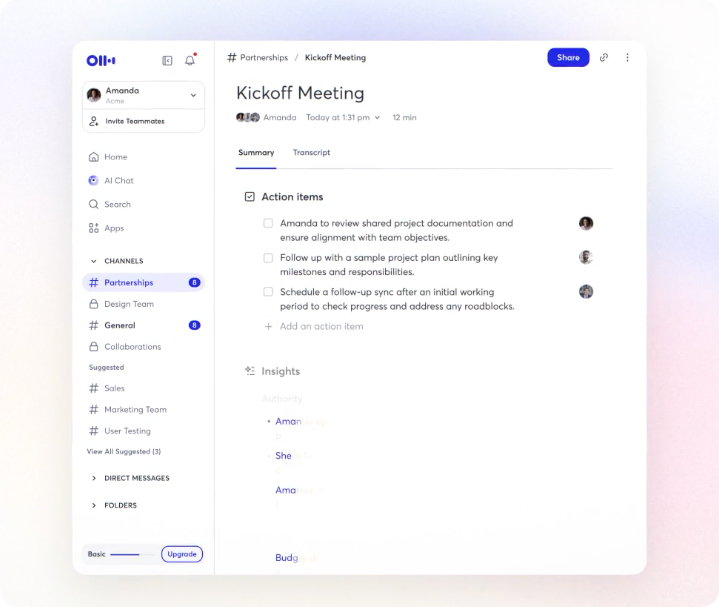
Otter’s main features are the following:
- Meeting recording: you can live record your meeting audio for later review and playback the recordings at different speeds.
- Real-time transcription: for meetings and virtual events, audio and video files. Live transcription also allows users to see text in real-time during meetings. The files created are saved in audio and textual formats (so they can be edited). You can finally use speaker identification to distinguish and tag different speakers for clarity.
- Otter assistant: AI bot that helps users manage their meetings and events (you can schedule the Otter assistant to join the meeting automatically and start recording).
- Meeting gems: they allow you to add and assign action items, comments and notes to the transcription documents (during or after meetings).
Otter.ai strengths
These functionalities can help improve your overall performance by facilitating your meeting sessions and your work to make the best of it, on your own or with your teams. In particular, Otter’s strengths are:
- Collaboration between teams: teams can for instance highlight, comment and add photos within transcripts, which will help to make the perfect document in the end.
- Seamless integration: with many other apps (like Zoom, Google Meet or Microsoft Teams).
- Ease of use: with searchable transcripts, Otter enables users to locate specific information quickly.
- Advanced features: such as real-time transcription, speaker identification, custom vocabulary.
How much does Otter.ai cost at a glance?
Otter.ai has a free Basic plan, a Pro plan for individual users, a Business plan for teams, and custom Enterprise pricing. Here's what you need to know about Otter's pricing structure right away:
| Plan | Monthly Cost | Annual Cost | Minutes/Month | Max Per Conversation | Best For |
|---|---|---|---|---|---|
| Basic | Free | Free | 300 | 30 minutes | Testing the platform, casual users |
| Pro | $16.99/user/mo | $8.33/user/mo ($99.96/year) | 1,200 | 90 minutes | Individual professionals, students |
| Business | $30/user/mo | $19.99/user/mo (~$240/year) | Unlimited | 4 hours | Teams of 5-25 members |
| Enterprise | Custom | Custom (~$15k-$35k/year) | Unlimited | 4 hours+ | Large organizations, sales teams |
Quick verdict: Pro is the sweet spot for individuals (especially with the student discount). Business is necessary for teams needing admin controls, unlimited monthly minutes, and unlimited file imports. Enterprise is the only tier with sales-specific AI features.
What does each Otter.ai plan include?
Otter.ai pricing changes mainly by monthly minutes, conversation length, file import limits, team controls, and sales-specific features. Now, let’s dive into Otter pricing structure to understand what features you can get at what cost.
1. Basic plan (Free)
This plan is free to use and gives access to Otter's basic automatic transcription tools (like speaker identification and automated summary), recording and playback devices (web and mobile), and collaboration functionalities.
The catches:
- Limited to 300 minutes per month total
- 30 minutes maximum per conversation (strict hard cap)
- Only 3 lifetime file imports (not per month, total)
- Workspace limited to 5 people
- Basic encryption only
The Basic plan is best for casual users testing the platform or students with short lectures. The 30-minute conversation limit is particularly restrictive if you have longer meetings.
2. Pro plan ($8.33/month annual)
The Pro plan offers two payment options:
- $16.99 per user per month (billed monthly)
- $8.33 per user per month (billed annually at $99.96/year)
What you get:
- 1,200 minutes per month (up from 300)
- 90 minutes per conversation (up from 30)
- Custom vocabulary
- Advanced export options (PDF, SRT, etc.)
- Faster playback speeds
Hidden restriction: The Pro plan caps you at 10 audio/video file imports per month. This is a major pain point for podcasters, researchers, or anyone who regularly uploads recordings rather than using live transcription. Many users report being forced to upgrade to Business specifically because of this limit.
Student discount: If you have a .edu email address, you can get approximately 20% off the Pro plan, bringing it down to around $6.67/month (billed annually) or $13.59/month (billed monthly).
3. Business plan ($19.99/month annual)
The Business plan provides:
- $30 per user per month (billed monthly)
- $19.99 per user per month (billed annually at about $240/year)
Key upgrades:
- Unlimited monthly minutes
- 4 hours maximum per conversation
- Unlimited file imports (this is the big difference from Pro)
- Workspace extended from 5 to 25 members
- Usage analytics and reports
- Priority email support
- Automatic sync with Zoom and Dropbox
Team cost example: A 10-person team would pay about $2,398.80 annually on the Business plan. That's nearly $24,000 over a decade, so the per-user pricing multiplies quickly.
4. Enterprise plan (Custom pricing)
The Enterprise plan is designed for large organizations requiring extensive security, control and support.
What's included:
- All Business features
- Unlimited workspace members
- Single Sign-On (SSO)
- Domain capture
- Otter Sales Notetaker / Otter for Sales (AI-powered sales intelligence)
- Dedicated account manager
- Advanced admin controls
Estimated cost: Based on market data, Enterprise contracts typically range from $15,000 to $35,000 per year, with an average around $17,400. The exact price depends on team size, feature requirements, and negotiation.
The Enterprise plan is the only tier that includes Otter Sales Notetaker, also called Otter for Sales, Otter's AI app designed specifically for sales teams to extract deal insights and sync notes to Salesforce or HubSpot.
What hidden costs and limitations should you know?
Beyond the list prices, there are several constraints that can affect your actual cost and experience with Otter:
Hard minute caps (No overage option)
Unlike some competitors, Otter doesn't offer pay-as-you-go overage charges on capped plans. When you hit your monthly limit on Basic or Pro, the service stops working entirely. You can't transcribe another minute until your plan resets or you upgrade. There's no rollover of unused minutes either.
This means if you're on the Pro plan with 1,200 minutes and you hit that limit on the 25th of the month, you're stuck waiting or forced to upgrade immediately.
The Pro plan import bottleneck
The 10 file import limit per month on the Pro plan is consistently cited in reviews as a major frustration. If you're a podcaster uploading episodes, a researcher processing interviews, or anyone who works with pre-recorded audio, you'll hit this ceiling fast. The only solution is upgrading to Business, which can feel like a forced upsell.
Per-user pricing multiplier
The Business and Enterprise tiers charge per user, not per workspace. This means a 20-person team on the Business plan pays about $4,797.60 annually, not a flat team rate. Make sure to calculate total costs based on your actual headcount.
Video recording restrictions
Lower-tier plans don't include video recording, only audio transcription. If you need both video and transcript, you'll need to use separate tools or upgrade plans. Competitors like tl;dv offer free video recording, which is worth considering.
No refunds on annual plans
If you pay for an annual subscription and decide Otter isn't right for you after a few months, there's no prorated refund. You're locked in for the full year.
How does Otter.ai compare with alternatives?
Not all meeting transcription tools are created equal. Here's how Otter compares to the top alternatives:
| Tool | Strengths | Best For | Price Comparison |
|---|---|---|---|
| Otter AI | Superior transcription accuracy, custom vocabulary, speaker identification | Individual professionals, teams prioritizing transcript quality | $8.33-$19.99/user/month |
| Claap | Conversation intelligence, AI-powered sales coaching, 99+ languages, CRM auto-complete | Sales teams focused on performance improvement | Free plan and fair per-seat pricing |
| Fireflies.ai | Strong CRM integrations, conversation intelligence for sales | Sales teams using Salesforce/HubSpot heavily | Similar pricing to Otter |
| Fathom | Completely free for individuals with unlimited recording | Solopreneurs, budget-conscious users | Free (vs Otter's 300 min cap) |
| tl;dv | Free video recording (not just audio), clip sharing | Remote teams needing video highlights | Free tier more generous than Otter |
Quick comparison:
- Transcription accuracy: Claap and Otter wins
- Free plan generosity: Fathom and tl;dv beat Otter (unlimited vs 300 minutes)
- Sales-specific features: Claap offers more robust coaching; Otter's sales features are Enterprise-only
- Video recording: Claap includes it; Otter is audio-first
- Language support: Claap supports 99+ languages; Otter's strongest coverage is still English-first
Which Otter.ai plan should you choose?
Here's a simple decision framework based on your situation:
Choose the Free plan if:
- You're testing Otter for the first time
- You have short meetings (under 30 minutes each)
- You transcribe fewer than 10 conversations per month
- You don't need to upload audio files
Choose the Pro plan ($8.33/month annual) if:
- You're an individual professional or student
- You attend 10-15 meetings per month (totaling under 1,200 minutes)
- You rarely need to upload files (less than 10/month)
- You have a .edu email (get the 20% student discount)
Choose the Business plan ($19.99/month annual) if:
- You're part of a team (5-25 members)
- You regularly hit the 1,200-minute limit on Pro
- You upload more than 10 audio/video files per month
- You need admin controls and usage analytics
Choose Enterprise (custom pricing) if:
- You have a large organization (25+ users)
- You need SSO and advanced security
- You want sales-specific AI features (Otter Sales Notetaker / Otter for Sales)
- You require dedicated account management
Consider alternatives if:
- You want free unlimited recording (try Fathom)
- You need robust video features (try Claap or tl;dv)
- You prioritize sales coaching and CRM automation (try Claap)
- You want stronger conversation intelligence for sales (try Claap)
How should you assess Otter pricing?
Pros
Otter's pricing structure offers affordability with four distinct options, including a free plan that lets you test core features and a competitively priced Pro plan at under $10/month. The student discount (20% off) makes it even more accessible, bringing the Pro plan down to $6.67/month annually or $13.59 monthly.
The structure also provides scalability. The Business and Enterprise plans cater to larger transcription needs with unlimited monthly minutes and can be tailored to complex organizations with extensive security requirements.
Cons
However, Otter's pricing doesn't always align with the value you receive. The hidden limitations, like the 10-file import cap on Pro and the hard minute cutoffs on capped plans, can force unwanted upgrades. The Basic, Pro, and Business tiers offer solid features, but if you want truly advanced AI capabilities (like Otter Sales Notetaker), you're locked into the most expensive Enterprise plan.
For small businesses that want to leverage AI for sales insights without enterprise-level budgets, this can be a dealbreaker. Other tools provide more AI-powered features at lower tiers, making them better options for teams focused on sales productivity and coaching.
What is the best Otter alternative for sales teams?
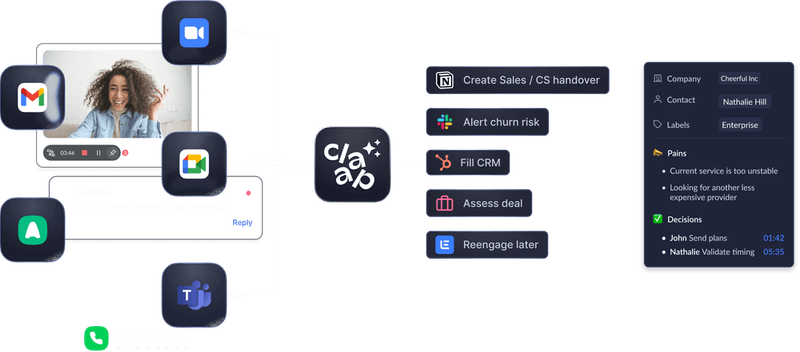
If you're looking for a more powerful alternative with better AI automation and clearer pricing, you should challenge Otter with Claap.
Claap is a conversation intelligence platform for sales teams. It captures sales conversations, turns them into follow-ups, CRM updates, coaching insights, and context for AI agents, including teams that want to connect their own agents through MCP.
Claap's best features
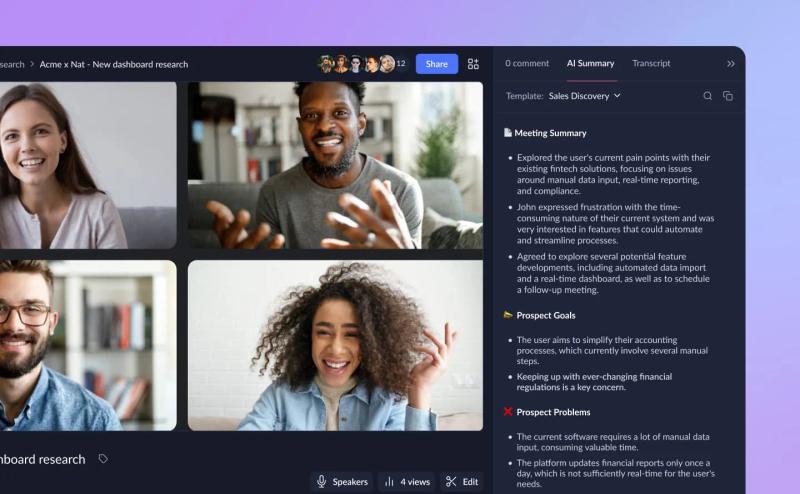
- AI-powered sales insights and deal reports: Claap automatically records your sales calls and generates notes and summaries, highlighting key action items, objections, risks, and competitive mentions. Instantly see what drives or blocks deals and act faster.
- Smart meeting templates: Customize summary templates that match your sales process. Whether it's discovery calls, demos, or QBRs, Claap structures insights automatically, no manual work needed. Use the Smart Tables module to analyze multiple calls at once, compare outcomes, and extract patterns effortlessly.
- Sales coaching that scales: With advanced coaching modules, managers can analyze talk ratios and conversation patterns to spot improvement opportunities, deliver targeted feedback, and help reps perform at their best.
- Seamless CRM and tool integrations: Claap connects effortlessly with your CRM (HubSpot, Salesforce, Attio) and collaboration tools (Notion, Slack, Jira). Integrate Claap to sync data automatically and keep your sales system up to date, no extra admin.
Claap pricing
Claap offers flexible pricing plans based on team size and needs, with a free plan and transparent per-seat pricing. Annual plans include a discount.
- Free plan: 10 videos + 300 minutes of recording
- Pro plan: Unlimited videos, storage, and expanded recording capacity
- Business plan: Includes AI-generated notes, CRM enrichment, deal insights, and coaching features
- Enterprise plan: Custom pricing tailored to your needs
Start with Claap's free plan (no credit card needed) and explore all core features. Want more power? Book a demo to unlock advanced capabilities and tailored guidance.
Why choose Claap over Otter?
Otter is a useful tool, but it remains basic compared to Claap for sales teams. With Otter, you can't record videos (only audio conversations), and its language coverage is more limited than Claap's 99+ languages. Otter primarily focuses on transcriptions and doesn't provide the comprehensive meeting intelligence features you might need for sales.
Claap saves sales reps over 6 hours a week by automating admin work, enriching your CRM, and providing actionable coaching insights, not just transcripts. You can also compare Otter to Fireflies.
With flexible licenses, Claap is the best compromise in terms of software capabilities and price options, meeting the needs of any type of sales team. You no longer have any excuses for not taking your sales team to the next level using AI.
Frequently asked questions
How much is Otter AI per month?
Otter AI costs $16.99 per user per month on the Pro plan, or $8.33 per user per month when billed annually at $99.96 per year. The Business plan is $30 per user per month, or $19.99 per user per month when billed annually. The Basic plan is free but limited to 300 minutes per month.
Is the Otter AI free plan really free forever?
Yes, the free plan is permanently free. You get 300 minutes per month, which resets each billing cycle. However, you're limited to 30 minutes per conversation and only 3 lifetime file imports.
Does Otter AI offer a student discount?
Yes, Otter offers approximately 20% off the Pro plan for users with a .edu email address. This brings the cost down to around $6.67 per month when billed annually or $13.59 per month when billed monthly.
What is the difference between Otter Pro and Business?
Otter Pro is built for individual users and includes 1,200 monthly minutes, a 90-minute conversation cap, and 10 file imports per month. Otter Business adds unlimited monthly minutes, a 4-hour conversation cap, unlimited file imports, admin controls, analytics, and support for teams of 5 to 25 members.
What happens if I go over my Otter AI minutes?
Otter does not offer overage charges or pay-as-you-go options on capped plans. When you hit your monthly limit on Basic or Pro, the service stops working until your plan resets or you upgrade.
How many file imports do I get with Otter AI?
The Basic plan allows only 3 lifetime file imports total. The Pro plan caps you at 10 file imports per month. The Business and Enterprise plans offer unlimited file imports.

![Learn how sales videos can help you win more deals [Tips, Techniques & Examples]](https://cdn.sanity.io/images/gb4upfg4/staging/4fa75cfa344cd19baf7441ee052b6bf048026d48-1536x864.jpg?w=800&h=450&fit=crop&auto=format&q=75)