What’s Otter Notetaker? Your Guide to AI Meeting Assistants
Discover Otter Notetaker, formerly OtterPilot, and how Otter.ai now supports transcription, summaries, AI Chat, role-specific agents, MCP access, and current pricing plans.

OtterPilot is the legacy name for what Otter.ai now generally presents as Otter Notetaker inside the broader Otter Meeting Agent platform. It records meetings, transcribes conversations, summarizes key points, and now also supports AI Chat, role-specific agents, and MCP access to meeting data.
What is OtterPilot?
OtterPilot was an AI-powered application by Otter.ai designed to record, transcribe, and summarize meetings in real-time. Today, Otter generally uses Otter Notetaker and Otter Meeting Agent language for the same core workflow, while older guides and settings may still mention OtterPilot.
Key points:
- Real-time transcription: Automatically transcribes meetings as they happen.
- Meeting summaries: Generates concise summaries of meetings, including key points and action items.
- Integration with collaboration tools: Works with platforms such as Zoom, Teams, and Meet.
- Multi-device access: Available on mobile (iOS and Android), web browsers, and desktop recording for Mac and Windows.
- AI-powered insights: Uses AI to extract actionable insights, answer questions through Otter AI Chat, and support follow-up tasks.
- Agent and MCP access: Otter now offers role-specific AI agents and an Otter MCP server so tools like Claude and ChatGPT can access Otter meeting data.
What’s an AI meeting assistant?
An AI meeting assistant is software that records conversations, transcribes speech, summarizes discussions, and identifies follow-up work. For sales teams, the best assistants also connect meeting insights to CRM updates, coaching, and pipeline visibility.
Key points:
- Automated note-taking: Eliminates the need for manual note-taking.
- Time-saving: Reduces the time spent on post-meeting documentation.
- Enhanced collaboration: Improves team collaboration with shared, accurate meeting notes.
- Consistency: Provides consistent and unbiased meeting records.
- Accessibility: Makes meeting content accessible to those who couldn't attend.
Why use AI meeting assistants?
- Efficiency: Speeds up the process of documenting and reviewing meetings.
- Accuracy: Reduces errors and ensures all important points are captured.
- Focus: Allows participants to focus on the discussion rather than on taking notes.
- Follow-up: Simplifies the follow-up process with clearly defined action items and summaries.
By understanding OtterPilot, now better understood as Otter Notetaker, and the broader concept of AI meeting assistants, you can appreciate how these tools can transform your workflow, making meetings more productive and less cumbersome.
What are the key benefits of OtterPilot and other AI meeting assistants?

Real-time transcription
Otter Notetaker ensures that every spoken word during a meeting is captured accurately and instantaneously. This real-time transcription eliminates the risk of missing crucial details and provides an immediate record of the discussion, which can be referenced at any time.
Meeting summaries
Otter Notetaker generates concise and comprehensive summaries of meetings, highlighting key points and decisions made. These summaries save users time by providing a quick overview of the meeting, allowing them to focus on strategic tasks rather than sifting through lengthy notes.
Action item identification
AI meeting assistants like Otter Notetaker can automatically identify and track action items from meetings. This feature ensures that follow-up tasks are clearly defined and assigned, enhancing accountability and streamlining the process of tracking progress and deadlines.
Improved accessibility
Otter Notetaker makes meeting content accessible to all team members, including those who were unable to attend. By providing accurate transcriptions and summaries, Otter ensures that everyone stays informed and can contribute effectively, fostering a more inclusive work environment.
Enhanced collaboration
With features like real-time transcription, summaries, action item tracking, Otter AI Chat, and role-specific agents, Otter enhances collaboration among team members. These tools facilitate better communication and ensure that everyone is on the same page, leading to more productive and efficient meetings.
What other features does Otter.ai offer?
Integration with collaboration tools
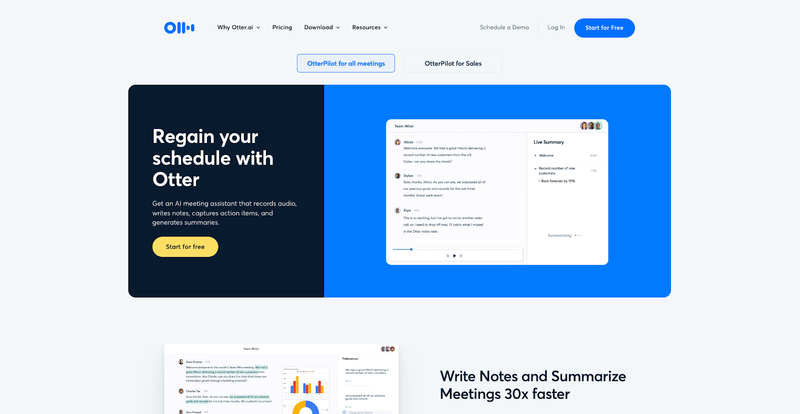
Otter.ai integrates seamlessly with popular collaboration platforms such as Zoom, Microsoft Teams, and Google Meet. This integration allows users to incorporate Otter.ai into their existing workflows effortlessly, enhancing the overall efficiency of their meeting processes.
Multi-device accessibility
Otter Notetaker is accessible on various devices, including mobile phones (iOS and Android), web browsers, and desktop recording on Mac and Windows. This multi-device support ensures that users can access their transcriptions and meeting summaries from anywhere, at any time, enhancing flexibility and convenience.
Support for multiple calendar applications
Otter Notetaker integrates with several calendar applications, such as Google Calendar and Microsoft Outlook. This feature allows users to schedule and manage their meetings more efficiently, with Otter automatically joining and transcribing scheduled meetings.
Centralized workspace for collaboration
Otter offers Otter Workspaces, a centralized interface for team collaboration and management. This feature includes administrative controls, centralized billing, reporting and analytics, and enhanced security measures like two-factor authentication. It ensures that teams can collaborate seamlessly and manage their activities effectively.
AI Chat, role agents, and MCP
Otter.ai now also offers Otter AI Chat, role-specific AI agents for teams such as sales, SDR, recruiting, education, and media, plus an Otter MCP server. That means Otter is no longer just a transcription app: it is moving toward AI agents that can answer questions and use meeting data in tools like Claude and ChatGPT.
What large language model does OtterPilot use?
Otter.ai, the company behind OtterPilot and Otter Notetaker, does not publicly specify the exact third-party large language model (LLM) providers it uses. Instead, it utilizes a combination of its proprietary internal large language models along with those from different service providers. This blend of internal and external models helps Otter deliver robust and reliable transcription and AI functionalities.
How do I get OtterPilot to join my meetings?
Step 1: Connect your calendar
To enable Otter to automatically join your meetings, you first need to connect your Google or Microsoft calendar to your Otter account. This syncs your calendar events with Otter, allowing the meeting assistant to join scheduled meetings.
- Navigate to the left menu and click on Apps.
- Under Connect calendars & contacts, click Add next to the calendar you want to connect.
- Sign in to your Google or Microsoft account when prompted.
- Allow Otter to access your account.
- Repeat these steps to add multiple calendars if needed.
Step 2: Enable auto-join
Once your calendars are connected, ensure that Otter is set to automatically join your meetings.
- Go to Account Settings > Meetings.
- Adjust the settings for auto-join, ensuring Otter will join meetings automatically.
Step 3: Manage individual meetings
You can control which meetings Otter should join:
- From your home page calendar in Otter, find your scheduled meetings.
- Toggle Otter on or off for specific meetings.
- If needed, manually add Otter to a meeting by clicking the Otter button next to the meeting in your calendar.
By following these steps, you can ensure Otter is ready to assist you with transcriptions and summaries during your meetings (Otter AI) (Otter).
How much does OtterPilot cost?
OtterPilot, now generally branded as Otter Notetaker, is available as part of Otter.ai's different pricing plans, which cater to various user needs. As of June 2026, Otter pricing is:
- Basic Plan: Free, with 300 transcription minutes per month, a 30-minute per-conversation cap, AI Chat, and access to the Otter MCP server.
- Pro Plan: Costs $16.99 per user per month monthly, or $8.33 per user per month billed annually. It includes 1,200 monthly transcription minutes and a 90-minute meeting cap.
- Business Plan: Costs $30 per user per month monthly, or $19.99 per user per month billed annually. It includes unlimited meetings and in-app recordings, with up to 4 hours per meeting.
- Enterprise Plan: Custom pricing, with demo-based access and enterprise controls such as Otter Sales Notetaker, SSO, SCIM, Domain Capture, and a HIPAA add-on.
What’s the best OtterPilot alternative?
If you’re interested in finding a new AI assistant to record your meetings, Otter is a strong choice but it isn’t the only one on the market. You have several alternatives and should look deeper at Claap vs Otter.
Turn every sales conversation into AI-ready revenue context with Claap
Claap is conversation intelligence for sales teams. It captures every sales conversation and turns it into follow-ups, CRM updates, coaching, and context for your own AI agents.

Unlike Otter, Claap allows you to record your meetings with or without a bot. That way, if you’re running discovery calls, deal reviews, or external prospect meetings, you don’t need some bot third wheeling.
Claap comes with powerful AI summaries that can be customized using pre-made templates so your team gets only the relevant information from each meeting too.
Claap is built for sales teams that need conversation intelligence beyond meeting notes: CRM auto-complete, deal insights, AI coaching, bot-free capture, and structured data that can power external AI agents through MCP.
That is why Claap is positioned for the AI Agent Era, not just the dashboard era. It helps sales reps, sales leaders, and RevOps teams record, enrich, activate, and coach from real sales conversations, with 10,000+ sales reps choosing speed, adoption, and fair pricing over legacy tooling.
You can sign up right now for free and see how Claap turns sales conversations into CRM updates, follow-ups, coaching, and AI-ready context. Go here to get started with Claap.
Frequently asked questions
Is OtterPilot still the current name?
OtterPilot is legacy branding. Otter.ai now generally presents the product as Otter Notetaker inside its broader Otter Meeting Agent platform, although older guides and settings may still use the OtterPilot name.
How much does Otter cost in 2026?
As of June 2026, Otter has a free Basic plan, Pro at $16.99 per user per month monthly or $8.33 billed annually, Business at $30 per user per month monthly or $19.99 billed annually, and Enterprise on custom pricing.
Does Otter.ai include AI agents and MCP?
Yes. Otter.ai now offers Otter AI Chat, role-specific AI agents, and an Otter MCP server that can let tools like Claude and ChatGPT access Otter meeting data.
What is the best Otter alternative for sales teams?
Claap is a strong Otter alternative for sales teams that need conversation intelligence, CRM auto-complete, deal insights, AI coaching, bot-free meeting capture, and AI-ready sales conversation data through MCP.
Can Claap record meetings without a bot?
Yes. Claap can record meetings with or without a bot, which is useful for discovery calls, deal reviews, and external prospect meetings where a visible meeting bot may be distracting.
![Learn how sales videos can help you win more deals [Tips, Techniques & Examples]](https://cdn.sanity.io/images/gb4upfg4/staging/598c98e38c098a0f797d3ca47c5a9083661df3dc-1536x864.jpg?w=800&h=450&fit=crop&auto=format&q=75)