


HubSpot conversation intelligence: what each plan gets you
HubSpot's conversation intelligence records, transcribes and searches calls on Sales Hub Professional. It scores none of them, and its deal score and forecast never read what the buyer said.

Updated November 4, 2026.
HubSpot conversation intelligence overview
- HubSpot conversation intelligence (CI) is the transcription and analysis layer of HubSpot's calling tool, built into Sales Hub and Service Hub.
- It transcribes calls, shows talk-time stats, writes an AI summary and lets managers comment on calls and build coaching playlists.
- Transcription and analysis need a Sales Hub or Service Hub Professional or Enterprise seat; tracked terms (keyword tracking) need Enterprise.
- It covers calls made with HubSpot's calling tool and some integrated calling apps; video meetings go through HubSpot's Notetaker.
- It does not score calls against your sales method, and HubSpot's deal score and AI forecast do not read call content.
HubSpot's conversation intelligence is worth switching on if you already pay for Sales Hub Professional, and a weak reason to upgrade: it records, transcribes and searches calls, but it scores none of them, and its deal score and forecast never read what the buyer said.
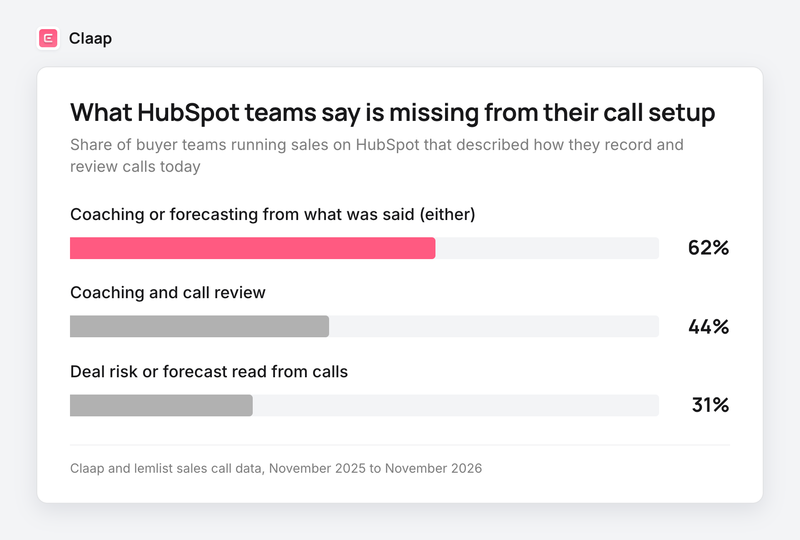
About six in ten of the HubSpot-run sales teams that described their call setup on our sales calls named coaching or forecasting from calls as what was missing (Claap and lemlist call data, November 2025 to November 2026).
This guide covers what HubSpot's conversation intelligence includes on each plan, what it costs, where it stops, and when an external tool is worth adding.
HubSpot conversation intelligence by plan
| Starter | Professional | Enterprise | |
|---|---|---|---|
| Record calls made with HubSpot calling | Yes | Yes | Yes |
| Review recordings and add notes | Yes | Yes | Yes |
| Automatic transcription and AI call summary | No | Yes | Yes |
| Call stats (talk time, monologue, interactivity) | No | Yes | Yes |
| Comments in the transcript, coaching playlists | No | Yes | Yes |
| Tracked terms, reports and workflow triggers on keywords | No | No | Yes |
| Contact and company enrichment from transcripts | No | No | Yes, in beta |
Sources: HubSpot's call recording and transcription article (updated October 9, 2026), HubSpot's coaching playlists and tracked terms articles. Transcription only runs for users with an assigned Sales or Service seat on those plans.
Why recorded calls in HubSpot rarely turn into coaching
In Claap and lemlist call data from November 2025 to November 2026, 44% of the HubSpot-run teams that described their call setup named coaching or call review as what was missing, 31% wanted deal risk or the forecast read from what buyers said, and 62% named at least one of the two (Claap and lemlist call data, same period).
An operations lead at a French B2B company that runs its sales on HubSpot described their setup:
- "We push the [dialer] calls up, you get the transcripts, the summaries made by HubSpot. [...] You have the recording of the meeting and everything, but honestly, nobody wants to watch it." (translated from French)
The founder of a sports-equipment company whose reps call from HubSpot through a dialer:
- "Once everything starts growing, it's hard to follow up really personally, person by person, rep by rep." (translated from French)
These are our own sales calls, so the sample leans toward teams already shopping for call tools: read the shares as what those teams ask for.
What HubSpot conversation intelligence includes
On a Professional or Enterprise seat, each recorded call gets its own review page in CRM > Calls (HubSpot's call recording and transcription article):
- A transcript split by speaker, searchable, with a global search across all call recordings.
- An AI call summary in five parts: purpose, key discussion points, decisions, sentiment and next steps. A Sales Rep template focuses it on objectives, objections and coaching tips. The call summary itself is not editable.
- A question box where you can ask Breeze, HubSpot's AI assistant, things like "Did the customer mention a budget?"
- Call stats once speakers are linked to contacts: rep talk time, talk speed, longest monologue, longest customer story, back-and-forth between speakers (interactivity) and pauses between them (patience).
- Threaded comments pinned to a moment in the transcript, and clips you can share by email.
- Automatic association of the call to contacts, companies, and, through an AI match, the right deal or ticket.
Coaching playlists collect full or clipped recordings into folders that reps can follow, with a daily email when a call is added (HubSpot's coaching playlists article).
On Enterprise, tracked terms flag every call where a word comes up, a competitor name or "pricing" for example. Each term can feed reports, workflow triggers, segments and notifications, and reports backfill the past 30 days of recordings (HubSpot's tracked terms article). Only super admins can add terms.
Enterprise also has conversational enrichment, a beta that reads call transcripts to update contact fields such as job title and buying role, and company fields such as industry and tech stack (HubSpot's call recording and transcription article). It does not write to deals.
Which calls HubSpot conversation intelligence covers
Conversation intelligence analyzes calls placed through HubSpot's own calling tool and through some third-party calling apps that integrate with it. HubSpot names Zoom, JustCall and Kixie among the calling services it works with on its conversation intelligence page, and the App Marketplace holds the full list of supported providers.
Video meetings are a separate path. Since August 31, 2026, Zoom, Google Meet and Teams meetings recorded by HubSpot's Notetaker or synced from a video integration create meeting records only, where they used to create a call record too, while HubSpot calling still creates call records (HubSpot's transcript sync article). If your question is whether HubSpot's bot is enough for meetings, our HubSpot Notetaker vs alternatives comparison covers it.
HubSpot documents call stats, coaching playlists and tracked terms on call records, and its Notetaker article lists none of them for meetings. If your discovery calls and demos run on Zoom, Meet or Teams, check which of these features reach your meeting records before you count on them.
What HubSpot conversation intelligence costs
Conversation intelligence has no price of its own. You pay for it through the seats that include it (HubSpot's Sales Hub pricing):
- Sales Hub Professional is $90 per seat per month billed annually, or $100 billed monthly, plus a required one-time $1,500 onboarding fee.
- Sales Hub Enterprise starts at $150 per seat per month, plus a required one-time $3,500 onboarding fee.
- Professional includes 3,000 HubSpot Credits a month and Enterprise 5,000 (HubSpot's Sales Hub pricing). Credits pay for AI features such as smart properties and custom-property capture from transcripts.
For a team of 10 reps on annual billing, that comes to $900 a month and $1,500 up front on Professional, or from $1,500 a month and $3,500 up front on Enterprise, where keyword tracking lives (HubSpot's Sales Hub pricing). The jump from Professional to Enterprise is at least $600 a month for those 10 reps on HubSpot's list prices, and tracked terms are the main CI feature it adds.
Pick Professional when you already need it for sequences, forecasting and reporting, because CI then comes at no extra cost. Avoid upgrading to Enterprise for tracked terms alone, because a conversation intelligence tool on top of Professional also flags competitor mentions and scores every call (see the last section).
What HubSpot conversation intelligence does not do
HubSpot uses transcripts for summaries, answers to questions and suggested field updates, but three things stay out of its reach.
It does not score calls. HubSpot's call stats measure how the rep talked: talk time, monologues, pauses. HubSpot's documentation lists no call scoring, nothing that checks whether the rep found the pain, the decision process or the next step, so a manager still listens to know how a discovery went (HubSpot's call recording and transcription article).
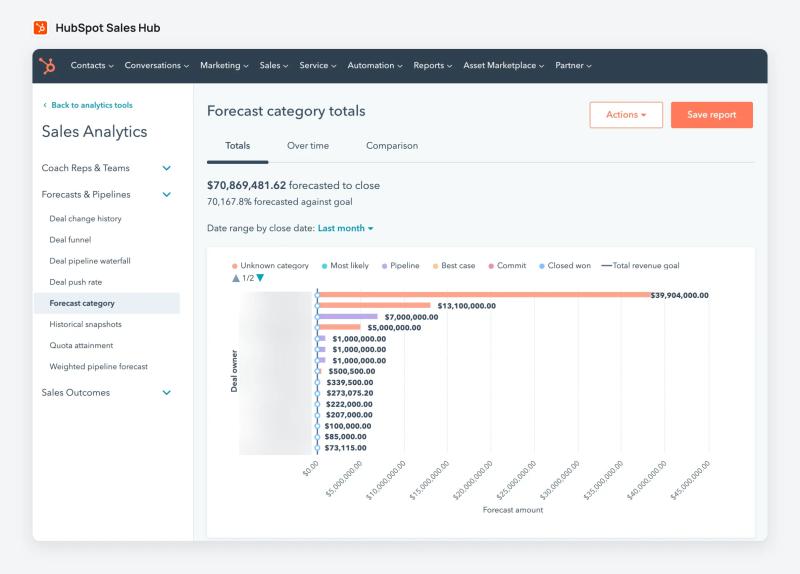
Its deal score does not read the calls. The deal score is built from deal properties (amount, close date, stage, probability, next step, owner) and the timing and count of activities. A logged call counts as activity; what the buyer said in it does not count. HubSpot can suggest deal property updates from a transcript through smart data capture, covered in our Notetaker comparison, but the score itself reads the CRM fields and activity only.
Its AI forecast projects from closed deals. Breeze forecasting, in beta on Professional and Enterprise, projects sales from deals closed won in the past three months, the only input its documentation names (HubSpot's AI forecasting article).
A revenue operations lead at a healthcare-education company, whose forecast runs on deal stages plus a confidence percentage each rep sets, described what they want instead:
- "Leveraging our calls to be able to say, like, hey, based on what happened on this call, you should not be confident in this closing this quarter. Like, you should downgrade this, or like you should be confident in this closing."
How to turn on conversation intelligence in HubSpot
A super admin turns it on once for the account (HubSpot's call recording and transcription article):
- Click the settings icon in the top navigation bar.
- In the left sidebar, go to Calling > Call Setup, then the Call Configurations tab.
- Turn on the Call recording switch. Without it, the Record button does not show during calls.
- Check that Transcription and analysis is on. It is on by default.
- On Enterprise, click Edit tracked terms to add categories and terms.
Check the call recording consent rules where you and your buyers are before you switch recording on. For the dialer side of the setup, our guide on how to record calls in HubSpot walks through HubSpot calling, Aircall and Ringover.
When to add an external conversation intelligence tool to HubSpot
A quick note: Claap is our product. Every HubSpot fact in this guide comes from HubSpot's own documentation and pricing page, linked above.
Conversation intelligence platforms plug into HubSpot to score every call against your sales method, and some also read deal risk from the calls. Gong, Avoma and Claap all score calls against criteria you define (Gong's scorecards guide, Avoma's call scoring page).
Claap records Zoom, Google Meet and Teams calls with or without a bot, plus Aircall, Ringover, Allo and lemlist dialer calls, and files each call on the right HubSpot contact and deal (HubSpot call recording with Claap). It scores every call against MEDDPICC, SPICED, BANT or your own criteria, flags competitor mentions across calls, and writes typed values into the standard and custom HubSpot properties you map. On its Enterprise plan, Claap's deal forecasting reads each deal's calls to flag risk. Its conversation intelligence runs on the Business plan, at $60 per seat per month billed yearly, on top of your HubSpot seats (Claap pricing).
Use HubSpot's own CI when your reps call from HubSpot, you are on Professional anyway and your managers coach from a few calls a week. Choose an external tool when you want every call scored against your method, or deal risk read from the calls, because HubSpot measures talk patterns and its deal score uses CRM fields and activity only.
This advice is wrong if your team runs fewer than five reps and the founder still listens to every call: at that size the founder already hears every call, so HubSpot's transcripts and playlists are enough.
Frequently asked questions
Does HubSpot have conversation intelligence?
Yes. HubSpot's conversation intelligence transcribes and analyzes calls made with its calling tool and some integrated calling apps. It adds AI summaries, call stats, transcript comments and coaching playlists, and tracked terms on Enterprise.
Which HubSpot plan includes conversation intelligence?
Transcription and analysis need a Sales Hub or Service Hub Professional or Enterprise subscription, and the user making the call needs an assigned Sales or Service seat. Tracked terms need Enterprise. On Starter, calls can be recorded and replayed, without transcripts.
Is HubSpot conversation intelligence free?
No. It has no separate price, but it only comes with Professional or Enterprise seats. Sales Hub Professional is $90 per seat per month billed annually plus a $1,500 onboarding fee, and Enterprise starts at $150 per seat per month plus $3,500.
Can HubSpot track competitor mentions on calls?
Yes, on Enterprise. Super admins add tracked terms such as competitor names, and HubSpot flags the calls where they come up, reports on them and can trigger workflows or notifications. Reports backfill the past 30 days of recordings.
Does HubSpot score sales calls?
No. HubSpot shows call stats such as talk time and longest monologue, but it does not score calls against criteria like MEDDPICC or SPICED. Conversation intelligence tools such as Claap score each call against the method you define and write the result to HubSpot.
Does HubSpot conversation intelligence work with dialers like Aircall?
It analyzes calls from HubSpot's calling tool and from the third-party calling apps HubSpot supports, which the App Marketplace lists, so check your dialer's listing there. Zoom, Google Meet and Teams meetings go through HubSpot's Notetaker and create meeting records with their own summary.