


Salesforce conversation intelligence: what's native in 2026
Salesforce now reads your calls in every Sales Cloud edition from Core up. The real decision is who fills the opportunity fields after each call, natively or with a tool that writes into Salesforce.


Updated November 4, 2026.
Salesforce conversation intelligence overview
- Salesforce conversation intelligence is the set of Sales Cloud features that transcribe recorded sales calls, flag key moments and show them on the call and the opportunity, sold today as Conversation Intelligence and long known as Einstein Conversation Insights.
- Einstein Conversation Insights is best for teams whose calls already run through Sales Dialer, Zoom, Google Meet or Microsoft Teams and who want call insights inside Salesforce without buying another tool.
- Momentum, the conversation capture product Salesforce acquired, is best for teams on Agentforce for Sales that want a Salesforce notetaker, email capture and automatic next-step and stage updates.
- An external conversation intelligence tool that writes into Salesforce is best for teams that want their own qualification fields filled on the opportunity after every call, including calls from dialers Salesforce does not read.
Salesforce now transcribes and tags your calls in every Sales Cloud edition from Core up, so the real decision is who fills the opportunity fields after each call, and that is the job Salesforce teams ask us about most.
Salesforce lists Conversation Intelligence in Core, Advanced and Max on its Sales Cloud pricing page, and a new version of Momentum added a notetaker and automatic CRM updates in October 2026.
What sales leaders on Salesforce bring to our calls is the step after: MEDDPICC, next steps and contact roles typed into the opportunity, so the forecast reflects what the buyer said.
Below: what each native piece does, what it costs, where it stops, and how to choose between it and a tool that writes into Salesforce.
Three in four Salesforce teams on our calls ask for filled opportunity fields
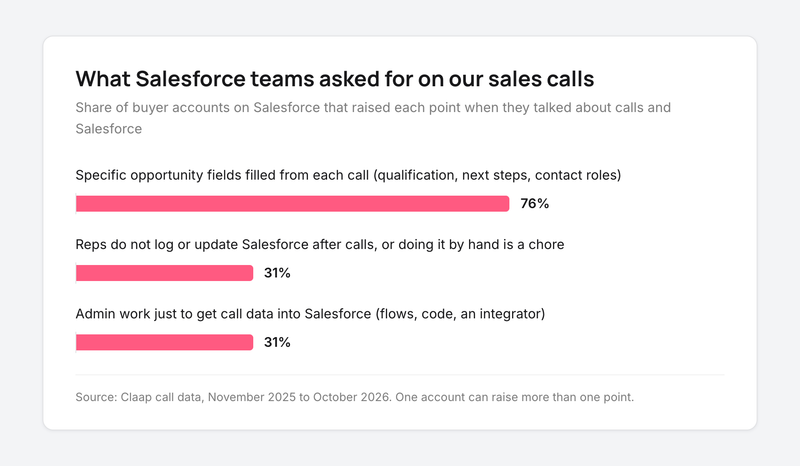
On Claap's own sales calls, about three in four buyer teams on Salesforce asked for specific opportunity fields to be filled from each call: qualification, next steps, contact roles, competitor picklists (Claap call data, November 2025 to October 2026).
About a third said their reps do not log or update Salesforce after calls, or that doing it by hand is a chore, and another third described admin work just to get call data into Salesforce: flows, custom code, an integrator (Claap call data, same period).
A RevOps analyst at a location-data company described the target:
- "Definitely need to push that information into the Salesforce records as well, or related Salesforce records as well. [...] it pushes into like opportunity it pushes into contact and accounts"
A sales director at a customer-experience outsourcing company described the starting point most teams share:
- "There are no call reports in Salesforce because they're senior sales directors and I haven't gone policing whether they took notes [...]" (translated from French)
A sales leader at an experimentation software company put the constraint that shapes the choice:
- "It was becoming too many tools. I stay in Salesforce [...] We have a SPICED framework in Salesforce where we ask reps to enter the information." (translated from French)
None of the buyers in this sample named Einstein Conversation Insights (Claap call data, same period). They asked which fields get filled, by whom, and how often.
These are our own sales calls, so the sample leans toward teams already looking at an external tool. Read the shares as what those teams ask for once they decide to act on call data.
What Einstein Conversation Insights does in Salesforce
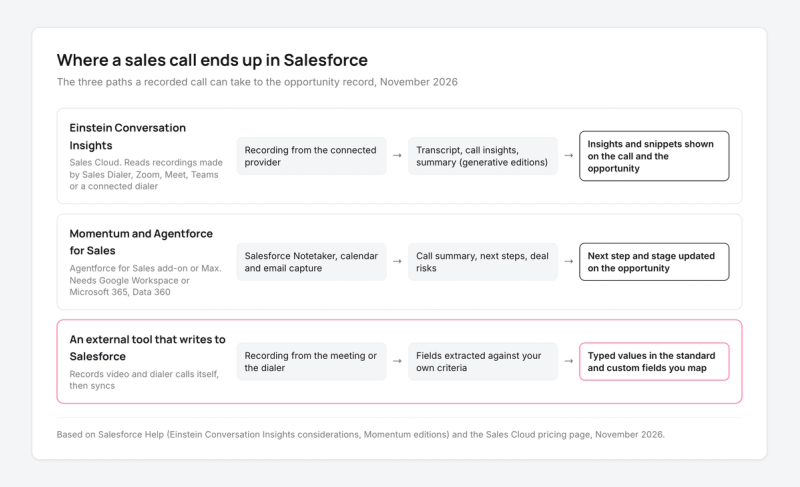
Einstein Conversation Insights reads recordings that another system made and turns them into insights inside Salesforce. It does not record calls itself: "you connect it with your recording system", as Salesforce Help puts it.
Once connected, it gives you:
- A transcript of each voice or video call, attached to the call record.
- Call insights: competitor and product mentions, pricing, next steps, plus up to 100 custom insights built from your own keywords (Salesforce Help).
- Opportunity insights: objections, risks, pricing and next steps shown on the opportunity record, with a jump to the transcript snippet (Salesforce's Conversation Intelligence page).
- Call summaries and generative insights in the editions that include generative AI.
- Call collections, coaching comments at a timestamp, and highlights shared to Slack.
Which calls Einstein Conversation Insights can read
Sales Dialer, Zoom Meetings, Google Meet and Microsoft Teams work out of the box. Dialpad, RingCentral, Aircall and Amazon Connect need extra setup, Zoom Phone is not available out of the box, and any other dialer needs integration work on your side through the API (Salesforce Help).
Check this list against where your deals happen. If half your discovery calls go through a dialer that is not on it, half your pipeline stays out of the insights.
What reaches the opportunity with Einstein Conversation Insights
The insights are there for people to read. Your own opportunity fields (MEDDPICC criteria, decision process, next step date) stay as they are until a rep or an automation fills them.
That is fine for a manager who reviews deals call by call. It falls short for a forecast that filters opportunities on what the buyer said.
Momentum and Agentforce for Sales: what changed in October 2026
Salesforce released a new version of Momentum in October 2026 that combines video recording with calendar sync, email capture and "automatic CRM updates based on your activity data", rolling out from early November (Salesforce Help).
Momentum now sits behind Salesforce's conversation intelligence: it captures the meeting with a Salesforce Notetaker, saves the email, event and video call as Salesforce records, and matches them to the contact, account and opportunity.
On the pipeline side, Agentforce uses that conversation data "to automatically update key fields, like next steps and deal stage" (Salesforce's Conversation Intelligence page).
Three requirements decide whether Momentum is an option for you, all from Salesforce Help:
- It needs Google Workspace or Microsoft 365, Data 360 and Einstein Generative AI.
- It is not compatible with Einstein Activity Capture or Einstein Conversation Insights, so moving to it means leaving the setup you may already run.
- It is available on Enterprise, Performance and Unlimited with the Agentforce for Sales add-on, and included in Agentforce 1 Sales, now sold as Max (Momentum editions article). Manual call scoring is not part of its Call Coaching.
What Salesforce conversation intelligence costs
Salesforce has renamed its Sales Cloud editions: Core replaces Enterprise, Advanced replaces Unlimited and Max replaces Agentforce 1 (Sales Cloud pricing page).
| Sales Cloud edition | List price per user per month, billed annually | Conversation intelligence included |
|---|---|---|
| Starter Suite | $25 | A reduced set with no call summaries or generative insights |
| Pro Suite | $100 | A reduced set with no call summaries or generative insights |
| Core | $195 | Conversation Intelligence; call summaries and Agentforce for Sales sold separately |
| Advanced | $395 | Conversation Intelligence; call summaries and Agentforce for Sales sold separately |
| Max | $550 | Conversation Intelligence, call summaries, Agentforce for Sales, Momentum |
Prices and inclusions from Salesforce's Sales Cloud pricing page; the Starter and Pro feature limits from the Einstein Conversation Insights considerations in Salesforce Help.
Agentforce for Sales, the add-on that brings autonomous pipeline updates and AI coaching, lists at $125 per user per month billed annually (Salesforce's Conversation Intelligence page).
So for 20 reps on Core who want call data written into the opportunity natively, the add-on is $2,500 a month: $125 × 20 seats at the price on Salesforce's Conversation Intelligence page, on top of the CRM licenses. Data 360, which Momentum needs, is now included in every edition from Core up (Sales Cloud pricing page).
Processed call hours per license
Einstein Conversation Insights counts processed call hours. Salesforce Help still uses the former edition names: on Enterprise (now Core) each included license covers up to 60 processed hours of calls a year, on Unlimited (now Advanced) and the older Performance edition up to 120, and a paid subscription up to 675, pooled across the org (Salesforce Help).
On Core that is a little over an hour of calls a week per license. An AE who spends three or four hours a week on discovery calls and demos uses the pool about three times faster, and extra hours are bought separately.
Limits to check before you turn it on
These come from the Einstein Conversation Insights considerations in Salesforce Help, and each one decides whether a team can use it as is:
- Data from European orgs is stored in Europe, but processing happens in the United States.
- Video calls with more than 40 participants are not processed, and calls over three hours may not process properly.
- Microsoft Teams support is limited to orgs under 30,000 users.
- Zoom mono audio recordings can mislabel speakers, which makes talk ratio unreliable.
- Calls are not processed in trial or demo orgs, so a free trial will not show you insights on your own calls.
- Shield Platform Encryption is not supported, and neither are Experience Cloud sites or Government Cloud.
For call recording itself (who records, where the file lives, how it reaches the record), our guide on tracking sales calls in Salesforce goes step by step.
How external conversation intelligence tools write into Salesforce
An external tool records the call itself, from the meeting or the dialer, then writes the result into Salesforce through its integration: an activity with the summary, a link to the recording, and values in the fields you map.
Some tools post a summary note on the activity timeline. Others write a typed value (a picklist choice, a date, a score) into a standard or custom field on the opportunity, which reports and the forecast can filter.
When you trial one, run three checks:
- Record one discovery call and open the opportunity: which fields changed, and are they the ones your forecast reads?
- Place a call through your own dialer: does it land on the same opportunity as the Zoom demo?
- Ask your admin what had to be built: a managed package and a field mapping, or flows and custom code.
A quick note: Claap is our product. To keep this guide fair, every Salesforce fact links to Salesforce's own documentation or pricing.
Claap records Zoom, Google Meet and Teams calls with a desktop app, a Chrome extension or a visible bot, and imports Aircall, Ringover, Allo and lemlist dialer calls (Salesforce call recording). After each call, it writes typed values into the Salesforce contact, account and opportunity fields you choose, standard or custom, following your own criteria (CRM auto-complete).
It keeps the video files out of your Salesforce storage and logs the summary and link on the record. Every call is also scored against your sales method, MEDDPICC, SPICED or your own grid, as part of Claap's conversation intelligence. CRM auto-fill and the Salesforce integration are on the Business plan at $60 per seat per month billed yearly (Claap pricing).
For the same 20 reps, that is $1,200 a month on Claap Business ($60 × 20 seats, Claap pricing), with no change to the Sales Cloud edition you run. If your team also works in Claude or ChatGPT, our Salesforce MCP guide covers how to query both from one prompt.
How to choose between native and an external tool
- Use Einstein Conversation Insights when your calls run through Sales Dialer, Zoom, Meet or Teams and your managers want to read insights call by call, because you already pay for it on Core and above.
- Choose Momentum with Agentforce for Sales when you are on Google Workspace or Microsoft 365 and next step and stage are the fields you need updated, because it keeps everything in one vendor.
- Pick an external tool that writes into Salesforce when your forecast depends on your own qualification fields, or when part of your calls go through a dialer Salesforce reads only after extra setup or not at all, because the fields get filled from the video calls and those dialer calls alike.
- Avoid switching to Momentum in the middle of a quarter if you run Einstein Activity Capture today, because the two are not compatible and email logging changes with it.
This advice is wrong if every call goes through Sales Dialer and your managers only want summaries: Einstein Conversation Insights on Core covers that with nothing else to buy.
Key takeaways
- On Core and above with Sales Dialer or the big three meeting tools, start with Einstein Conversation Insights: it is already paid for, and check the processed hours first.
- If next step and stage are the only fields you need updated and you run Google Workspace or Microsoft 365, Agentforce for Sales with Momentum keeps it all in Salesforce.
- If your forecast reads your own qualification fields, or calls run through other dialers, a tool that writes typed values into Salesforce does that job.
Frequently asked questions
What is Salesforce conversation intelligence?
It is the set of Sales Cloud features that transcribe recorded calls, detect moments such as competitor mentions, pricing and next steps, and show them on the call and the opportunity. Salesforce sells it as Conversation Intelligence, built on Einstein Conversation Insights and, since the Momentum acquisition, on Momentum's capture.
Is Einstein Conversation Insights free?
It is included in the Core, Advanced and Max editions according to Salesforce's Sales Cloud pricing page, with a usage limit in processed call hours per license. Starter and Pro Suite get a reduced set without call summaries, and Agentforce for Sales, which updates opportunity fields, is a paid add-on listed at 125 dollars per user per month.
Does Einstein Conversation Insights record calls?
No. Salesforce Help says it reads recordings from a connected system: Sales Dialer, Zoom, Google Meet and Microsoft Teams out of the box, Dialpad, RingCentral, Aircall and Amazon Connect with extra setup. Recording consent stays the customer's responsibility.
Does Einstein Conversation Insights work with Microsoft Teams?
Yes. Salesforce Help lists Microsoft Teams as supported out of the box for video calls, in orgs under 30,000 users. Transcription covers dozens of languages through Teams, and the automatic insights such as next steps vary by language.
What is the difference between Einstein Conversation Insights and Momentum?
Einstein Conversation Insights analyzes recordings made by your dialer or meeting tool. Momentum captures meetings with a Salesforce notetaker, syncs calendar and email, and feeds Agentforce updates to next step and stage. Salesforce Help says the two are not compatible, and Momentum needs the Agentforce for Sales add-on or Agentforce 1 Sales, now sold as Max.
Can Salesforce conversation intelligence update opportunity fields?
Natively, Agentforce for Sales updates key fields such as next steps and deal stage from conversation data. Your own qualification fields need a rep, an automation you build, or an external tool such as Claap that writes typed values into the opportunity fields you map.