

How to migrate from Gong: export, contract, checklist
Leaving Gong is planned backwards from the renewal date. The notice period and the export window set the timeline, and the call export follows.


Updated November 4, 2026.
How to migrate from Gong: the short version
- Find the end date of your Gong subscription term: Gong's standard terms renew it for a year unless you give written notice at least 60 days before it ends.
- List what lives in Gong: recordings, transcripts, scorecards, trackers and the CRM fields Gong fills.
- Export recordings and transcripts through the Gong API before the contract ends: the CSV export in the app holds metadata only.
- Re-create your scorecards and CRM fields in the new tool, then give each field one tool that writes it.
- Keep the overlap between the two tools short, and train reps before you stop recording in Gong.
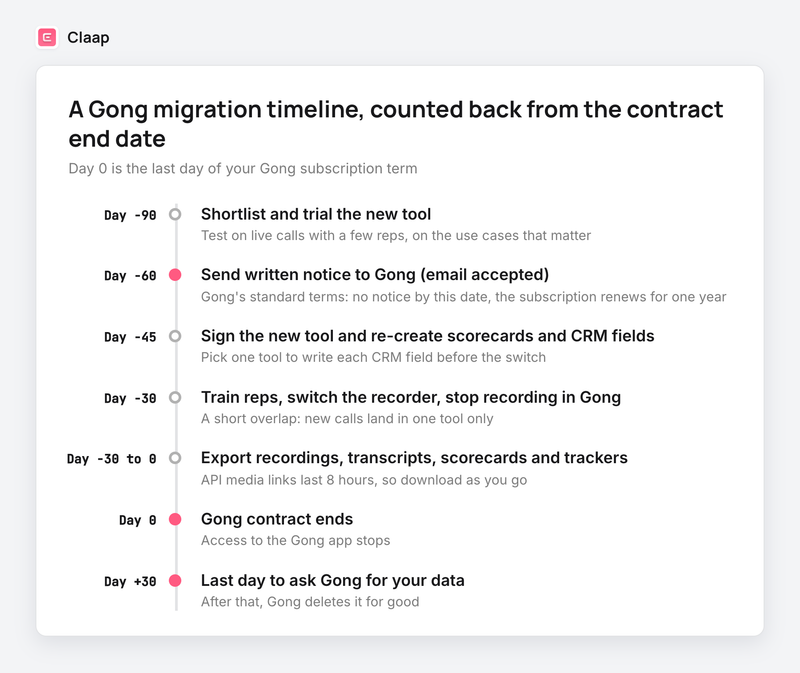
Plan your move off Gong backwards from the renewal date, because the 60-day notice and the 30-day export window in Gong's standard terms decide your timeline more than the size of your call library does.
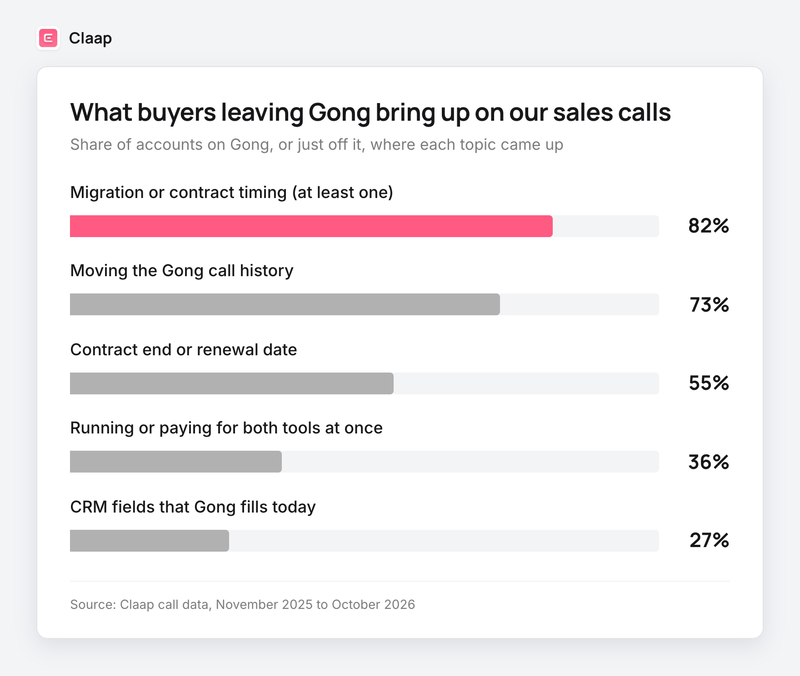
On our own sales calls, the topic comes up with almost every team on Gong: in 82% of the accounts that were on Gong or had just left it, migration or contract timing came up (Claap call data, November 2025 to October 2026).
What holds teams back from leaving Gong: the contract and the call history
We went back over our calls with teams that were on Gong or had just left it. Two topics lead. The call history comes first, raised in 73% of these accounts, and the contract end or renewal date came up in 55% of them (Claap call data, November 2025 to October 2026).
In their words:
- "We have to notify Gong before the 14th. We have to make sure. And then if we would do the transition, like we could sign, hopefully, someone by the next week, that would mean we can start migration." The person leading the switch at a B2B SaaS company.
- "We do want to probably only have like one month overlap of two spendings." The same buyer, on the budget side.
- "For that month we would have data both in gong and in, uh, Claap. ... And we would need to update our existing integration so that, for instance, the MEDDIC fields are only updated from Claap..." The person running the evaluation at a consumer app scale-up.
- "Think about having a kind of like, more of a company-wide trial before we renew, which is in July next year with Gong." A sales lead at a professional services firm.
How to migrate from Gong in 7 steps
Step 1: find your Gong renewal date and notice deadline
Unless your order form says otherwise, Gong's standard terms renew a subscription automatically for one-year periods. To stop that, either party gives the other written notice at least 60 days before the end of the current term, and email is accepted.
Three more clauses in Gong's standard terms matter when you leave:
- Payment obligations are non-cancelable and fees are non-refundable.
- A renewal with fewer licenses or a shorter term is re-priced without regard to the previous per-unit price, so cutting seats for a transition year can raise the price per seat.
- After the contract ends, Gong makes your data available for export if you ask within 30 days, then deletes it.
Start with your signed order form, because it can change these periods. Then put the two dates from Gong's standard terms in your calendar: day −60 for the notice and day +30 for the last export request.
Step 2: list what lives in Gong
List what your teams really use, object by object:
- Audio and video recordings, and their transcripts.
- Scorecards, and the answers managers already filled in.
- Trackers (keyword trackers and AI trackers).
- The CRM fields Gong fills, and the activities it creates in HubSpot, Salesforce or Dynamics.
- Call library folders (onboarding, best calls).
On the history side, Gong's retention policy keeps emails, calls and transcripts for the lesser of three years and the time you have been a customer. Calls in the company library sit outside that limit until someone deletes them. Your Gong history covers three years at most, which sets the volume to export.
Step 3: export Gong recordings and transcripts
Gong offers three routes, and they do not deliver the same thing:
- The "Download call data" CSV. From call search, Gong emails a CSV with one row per call: title, date, duration, participants, conversation stats, CRM data, trackers and a link to the call (Gong's help center). It holds no audio, no video and no transcript.
- The Gong API. A tech admin creates a key under Admin center, Settings, API (Gong's help center). One endpoint returns transcripts, another returns call details with audio and video links that stay valid for 8 hours (Gong's API documentation).
- Gong Data Cloud. An add-on that copies your Gong data once a day into Snowflake, BigQuery, Databricks, S3 or Redshift (Gong's help center).
The API is the one documented route to the audio and video files. It allows 3 calls per second and 10,000 calls per day (Gong's API documentation), a limit that rarely gets in the way when files are downloaded as you go. Use the API as soon as you want to keep your recordings, because the media links expire fast and the CSV does not carry them.
Step 4: export Gong scorecards and trackers
- Scorecard answers. Gong lets you download every answer to a scorecard as a CSV, private ones included, with the call, the rep scored and the person who scored (Gong's help center).
- Scorecard questions. The API returns each scorecard and its questions (Gong's API documentation). A screenshot of each scorecard works too.
- Trackers. Keyword trackers download as a CSV from Agent Studio (Gong's help center). For AI trackers, copy their description by hand.
For each question, write down the text, the scoring guide and the answer type (yes or no, rating, list). That is what you will rewrite in the new tool.
Step 5: take back the CRM fields Gong writes
Gong writes to your CRM in two ways. It creates activities: in HubSpot, the meeting record gets a link to the Gong recording, without the transcript (Gong's help center). And its AI Data Extractor agent can fill deal or account fields, such as competitors mentioned or methodology steps (Gong's help center).
Two consequences:
- The Gong links in your CRM activities point to an app you will no longer open. Keep your call export matched to the IDs of those calls.
- Every field Gong fills needs a new owner before the switch. Give each field one tool, because two tools writing the same field overwrite each other.
Step 6: run both tools for as short a time as you can
Two recorders on the same calls means duplicate notes in the CRM and data in two places for your AI agents. Choose a fixed length of a few weeks at most, because a trial with no end date drifts into the renewal.
During the trial, turn Gong off for the reps who test the new tool. Each call then lands in one tool only, and you compare on real calls.
Step 7: train reps before the switch
In the migrations we run, the order that works is: train the reps, switch the recorder, then start importing the history. No call gets recorded in Gong while the history moves, so nothing falls between the two.
The training is about what the rep gets: the recap and the follow-up email ready after the call, and deal fields filled without typing. Then plan a session for managers on pipeline reviews and coaching, once the first weeks of calls are in.
What happens to your Gong data after the contract ends
Under Gong's standard terms, you have 30 days after the contract ends to ask for your data, recorded calls included, and then Gong deletes it for good. Run the export while the contract is still live and your API keys still work, and keep the 30-day request as a safety net.
Gong migration checklist
- Find the Gong order form and the end date of the current term.
- Send written notice at least 60 days before that date, per Gong's standard terms.
- List users, scorecards, trackers, library folders and the CRM fields Gong fills.
- Create a Gong API key and test the export of one call (audio, video, transcript, metadata).
- Download scorecard answers as CSV and copy the questions of each scorecard.
- Download keyword trackers as CSV and copy your AI trackers.
- Re-create scorecards and fields in the new tool, and test them on calls already recorded.
- Give each CRM field one tool that writes it.
- Train reps, switch the recorder and turn Gong off for them.
- Start the history import, then check a sample of older calls.
- Keep a copy of the export outside both tools.
Switching from Gong to Claap
A quick note: Claap is our product. In this section we stick to what our own site says.
Claap moves your Gong transcripts, recordings and metadata over, so the team keeps its history (Claap vs Gong). Setup itself takes about 5 minutes: calendar, conferencing, dialer (same page).
For scorecards, each criterion is a prompt and a format: a rating from 0 to 5 or a list of values you define. You start from a MEDDIC, MEDDPICC, BANT or SPICED template, or write your own criteria, then test each one on calls already in the workspace (coaching and scoring). This is where the questions you copied in step 4 come back.
For CRM fields, an AI field (budget, decision-maker, competitor, risk) is filled per meeting, deal and account, syncs to HubSpot or Salesforce and backfills your call history (CRM auto-complete). Through Claap's MCP, Claude or ChatGPT can also create a new scoring field and its view on request.
If you are still choosing a tool, our Gong alternatives comparison reviews the market, and our Gong pricing guide helps you put a number on what you pay today.
Key takeaways
- The calendar comes from the contract: day −60 in Gong's standard terms comes before the choice of the new tool.
- The export runs while the contract is live, through the API, and the 30-day window in Gong's standard terms is a safety net.
- This plan does not apply if your Gong order form sets other notice or export periods: then its dates are the ones that count.
Frequently asked questions
How long does it take to migrate from Gong?
Downloading the calls is the short part. What takes time is the notice period (at least 60 days before the end under Gong's standard terms), re-creating scorecards and CRM fields, and training reps. Count the project in weeks and start three months before the contract ends.
Can I export all my Gong recordings?
Yes, through the Gong API, which returns audio and video links for each call along with transcripts. The CSV export in the app holds metadata only. The media links expire after a few hours, so download the files as you go.
What happens to my Gong data if I cancel?
Under Gong's standard terms, you can ask for your data within 30 days after the contract ends. After that, Gong deletes it. The safest route is to export while the contract is still running.
How do I cancel a Gong contract?
Send Gong written notice at least 60 days before the end of your subscription term; email is accepted. Without notice, the subscription renews for a year. Check your order form first, since it can set different terms.
Can I keep my Gong scorecards?
Answers download as a CSV and the questions come back through the API. The scorecards themselves are re-created in the new tool, so keep the text of each question, its scoring guide and its answer type.
Do I have to pay for Gong and the new tool at the same time?
Often for a few weeks, during the trial and the switch. Keep that overlap short and dated, and time the new contract to the end date of your Gong term.