RevOps AI tools: the 9 best for 2026
AI in RevOps only works on data it can read. 9 RevOps AI tools by job, what each AI does, what it costs, and what RevOps buyers told us on sales calls.


Updated October 29, 2026.
Best RevOps AI tools at a glance: the short answer
- HubSpot is best for SMB and mid-market teams that want Breeze agents to answer on CRM records and keep deals moving.
- Salesforce is best for enterprise teams that want Agentforce to update opportunity fields from calls and emails.
- Gong is best for large teams that want an AI deal likelihood score and call answers written to CRM fields.
- Claap is best for teams whose CRM fields stay empty, because its AI fills them from calls, meetings and emails and opens them to Claude and ChatGPT.
- Clari Forecast is best for sales leaders who want an AI projection next to the human forecast call.
- Dust is best for RevOps teams that want to build their own AI agents on top of HubSpot or Salesforce.
AI in RevOps only works on data the AI can read, and most deal data lives in calls that reps never typed up, so in 2026 the RevOps AI tools worth paying for are the ones that read conversations before they predict anything.
Reps spend 28% of their week selling, and most of the rest goes to tasks such as deal management and data entry, according to Salesforce's State of Sales research.
So most RevOps tools sit on top of fields a rep was supposed to fill. Add AI to them and the forecast agent or deal score reads the same half-empty CRM.
When RevOps leads join our sales calls, that is the problem they describe: they want AI, and they know it has nothing reliable to read yet.
We read those calls back, then picked nine RevOps AI tools by the job their AI does, with what it really costs to turn that AI on.
What are the best RevOps AI tools?
The best RevOps AI tools in 2026 are HubSpot Breeze and Salesforce Agentforce inside the CRM, Gong and Claap for deal data from conversations, Clari Forecast and Aviso for AI forecasting, Backstory for activity capture, Clay for AI enrichment and Dust for custom AI agents. Each price below is the cheapest setup that turns on the AI the section describes, from each vendor's pricing page on October 29, 2026 (billed annually, before tax).
| Tool | What its AI does for RevOps | Best for | Price to get the AI |
|---|---|---|---|
| HubSpot | Breeze agents answer on CRM records and suggest deal updates after calls | SMB and mid-market on HubSpot | $90 per seat per month (Professional) plus onboarding; agents use HubSpot Credits |
| Salesforce | Agentforce turns calls, emails and notes into opportunity field updates | Enterprise on Salesforce | $320 per user per month: Core $195 + Agentforce for Sales $125 |
| Gong | AI Deal Predictor scores deals; AI Data Extractor writes call answers to CRM fields | Large teams, one vendor for calls and forecast | On request: per-user licence plus a platform fee |
| Claap | AI fields fill typed CRM fields from calls, meetings and emails; MCP for Claude and ChatGPT | Teams whose deal fields stay empty | $60 per seat per month (Business) |
| Clari Forecast | AI projection next to the human forecast call | Weekly forecast calls on Salesforce | On request |
| Aviso | AI forecasting and live deal scoring | Forecast-led enterprise teams | On request |
| Backstory (formerly People.ai) | Captures activity into the CRM and answers questions on deals | Salesforce teams that want activity data captured | On request |
| Clay | Claygent researches accounts on the web and fills columns | Enrichment across many data providers | $446 per month billed annually (Growth, with CRM sync) |
| Dust | Agents you build on HubSpot, Salesforce and other connected tools | RevOps teams that build their own agents | $24 per seat per month (Pro) |
Sources: the pricing pages of HubSpot, Salesforce, Gong, Claap, Salesloft, Aviso, Backstory, Clay and Dust, linked in each tool's section.
Why RevOps AI breaks on data nobody typed
We read back the sales calls where a RevOps or sales ops lead joined from the buyer side, on Claap's calls and on those of lemlist, Claap's parent company. These buyers were already looking at a sales tool, so the shares below describe people with the problem, and they are floors: a theme counts only when a buyer said it out loud.
- In Claap and lemlist sales call data from October 2025 to October 2026, 60% of these accounts wanted CRM fields filled from their calls, meetings or emails.
- In the same call data, 57% said their CRM was incomplete, wrong or not updated.
- In the same call data, 57% also had too many tools, or tools that overlapped.
- In the same calls, 27% wanted an AI agent such as Claude or ChatGPT to read their call or CRM data, and 27% could not build the reports they needed.
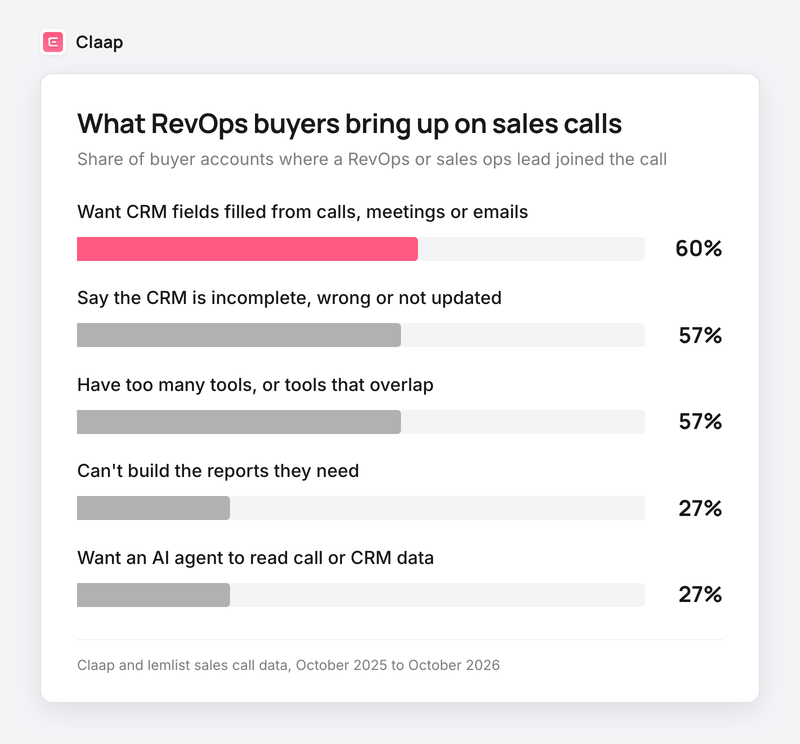
The AI request is real, but the CRM it would read is half empty, and every new tool asks reps to type one more thing.
What RevOps leads said, in their own words:
- "And we've got all this unstructured data in a notes field in Hubspot, for example, that nobody ever looked at." RevOps lead at a B2B SaaS company.
- "I know very well that engagement dates get filled in one time out of two, and competitors mentioned one time out of two as well." RevOps lead at a B2B cybersecurity software company (translated from French).
- "So me and my junior are just busy on trying to make everything flow together and it's a bit of a mess." RevOps lead and HubSpot admin at a B2B SaaS company.
- "Actually, there are too many tools scattered around, so we don't have any data." RevOps team member at a B2B finance software company (translated from French).
The reviews say the same from the other side. A CRM manager reviewing Salesforce on G2 writes that "reports are only as good as the data you enter". A Backstory reviewer adds that "value depends on a good account hierarchy, underlying CRM hygiene and consistent user adoption".
That is why we judge every AI below on one question first: where does it get its data, and does that data exist without a rep typing it?
How we built this list
We kept the AI tools that RevOps guides and buyers name for each RevOps job: CRM agents, deal data from conversations, forecasting, activity capture, enrichment and custom agents.
- Each section is about the tool's AI, and its price is what it costs to turn that AI on, required plans and add-ons included.
- Ratings and review lines come from each tool's G2 page, with a link to every review.
- Our own data comes from Claap and lemlist sales calls, anonymized, with the period stated.
Important note: RevOps.ai ranks for these searches, but its G2 profile has no reviews, and Floqer has very few, so we left both out. Weflow is a credible Salesforce option, but nine of the ten reviews on its G2 first page landed within one week, so we left it out too.
Important note: Clari merged with Salesloft, and Salesloft is now the brand. Clari's own G2 listing has been retired, so its section quotes Salesloft's listing and says so. Momentum was acquired by Salesforce in 2026 and now ships inside Salesforce's Core edition.
1. HubSpot Breeze, best for SMB and mid-market teams that want AI agents inside the CRM
HubSpot's AI is the safe pick under about 200 reps when HubSpot is already your CRM: its agents answer from the records you have, so they are only as good as what your team logs.
Who HubSpot's AI works best for
- Teams on HubSpot that want AI answers on contacts, companies and deals without another vendor.
- RevOps teams of one or two people who need forecasting and AI deal updates without a developer.
HubSpot's AI overview
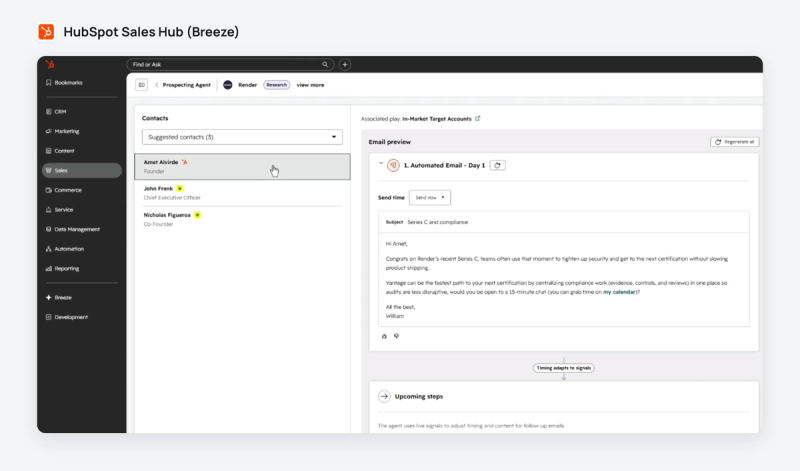
HubSpot's AI runs as Breeze agents, per its AI page. The data agent answers custom questions about a contact or company from the signals in the CRM, calls, emails and documents. The prospecting agent watches accounts for buying signals, and smart deal progression suggests CRM updates and follow-up drafts after each meeting for a rep to approve. Agents run on HubSpot Credits, which every paid plan includes each month.
HubSpot's AI pricing
- Professional costs $90 per seat per month billed annually on HubSpot's pricing page, the first plan with AI deal progression and forecasting, plus required onboarding with no amount shown.
- Professional includes 10,000 HubSpot Credits a month on the same pricing page.
- The data agent uses 10 credits per answer on one record, per HubSpot's credits rate sheet, so the included credits cover about 1,000 answers a month.
HubSpot integrations
HubSpot is the CRM. Its MCP server gives outside AI tools read and write access to contacts, companies, deals and engagements.
HubSpot's AI pros and cons
Pros:
- Agents work on the CRM you already run, with no extra contract.
- Suggested deal updates after meetings keep a rep in the loop.
- An MCP server for outside agents.
Cons:
- Deal AI and forecasting start at Professional.
- Agent answers depend on what reps logged in HubSpot.
What G2 reviewers say about HubSpot's AI
HubSpot Sales Hub rates 4.4 out of 5 from 14,379 reviews on G2.
- "I use its AI features to filter clients, identify relevant contacts and outreach information, and organize companies based on specific criteria." Business development manager, small business, August 2026.
- "The CRM still has to be maintained by the team, and if reps do not update activities or add information differently, report data will be less accurate." Sales operations manager, mid-market e-learning company, October 2026.
2. Salesforce Agentforce, best for enterprise teams that want AI to update opportunities
Agentforce is the right pick when Salesforce is your system of record and you want an agent to keep opportunity fields current from conversations, with a budget for the add-on.
Who Salesforce's AI works best for
- Enterprise and upper mid-market teams on Salesforce with an admin.
- Teams that want AI field updates on opportunities, either automatic or approved by the rep.
Salesforce's AI overview
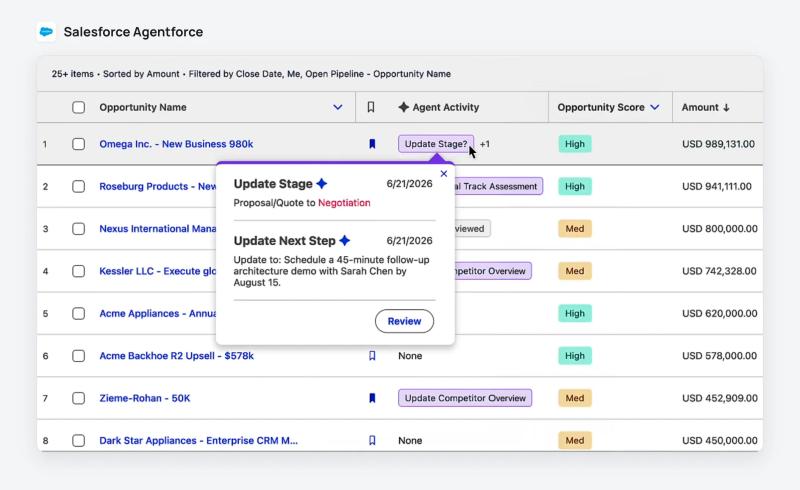
Agentforce for Sales turns calls, meetings, emails and seller notes into opportunity field updates such as stage and next steps, per Salesforce's AI sales agent page. It runs in an autonomous mode, or in a suggestive mode where the rep reviews and approves each update. Salesforce also sells an outbound agent, and since buying Momentum in 2026 it bundles call capture into its Core edition.
Salesforce's AI pricing
- Agentforce for Sales is an add-on from $125 per user per month on Salesforce's pricing page, and it needs the Core edition or above, $195 per user per month billed annually on the same page.
- That makes $320 per user per month for Core plus Agentforce, or $38,400 a year for ten users, on the same pricing page.
- Max costs $550 per user per month billed annually on the same page and includes Agentforce for Sales with Flex Credits.
Salesforce integrations
AppExchange and the API connect almost every tool on this list. Salesforce announced hosted MCP servers in 2025, still described as a pilot on its developer blog.
Salesforce's AI pros and cons
Pros:
- AI updates land on the opportunity, where forecasts and reports already read.
- A suggestive mode keeps reps in control of what changes.
Cons:
- The AI is an add-on on top of an expensive edition.
- Configuration needs an admin, and credit consumption per agent action is not spelled out.
What G2 reviewers say about Salesforce's AI
Salesforce Sales Cloud rates 4.4 out of 5 from 27,580 reviews on G2.
- "Coworker's ability to tap into all of our data through premade connectors allows it to surface information that was previously siloed." Global Salesforce administrator, enterprise company, September 2026.
- "I also believe that reports are only as good as the data you enter, so upkeep and standardization of CRM records take some effort." CRM manager, mid-market e-learning company, October 2026.
3. Gong AI, best for large teams that want deal scores and call data in the CRM from one vendor
Gong is the safe pick above about 50 reps with budget for a platform fee: its AI scores every open deal and writes call answers into existing CRM fields.
Who Gong's AI works best for
- Sales orgs of 50 reps and more on Salesforce, HubSpot or Microsoft Dynamics.
- Companies that want call recording, deal scoring and forecasting from one vendor.
Gong's AI overview
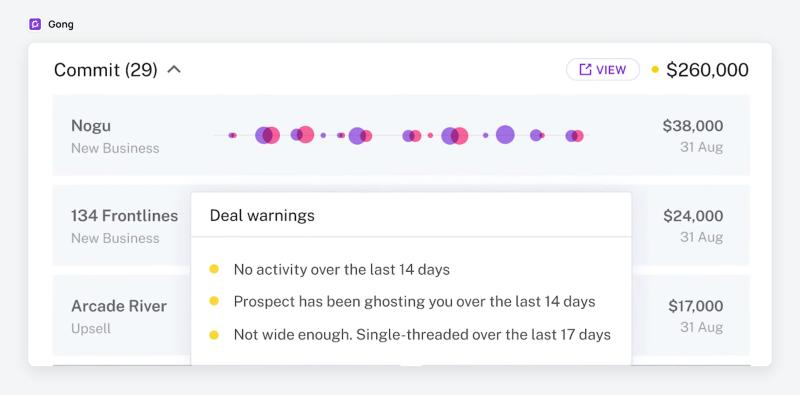
Gong's AI Deal Predictor gives each open deal a likelihood score from CRM, call, email and tracker signals, shown on forecast pages, deal boards and pipeline views, per Gong's help center. It needs Gong Forecast seats and enough deal history. The AI Data Extractor turns conversations into answers it can export to existing CRM fields, and Gong does not create new CRM fields, per its AI Data Extractor doc. Gong's forecast also shows AI deal warnings on committed deals, such as no recent activity or a single-threaded deal. Its MCP server lets Microsoft Copilot, ChatGPT and Claude ask about accounts and deals, read-only.
Gong's AI pricing
Gong's pricing page prices licences per user plus a platform fee, with no public figures. The AI Data Extractor comes with Gong Foundation, and the AI Deal Predictor needs Gong Forecast seats. Pricing on request.
Gong integrations
Gong's partner marketplace lists Salesforce, HubSpot and Microsoft Dynamics among its partners, on Gong Collective.
Gong's AI pros and cons
Pros:
- Deal scores and call-based CRM answers from one platform.
- A read-only MCP server for AI assistants.
Cons:
- No public price; deal scores need separate Forecast seats.
- The Data Extractor writes only to CRM fields that already exist.
What G2 reviewers say about Gong's AI
Gong rates 4.7 out of 5 from 6,782 reviews on G2.
- "Gong brings a lot of work we were doing across separate tools under one hood..." Senior director of revenue strategy and enablement, mid-market company, October 2026.
- "Some of the AI-generated insights are not as accurate or consistent as I'd like." Customer success manager, enterprise software company, October 2026.
A quick note: Claap is our product. To keep this list fair, we relied on third-party reviews and linked every major claim to its source.
4. Claap, best for teams whose CRM fields stay empty
Claap is the pick when your forecast and your AI agents read deal fields that reps leave half empty: its AI fills those fields from what buyers said on calls, in meetings and in emails, and opens them to Claude and ChatGPT.
Who Claap's AI works best for
- RevOps teams on HubSpot or Salesforce whose deal fields (next step, competitor, decision process) are half empty.
- Teams of 5 to 100 reps that want sales intelligence from their own conversations at a published price.
- Teams that want Claude, ChatGPT or their own agents to read deals and call data.
Claap's AI overview
Claap is a sales intelligence tool: it captures calls, meetings and emails, then its AI turns what was said into deal data. Each AI field is a question (economic buyer confirmed? competitor in play?) answered on every call and written as a typed value into HubSpot or Salesforce, with a sync mode per field, per Claap's revenue intelligence page. Every deal gets a summary of context, progress, decision process and main risk, and it says "timeline unclear" when the calls don't say. Claap does not compute a forecast roll-up: it feeds the CRM your forecast already runs on, the same way it automates CRM updates after every call. Through the Claap MCP, Claude, ChatGPT and other agents read the same deals, views and AI fields, with your permissions. Claap joined lemlist in 2025.
Claap's AI pricing
- Business costs $60 per seat per month billed yearly on Claap's pricing page, the plan with CRM auto-enrichment, the HubSpot, Salesforce, Attio and Pipedrive sync and deal insights.
- Pro costs $32 per seat per month billed yearly, and Basic is free, on the same page; the Claap MCP is included on every plan.
- Ten recording seats on Business come to $7,200 a year, and people who don't record stay on free Basic licences, on the same pricing page.
Claap integrations
HubSpot and Salesforce natively, plus Attio and Pipedrive; Zoom, Google Meet and Microsoft Teams; Aircall, Ringover, Allo and lemlist dialers; Slack and Notion; Zapier, Make, n8n and webhooks.
Claap's AI pros and cons
Pros:
- Fills typed CRM fields from calls, meetings and emails, with a sync rule per field.
- Deal summaries and risks quote the call they come from.
- MCP on every plan, readable from Claude and ChatGPT.
Cons:
- No contact database: pair it with an enrichment tool.
- No forecast roll-up: it feeds the forecast in your CRM.
- CRM sync and deal insights need the Business plan.
What G2 reviewers say about Claap
Claap rates 4.6 out of 5 from 484 reviews on G2.
- "The integrations with tools we already use made it feel like it fit into our workflow from day one, instead of being something we had to reorganize everything around." Founder, small business, October 2026.
- "...some of the more advanced features, like ClaapAgent, are only available with a Business license." Digital marketing manager, small business, August 2026.
5. Clari Forecast, best for sales leaders who want an AI projection next to their forecast call
Clari Forecast is the pick when the weekly forecast call drives the quarter and you want the AI's number next to the managers' number.
Who Clari Forecast works best for
- CROs and RevOps teams that roll a forecast up from reps to the board every week.
- Salesforce teams that already run Salesloft.
Clari Forecast's AI overview
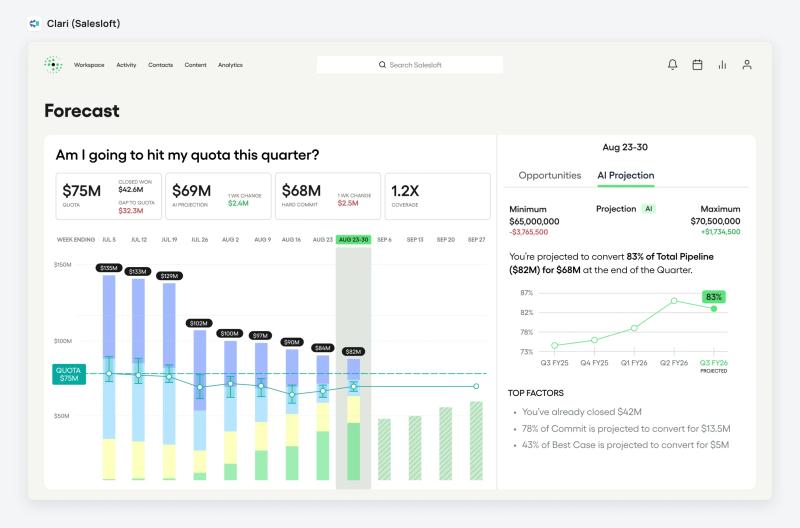
Clari Forecast combines AI with deal data to predict outcomes, and its CRO view shows an AI forecast summary and a human versus AI projection, per Salesloft's platform overview. Clari merged with Salesloft in December 2025, and since September 2026 Salesloft is the brand while Clari Forecast keeps its name, per Salesloft's announcement. Salesloft announced an MCP server in 2026 that exposes forecast and deal data to AI tools.
Clari Forecast pricing
Clari's pricing page now redirects to a Salesloft demo form with no prices. Pricing on request.
Clari Forecast integrations
Salesloft's integrations page names Salesforce as its CRM.
Clari Forecast's AI pros and cons
Pros:
- The AI projection sits next to the human call, so gaps show before the board meeting.
- Same platform as Salesloft engagement and conversation intelligence.
Cons:
- No public price, and a brand in transition.
- The projection reads the deal fields in Salesforce, so empty fields weaken it.
What G2 reviewers say about Clari Forecast
Clari's own G2 listing has been retired since the merger. Salesloft, which now includes Clari, rates 4.5 out of 5 from 9,912 reviews on G2.
- "I find Clari very easy to use, and the data I need is almost always presented right when I need it." Enterprise education company reviewer, February 2026.
- "It was hard as you didn't know which elements contributed to your forecast." Same reviewer.
6. Aviso, best for forecast-led enterprise teams that want AI scoring on every deal
Aviso is the pick when forecasting is the AI job that matters most and you want a dedicated forecasting platform with deal scoring.
Who Aviso works best for
- Enterprise sales and RevOps teams that still forecast in spreadsheets next to the CRM.
- Teams on Salesforce or Microsoft Dynamics.
Aviso's AI overview
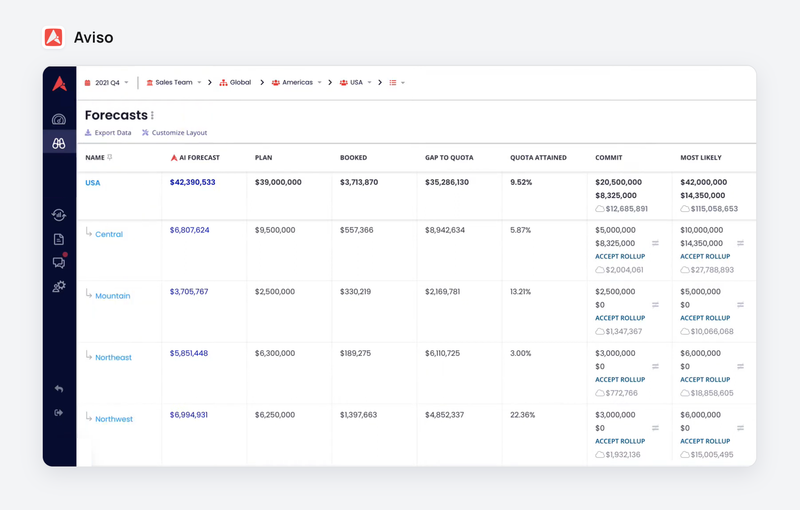
Aviso sells AI forecasting, pipeline inspection, live opportunity scoring and deal risk, plus an agent orchestrator called MIKI, per Aviso's pricing page. It reads CRM and activity data to project the number and flag deals at risk.
Aviso pricing
Aviso's pricing page asks for a form and sends a tailored proposal. Pricing on request.
Aviso integrations
G2 reviewers mention Salesforce, Microsoft Dynamics and Google Meet. Aviso's own integrations list is not published on its pricing page.
Aviso's AI pros and cons
Pros:
- A forecasting product first, with deal scoring built in.
- Replaces spreadsheet forecast models.
Cons:
- No public price.
- Reviewers ask for more transparency in how the AI reasons.
What G2 reviewers say about Aviso
Aviso rates 4.3 out of 5 from 993 reviews on G2.
- "I like the forecast tab because it helps me move from Excel models to a better AI-integrated source." Senior sales operations analyst, enterprise company, May 2026.
- "I think the AI in Aviso could be much more transparent about its reasoning..." Software company reviewer, mid-market, July 2026.
7. Backstory, best for Salesforce teams that want activity captured and questions answered
Backstory, renamed from People.ai in 2026, is the pick when reps don't log emails and meetings in Salesforce and you want AI answers on top of that captured activity.
Who Backstory works best for
- Enterprise teams on Salesforce with many reps and many accounts.
- RevOps teams that want leaders to ask questions about deals without a dashboard.
Backstory's AI overview
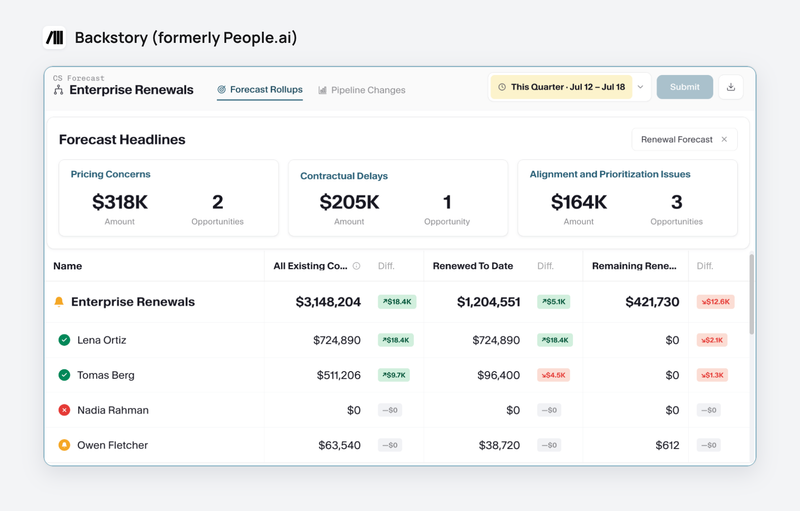
Backstory captures emails, calls and meetings into Salesforce and calls itself a revenue answers platform: leaders ask about deals and risks and get answers from that activity. Its MCP server connects Claude, Microsoft Copilot, ChatGPT, Gemini and custom agents to the same data.
Backstory pricing
Backstory's pricing page charges a platform fee per customer-facing person plus pre-paid usage, with no figures. Pricing on request.
Backstory integrations
Salesforce, email and calendar capture, plus the MCP connection to AI assistants.
Backstory's AI pros and cons
Pros:
- Removes manual activity logging in Salesforce.
- MCP access for the main AI assistants.
Cons:
- No public price, and a usage meter on top of seats.
- Answers depend on a clean account hierarchy in the CRM.
What G2 reviewers say about Backstory
Backstory rates 4.5 out of 5 from 630 reviews on G2.
- "People.ai eliminates the need for manual data entry in Salesforce which is a huge time saver and improves productivity." Biotechnology company reviewer, mid-market, April 2026.
- "The inaccuracies in data interpretation and lack of transparency are my biggest pain points." Same reviewer.
8. Clay, best for RevOps teams that enrich accounts with AI research
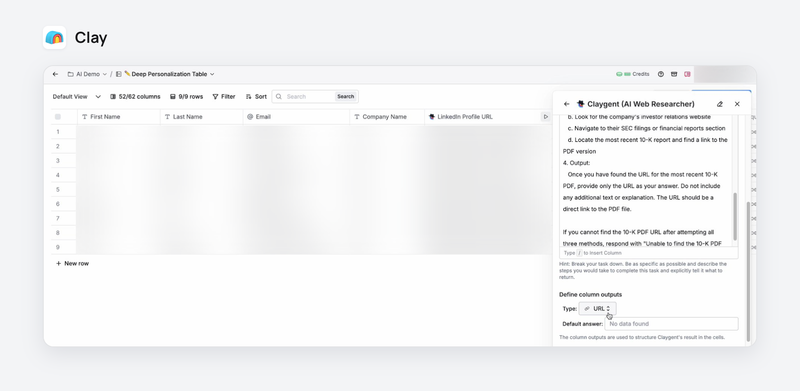
Clay is the pick when one data vendor never has everything: Claygent researches each account on the web and fills the columns your scoring and routing need.
Who Clay works best for
- RevOps and growth teams that build account and contact lists for outbound.
- Teams with someone comfortable building tables and prompts.
Clay's AI overview
Claygent is Clay's AI agent with web research: you ask a question per row and it returns a custom data point, per Clay's pricing page. It sits next to waterfall enrichment across many data providers, and the Growth plan syncs results to the CRM.
Clay's AI pricing
- Every AI prompt counts as one action, and a web research task costs 1 data credit on the Helium model or 3 on Argon, per Clay's AI pricing doc.
- Claygent runs on the free plan, and Growth, the first plan with CRM sync, costs $446 per month billed annually on Clay's pricing page.
Clay integrations
Salesforce, HubSpot, Microsoft Dynamics 365 and Pipedrive among its CRM integrations, per Clay's integrations page.
Clay's AI pros and cons
Pros:
- Claygent finds data points no database sells.
- Flexible tables for scoring and research.
Cons:
- Credit-based pricing is hard to predict.
- AI output still needs checking.
What G2 reviewers say about Clay
Clay rates 4.6 out of 5 from 234 reviews on G2.
- "I also find the credit-based pricing a little difficult to predict." Sales manager, enterprise marketing company, April 2026.
- "Sometimes the data is not fully correct, so I still need to check it myself." Developer, small IT company, August 2026.
9. Dust, best for RevOps teams that want to build their own AI agents
Dust is the pick when no packaged agent does your RevOps job and you have someone who will build one on top of HubSpot or Salesforce.
Who Dust works best for
- RevOps teams with a builder who wants agents across the CRM, Slack and docs.
- Companies that want to switch between AI models from several providers.
Dust's AI overview
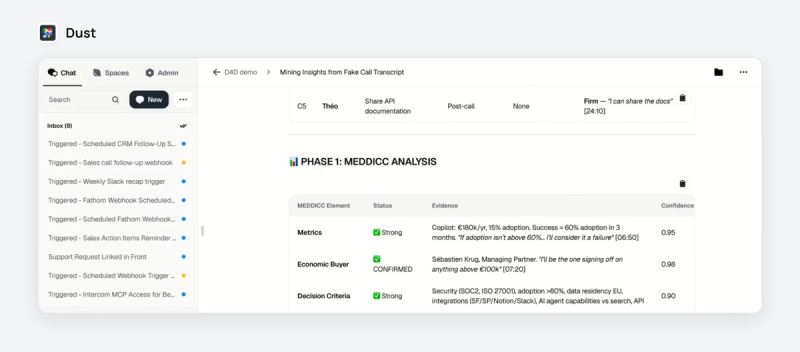
Dust is a platform to build AI agents on your company's tools, with models from OpenAI, Anthropic, Google and Mistral. Its integrations page lists HubSpot, Salesforce, Salesloft, Clay and Attio among its sales connectors, and any other tool can connect through MCP.
Dust pricing
Pro costs $24 per seat per month billed yearly, per Dust's pricing page.
Dust integrations
HubSpot, Salesforce, Salesloft, Clay, Attio and Stripe in its CRM and sales section, plus Slack, Notion, Google Drive and any MCP server.
Dust's AI pros and cons
Pros:
- Build agents for the exact RevOps workflow you run.
- Model choice and MCP connections.
Cons:
- You build and maintain the agents yourself.
- The onboarding curve is steep for non-technical users.
What G2 reviewers say about Dust
Dust rates 4.6 out of 5 from 87 reviews on G2.
- "Plugging into our existing tools meant our agents actually had the context they needed to be useful for support and RevOps work." Product manager, small business, August 2026.
- "The onboarding curve for non-technical users is still steep." Founder, small IT services company, July 2026.
RevOps AI tools comparison: data source, AI access and reviews
| Tool | Where its AI reads | MCP for outside agents | G2 rating |
|---|---|---|---|
| HubSpot Breeze | HubSpot records, calls, emails | Read and write | 4.4 (14,379 reviews) |
| Salesforce Agentforce | Calls, emails, notes, opportunities | Hosted MCP announced (pilot) | 4.4 (27,580 reviews) |
| Gong | Calls, emails, CRM, trackers | Read-only | 4.7 (6,782 reviews) |
| Claap | Calls, meetings, emails, CRM | Read, and write to HubSpot deals | 4.6 (484 reviews) |
| Clari Forecast | Salesforce deals and activity | Salesloft MCP | Listing retired (Salesloft 4.5, 9,912 reviews) |
| Aviso | CRM and activity data | Not documented | 4.3 (993 reviews) |
| Backstory | Emails, calls, meetings in Salesforce | Yes | 4.5 (630 reviews) |
| Clay | The web and data providers | For coding agents | 4.6 (234 reviews) |
| Dust | Whatever you connect | MCP client | 4.6 (87 reviews) |
Sources: each vendor's docs and G2 page, linked in the tool sections above, read on October 29, 2026.
Where AI fits in your RevOps tools stack
The AI is already inside most RevOps tools, so the order you turn it on decides whether it helps.
- Start by filling the CRM from conversations, because every agent and forecast reads it. That is the job of Claap, Gong's Data Extractor, Agentforce or Backstory.
- Turn on your CRM's own agents next: Breeze on HubSpot, Agentforce on Salesforce. They get better as the fields fill.
- Add AI forecasting (Clari Forecast, Aviso, Gong's Deal Predictor) once deal fields are filled on most open deals, because a model trained on empty fields only scores empty fields.
- Use Clay for AI enrichment and Dust for custom agents when a job has no packaged tool.
- Skip an AI feature whose answer your CRM could give with one filled field.
For the deal and forecast layer in more depth, see our comparison of revenue intelligence software. For prospect data and signals, see the best sales intelligence tools.
This advice is wrong if your reps already fill the CRM reliably, for example a small team with a strict manager and few fields. Then forecasting AI or a CRM agent can come first.
Key takeaways
- Pick HubSpot Breeze when HubSpot is your CRM and you want agents on your records, starting at Professional.
- Pick Salesforce Agentforce when Salesforce is your system of record and $320 per user (on its pricing page) fits the budget.
- Choose Gong when you want deal scores and call answers from one vendor and the platform fee fits.
- Choose Claap when your AI and your forecast read half-empty deal fields, because it fills them from calls, meetings and emails at a published price and opens them to Claude and ChatGPT.
- Use Clari Forecast or Aviso when the forecast call is the job and your deal fields are already filled.
- Add Backstory, Clay or Dust for activity capture, enrichment or custom agents.
Frequently asked questions
What are RevOps AI tools?
RevOps AI tools are software where AI does part of a revenue operations job: CRM agents that update records, AI that turns calls into deal fields, AI forecasting, activity capture, AI enrichment and custom agents. They read the CRM and the conversations behind it, so their output depends on the data they can reach.
How is AI used in RevOps?
RevOps teams use AI to fill and clean CRM data, score deals and flag risk, project the forecast, enrich accounts and answer questions about the pipeline. The common thread is data: AI that reads calls, meetings and emails fills the fields reps skip, and the other uses get better once those fields exist.
What are the most common tools used for revenue management?
The most common are a CRM with its AI (HubSpot Breeze or Salesforce Agentforce), a revenue intelligence tool (Gong or Claap), a forecasting tool (Clari Forecast or Aviso), an enrichment tool (Clay) and, more and more, an agent platform (Dust) or an MCP connection to Claude or ChatGPT.
Which RevOps AI tools work with Claude or ChatGPT?
HubSpot, Gong, Salesloft, Backstory and Claap all document an MCP server that AI assistants can connect to. Gong's is read-only, HubSpot's reads and writes CRM data, and Claap's reads calls, emails, deals and AI fields from Claude, ChatGPT or any MCP client.
How much do RevOps AI tools cost?
On their pricing pages, HubSpot Professional costs $90 per seat per month and Salesforce Core plus Agentforce $320 per user per month, both billed annually. Claap Business costs $60 per seat per month and Dust Pro $24 on their pricing pages. Gong, Clari Forecast, Aviso and Backstory quote on request.
What is the best RevOps AI tool for a small team?
For a small team, use the AI in your CRM first, such as HubSpot Breeze. If deal fields stay empty, add a tool that fills them from calls: Claap's Business plan costs $60 per seat per month billed yearly on its pricing page and syncs to HubSpot. Leave dedicated forecasting AI for later.