

Grok Bot connectors and MCP: setup for sales teams
Grok Bot comes with your inbox, calendar, Slack and CRM. The connector a sales team should add first is the one it lacks: the call history behind every deal. Here are the connectors that exist, how to add an MCP server by URL, what the Bot can see, and the Slack limits to know.

Updated November 14, 2026.
Grok Bot connectors at a glance
- Built-in connectors link Grok Bot to Gmail, Google Calendar, Drive, Slack, Notion and many more apps from the Connect apps menu, per xAI's documentation.
- For CRM, xAI's changelog lists Salesforce and Zoho CRM connectors; any other CRM comes in through its MCP server.
- A custom connector takes any remote MCP server: a name, a server URL, and optional HTTP headers and OAuth client ID.
- Permissions stay those of the connected account: the Bot can do nothing that account could not already do.
- In Slack, the app posts as you, and a Team Bot gets its own Slack app once a Slack admin approves it.
- Sales calls have no built-in connector: the Bot takes notes in meetings it joins, and the team's call history comes in through MCP.
For a sales team, the connector to add to Grok Bot first is the one that doesn't ship with it: the call history behind every deal.
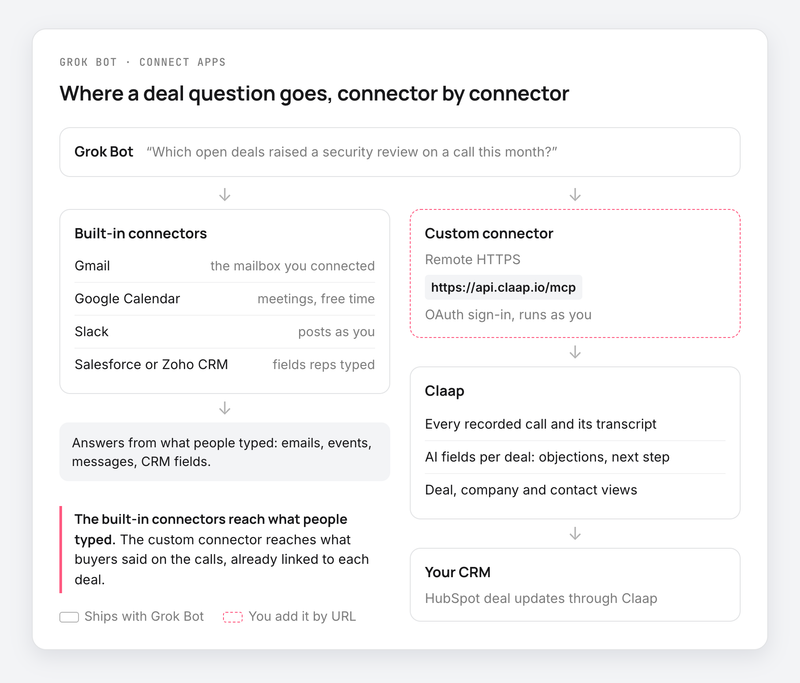
The built-in connectors give the Bot what your team wrote down: emails, calendar events, Slack messages, CRM fields. What the buyer said on the call, the budget they confirmed or the competitor they named, stays in your call recorder.
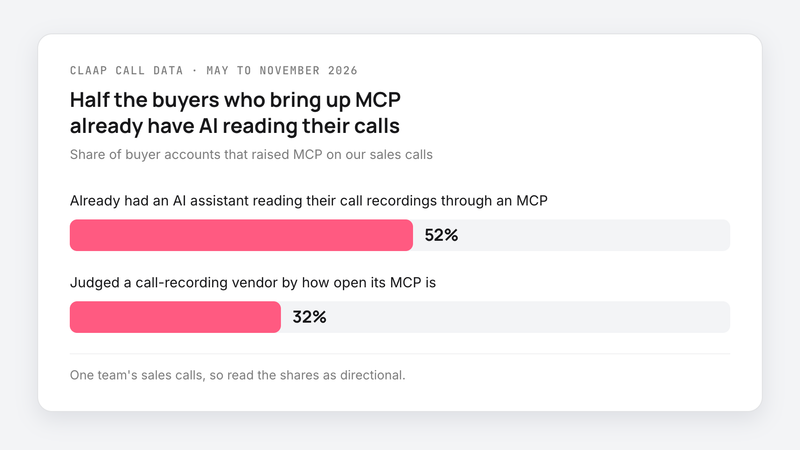
On our own sales calls, about half (52%) of the buyers who brought up MCP already had an AI assistant reading their call recordings through an MCP (Claap call data, May to November 2026). These are one team's calls, so read the shares as directional.
Where Grok Bot's connectors leave out your sales calls
Ask Grok Bot a sales manager's question: "Which open deals raised a security review on a call this month?"
With Gmail, Google Calendar, Slack and the CRM connected, the Bot searches emails, meetings and fields. It finds the security review when a rep wrote it down somewhere. It misses it when the buyer said it out loud and nobody typed it in.
Grok Bot can also join a meeting. On Team, Enterprise and Ultra plans, a Bot joins a Google Meet, Zoom or Microsoft Teams call, takes notes and sends a summary at the end, per xAI's Meetings page, with three limits for a sales team:
- It knows only the meetings it joined. Calls from before you set it up, and calls nobody invited it to, don't exist for it.
- It joins under its owner's name, as "(your first name)'s Bot - transcribing". You add it meeting by meeting, or let it follow your calendar.
- Its notes sit in the Bot's chat. They are not attached to the opportunity in your CRM.
About a third (32%) of the buyers who brought up MCP on our calls judged a call-recording vendor by how open its MCP was (Claap call data, May to November 2026). A sales leader at an AI software company put the need plainly after pulling a rep's calls into his assistant:
- "So the data is there and it's accessible, which is all I care about."
- Connect your call history before you automate follow-ups, because a routine that writes emails without knowing what was said on the call follows up on the wrong thing.
- Pick a call recorder whose MCP returns data linked to deals, because a search over raw transcripts only brings back a sample of the calls.
- Keep the built-in CRM connector for amounts, stages and owners, because a CRM's MCP reads only what reps typed, as our HubSpot MCP and Salesforce MCP guides show.
Which Grok Bot connectors and plugins exist
In Grok Bot, a plugin is an app from the catalog: one or more MCP servers, sometimes with skills. A connector is that app's connection to your account. xAI's page on how Grok Bot works says Bots use other services "through plugins and custom MCP servers."
| Connector | What the Bot can do | Known limit |
|---|---|---|
| Gmail | Search, read, draft, send, label | One mailbox at a time |
| Google Calendar | Read calendars, create and update events | Can't add a Zoom link |
| Google Drive, Docs, Sheets | Search and read files, edit cells | A view-only file stays view-only |
| Slack | Post and read as you | Only in channels you can post in |
| Notion | Read and update pages | Can connect a second account |
| Salesforce | One row per server, each with its own sign-in | Several servers to connect |
| Zoho CRM | Access to your account's Zoho CRM | Pick the data center before sign-in |
| Zoom | Sign-in from the desktop app | Error 4700 at authorization, no workaround yet |
Sources: Use the computer and apps and the Grok Bot changelog, read in November 2026.
For an app that isn't in the catalog, xAI offers two paths: add its MCP server, or ask the tinkabot Bot to build one from the service's API. tinkabot wraps the API in a plugin, tests it and publishes it only when you say so.
How to add a custom MCP server to Grok Bot
Ask the Bot to add it
Per xAI's Connect an app docs, give the Bot the server URL, for example "Add the MCP server at this address." It installs it on your account and shows a Connect card when you need to sign in.
Add it yourself in the desktop app
- Open Connect apps from the sidebar.
- At the bottom, choose Add a custom connector.
- Enter a Name, then pick a Type: Remote HTTPS for a hosted server, Command for a server started on the Bot's computer.
- For Remote HTTPS, paste the Server URL. Add HTTP headers and an OAuth Client ID if the server needs them (a Client Secret field appears once you enter one).
- Choose Add plugin, then finish the sign-in when the Bot asks.
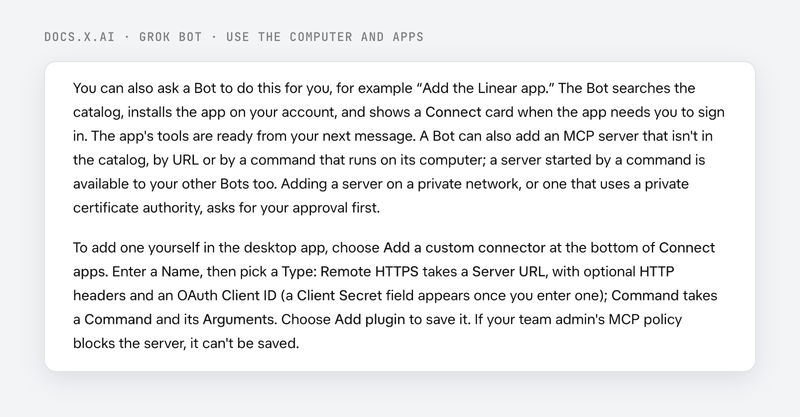
If your admin's MCP policy blocks the server, it can't be saved. Grok Bot signs in with a Cursor account, xAI's FAQ says, so on a team it inherits the team's Cursor connector policy, and the MCP allowlist is Enterprise only, per xAI's teams and enterprises page.
Add Claap as a custom connector
A quick note: Claap is our product, so read this part knowing that.
The Claap MCP server lives at https://api.claap.io/mcp. Claap's product page says it works with any MCP-compatible client, and xAI's docs say Grok Bot takes any remote MCP server by URL. On that basis, the setup is three fields:
- Name: Claap.
- Type: Remote HTTPS, with https://api.claap.io/mcp as the Server URL.
- Sign-in: OAuth by default, or a Claap API key sent as an Authorization: Bearer header, per the Claap help center.
The Bot can then read calls, transcripts, synced emails and deal views, limited to what you can see in Claap. It can create AI fields and update a HubSpot deal. Claap MCP deletes nothing and cannot send an email. It is included on every plan, the free one too, per the product page.
What Grok Bot can see through a connector
xAI's docs put it in one line: an app "can do only what that account can already do," and it cannot raise your access or change sharing.
- Connectors are account-wide. A connected app is available to every Bot you run, with no per-Bot setting.
- Tokens stay off the Bot's computer. OAuth tokens are held on Cursor's connector backend (Grok Bot signs in through Cursor), and the Bot calls tools without receiving them.
- Sensitive actions go through Auto Review. Before it uses an app or sends a message, the Bot can show an approval card, per xAI's approvals and privacy page.
- In Slack channels, a Team Bot uses only its owner's apps, and asks before it uses yours, per xAI's Team Bots page.
- A custom MCP connector on a Team Bot shows as shared with everyone, according to release 1.0.1 in the changelog. Connect a server that applies its own per-user permissions, or check who uses it.
A sales leader at a US online-education company described the problem with a homegrown MCP on a call with us:
- "our CTO actually built his own MCP that I have access to. However, we can't give everyone access to it because you have to be a technical admin in [their call recorder] in order to have access to it. [...] So for the team, it's really not working."
An MCP that carries the source tool's permissions avoids this: each rep sees only the calls they can already see.
How to set up Grok Bot in Slack, and its limits
The Slack app, to post as you
Connected from Connect apps, the Slack app posts as the Slack user you connected. It can post only in channels that user can post in, and another workspace needs its own connection, per Use the computer and apps.
A Team Bot in Slack, for the whole team
- The owner or a Manager shares the Bot, then opens its details.
- Under Channels, they choose Bring to your team's Slack, then Connect.
- If it says Awaiting admin approval, a Slack workspace admin approves the app.
- Each teammate links their Slack account under Settings, General, Team Bots.
Once connected, the Team Bot has its own Slack app and handle, answers in threads, and follows a thread where its routine replied.
Slack triggers, to start a routine
A Slack trigger belongs to a routine: it starts the Bot on a mention, a phrase or a reaction. It is separate from the Slack app and needs Slack connected on the Cursor account that owns the Bot, per xAI's skills and routines page.
Known limits of Grok Bot in Slack
- Slack guests, Slack Connect channels and other workspaces are never included (Team Bots page).
- A personal Bot talks only to its owner, and does not hand work to other Bots from a channel thread.
- Someone without a linked account is told that "some features will be limited," and cannot use the owner's logins or private data (changelog).
- In a thread, only the person who asked can answer an approval card.
- A routine on a private channel runs only while you stay a member through your linked Slack account.
What to connect first
- Connect Gmail, Google Calendar and Slack first if you start alone, because that is where your day's tasks come from.
- Add your call recorder's MCP next when you want to ask about the pipeline, because deal answers come from what was said on calls.
- Test a custom connector on your own account before a Team Bot, because there it shows as shared with the whole team.
This advice does not apply if your team sells over email only and records no calls: the built-in connectors cover that.
Frequently asked questions
Does Grok Bot support MCP?
Yes. Grok Bot takes any MCP server, added by URL as Remote HTTPS or started by a command on the Bot's computer.
What plugins and connectors does Grok Bot have?
The catalog covers Gmail, Google Calendar, Drive, Docs, Sheets, Slack, Notion, Outlook, Microsoft Teams, Salesforce, Zoho CRM, Granola and many more. A plugin bundles one or more MCP servers and sometimes skills. An app that is missing comes in through its MCP server.
Can Grok Bot connect to HubSpot?
xAI's docs list Salesforce and Zoho CRM connectors. For HubSpot, add HubSpot's remote MCP server as a custom connector, with the OAuth client ID you create on the HubSpot side, or go through a tool that writes to HubSpot, such as Claap.
How do I add Grok Bot to Slack?
To post as yourself, connect the Slack app in Connect apps. For the whole team, share a Team Bot and choose Bring to your team's Slack in its details; a Slack admin approves the app if your workspace requires it.
Can Grok Bot read my call recordings?
It reads notes from the meetings it joined, on Team, Enterprise and Ultra plans. For the team's full call history, linked to deals, add your call recorder's MCP server, for example Claap's at api.claap.io/mcp.
What can Grok Bot see through a connector?
What the connected account can already see, and no more. A connected app works for all your Bots, tokens stay on the connector backend, and sensitive actions go through an approval card.