


AI CRM autofill: 6 tools that fill CRM fields from calls
Every call recorder now posts a summary to your CRM. The six tools here also write typed field values. What sets them apart is what the next call is allowed to change, and what that costs.


Updated November 9, 2026.
AI CRM autofill tools overview
- Gong is best for Salesforce teams of 50 reps and more that already run Gong and want typed deal fields filled with no extra tool.
- Claap is best for HubSpot and Salesforce teams of 5 to 100 reps who want to choose, field by field, what each new call may change.
- Avoma is best for small teams that want deal and account fields filled for a published price, and are fine with every call appending to the field.
- Sybill is best for teams on Zoho, Dynamics 365 or Pipedrive that want deal fields filled from calls and emails.
- Fireflies is best for teams that want a person to approve every value before it reaches the CRM.
- Fathom is best for small teams that only need text fields filled from the call summary.
The CRM autofill tool worth paying for writes your qualification fields as typed values without asking a rep, and lets you decide field by field what the next call may change.
Every tool in this list already posts a call summary to HubSpot or Salesforce. That note reads well and fills no report.
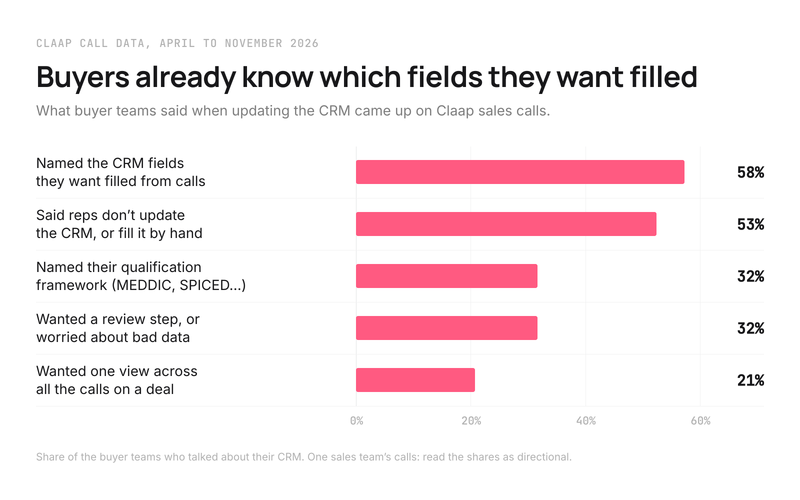
What sales leaders ask for is different. On our own sales calls, 58% of the buyer teams that talked about their CRM named the exact fields they wanted filled from calls, and 53% said their reps don't update the CRM or fill it by hand (Claap call data, April to November 2026). These are one sales team's calls with prospects and customers, so read the shares as directional.
So this comparison looks at what each tool actually writes, where, and what happens to a field when the second, third and fourth call land on the same deal. By the end you will know which tool fits your CRM, your team size and the fields your reports read.
AI CRM autofill tools at a glance
| Tool | Best for | Typed fields | What the next call does to a filled field | Cheapest plan with field autofill |
|---|---|---|---|---|
| Gong | Salesforce teams of 50+ reps | Yes/no, text, picklists, number, date, range | Overwrites it | Gong Foundation, price on request |
| Claap | HubSpot and Salesforce teams of 5 to 100 reps | 10 types incl. select, multi-select, date, number, rating, checkbox | Your choice per field: only if empty, append, or overwrite | Business, $60 per seat per month, billed yearly |
| Avoma | Small teams on a budget | Multi-select, date, number, multi-line text | Appends to it | $48 per seat per month: Startup plus Revenue Intelligence add-on, billed yearly |
| Sybill | Teams on Zoho, Dynamics 365 or Pipedrive | Not documented | Not documented | Business, $90 per user per month billed yearly, 10 fields |
| Fireflies | Teams that want to approve every value | Text and date | Your choice per field: append or overwrite, after a person approves | Business, $19 per seat per month billed yearly |
| Fathom | Small teams that need text fields only | Text only | Overwrites it (Salesforce) | Business, $25 per user per month billed yearly, 2-user minimum |
Prices are each vendor's own list price on November 9, 2026, for the cheapest configuration that fills CRM fields from calls (Gong's pricing page, Avoma's pricing page, Sybill's pricing page, Fireflies' pricing page, Fathom's pricing page, Claap's pricing page). Field types and overwrite behavior come from each vendor's help center, linked in the tool sections below.
What a CRM field does when the next call comes in
A deal rarely closes on one call. The champion changes, the decision date slips, a new objection appears on the fourth meeting. So the question that separates these tools is what call number four does to a value written after call number one.
There are three possible rules, and each one fits a different field:
- Only if empty. The call writes the value once and never touches it again. This is the rule for the two or three fields your reps type by hand and want left alone, like the deal amount.
- Append. Each new call adds its answer under the previous ones. This is the rule for running lists, like objections or competitors named.
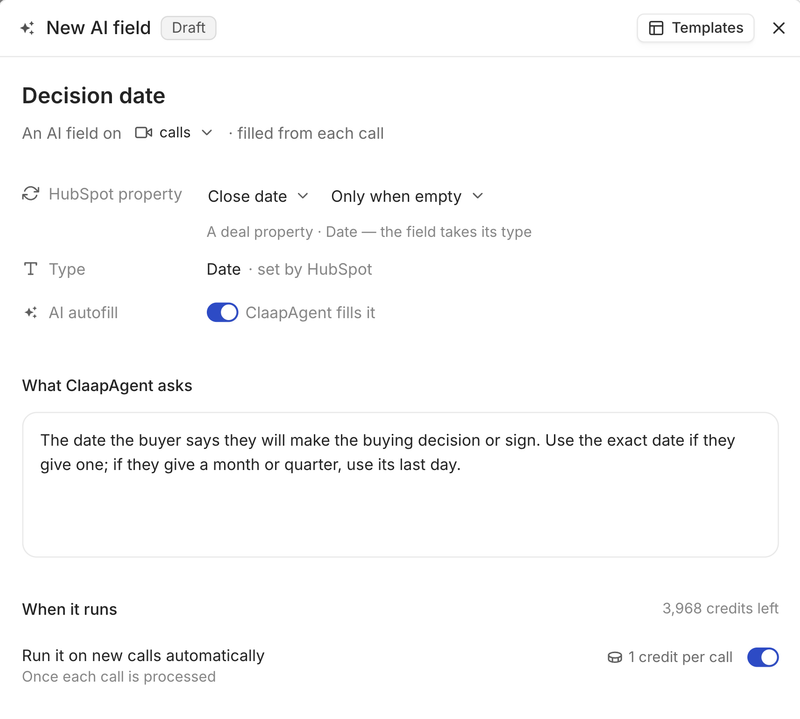
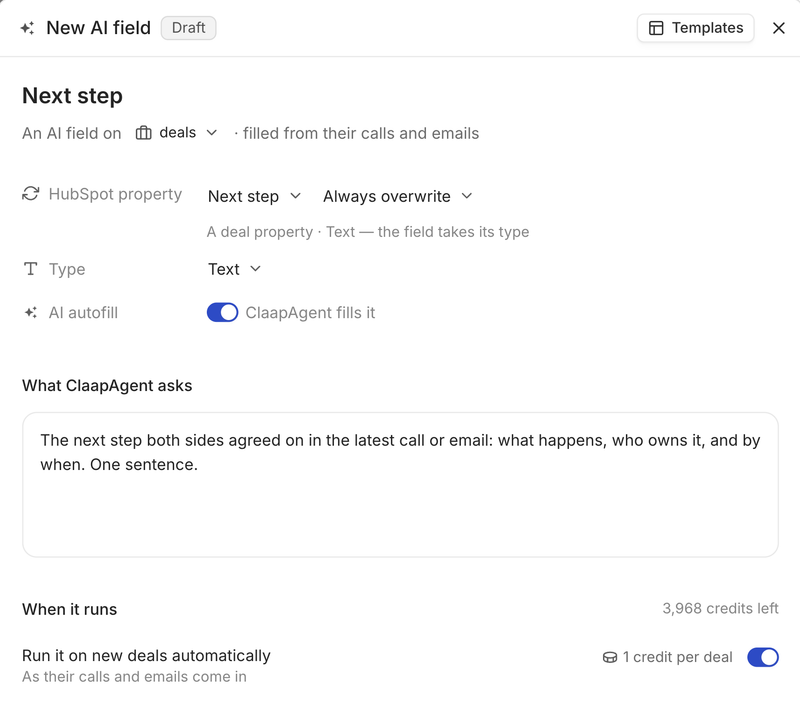
- Always overwrite. The latest call wins. This is the rule for fields that must stay current, like the next step or the decision date.
Most tools pick one rule for every field. Gong's AI Data Extractor overwrites the previous value (Gong help center), Avoma appends to the field (Avoma help center) and Fathom overwrites Salesforce fields (Fathom help center). Fireflies lets you pick append or overwrite per field, and Claap lets you pick only if empty, append or overwrite per field.
Pick a tool with per-field rules when reps still type some fields by hand, because a single overwrite rule will erase their work on the next call. This advice is wrong if your mapped fields are only ever written by the tool: then any single rule works, and you should choose on price.
Which CRM fields to autofill first
Start with the fields your pipeline review already reads. On our own sales calls, the fields buyer teams named most were the criteria of their qualification framework (MEDDIC, SPICED and similar), named by 32% of the teams that talked about their CRM, then the deal stage and the next step (Claap call data, April to November 2026).
A head of sales who wanted to standardize their HubSpot pipeline put it this way: "I want to add a lot of HubSpot properties to fill, but given where we're starting from, I don't want to ask the reps." Another sales leader described the qualification fields they have stopped filling: "Today I don't fill them in, I don't have time. The goal is no longer for a rep to do it field by field, it's to have as much of it fed automatically as possible."
Three rules for the first rollout:
- Start with 5 to 8 fields: your qualification criteria, the next step and the decision date. A field nobody reads in a pipeline review is cost with no return.
- Use a select or date type whenever the CRM property has one, because a paragraph can't be filtered in a report.
- Give select fields a "Not mentioned" option, so a missing answer shows up as a known gap in your reports.
About a third of buyer teams asked for a review step or worried about bad data (Claap call data, April to November 2026). If that is you, start with review before sync for two weeks, then switch the fields that proved reliable to automatic.
How we built this comparison
Every tool here writes values into CRM properties from calls. We compared them on five criteria: what they write (field types, objects, custom properties), what the next call does to a filled field, whether they run with no one clicking, which CRMs they support, and the cheapest plan that includes field autofill. Each claim links to the vendor's own help center or pricing page.
Important note. Momentum is now part of Salesforce (the acquisition closed on March 2, 2026, per Salesforce's announcement) and only writes to Salesforce, so it is outside this list. Attention also fills Salesforce and HubSpot fields from calls, with free text and picklist fields (Attention docs), and gives its price on request.
A quick note: Claap is our product. To keep this comparison fair, we relied on each vendor's own help center and on third-party reviews, and linked every major claim to its source.
1. Gong, best for Salesforce teams of 50 reps and more
Gong is the safe pick if you already pay for Gong and run Salesforce: its AI Data Extractor fills typed deal fields with no extra tool. Under 50 reps, its platform fee and per-user license are hard to justify for autofill alone.
Gong CRM autofill: what it writes
- Gong's AI Data Extractor writes answers from conversations into mapped CRM fields as yes/no, text, single or multi-select picklist, number, date or range (Gong help center).
- It writes to deals, to accounts and to custom objects linked one-to-one to a deal or account. Contacts are not documented.
- It can only map fields already imported into Gong, and a workspace can publish at most 20 extractors (Gong help center).
- The previous value is overwritten, and you test an extractor on one deal before publishing it. There is no per-call review after that.
Gong CRM integrations
Salesforce, HubSpot and Microsoft Dynamics are native; other CRMs go through Gong's API (Gong help center). Gong's MCP server is read-only: it "does not create, update, or delete data in Gong or the CRM" (Gong help center).
Gong pricing
The AI Data Extractor needs Gong Foundation. Gong prices it on request, per user plus a platform fee based on the number of users (Gong's pricing page).
Gong pros and cons
Pros:
- Full set of typed field formats, including picklists and ranges.
- Custom objects tied to a deal or account.
- Native Microsoft Dynamics support.
Cons:
- One rule for every field: the next call overwrites the value.
- No contact fields documented, and a cap on the number of published extractors.
- No public price, and a platform fee on top of seats.
What G2 reviewers say about Gong
Gong rates 4.7 out of 5 from 6,787 reviews on G2.
- "Gong can pick this up from calls, show it in the deal view, and push it to HubSpot." Verified user, mid-market software company, October 2026.
- "The CRM integration can have syncing issues or missing details, so I end up double-checking things manually." Account manager, mid-market, October 2026.
2. Claap, best for HubSpot and Salesforce teams of 5 to 100 reps
Claap is the pick when reps still type some fields by hand and you need each field to follow its own rule. It writes typed values into HubSpot and Salesforce properties after every call, for a published price. If you run Pipedrive or Attio, Claap logs notes there but does not map fields, so look at Sybill instead.
Claap CRM autofill: what it writes
A Claap field is a name, an output type, a prompt (the question the AI answers on each call) and the CRM property it fills (Claap help center).
- Ten output types: paragraph, action list, bullet points, checkbox, date, multi-select, numeric, rating, rich text and select. When you map a field to a CRM property, the type follows the property, so a date property gets a date (Claap help center).
- HubSpot objects: contact, company, deal, meeting, call and lead, with standard and custom properties on each. Lead fields need an extra permission in the HubSpot connection and write to the open leads of the external attendees.
- Salesforce objects: contact, account, opportunity, and the event linked to the meeting or call, with standard and custom fields.
- One call fills several records: the same call can write the decision date on the deal and the job title on the contact.
- Templates to start from: Budget, Champion, Decision Criteria, Deal Timing, Critical Event, Action Items, plus SPICED and MEDDIC sets. You can test a field on a few recordings for free before rolling it out (Claap help center).
- Known gaps show as gaps: when a call never mentions the answer, the field shows "No data found in the transcript" and writes nothing.
How Claap handles the next call on a deal
- The default rule for automatic enrichment, which runs once each new recording is processed: append to fields that accept it, fill other fields only when they are empty, and leave a filled field that can't be appended untouched (Claap help center).
- A sync mode on each field overrides that default, on automatic syncs too: only if empty, only if empty and append when possible, or always overwrite. Admins set it in the field itself, so the next step can always take the latest call while the deal amount a rep typed stays put.
- Review first if you prefer: switch automatic enrichment off and the values wait on the recording page, where someone checks, edits and syncs them.
- Deal-level fields read every call and email on the deal and answer once for the deal, so the next step reflects the whole conversation history (Claap help center).
- Matching: each call is attached to the CRM contact by email, to that contact's company, and to the open deal, or for dialer calls by phone number (Claap help center).
One limit to know: automatic enrichment runs when a recording is first processed. If you edit a value later, you push it to the CRM with a manual sync from the recording page.
Claap CRM integrations
- Field autofill: HubSpot and Salesforce, the two CRMs with field mapping.
- Notes only: Pipedrive and Attio get a note with the summary, participants and a link to the recording, attached to the right people and deals (Claap help center).
- Calls it captures: Zoom, Google Meet and Microsoft Teams meetings, Aircall, Ringover and lemlist calls, and in-person meetings from the mobile app.
- MCP server: Claude, ChatGPT or n8n can read your calls and deals and update a HubSpot deal's stage, amount, close date or owner, or create a new field mapped to a CRM property (Claap help center). Of the other five, Gong documents a read-only MCP server, Avoma, Sybill and Fireflies document no CRM write tool, and Fathom does not publish its tool list.
Claap pricing
CRM autofill and the CRM integrations are on the Business plan, $60 per seat per month billed yearly, and on Enterprise, priced on quote (Claap's pricing page). Each field run uses 1 AI credit from a pool shared by the workspace, with 1,000 credits per Business license per month, and calls recorded by free Basic users are still processed automatically while the pool has credits (Claap help center).
Claap pros and cons
Pros:
- Per-field sync mode, with only if empty to protect what reps type.
- Deal-level fields that read every call and email.
- Six HubSpot objects, including meetings, calls and leads.
- An MCP server that can write to HubSpot deals.
- A published price.
Cons:
- Field mapping on HubSpot and Salesforce only.
- Values edited after the first sync need a manual push.
- Each field's prompt has to be written and tested at setup.
- No contact or company database: pair it with a data provider for phone numbers or company size.
What G2 reviewers say about Claap
Claap rates 4.6 out of 5 from 484 reviews on G2.
- "I like how Claap automatically captures important points from sales conversations, including objections and next steps." Mid-market reviewer, August 2026.
- "...some of the more advanced features, like ClaapAgent, are only available with a Business license." Digital marketing manager, small business, August 2026.
Want the field-by-field setup? The CRM auto-complete page shows how a field is built and mapped, and the HubSpot integration page lists what syncs.
3. Avoma, best for small teams that want deal fields filled on a budget
Avoma is the cheapest way here to fill typed deal and account fields automatically. The catch is that every call appends to the field, so a next step or a decision date grows into a list.
Avoma CRM autofill: what it writes
- Avoma pushes the notes it files under a mapped topic into the mapped CRM field, in real time after the call (Avoma help center).
- Supported field types: multi-line text, multi-select, date and number. Single-line text fields can't be mapped.
- Field mapping covers the opportunity or deal and the account or company. Salesforce custom objects are not supported.
- Avoma appends to the content of the CRM field. No review step before sync is documented.
Avoma CRM integrations
Field mapping works with HubSpot and Salesforce, one CRM per workspace. Notes also save to Zoho, Pipedrive and Copper (Avoma's pricing page). Avoma's MCP server lists read tools; writing to the CRM through it is not documented.
Avoma pricing
CRM field updates are in the Revenue Intelligence add-on, $29 per seat per month billed yearly, on top of the Startup plan at $19, so $48 per seat per month billed yearly (Avoma's pricing page).
Avoma pros and cons
Pros:
- Typed date, number and multi-select fields.
- The lowest published price for automatic typed field updates in this list.
Cons:
- Every call appends, with no only-if-empty or overwrite rule.
- No contact fields and no Salesforce custom objects.
- One CRM per workspace.
What G2 reviewers say about Avoma
Avoma rates 4.6 out of 5 from 1,366 reviews on G2.
- "Love that Avoma is helping you quickly get insights from recorded calls and keeping everything ... synced with your CRM." Sales operations, mid-market, February 2025.
4. Sybill, best for teams on Zoho, Dynamics 365 or Pipedrive
Sybill is the pick when your CRM is not HubSpot or Salesforce, because it lists five CRMs for autofill. Its help center does not say which field types it writes or what the next call does to a filled field, so test both before you buy.
Sybill CRM autofill: what it writes
- CRM Autofill writes into mapped fields from calls and emails, with prompts Sybill proposes per field, such as deal stage, next steps, MEDDPICC, BANT, competition and risks (Sybill help center).
- The HubSpot guide covers deal fields; custom fields can be added (Sybill help center).
- Admins review prompts and test on one deal at setup. After that it runs on every call and email with no manual step.
Sybill CRM integrations
HubSpot, Salesforce, Zoho, Dynamics 365 and Pipedrive (Sybill help center). Its MCP tools are read and query tools; writing to the CRM through them is not documented.
Sybill pricing
Business is $90 per user per month billed yearly and includes 10 autofill fields; Enterprise, on quote, has no field cap (Sybill's pricing page).
Sybill pros and cons
Pros:
- Five CRMs, including Zoho, Dynamics 365 and Pipedrive.
- Reads emails as well as calls.
Cons:
- Field types and overwrite behavior not documented.
- A cap on autofill fields on the Business plan.
- The highest published price per seat in this list.
What G2 reviewers say about Sybill
Sybill rates 4.8 out of 5 from 150 reviews on G2.
- "We use Sybill to update Hubspot and to capture insights into product gaps that come up on calls with prospects..." VP of sales, mid-market, July 2026.
- "The integrations with Salesforce have improved, and the call summaries are endlessly useful." District sales coordinator, mid-market, July 2026.
5. Fireflies, best for teams that want to approve every value
Fireflies fills fields automatically, then waits for a person to review and send each update. That suits a team that distrusts autofill, and slows down a team that wants the CRM current without anyone clicking.
Fireflies CRM autofill: what it writes
- Autofill CRM extracts meeting data into default and custom CRM fields; custom fields are defined by a prompt and the property must already exist (Fireflies help center).
- Documented types are text and date. Picklist and number fields are not mentioned.
- Objects: HubSpot contacts, companies and deals; Salesforce contacts, accounts and opportunities (Fireflies help center).
- Each field can append or overwrite, and nothing reaches the CRM until someone reviews and sends it.
Fireflies CRM integrations
Field autofill works with HubSpot and Salesforce. Fireflies also logs notes to a longer list of CRMs, including Pipedrive, Attio, Close and Zoho. Its MCP server writes inside Fireflies and has no CRM tool (Fireflies docs).
Fireflies pricing
Autofill CRM is on Business, $19 per seat per month billed yearly, and Enterprise (Fireflies' pricing page). It uses 1 AI credit per meeting.
Fireflies pros and cons
Pros:
- Per-field append or overwrite.
- A review step before every sync.
- The lowest entry price in this list.
Cons:
- Someone has to send every update, so the CRM is only as current as that person.
- Text and date fields only, as documented.
What G2 reviewers say about Fireflies
Fireflies rates 4.7 out of 5 from 756 reviews on G2.
- "Maybe the data you sync to the CRM coud be easier to modify, as after a while, you want to tweak the reports of fhe meetings and maybe add some action items too" Head of sales, small business, July 2026.
6. Fathom, best for small teams that only need text fields
Fathom maps sections of its AI call summary to CRM text fields. It is quick to set up for a small team, and limited the moment your reports need a date, a number or a picklist.
Fathom CRM autofill: what it writes
- Fathom maps the headings of its deal summary template to CRM fields (Fathom help center).
- Text fields only: HubSpot text properties, and Salesforce long text and single-line text (Fathom help center).
- Field mapping targets the Salesforce opportunity and the HubSpot deal.
- On Salesforce, the next summary overwrites the field. The HubSpot behavior is not stated.
Fathom CRM integrations
HubSpot and Salesforce (Fathom's CRM page). Fathom has an MCP server for meeting data; its tool list is not published.
Fathom pricing
Deal field sync is on Business, $25 per user per month billed yearly with a 2-user minimum, so $50 a month at the least (Fathom's pricing page).
Fathom pros and cons
Pros:
- Writes automatically as soon as the summary is ready.
- Low entry price for a small team.
Cons:
- Text fields only, so no filterable dates, numbers or picklists.
- Deal or opportunity fields only.
What G2 reviewers say about Fathom
Fathom rates 5.0 out of 5 from 7,153 reviews on G2.
- "...the meeting minutes and actions are extracted all sent to me right after the call and then our HubSpot CRM is automatically updated also." VP strategic business development, small business, May 2026.
Which AI CRM autofill tool to pick
- You run Salesforce, have 50+ reps and already pay for Gong: turn on Gong's AI Data Extractor before you buy anything else.
- Reps still type some fields by hand: choose Claap, because only if empty keeps their values while the other fields update.
- You want the lowest price for typed deal fields: choose Avoma, and keep fields that must stay current, like the next step, off the mapping.
- Your CRM is Zoho, Dynamics 365 or Pipedrive: shortlist Sybill, and test what it writes on a real deal first.
- Every value must be approved by a person: choose Fireflies.
- You only need text in a couple of deal fields: Fathom is enough.
Whichever you pick, start with your qualification fields, the next step and the decision date. For the step-by-step setup, read our guide to automated CRM data entry.
Frequently asked questions
Can AI fill CRM fields automatically after a sales call?
Yes. Tools like Claap, Gong, Avoma, Sybill and Fathom write values from the call into HubSpot or Salesforce properties automatically once the call is processed. Fireflies extracts the values automatically but waits for a person to send them.
Will AI autofill overwrite what my reps typed in the CRM?
It depends on the tool's rule. Gong and Fathom (on Salesforce) overwrite the previous value and Avoma appends to it. Claap lets you set only if empty on a field, so a value a rep typed is never touched, and Fireflies lets you choose per field and review before sending.
Which CRMs support AI field autofill from calls?
HubSpot and Salesforce are supported by every tool in this list. Gong adds Microsoft Dynamics, and Sybill adds Zoho, Dynamics 365 and Pipedrive. On Pipedrive and Attio, Claap logs notes but does not map fields.
Does CRM autofill work with phone calls and dialers?
With Claap, yes: calls from Aircall, Ringover and lemlist are captured and matched to the CRM contact by phone number, then fill the same fields as video calls. Check each other vendor's list of supported dialers before buying.
How much does AI CRM autofill cost?
On each vendor's pricing page, the cheapest plans that fill fields from calls start at $19 per seat per month billed yearly for Fireflies, $48 for Avoma, $60 for Claap and $90 for Sybill; Fathom's starts at $50 a month for two users. Gong prices on request.
What is the difference between CRM autofill and CRM enrichment?
CRM autofill, as in this guide, writes what the buyer said on a call into your fields: budget, timing, next step. Data enrichment adds firmographic and contact data such as company size or phone numbers from a database. Most teams need both, from different tools.