HubSpot MCP server: what Claude sees, setup and limits
HubSpot's MCP server hands Claude your CRM, blind spot included: it reads what reps typed. What it covers, how to set it up, and how to get call data in.

Updated 20 October 2026.
HubSpot MCP overview
- HubSpot runs two MCP servers: a remote one at mcp.hubspot.com that connects AI tools to your CRM data, and a local developer MCP server that helps coding tools build HubSpot apps and CMS content.
- The remote HubSpot MCP server reads and writes contacts, companies, deals, tickets, leads, custom objects and activities, inside each user's own HubSpot permissions.
- Claude and ChatGPT connect through HubSpot's own connectors, and any MCP client that supports OAuth with PKCE can connect to mcp.hubspot.com directly.
- With HubSpot's Sensitive Data setting turned on, calls, emails, meetings, notes, tasks and conversation data are blocked through the MCP server, while the standard CRM APIs keep access.
- Search runs on HubSpot's CRM search API: filters and keywords, with no semantic search.
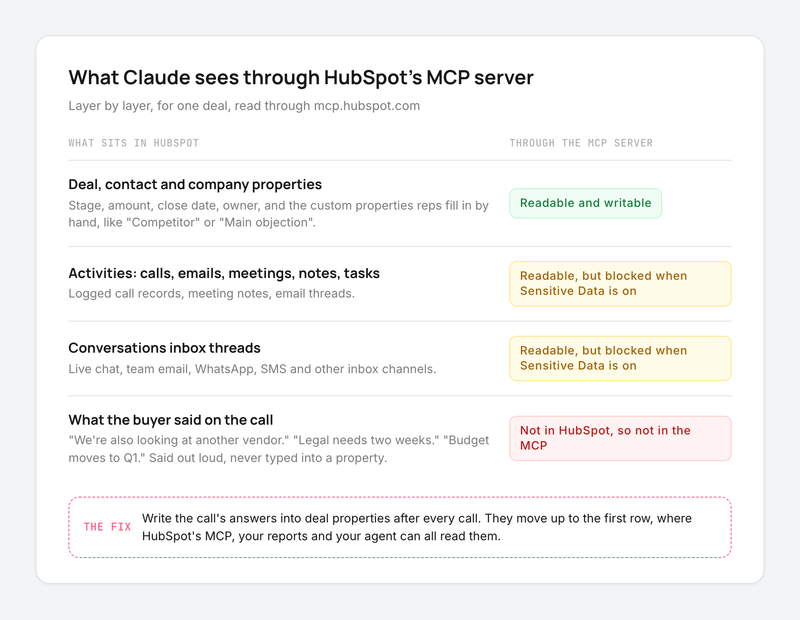
- The MCP server reads what is stored in HubSpot. What buyers said on calls reaches it only once someone, or something, writes it into a property.
HubSpot's MCP server gives your agent the CRM, so your agent inherits the CRM's blind spot: it reads what reps typed, and what buyers said on calls stays out of reach until someone writes it down.
Ask Claude "which deals mention a competitor?" and it answers with full confidence, from whatever the competitor property holds.
In Claap call and HubSpot deal data from Q3 2026, 53% of the deals where a buyer named a competing call-recording tool on a call had no matching value in the CRM's competitor property.
Below: what the HubSpot MCP server reads and writes, how to connect Claude to HubSpot, and its limits, starting with what your agent cannot see and how to fix it upstream.
What HubSpot's MCP can't see: the calls nobody logged
It reads what reps typed
An agent connected to HubSpot answers from deal properties, contact properties and logged activities. Each of those exists because a rep, a form or an integration put it there.
The buyer who said "we're also talking to another vendor" on a discovery call left no trace in HubSpot unless the rep typed it into the competitor property. The same goes for the legal review that adds two weeks, the budget that moves to next quarter, or the champion who just changed roles.
A data and RevOps lead at a B2B logistics software company described what their current call tool does with a call:
- "It takes the transcript, it just creates a summary and then push the summary to HubSpot. It doesn't do more than that."
A summary pasted as a note is text an agent can read one deal at a time. It gives the competitor property, the next step and the close date nothing to filter on.
So when you ask Claude "which open deals are at risk?", it reasons over the fields that were filled. A pipeline where much of the call content stayed off the record gets a confident answer built on part of the story.
Sensitive Data switches off the activity layer
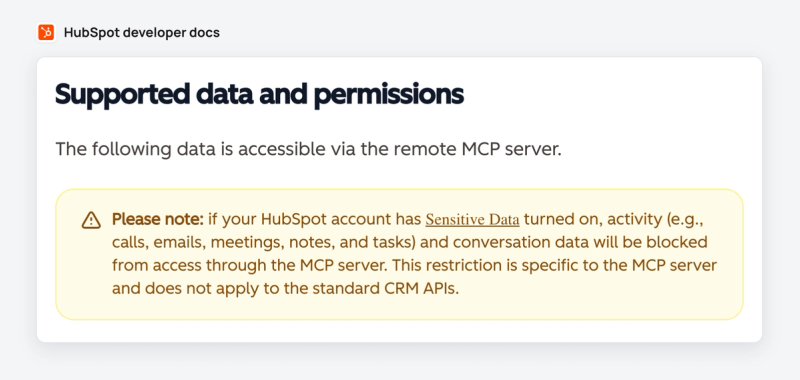
HubSpot adds a second gap for some teams. If your account has the Sensitive Data setting turned on, "activity (e.g., calls, emails, meetings, notes, and tasks) and conversation data will be blocked from access through the MCP server", according to HubSpot's MCP server documentation.
The same note adds that this restriction is specific to the MCP server and does not apply to the standard CRM APIs. HubSpot's Claude connector says the same thing in its own words: with Sensitive Data on, Claude cannot access any engagement data.
Teams in healthcare, financial services and other regulated markets turn this setting on for good reasons. For them, the logged call notes that could have covered the gap are out of reach too. What stays readable is the record itself: deal, contact and company properties.
Search finds fields, so a summary in a note stays buried
The MCP server's search tool is built on HubSpot's CRM search API. It supports up to five filter groups with up to six filters each and returns at most 200 results per page, per the search_crm_objects tool reference.
HubSpot's docs also say the server "currently doesn't include vector search capabilities". Filters work well on typed properties: stage, amount, close date, a picklist value. A buyer's objection buried in the third paragraph of a call note is hard to filter on.
Put together: the more of your deal story lives in properties, the more useful HubSpot's MCP becomes.
Fill the properties from the call, then HubSpot's MCP reads them
The fix sits upstream of the MCP. Get what was said on calls into HubSpot properties after every call, and every reader of HubSpot benefits at once: the MCP server, your reports, your workflows and your reps.
A quick note: Claap is our product. Claap records sales calls and its AI fields write a typed value into the HubSpot property you choose after each call: the competitor named, the decision date, the main objection, the next step. Values land on HubSpot contacts, companies, deals, meetings, calls and leads, as a paragraph, select, date, number or rating, according to the CRM auto-complete page.
A few details make this work with an agent on the other end:
- Each field has its own sync mode: only if empty (a value a rep typed stays), append when possible (objections build into a running list across calls), or always overwrite (the latest next step wins).
- Auto-run writes the value back as soon as the recording is processed, so nobody has to open the record.
- Once the value is in a deal property, HubSpot's own MCP server reads it like any other field, and Sensitive Data's activity block leaves it in place. Keep those properties out of HubSpot's sensitive property category, since HubSpot's MCP FAQ says custom Sensitive Data properties are excluded.
Use this route when your team already lives in HubSpot and wants one source of truth, because the same properties then feed your dashboards and your agent. More on how the recording side works on our HubSpot call recording page.
Or let the agent read the calls directly
The second route adds a second connector next to HubSpot's. The Claap MCP server gives Claude or ChatGPT the calls, transcripts, synced emails and saved views, each view returning every row with its AI field values and the reasoning behind each one.
That route suits a question about the calls themselves: "what did buyers say about our pricing this quarter?" HubSpot's MCP answers from HubSpot, Claap's MCP answers from the conversations, and Claude can use both in the same chat. Claap MCP is on every Claap plan, including the free one, according to the Claap MCP page.
This advice is wrong if your reps already log every call in detail and your account has Sensitive Data turned off. In that case HubSpot's activities carry the story, and HubSpot's MCP alone may be enough.
What is the HubSpot MCP server?
MCP (Model Context Protocol) is the open standard AI assistants use to connect to outside tools. HubSpot publishes two first-party MCP servers, described side by side on HubSpot's MCP page:
- The remote HubSpot MCP server lives at mcp.hubspot.com and is hosted by HubSpot. It connects Claude, ChatGPT, Cursor and other MCP clients to the CRM data of one HubSpot account. This is the one a sales or RevOps team means by "HubSpot MCP".
- The developer MCP server runs locally through the HubSpot CLI. It helps coding tools such as Claude Code, Cursor, Codex CLI, Gemini CLI, VS Code and Windsurf scaffold and deploy HubSpot apps and CMS content. You install it with
hs mcp setup, on CLI version 8.2.0 or higher, per the developer MCP setup guide.
The remote server became generally available to all HubSpot accounts on April 13, 2026, when HubSpot added write access, activity history and marketing content (HubSpot changelog).
What the HubSpot MCP server reads and writes
Everything below comes from HubSpot's remote MCP server documentation, which lists the supported data and tools. Every action respects the connected user's HubSpot permissions.
| Data | Read | Write |
|---|---|---|
| Contacts, companies, deals, tickets, leads | Yes | Create and edit |
| Custom object records | Yes | Create and edit |
| Activities: calls, emails, meetings, notes, tasks | Yes, unless Sensitive Data is on | Yes |
| Conversations inbox and help desk threads | Yes, unless Sensitive Data is on | No |
| Segments (lists) | Yes | Create static segments, add or remove records |
| Properties and pipelines | Yes | Create custom properties, manage pipelines |
| Landing pages, website pages, blog posts | Yes | Create, edit, publish |
| Campaigns and marketing emails | Yes | Campaigns, email drafts |
| Quotes and other revenue objects | Beta | Quotes in beta |
Source: HubSpot's remote MCP server documentation, last modified September 30, 2026. Some older guides say custom objects are out of reach; the current docs list custom object records under both read and write.
The tools a sales team uses most:
search_crm_objectsfilters records, with up to five filter groups of six filters and 200 results per page (HubSpot docs).get_crm_objectsfetches up to 100 records by ID in one request, per the same tool reference.query_crm_dataruns SQL with HubSpot extensions for counts and aggregates; HubSpot's tool reference notes it does not support joins, subqueries or association traversal.manage_crm_objectscreates or updates records and activities, and shows a proposed-changes summary that the user confirms before anything is written.get_user_detailstells you which objects and tools your account can reach. Run it first.
How to connect Claude to HubSpot
There are two ways in, depending on where you work.
With HubSpot's connector for Claude (most sales teams)
This is the route for Claude on the web, desktop or mobile. The steps below follow HubSpot's knowledge base article:
- A Super Admin, or a user with App Marketplace Access, approves the connector in HubSpot and picks which data permissions it gets and who can install it.
- In Claude, open your profile, then Settings, then Connectors.
- Search for HubSpot and select it.
- Log in to the HubSpot account you want to use, choose the permissions, and click Connect app.
- In a chat, click + then Connectors, toggle HubSpot on, and ask your question.
The connector needs a paid Claude plan (Pro, Max, Team or Enterprise), and bulk creates or updates go through 10 records at a time, both per HubSpot's knowledge base article. Writes show up in HubSpot's audit log under both the user and the Claude connector.
Start with one record before any bulk change, because every write is a real change in your CRM.
HubSpot runs a similar connector for ChatGPT, set up from ChatGPT's settings with the same Super Admin approval (HubSpot's ChatGPT connector article).
With any MCP client (Claude Code, Cursor, a custom agent)
For other clients, you connect to the remote server yourself:
- In HubSpot, go to Development, then MCP Connectors, and create a connector with a name and a redirect URL. HubSpot generates the OAuth client ID and secret.
- Point your MCP client at https://mcp.hubspot.com with those credentials. The client must support OAuth with PKCE, which HubSpot requires for every connection.
- Sign in, pick the HubSpot account, grant the permissions, and call
get_user_detailsto confirm what you can reach.
When HubSpot adds tools, the scopes change, and existing users have to reinstall the connector to get them, per HubSpot's MCP documentation.
HubSpot MCP limits to know before rollout
- Sensitive Data. Activities and conversations are blocked through the MCP server when the setting is on, and custom sensitive properties stay out of reach (HubSpot's MCP FAQ).
- Search. Filters and keywords only, with no vector search, so questions work best when they name a property or a value.
- Page size. Search returns at most 200 results per page (HubSpot's tool reference), so a pipeline-wide question means the agent pages through results.
- API limits. Everything the Claude connector does counts against HubSpot's API usage limits, per HubSpot's knowledge base article on the connector.
- One CRM. The server sees HubSpot and nothing else: your calls, your Slack and your other tools need their own connections.
Which setup fits your team
- Pick HubSpot's connector for Claude when your reps want quick answers and record updates from a chat, because it takes five clicks and inherits each user's permissions.
- Use the remote server with your own MCP client if you build agents or work in Claude Code or Cursor, because you control the client and can combine HubSpot with other servers.
- Use the developer MCP server only when you build HubSpot apps or CMS themes. It does not read your CRM records.
- Add call data upstream when your deal story lives on calls: fill HubSpot properties from each call with a tool such as Claap, because then HubSpot's MCP, your reports and your agent all read the same fields.
If you want the longer version of the property-filling side, our guide to automated CRM data entry walks through it step by step, and our comparison of HubSpot's built-in notetaker and external tools covers what HubSpot captures on its own.
Frequently asked questions
Can Claude integrate with HubSpot?
Yes. HubSpot publishes an official connector for Claude, built on its remote MCP server, that reads and updates CRM records and logs activities from the Claude chat window. It needs a paid Claude plan, and a HubSpot Super Admin approves it first.
Is the HubSpot MCP server free?
HubSpot made the remote MCP server generally available to all HubSpot accounts, and its Claude connector is listed for all products and plans. Some tools need a paid hub, such as the AEO tools on Marketing Hub Professional or Enterprise, and Claude itself needs a paid plan for the connector.
Can the HubSpot MCP server update records?
Yes. It creates and edits contacts, companies, deals, tickets, leads and custom object records, and logs calls, emails, meetings, notes and tasks. Each write runs as the signed-in user, applies pipeline stage rules, and waits for the user to confirm the proposed change.
Does the HubSpot MCP server read sales call transcripts?
It reads the call activities logged in HubSpot, with the notes and properties attached to them, unless Sensitive Data is turned on. What was said on a call reaches the MCP server only if a rep or a recording tool wrote it into HubSpot, which is why teams fill deal properties from each call.
What is the difference between the HubSpot MCP server and the developer MCP server?
The remote HubSpot MCP server at mcp.hubspot.com connects AI tools to your CRM data. The developer MCP server runs locally through the HubSpot CLI and helps coding tools build HubSpot apps and CMS content.
Which AI tools work with the HubSpot MCP server?
HubSpot runs its own connectors for Claude and ChatGPT. Any MCP client that supports OAuth with PKCE, such as Claude Code or Cursor, can connect to mcp.hubspot.com with a connector created in HubSpot.