Claude for sales: 6 plays on your own call data
Most Claude for sales guides stop at prospecting. The bigger win sits in your own calls and deals, once Claude or ChatGPT can read every call of every deal. Six plays, prompts and setup.


Updated October 29, 2026.
Claude for sales overview
- Claude for sales means using Anthropic's Claude assistant on sales work: account research, emails, call prep, deal reviews and coaching.
- ChatGPT covers the same jobs, and both read outside data through connectors built on MCP (Model Context Protocol), an open standard for plugging an AI assistant into a tool.
- On a deal, Claude only knows what you give it, so its answers stay generic until it can read your own calls, emails and CRM.
- Pasting a transcript into Claude works for one call; a question that spans a whole deal or a whole team needs Claude or ChatGPT connected to the place your conversations are stored.
- Once the calls are connected, six plays pay off: deal catch-up, loss patterns, competitor battlecards, demo checks, pipeline review and coaching themes.
- For a question you ask every week, a field computed on every call gives a more reliable answer than a fresh prompt.
The biggest win of Claude for sales sits in your own calls and deals, and it only shows up once Claude can read every call of every deal: fed one pasted transcript at a time, it stays a summarizer.
We hear it on our own sales calls. Between April and October 2026, half of the buyer teams that brought up Claude, ChatGPT or an MCP connector on calls with us wanted it to analyze many deals or calls at once, and a quarter were already pasting or exporting transcripts by hand (Claap call data, April to October 2026).
What stops these buyers is the plumbing: a transcript copied by hand, a CSV export, one opportunity at a time.
In a Gartner survey of 1,026 B2B sellers, those who partner effectively with AI tools were 3.7 times more likely to meet quota (Gartner, September 2024).
Most guides to Claude for sales stop at prospecting, where Claude reads the web.
This one covers the other half: your conversations. You will get six plays with a prompt you can paste, the setup in Claude or ChatGPT, and the line between a question you ask once and a field you compute on every call.
Claude for sales at a glance
| Play | The question | What Claude needs to read | Paste or connect |
|---|---|---|---|
| Deal catch-up | "Where is this deal, really?" | Every call and email of one deal | Paste works for 1 or 2 calls |
| Loss patterns | "Why do we lose?" | Calls of every lost deal in a period | Connect |
| Competitor battlecard | "What do buyers say about Competitor X?" | Every call where X came up | Connect |
| Demo check | "Did reps show the new deck?" | Every demo in a period | Connect, ideally a field |
| Pipeline review | "Which deals are real?" | Open deals with what buyers said | Connect, ideally a field |
| Coaching themes | "What should this rep work on?" | A rep's recent calls, scored | Connect, ideally a field |
What buyers want Claude to do with their calls
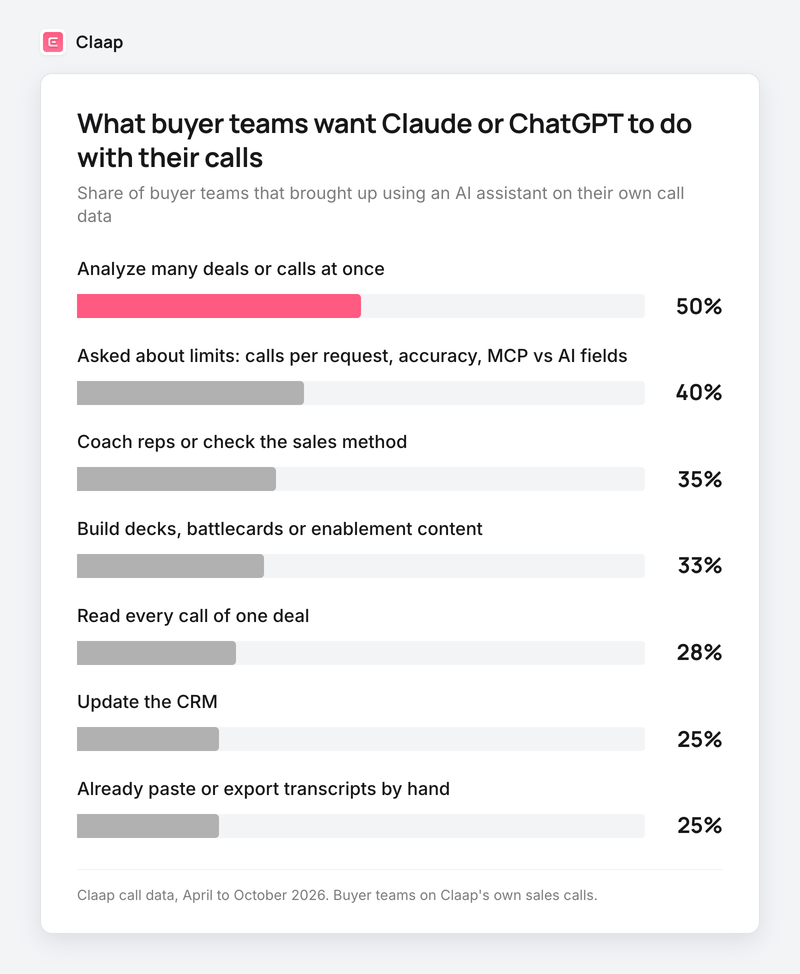
Across Claap call data from April to October 2026, here is what buyer teams wanted when they brought up using Claude, ChatGPT or an MCP connector on their own calls:
- 50% wanted it to analyze many deals or calls at once: loss reasons, a whole team's pipeline, one team against another (Claap call data, April to October 2026).
- 40% asked about its limits: how many calls fit in one request, how accurate the answers are, or how an MCP question differs from an AI field (Claap call data, same period).
- 35% wanted it to coach reps or check that they follow the sales method (Claap call data, same period).
- 33% wanted decks, battlecards or enablement content built from their calls (Claap call data, same period).
- 28% wanted it to read every call of one deal (Claap call data, same period).
- 25% were already pasting or exporting transcripts into an assistant by hand (Claap call data, same period).
- Claude came up in 70% of these teams and ChatGPT in 23% (Claap call data, same period).
Buyers also raise the limits themselves. Here is how they put it:
- "Say a certain AE's talking to a certain company. He's had the first discovery call, then the demo call, and then two other calls, right? It's a whole deal. [...] Can the AI talk between the calls and build the whole summary of the entire thing?" (Product marketer, web experimentation software company)
- "If I had like five meetings with the same company and I'm like, tell me their pain points. It looks across all the meetings and gives you one consolidated kind of AI output." (Team member at a B2B services firm, describing how they use Claude)
- "What is the limit on how many calls we could actually fetch with one request? Let's say if I want to do a pipeline review for the entire [regional] team." (RevOps lead, fast-growing SEO software company)
One limit to keep in mind: these teams were talking to a conversation intelligence vendor, so they lean toward the problem. The shares describe what buyers said on the call.
Why context is the bottleneck for Claude in sales
On a deal, what Claude lacks is the deal.
There are three ways to give it your conversations:
- Paste. You copy one transcript into the chat. Fine for one call, and you choose the call, so the answer is only as good as your pick.
- Export. You filter calls, download a CSV, and upload it. It works once, then the file is out of date by the next call.
- Connect. Claude or ChatGPT reads your call tool through an MCP connector, asks for the calls it needs, and pages through the results.
Buyers describe the first two well:
- "I have to filter by the people's calls and then go one by one. And then put in a specific tag and then download the CSV. And then put it through Claude [...] it was quite the hassle." (Sales operations leader, SEO software company)
- "Using Claude with [our current call tool] is really not that advanced right now. It can only read one opportunity at a time. It doesn't read across opportunities." (Sales leader, global research and consulting firm)
- "Today I do almost exactly that prompt, but I do it with Claude and it eats a phenomenal number of credits, because it has to read every transcript [...] and I always have to challenge it: are you sure you actually listened to them?" (Head of sales, French B2B company, translated)
Connecting has a trap of its own. Point an assistant at hundreds of raw transcripts and it samples: in the walkthrough on Claap's help center, the assistant found 528 recordings, read 3, and then produced a team average that the data did not support (Claap help center).
So the rule of thumb: for one deal, let Claude read the transcripts. For a question across many calls, give it a table where each call is already scored, and let it count.
6 Claude for sales plays on your call data
Each play below works in Claude or ChatGPT once your calls are connected. Replace the bracketed parts. The prompts name the data on purpose: an assistant that is told where to look samples less.
Play 1: catch up on a deal before a one-to-one
A manager has ten minutes before a deal review and has not been on any call of the deal. Ask for the deal across every call and email, with the evidence.
Prompt: "Find the deal [deal name]. Read every call and email linked to it, oldest first. Give me: where the deal stands, who decides, what the buyer said about budget and timing in their own words with the call date, what changed since the last call, and the one question I should ask the rep in our one-to-one."
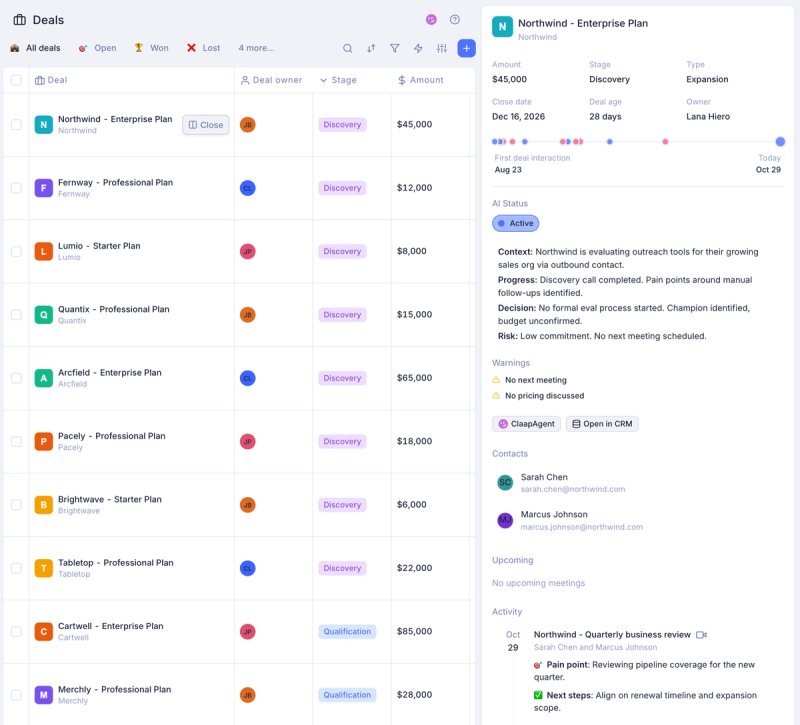
Use this play before every one-to-one, because it replaces the "so, where are we?" opening that eats half the meeting.
Play 2: find the pattern in lost deals
Loss reasons in the CRM are picked from a dropdown at close, often by the rep who lost. What the buyer said on the last two calls is closer to the truth.
Prompt: "List the deals we lost between [start date] and [end date]. For each one, read the last two calls and give the reason the buyer gave, quoted, with the call date. Then group the reasons and count how many deals fall in each group. Only count reasons a buyer said out loud."
Skip this play when you have fewer than 10 lost deals in the period, because a pattern on five deals is an anecdote.
Play 3: build a competitor battlecard from real mentions
Battlecards written by marketing tend to answer the objections marketing expects. Buyers raise different ones.
Prompt: "Search our calls from the last 90 days where a buyer mentioned [competitor]. For each mention, give the quote, the deal and what the buyer was comparing. Then write a one-page battlecard: the three reasons buyers bring [competitor] up, what our reps answered when the deal moved forward, and the claims we should stop making."
Claap tags competitor mentions on each call (Claap MCP page), so the assistant can filter on them before it reads anything.
Play 4: check what reps show in demos
A team launches a new deck or a new pitch, and nobody knows if reps use it.
Prompt: "Read the demo calls from [start date] to [end date]. For each one, tell me whether the rep presented [the new deck, or the new pricing page], quote the moment, and give the rep's name. Then give me the share of demos per rep."
Start with a field instead of this prompt when demos run into the hundreds, because the field checks every demo once and the prompt re-reads them on every run (see below).
Play 5: run the pipeline review from what buyers said
Pipeline reviews run on rep opinion. The calls say whether the buyer confirmed budget, named a decision date or went quiet.
Prompt: "Take the open deals closing this quarter. For each one, read the latest call and tell me: did the buyer confirm budget, name who signs, and agree to a dated next step? Quote the line for each yes. Flag every deal where the answer to all three is no, sorted by amount."
The AI pipeline management guide covers how to turn these answers into a weekly review.
Play 6: spot coaching themes per rep
A manager hears two calls a week per rep at best. The pattern sits in the other twenty.
Prompt: "Read [rep name]'s discovery calls from the last 30 days. Score each on [our method, for example SPICED or MEDDPICC], quote the strongest and the weakest moment, and tell me the one skill to work on in our next one-to-one, with two calls to listen to together."
Pick one skill per one-to-one, because a list of five gaps changes nothing.
What Claude and ChatGPT already do well for sales
The plays above sit on top of the jobs most sales teams already hand to Claude or ChatGPT:
- Account research before a first call, from the company's site, news and your CRM. Anthropic publishes a Claude Cowork account research tutorial for it.
- Emails and follow-ups, drafted from your notes or the call.
- Call prep and roleplay, where Claude plays the buyer and pushes back.
- CRM work inside the CRM, for example Salesforce's own Claude integration (Claudeforce) on Salesforce records.
How to connect Claap to Claude or ChatGPT
A quick note: Claap is our product. The setup below comes from Claap's MCP and API page and help center, and the same plays work with any call tool that offers an MCP connector.
- Add the endpoint. In Claude, add a custom connector with the URL https://api.claap.io/mcp. In ChatGPT, add it as a connector in Developer mode, which is still in beta (Claap MCP page).
- Sign in. OAuth by default; automations such as n8n use a workspace API key instead.
- Let the tools load. Claude or ChatGPT registers the Claap tools: recordings and transcripts, emails, deals, companies, contacts and views.
- Ask. Name the deal, the rep or the period in plain words, as in the prompts above.
What to know before you roll it out:
- Plans. The Claap MCP is included on every plan, the free Basic plan included (Claap pricing). AI fields use AI credits: 500 per licence a month on Pro ($32 per seat per month billed yearly) and 1,000 on Business ($60), per Claap pricing.
- Permissions. The connector sees what you can see in Claap, nothing more. A private recording stays out of reach.
- Volume. Each request returns up to 100 results and continues with a cursor, so an assistant can read a full view to its last row (Claap help center).
- Writes. The assistant can update deals and contacts (HubSpot today), create views and fields, and never delete or send an email.
- In-app option. Reps who do not use Claude or ChatGPT can ask the same questions inside Claap with ClaapAgent.
For the CRM side, our HubSpot MCP guide covers what Claude sees in HubSpot and where it stops.
MCP or AI fields: a one-off question or a field on every call
A buyer at a supply chain software company asked us the question every team gets to:
- "What is the fundamental difference? If I query the MCP versus the AI fields [...] with the AI fields, you have already pre-processed the data, and I am 100% sure it will always be better. But I could also go through the MCP. [...] What is the real difference between the two?" (Head of business development, supply chain software company, translated)
The difference is when the reading happens.
- An MCP question reads the calls when you ask. Best for a one-off question, a single deal, or a topic nobody tracks yet.
- An AI field reads each call once, when it ends, and stores a typed answer (a score, a yes or no, a date) next to the call or the deal. Claude or ChatGPT then reads that column across every call and counts. In Claap, AI fields can also fill your CRM properties.
Use an AI field when you will ask the same question every week, because a field gives the same answer the same way on every call, and a prompt re-reads and re-decides each time. Plays 4, 5 and 6 usually end up as fields. Plays 1, 2 and 3 stay prompts.
Where to start with Claude for sales
- Start with play 1 on your three biggest open deals, because it needs no setup beyond the connector and the answer is easy to check against what you already know.
- Move a question to an AI field the second time you ask it.
- Choose Claude or ChatGPT by what your team already uses: the connector and the prompts are the same.
This advice is wrong if your team records few calls: under a few dozen calls a month, a manager can read the deals and the plays add little.
Frequently asked questions
Is Claude good for sales reps?
Yes, for research, emails, call prep and deal reviews. On deals, Claude is only as good as what it can read: connected to your calls and CRM, it can review a deal across every call; with nothing connected, it gives generic advice.
Can Claude access Salesforce?
Yes. Salesforce offers its own Claude integration for Salesforce records, and call tools such as Claap expose deals, calls and emails to Claude through MCP whatever your CRM. Through the Claap MCP, deal updates work with HubSpot today.
Can Claude act as a CRM?
No. Claude has no database of its own: it reads and writes the tools you connect. Keep the CRM as the system of record and let Claude read it, along with your calls.
How many calls can Claude read in one request?
Claap's MCP returns up to 100 results per request and pages through the rest with a cursor. For questions across hundreds of calls, have Claude read a view where each call is already scored, so it counts every row.
What is the difference between the MCP and AI fields?
The MCP lets Claude or ChatGPT read your calls when you ask a question. An AI field reads each call once and stores a typed answer, which Claude can then count across every call. Ad hoc questions go through the MCP, recurring ones become fields.
Does this work with ChatGPT too?
Yes. Claude and ChatGPT both connect to the Claap MCP. In ChatGPT the connector runs in Developer mode, which is still in beta, and the prompts in this guide work the same way.