Salesforce MCP: setup, limits and the data it can't see
Salesforce's MCP gives your agent the CRM under each user's permissions, so it also inherits what the CRM is missing: what buyers said on calls and nobody typed in. Here is how it works, how to connect Claude or ChatGPT, and how to close the gap.


Updated October 20, 2026.
Salesforce's MCP gives your AI agent the CRM, under each user's permissions, so the agent inherits everything the CRM is missing. What buyers said on calls and reps forgot to log is absent, and the agent counts those gaps with full confidence.
"Why should you ever log into Salesforce again?" That is Parker Harris, Salesforce's co-founder, quoted in Salesforce's announcement when Hosted MCP Servers went generally available in April 2026.
A rep can now ask Claude or ChatGPT for an account review and get it from live Salesforce data, without opening a single tab.
But an agent reading Salesforce knows what Salesforce knows. On our own calls with Salesforce teams, 35% of the teams that discussed bringing call data into Salesforce said their Salesforce is not filled from their calls today (Claap call data, January to October 2026).
This guide covers what Salesforce MCP is, which servers and editions you get, what it costs, how to connect Claude or ChatGPT, and how permissions work. First, the part the setup guides skip: what your agent cannot see.
Salesforce MCP at a glance
- What it is: Salesforce Hosted MCP Servers, managed endpoints that let any MCP client (Claude, ChatGPT, Cursor, a custom agent) read and write your org, per Salesforce's developer docs.
- Standard servers: SObject All, Reads, Mutations and Deletes for records, plus Data 360, Tableau Next, Headless 360 (beta) and a few product servers, all off by default.
- Who gets it: every Enterprise Edition org and above, according to Salesforce's GA announcement.
- Cost: record reads and writes are unmetered for now; Agentforce actions and Data 360 queries consume Flex Credits.
- Security: each call runs as the signed-in user, with field-level security, object permissions and sharing rules applied, over OAuth with PKCE.
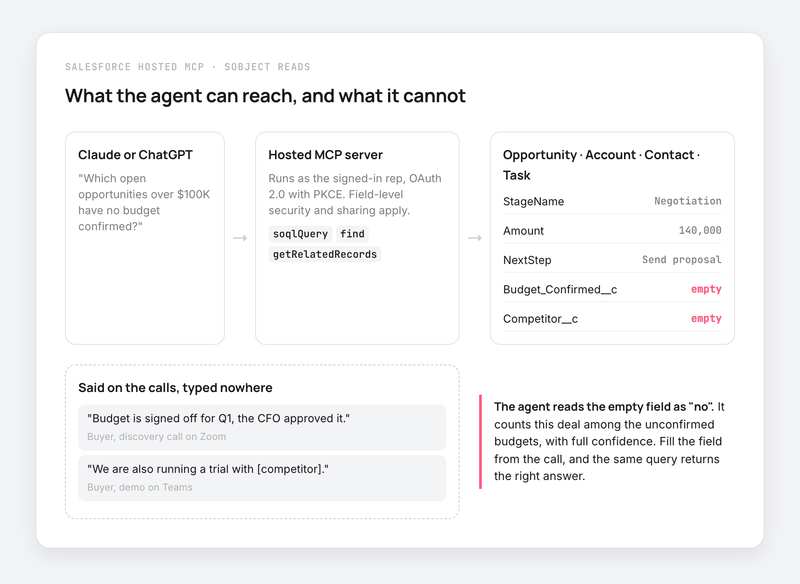
- Blind spot: the agent sees fields and activities. A budget confirmed on a Zoom call that nobody typed into Salesforce does not exist for it.
Salesforce MCP reads the opportunity, and the opportunity only knows what reps typed
Take a question a sales manager will ask on day one: "Which of our large open opportunities have no confirmed budget?"
The SObject server turns it into a SOQL query on Opportunity, filters on Amount and a budget field, and returns a clean list. The docs say soqlQuery handles "filtering, sorting, aggregation, or relationship traversal" (SObject All reference), so the agent can count and group, too.
The query is correct. The answer can still be wrong. When the buyer confirmed the budget on a Teams call and the rep moved on to the next meeting, the field is empty, and the agent reads empty as "no".
Claap call and HubSpot deal data from Q3 2026 shows how wide the gap gets: on 92% of deals where a call explicitly agreed a next step, the CRM's next-step field was empty.
A sales lead at a travel-tech software company described the workaround on a call with us:
- "...go into [Claude] and run the skill. [...] So ideally, we would want to sync that into [the CRM]."
Three things follow for anyone wiring Claude or ChatGPT to Salesforce.
- The agent inherits the CRM's gaps, and reports them as facts. An empty Competitor field becomes "no competitor on this deal". A missing Next Step becomes "stalled". Nothing in the MCP response tells the agent the field was left blank.
- Activities help less than they look. Task and Event are standard objects, so the agent can read them. They hold what the rep logged: a subject line and maybe a note. The objection the buyer raised halfway through the call is rarely in there.
- Salesforce's own call data reaches the agent only in one setup. Einstein Conversation Insights stores call insights in objects such as VoiceCallInsight, which support query() when ECI is on and the user holds the Conversation Insights for Sales permission set (Salesforce object reference). The MCP docs do not document those objects, and ECI only analyzes calls a connected video or phone provider recorded.
Fill the Salesforce fields from the call, then let the MCP read them
The fix sits upstream of the agent. Get what the buyer said into the fields the agent queries, and Salesforce's own MCP gives the right answer with no extra setup.
A quick note: Claap is our product.
Claap records your Zoom, Meet, Teams and dialer calls and logs each one on the right Salesforce contact, account and opportunity. Its AI fields then write a typed value into the Salesforce fields you map, standard or custom: a select for "Budget confirmed", a date for the decision, a text for the competitor (CRM auto-complete, on the Business and Enterprise plans).
Two settings matter for agents. A select field can return "Not mentioned", so the agent sees a known gap where it would otherwise see an empty field. And each field has a sync mode: only if empty, append, or always overwrite, so a value a rep typed by hand stays as it is.
Then the same SOQL query, through the same SObject server, counts real budgets.
Or let the agent read the calls through Claap's MCP
The second route skips the CRM for call questions. The Claap MCP, available on every plan including the free one, connects Claude or ChatGPT to your recordings, transcripts and saved views, where every call is already scored by the same AI fields. The agent reads a whole view row by row, so "how many deals raised a security objection this quarter" is counted on every call, and the agent skips the guesswork of a search sample.
Most teams end up with both connectors in the same Claude workspace: Salesforce's MCP for pipeline, owners and amounts, Claap's for what was said. It is a complement to Salesforce's MCP, and Salesforce stays the system of record.
What we recommend, in order:
- Start with the SObject Reads server in a sandbox, because it cannot change a record, and Salesforce itself suggests it as the first step.
- Fill the three or four fields your managers ask about first (budget, next step, competitor, decision date) from the calls, because those are the questions an agent will get on day one.
- Use the Claap MCP for questions about what was said when the answer depends on wording, objections or sentiment that no picklist captures.
This is wrong if your reps already log every call in detail and your Opportunity fields are complete. Then Salesforce's MCP alone answers well, and the gap above is small.
What the Salesforce Hosted MCP servers are
Salesforce Hosted MCP Servers are Salesforce-managed MCP endpoints. Salesforce hosts and scales them, handles sign-in and enforces permissions, so there is no server to run on your side.
You get two kinds of servers.
- Standard servers, pre-configured by Salesforce with a fixed set of tools. An admin turns them on, and their tool sets cannot be edited.
- Custom servers, where you expose your own logic as MCP tools: Apex invocable actions, @AuraEnabled methods, Apex REST, Flows and Named Queries, plus Prompt Builder templates as MCP prompts.
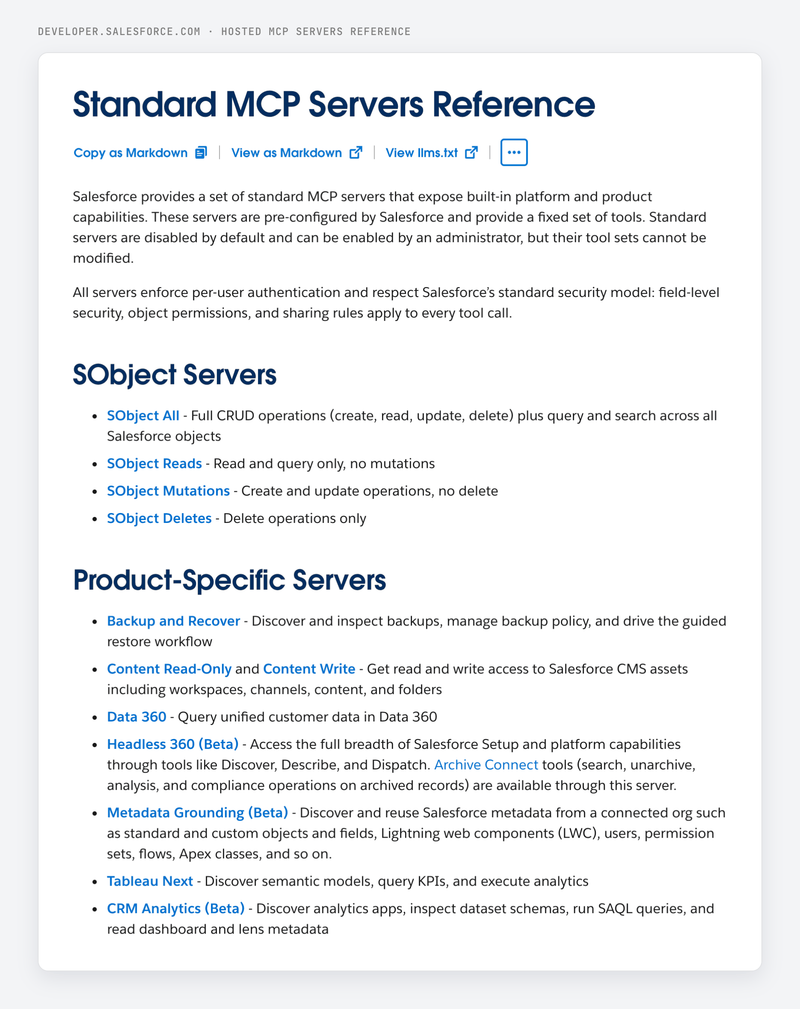
The four SObject servers are the ones sales teams care about. They differ only in what they allow:
| Server | Read and query | Create and update | Delete |
|---|---|---|---|
| SObject All | Yes | Yes | Yes |
| SObject Reads | Yes | No | No |
| SObject Mutations | Yes | Yes | No |
| SObject Deletes | Yes | No | Yes |
Source: Salesforce's standard servers reference and Salesforce Ben's admin guide.
Data 360 runs SQL on unified customer data. Tableau Next queries semantic models and KPIs. Headless 360, in beta, reaches Setup and platform capabilities, Archive Connect included. CRM Analytics, also in beta, runs SAQL on sandbox and scratch orgs only.
What the SObject servers can read and write
The SObject All server exposes every standard and custom object in your org through eleven tools, listed in the SObject All reference.
- getObjectSchema returns a compact index of your objects, then the fields of one object, including admin notes such as which amount field to trust.
- soqlQuery runs SOQL, aggregates included, with a ceiling of 50,000 records per transaction across all queries, per the SObject All reference.
- find runs a SOSL text search across objects and returns at most 2,000 records, per Salesforce's tool docs.
- getRelatedRecords walks from a parent to its children, such as an account's contacts.
- getUserInfo and listRecentSobjectRecords give the agent "my" context: who you are and what you opened last.
- createSobjectRecord, updateSobjectRecord and updateRelatedRecord write, with validation rules applied.
- deleteSobjectRecord and deleteRelatedRecord delete; a deleted record sits in the Recycle Bin for 15 days, and there is no undelete tool, according to the SObject All reference.
"How many opportunities moved to Negotiation this month, by owner?" is one aggregate SOQL query. The limit is the data behind the count.
Activities are readable too. Task and Event are standard objects, so an agent can list the calls a rep logged on an account, or create a follow-up task, which is one of the example prompts in the docs.
Which Salesforce editions get MCP, and what it costs
Hosted MCP Servers are "a production-ready capability for every Enterprise Edition org and above", in the words of Salesforce's GA announcement.
Basic MCP access needs no Agentforce license or add-on, according to Salesforce Ben.
Pricing has three parts today, per Salesforce Ben's admin guide:
- Record operations (create, read, update, delete) and processes called through MCP (Flows, Apex) have their own usage types, both unmetered for now. Salesforce committed to 30 days' notice before metering starts, according to Salesforce Ben.
- Agentforce actions called through MCP and Data 360 queries consume Flex Credits.
- Agentforce agents need their own licenses.
One line to read carefully: Salesforce's overview says Hosted MCP Servers "are intended only for customers with Flex Credits", and that usage may be billed. Check with your account executive before you plan a heavy rollout on the unmetered assumption.
How to configure Salesforce MCP servers
Salesforce says the setup takes less than 30 minutes (GA announcement). It has three steps, and the middle one needs a Salesforce admin.
- Turn on a server. In Setup, go to API Catalog, then MCP Servers, and enable the server you want. Start with platform/sobject-reads.
- Create an External Client App. In Setup, open External Client App Manager and create a new app. Enable OAuth, add the callback URL of your client, add the scopes mcp_api and refresh_token, and issue JWT-based access tokens for named users. Connected Apps are not supported. Copy the consumer key.
- Connect your client with the server URL and the consumer key (steps below).
The app can take up to 30 minutes to become usable, according to Salesforce's External Client App guide.
Server URLs follow one pattern:
- Production: https://api.salesforce.com/platform/mcp/v1/platform/sobject-reads
- Sandbox or scratch org: https://api.salesforce.com/platform/mcp/v1/sandbox/platform/sobject-reads
Connect Claude to Salesforce
- In the External Client App, use the callback https://claude.ai/api/mcp/auth_callback.
- In Claude, open Customize, then Connectors, then Add custom connector.
- Name it, paste the server URL, and under OAuth client choose "Use your own OAuth client".
- Paste the consumer key as the OAuth Client ID and leave the secret blank.
- Click Connect and sign in to Salesforce.
Claude Code picks up the same connector, according to Salesforce's Claude setup page. After connecting, Configure lets you switch individual tools on or off.
Connect ChatGPT to Salesforce
- In ChatGPT, turn on developer mode, then go to Settings, Apps, Create App.
- Paste the server URL and open Advanced settings under Authentication.
- Set the registration method to a user-defined OAuth client and copy ChatGPT's callback URL into the External Client App.
- Paste the consumer key and the consumer secret. ChatGPT marks the secret optional, and Salesforce requires it.
- Uncheck "OIDC enabled", create the app, then pick Salesforce under the + button in a chat.
Source: Salesforce's ChatGPT setup page.
How Salesforce MCP permissions work
Every MCP call runs as the person who signed in. Salesforce's GA announcement puts it simply: if the agent updates a record, that person's name appears in the audit trail.
- Field-level security and object permissions apply. An agent cannot edit a field the user cannot edit in Lightning.
- Sharing rules apply. A rep's agent sees the rep's opportunities, and a manager's agent sees the team's.
- OAuth 2.0 with PKCE handles sign-in, with a dedicated mcp_api scope that does not open the rest of the REST API.
- Standard servers are off by default, and the tool list of each one is fixed.
Before production, Salesforce suggests a few optional controls on the External Client App: require a permission set to use it, restrict IP ranges, shorten refresh tokens to 30 days with rotation, and turn on single logout, per the External Client App guide.
The permission model has a side effect on the blind spot above. An agent can only count what the signed-in user can see. A rep asking about the whole region gets an answer based on their own deals, and nothing in the reply says so.
Two other things people mean by "Salesforce MCP"
The Salesforce DX MCP server is a local server for developers (@salesforce/mcp, run with npx) with toolsets for orgs, metadata, data and users. It reaches end of life on November 2, 2026, and Salesforce now ships that tooling as skills, according to the deprecation notice on GitHub.
Salesforce in Claude, announced under the Claudeforce name, is a Claude plugin with 37 skills built for sellers, running on Headless 360 over MCP. Salesforce's Claudeforce page says it is available to pilot customers, with an open beta planned for September 2026. It reads the same CRM, so the same rule applies: its skills are as good as the fields underneath.
What to set up first
- Pick SObject Mutations over SObject All when reps want the agent to log tasks and update stages, because it blocks deletes.
- Audit five fields before you announce the connector: amount, stage, next step, budget, competitor. Whatever is empty there will be empty in every agent answer.
- Fill those fields from the calls, so the agent counts what buyers said on top of what reps had time to type.
Frequently asked questions
What does Salesforce MCP do?
Salesforce MCP lets an AI client such as Claude, ChatGPT or Cursor read and update your Salesforce data through the Model Context Protocol. Hosted servers expose records, Data 360, Tableau Next and custom Apex or Flow tools, and every call runs with the signed-in user's permissions.
How do I configure Salesforce MCP servers?
An admin enables a server in Setup under API Catalog, then MCP Servers, and creates an External Client App with the mcp_api and refresh_token scopes. You then add the server URL and the app's consumer key in your MCP client. Salesforce says the whole setup takes less than 30 minutes.
How do I run an MCP server for Salesforce?
With Hosted MCP Servers you run nothing: Salesforce hosts the endpoint at api.salesforce.com. The local Salesforce DX MCP server, which you ran with npx, is a developer tool that reaches end of life on November 2, 2026.
Is Salesforce MCP free?
Access is included in Enterprise Edition and above with no Agentforce license, and record reads and writes are unmetered for now. Agentforce actions and Data 360 queries consume Flex Credits, and Salesforce has promised 30 days' notice before record operations are metered.
Can Claude connect to Salesforce?
Yes. Add a custom connector in Claude with the Salesforce server URL and the consumer key of your External Client App, then sign in to Salesforce. Claude Code uses the same connector.
Can an agent read sales call transcripts through Salesforce MCP?
Only what sits in Salesforce objects the user can query. Logged tasks and events are readable, and Einstein Conversation Insights objects can be queried when ECI is on and the user has the right permission set. Calls recorded outside Salesforce reach the agent only if a tool writes them into Salesforce fields, or through that tool's own MCP.