


Conversation intelligence or forecasting software?
Until your forecast rolls up through more than one layer of managers, conversation intelligence feeding your CRM's forecast module is enough. A separate forecasting tool pays off when you consolidate commits across levels.


Updated November 18, 2026.
Article overview
- HubSpot or Salesforce forecasting, fed by a conversation intelligence tool, is best for teams whose forecast is decided in one weekly review.
- Clari Forecast, now part of Salesloft, is best for organizations where several layers of managers submit commits that need to be consolidated and tracked week over week.
- Gong Forecast is best for teams already on Gong that want call analysis and the forecast roll-up in one platform.
- Claap is best for teams that keep their forecast in the CRM and want every deal to arrive there with its risk, decision-maker and decision date read from the calls.
Until your forecast rolls up through more than one layer of managers, a call analysis tool feeding your CRM's forecast module is enough, and a separate forecasting tool pays off the day you have to consolidate commits, track how they move week after week and compare them with your history.
The forecast already eats a lot of time: in a Vantage Point study of nearly 100 B2B sales forces, 72% expected their sales managers and reps to meet more than once a month about pipelines and forecasts, in meetings that last 53 minutes on average (Salesforce, Vantage Point).
With that many hours at stake, this guide helps you decide between one tool and two from the way your forecast is actually built: who submits it, how often, and what each tool really does.
The decision at a glance
| Your forecast today | What is enough | Example tools |
|---|---|---|
| One weekly review, one layer of managers | Your CRM's forecast module, fed by conversation intelligence | HubSpot Sales Hub Professional, Salesforce Pro Suite |
| Commits rolled up through several layers of managers | A dedicated forecasting tool, fed by conversation intelligence | Clari Forecast (Salesloft), Gong Forecast |
| A team already on Gong that wants one platform | Gong with its Forecast offer | Gong Forecast |
| No forecast at all yet | Your CRM's forecast categories, before any other tool | HubSpot, Salesforce |
Sources for the table: HubSpot's forecast tool documentation, Salesforce's pricing page, the Gong Forecast page and Salesloft's Clari Forecast page.
Is a call analysis tool enough to run the sales forecast?
A call analysis tool is enough to judge every deal in the forecast, and computing the number (the roll-up, the commit, the weighted pipeline) stays with your CRM's forecast module or a dedicated tool. Claap, for example, reads the calls and emails on each deal, gives it an AI status and writes the risk, the decision-maker and the decision date into the HubSpot or Salesforce fields your forecast is built on, without computing the forecast itself.
Judging each deal is the part teams are missing. When sales leaders describe their own forecast on our sales calls, 82% want each deal's status and risk to come from what was said in meetings, and 64% add a manual layer on top of the CRM forecast or have no forecast yet (Claap call data, January to October 2026). None of these teams runs its forecast in a standalone tool such as Clari (Claap call data, January to October 2026).
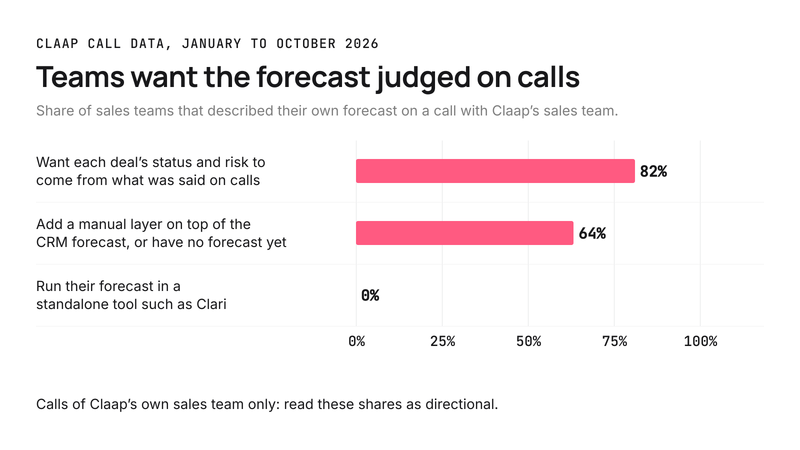
These shares come from one sales team's calls, so read them as directional.
A head of sales ops at a financial services group put it plainly:
- "Today we mostly just read off the numbers in the business review."
A review that reads meters needs evidence on each deal before it needs a better calculation. Start with conversation intelligence when your pipeline reviews consist of asking each rep "are you sure?", because it brings the answer.
When your CRM's forecast module is enough
Your CRM already does the math. HubSpot's forecast tool comes with Sales Hub Professional and Enterprise, with default categories (Pipeline, Best case, Commit, Most likely) and a weighted amount (HubSpot's documentation). Salesforce includes forecasting from its Pro Suite edition and keeps advanced pipeline management and forecasting for its higher editions (Salesforce's pricing page).
That module is enough in three cases:
- your forecast is decided in one review, with one layer of managers;
- your reps update stage, amount and close date, and conversation intelligence checks what nobody types in (the decision-maker, the risk, the real decision date);
- you compare the forecast with the quarter's target, with no statistical model built on years of history.
Use your CRM's module when your team fits in one pipeline review, because a second tool would add one more place to update without changing the deals it reads.
When you need a separate forecasting tool
A dedicated forecasting tool earns its cost when the forecast becomes a process with several floors. The signs:
- reps submit a commit, their managers adjust it, and a regional or global leader consolidates it;
- you need to see how each commit moved from one week to the next, and who changed it;
- you want a projection computed from the history of won and lost deals, to set against the number managers call.
A head of sales at a language-learning SaaS company with a global sales team describes exactly that setup:
- "Where we have our team do some soft commits in HubSpot, then our sales directors for each region own the final forecast."
At that point, two families of tools fit. Clari Forecast is now part of Salesloft, whose forecast agent analyzes historical deal data and live rep activity (Salesloft's Clari Forecast page). Gong Forecast adds forecast submission, roll-up, an AI deal predictor and forecast analytics to Gong (the Gong Forecast page).
Even with a dedicated tool, each deal needs its evidence: the forecasting tool computes and tracks the number from deal fields that someone, or something, has to fill from the calls.
Choose a dedicated forecasting tool when several layers of managers change the number every week, because the CRM alone does not keep a readable history of those adjustments. Choose a single platform such as Gong if you already use it for calls and its Forecast offer fits the budget: Gong prices licenses per user plus a platform fee based on the number of users (Gong's pricing page).
This advice does not apply if your number depends mostly on product usage (consumption pricing, renewals): there, product and billing data are what to plug into the forecast, and calls carry less weight.
How to connect conversation intelligence to your CRM forecast
A quick note: Claap is our product, so read this section with that in mind.
With Claap, every deal reaches the forecast review with the evidence from its calls, in three steps:
- Turn your forecast questions into AI fields: economic buyer confirmed? Decision date stated? Competitor in play? Each deal gets a typed answer, with the buyer's words as evidence, and a dash when the calls say nothing.
- Link each field to a HubSpot property or a Salesforce field, with a sync mode per field: fill only if empty, append or overwrite, as our CRM auto-complete page describes.
- Before the review, open the Deals view as a Kanban board grouped by AI status, so the deals that need action come first.
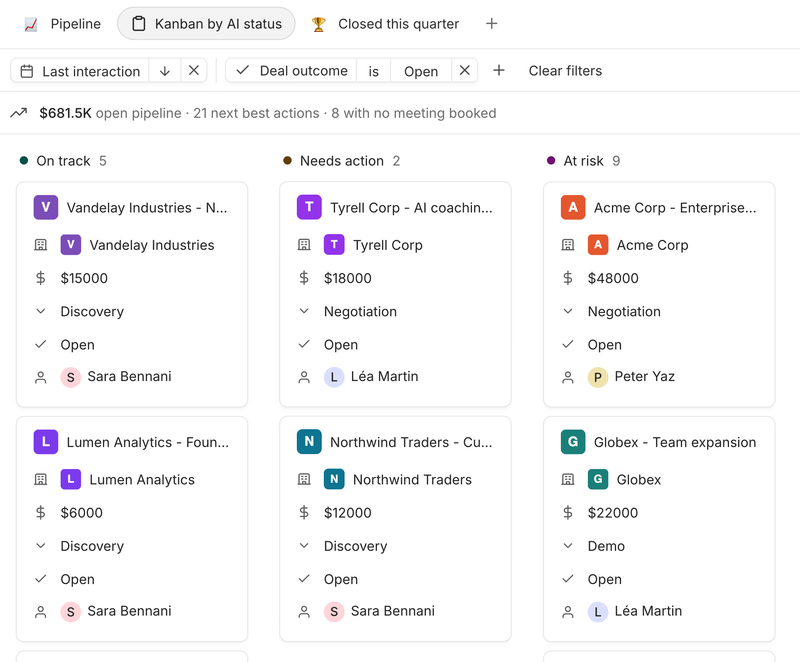
A RevOps lead at an AI-SEO software company describes what the review needs:
- "So I want to give him an understanding of every deal that an AE put into commit or best case, so he can actually just read it beforehand."
Claap does not compute a roll-up, a commit or a weighted pipeline: the number stays in HubSpot or Salesforce, and our AI sales forecasting page details what Claap writes on each deal. The Deals view with each deal's summary and AI status comes with the Business plan, at $60 per seat per month billed yearly (Claap's pricing page).
To make the number itself more reliable, see our guide to AI in sales forecasting, and to spot at-risk deals every day, our method for AI pipeline management.
Key takeaways
- One weekly pipeline review and one layer of managers: keep your CRM's forecast module and feed it with conversation intelligence.
- Commits consolidated across several layers of managers: add Clari Forecast or Gong Forecast, and keep conversation intelligence for the evidence on each deal.
- A number that depends mostly on product usage: plug product and billing data into the forecast first.
Frequently asked questions
Is a call analysis tool enough for forecasting, or do you need a separate tool?
A call analysis tool is enough to judge every deal in the forecast, and computing the number stays with your CRM's forecast module. Claap reads the calls and emails on each deal and writes the risk, decision-maker and decision date into HubSpot or Salesforce. A separate tool such as Clari Forecast or Gong Forecast pays off when several layers of managers consolidate commits.
Does Claap calculate the forecast?
No. Claap does not compute a forecast roll-up, a commit, a weighted pipeline or quota attainment. It reads each deal from its calls and emails, flags risks and missing decision-makers, and writes those answers into the HubSpot or Salesforce fields your forecast is built on.
Can Gong replace a forecasting tool like Clari?
Yes, if you buy its Forecast offer: it adds forecast submission, roll-up and an AI deal predictor to call analysis. It is the natural choice for a team already on Gong, since the calls and the forecast then live in the same place. For a team with no tool yet, the CRM's forecast module is usually the first step, and a dedicated tool can come later.
Is HubSpot's forecast tool enough for a small team?
In most cases, yes. It comes with Sales Hub Professional and Enterprise, with categories such as Commit and Best case. What it lacks is evidence on each deal, which conversation intelligence can write into its properties: the decision-maker, the main risk and the decision date heard on the calls.
What about forecasting call volume in a contact center?
That is a different need. Forecasting inbound call volume and staffing for a contact center is the job of workforce management (WFM) software. This guide covers the sales forecast: which deals will close and for how much.