Attio call recording: how sales calls reach the deal
What Attio's own call recorder logs, how phone and in-person calls get in, and what it takes to put what the buyer said on the Attio deal.

Updated 16 October 2026.
Attio call recording overview
- Attio records Zoom, Google Meet and Microsoft Teams calls with its own call recorder, on the Pro and Enterprise plans.
- Attio's recorder joins the meeting as a participant, and someone on the call has to admit it.
- Attio links each recorded call to the people and companies on it, and a deal is linked by hand.
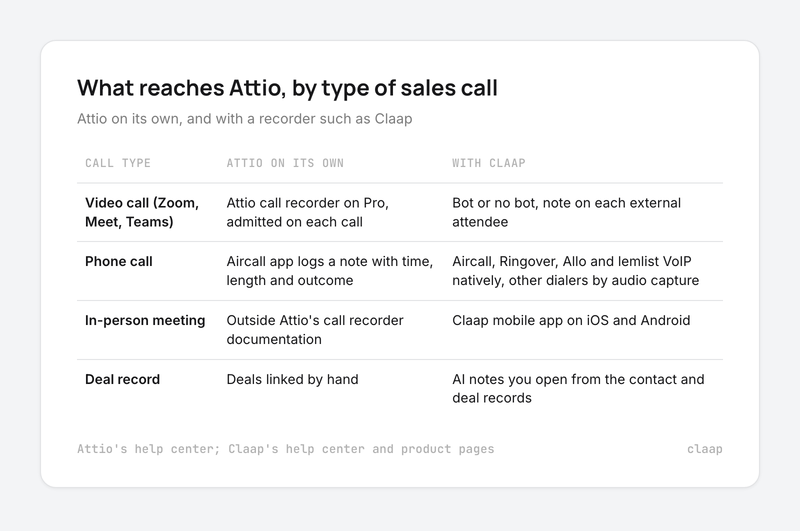
- Phone calls made through Aircall show up in Attio as a note with the call's time, length and outcome.
- Attio's call recording documentation covers video calls, so a meeting in a room needs a recorder on a phone.
- A separate recorder such as Claap adds bot-free recording, more dialers, in-person meetings and AI notes you open from the Attio contact and deal.
On Attio, recording the call is the easy part: the work is getting what the buyer said onto the deal record, and Attio's own recorder leaves that step to the rep.
That step is the one reps skip. Sales reps spend only a third of their time on revenue-generating work, and logging customer information is one of the jobs that eats the rest, according to Salesforce's State of Sales report.
We hear the same thing from Attio teams on our own sales calls.
So this guide takes the three kinds of sales calls your team runs (video, dialer and in person), shows what Attio logs for each one on its own, and what a recorder adds when you need the call on the deal.
Attio call recording at a glance
| What you need | Attio on its own | With a recorder such as Claap |
|---|---|---|
| Video calls (Zoom, Meet, Teams) | Attio's call recorder on Pro, $79 per seat per month billed yearly; the bot is admitted on each call | Bot or no bot; the Attio integration is on Business, $60 per seat per month billed yearly |
| Phone calls | The Aircall app logs a note with the call's time, length and outcome | Aircall, Ringover, Allo and lemlist VoIP natively; any other dialer through audio capture |
| In-person meetings | Outside Attio's call recorder documentation | Claap mobile app on iOS and Android |
| Where the call lands | Linked to people and companies; deals added by hand | A note on each external attendee; AI notes you open from the contact and deal records |
| Transcript and summary | Real-time transcript, AI summary, insight templates | Transcript in 99+ languages, AI summary, follow-up email draft |
Sources: Attio's pricing page and Attio's help center for Attio; Claap's pricing page, Claap's help center and Claap's dialer page for Claap.
Why Attio teams still retype their calls
Attio teams treat the CRM as the place where the deal lives. So a call that stays in a separate tool, or lands as a paragraph on a contact, still has to be read and copied onto the deal by someone.
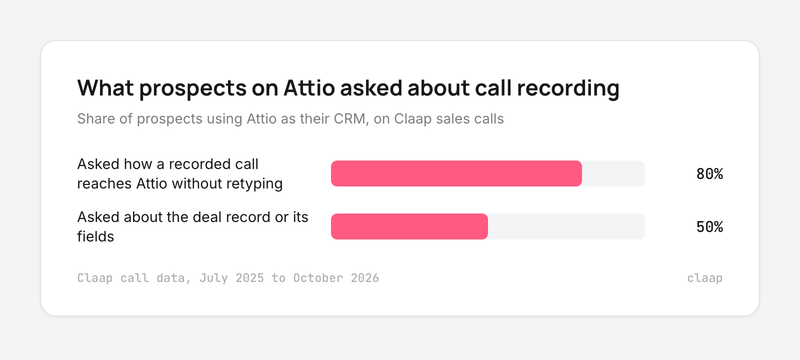
On Claap sales calls from July 2025 to October 2026, 80% of the prospects using Attio as their CRM asked how a recorded call would get into Attio without retyping, and 50% asked specifically about the deal record or its fields (Claap call data, July 2025 to October 2026).
- Attio is the source of truth, so the call has to live there. An AI lead at an investment firm said (translated from French):
- "We'd still like Attio to be the single source of truth. [...] The real bridge I'm missing today is something stable between Attio and our recorder, so that everything is in Attio."
- Typing the call up is the job that gets dropped. A sales lead at a B2B software company put it this way:
- "I don't want to be logging information into Attio."
- "Our sales rep [...] has no time between calls to go and update the CRM."
- The recorder choice used to be narrow. A revenue operations lead at a climate data company said:
- "We use Attio for our CRM, and for a long time, there weren't many call recording software that integrates with Attio. So initially, we started using [another note taker]. [...] And it was fine when our company was just three to five people [...] But as the team grows, [it] becomes not enough."
That is why we judge an Attio setup on one question: after the call, what does the deal record say?
How Attio's native call recorder works
Attio's call recorder is the right default for a team that sells over video, accepts a visible bot and is happy to update the deal after reading the summary.
- Plans: call recording is on Attio's Pro and Enterprise plans, according to Attio's help center. Pro costs $79 per seat per month billed yearly, or $99 billed monthly, according to Attio's pricing page.
- Platforms: the recorder works with Zoom, Google Meet and Microsoft Teams. Each member turns on auto-record for meetings with external participants, and Attio only records meetings synced through a member's calendar.
- The bot: the recorder joins as a meeting participant and has to be admitted on every call; on Zoom the host approves it. It waits in the waiting room for up to 10 minutes, then leaves, according to Attio's help center.
- What you get: the video, a real-time transcript with speaker labels, an AI summary, chapters, each speaker's talk time, and insight templates, which are prompts that pull sections of text or lists out of a call.
- Where the call lands: recordings are linked automatically to the people on the call and to their companies by email domain. Deals and other record types are linked by hand, according to Attio's help center.
- Updating the deal: from a recording, Ask Attio can suggest updates to the deal record based on the call. The rep reviews them and makes the change.
- Visibility: every recorded call is visible to every member of the workspace.
How phone calls get into Attio
Attio's call recorder covers video meetings. Phone calls come in through dialer apps, and Aircall is the one Attio documents.
- The Aircall note: a note is added to the person's record within a few minutes of each successful Aircall call, inbound or outbound, according to Attio's help center.
- What the note holds: the rep who placed the call, the date and time, the length, whether it was answered, and any notes typed in Aircall. What the buyer said stays in the Aircall recording.
- The matching rule: the person must already exist in Attio with the right phone number. The app creates no new records, and calls made before the record existed are left out.
- Workflows: a "call ended" trigger can update a deal stage or create a follow-up task, and it passes on the recording URL when it is ready.
For a team that calls from Aircall and only needs a log of who called whom, this is enough. For a team that needs the budget, timing or competitor the buyer mentioned, the call still has to be listened to and typed up.
In-person meetings on Attio
Attio's call recording documentation lists Zoom, Google Meet and Microsoft Teams as the platforms its recorder works with. A meeting across a table, at a customer site or at a trade show needs a recorder that runs on a phone and sends the meeting to Attio like any other call.
What a recorder adds on top of Attio
A quick note: Claap is our product. Every Claap fact below comes from Claap's own pricing page, product pages and help center.
Claap fits an Attio team whose calls happen on several channels, or whose managers want every call's notes on the Attio record without retyping.
- Recording without a bot: the Chrome extension and the desktop app record in the background, so nothing joins the participant list. A visible meeting bot is there for teams who prefer it.
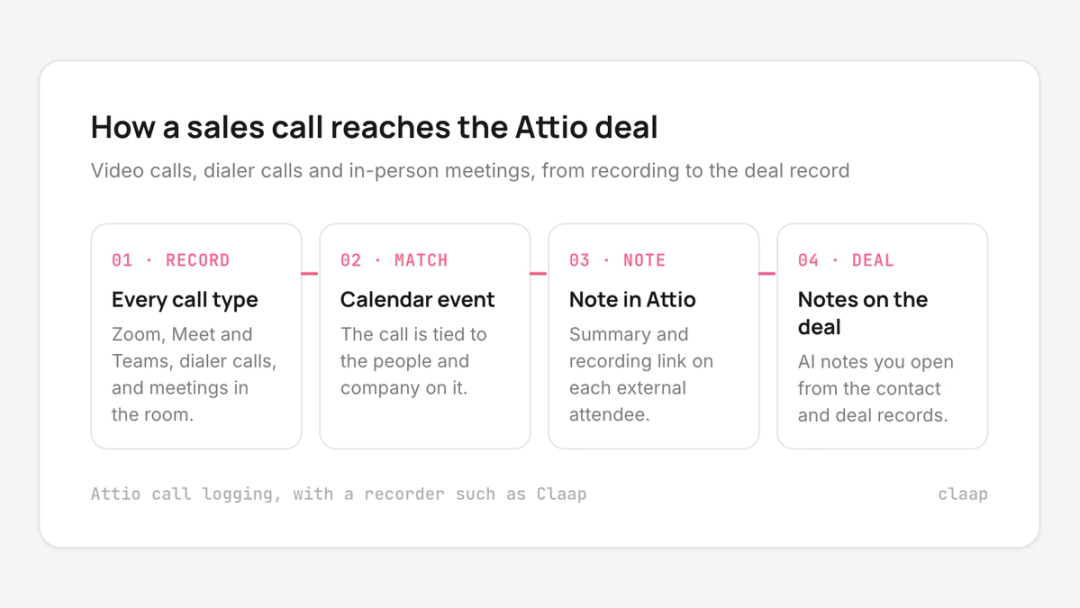
- Phone calls: Aircall, Ringover, Allo and lemlist VoIP calls import on their own, and calls from any other dialer are picked up by audio capture, with the same transcript and AI notes as a video call, according to Claap's dialer page.
- In-person meetings: the Claap mobile app records meetings in a room on iOS and Android.
- A note on each attendee: for every meeting with external participants on your connected calendar, Claap logs a note in Attio with the meeting details, participants, summary and a link to the recording. It is added for each external attendee, and a new Attio contact is created when the email is missing, according to Claap's help center.
- Notes on the deal: AI notes from each call go to Attio and open from the contact and deal records, and CRM auto-complete lists Attio among its CRM integrations on the Business plan.
- Attio data back in Claap: the Attio integration sends CRM data back to Claap, so deal reviews and AI answers in Claap start from the deal's stage and amount.
- Price: the Attio integration, CRM auto-complete and the AI follow-up email are on Business, at $60 per seat per month billed yearly according to Claap's pricing page. Basic is free for teammates who only watch and search calls.
How to set up call logging on Attio
- Sync every rep's calendar first. Attio's recorder only records meetings synced through a member's calendar, and Claap's Attio note relies on the connected calendar too.
- Pick the questions before the first call. Choose the three to five things a manager checks in a pipeline review: next step, decision date, competitor, champion. Write one AI field per question.
- Decide bot or no bot, and handle consent. Attio's help center advises telling participants before the call and asking for verbal consent before admitting the recorder. Keep the same habit with a bot-free recorder.
- Connect the dialer. Without it, phone calls reach Attio as a log line at best.
- Check the deal links on the first ten calls. With Attio's own recorder the rep adds the deal by hand, so check it happened. With a recorder that sends notes, check each note landed on the right deal.
This setup is wrong if your team sells only over video and nobody filters the pipeline on what was said in calls. Then Attio's own recorder on Pro covers the job, and a second tool adds cost for little gain.
Takeaways
- Video calls only, and a visible bot is fine: use Attio's call recorder on Pro, because the call lands on the person and company with no extra tool.
- Calls on Aircall: start with Attio's Aircall app for the log, and add a recorder if you need what the buyer said on the deal.
- Calls on Ringover, Allo, lemlist VoIP or in person: pick a recorder that covers them, because Attio's call recording documentation covers video meetings.
- Pipeline reviews built on deal fields: check that the recorder can write typed values to Attio deal fields before you buy, because a summary note cannot be filtered.
- Choosing the CRM itself: see our comparison of the best CRMs for tracking sales calls. For consent rules and recording tools across every CRM, see our sales call recording guide.
Frequently asked questions
Does Attio record calls?
Yes, on the Pro and Enterprise plans. Attio's call recorder joins Zoom, Google Meet and Microsoft Teams calls and produces a video, a transcript, a summary and insights. Someone on the call has to admit it.
Is Attio call recording free?
No. Call recording is on Attio's Pro and Enterprise plans, and Pro is $79 per seat per month billed yearly on Attio's pricing page.
Can Attio record phone calls?
Attio's call recorder covers video calls. Calls made through Aircall are logged as a note on the person's record with the time, length and outcome, through Attio's Aircall app.
Does Attio have a call recording app for in-person meetings?
Attio's call recording documentation covers Zoom, Google Meet and Microsoft Teams. For meetings in a room, teams use a mobile recorder such as the Claap app on iOS and Android.
Can Attio record calls without a bot?
Attio's recorder joins the call as a participant that someone has to admit. Bot-free recording on Attio needs a separate tool, such as Claap's Chrome extension or desktop app.
How do I get call notes onto an Attio deal automatically?
Attio links recorded calls to people and companies, and deals are added by hand. Claap logs a note on each external attendee, and you open it from the contact and deal records in Attio.