Sales meeting recording: how to record every call and demo
A rep's guide to recording sales meetings and demos on every channel: setup, the consent sentence, bot or no bot, and the hour after the call.

Updated 16 October 2026.
Sales meeting recording overview
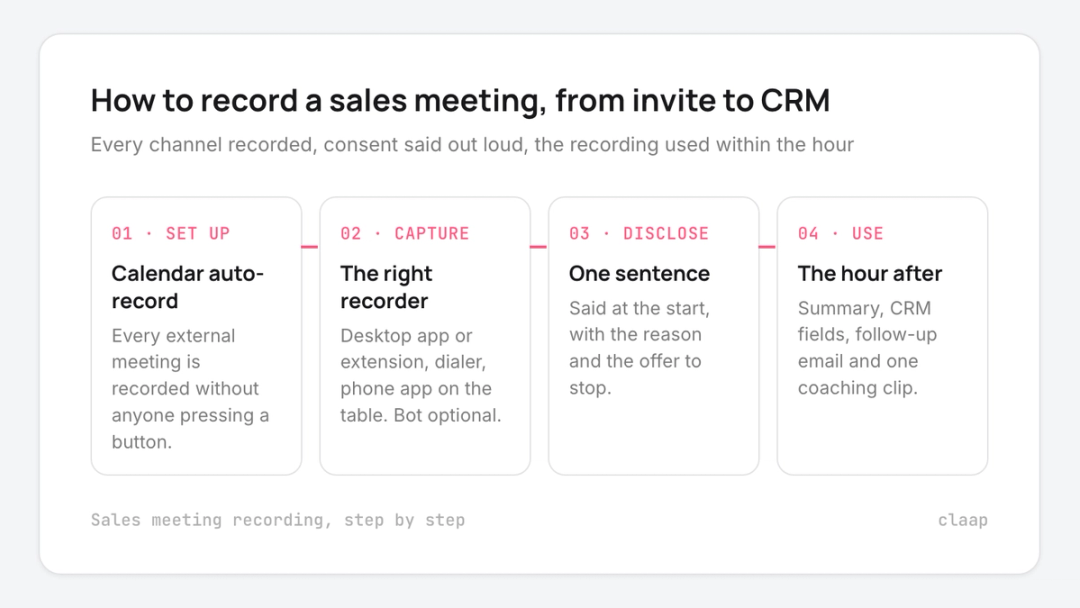
- Video meetings on Zoom, Google Meet or Microsoft Teams record best from your calendar with an auto-record rule, so nobody has to remember to press a button.
- Phone calls record through your dialer's own recording, then import into the tool that holds your other meetings.
- In-person meetings and demos in a room record from a phone app placed on the table, since no meeting bot can join a room.
- Consent comes from one sentence the rep says at the start of the meeting, with an offer to stop the recording.
- A meeting bot tells everyone the call is recorded but changes the room; bot-free recording keeps the room as it is and puts the disclosure on the rep.
- After the meeting, the recording pays off when the notes, the CRM fields and the follow-up email exist within the hour.
Record your sales meetings without a bot and let the rep's own sentence carry the consent. The bot is the part of a recorded meeting that buyers notice, and a sentence said by a person lands better than a name in the participant list.
46% of sales reps say they rarely get feedback on their sales conversations, according to Salesforce's State of Sales report, a survey of 4,050 sales professionals. Recording the meeting is what makes that feedback possible without a manager in every call.
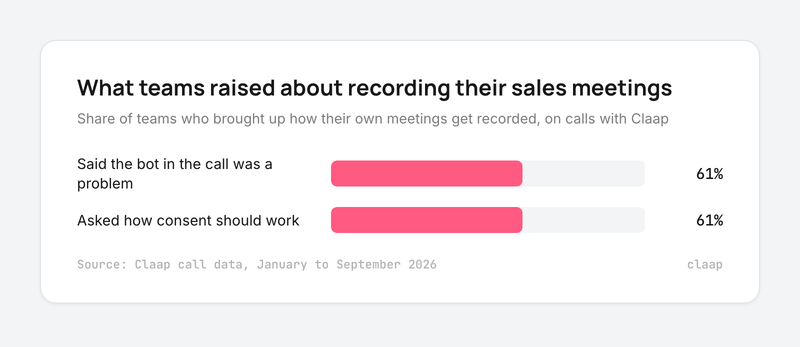
The friction is rarely the recording itself. On Claap's own sales calls, 61% of the sales teams who talked about how they record their meetings said the bot in the call was the problem, for their buyers or for themselves (Claap call data, January to September 2026).
So this guide to sales meeting recording walks through how to record each kind of sales meeting, what to say so the buyer is fine with it, when a bot still makes sense, and what to do with the recording once the meeting ends.
Sales meeting recording at a glance
| Where the meeting happens | How to record it | How the buyer knows |
|---|---|---|
| Zoom, Google Meet, Microsoft Teams | Calendar auto-record, with a desktop app, a browser extension or a meeting bot | The bot's name and chat message, or the rep's sentence |
| Phone, from a dialer | The dialer's own call recording, imported after the call | A recorded message or the rep's sentence |
| In person, in a room | A phone app on the table | The rep's sentence, and the phone in plain sight |
| Product demo with screen share | The same recorder as the video call, with the screen captured | The rep's sentence, plus the offer to send the recording |
Sources for the table: Zoom's and Google's help centers for native recording, and Claap's help center for the recorder options.
Why the bot is what buyers push back on
We looked at every Claap sales call from January to September 2026 where the other side brought up how their own meetings get recorded: the bot, the notice, the consent. 61% of those teams said the bot in the call was a problem, and the same share, 61%, asked how consent should work (Claap call data, January to September 2026).
- The bot changes the room. A sales leader at an education technology company that sells across Asia described what happens when a notetaker joins:
- "There's a bot living in the call. And in markets like Korea and Japan that are high trust cultures, people don't like being recorded. [...] It's pretty loud and like, disrupts the flow of a call, kind of freaks people out."
- Some buyers will not say why. A revenue operations lead at a cybersecurity software company, whose buyers include public-sector teams, said (translated from French):
- "Having a robot that records everything makes them uneasy. These are people who don't even turn their camera on."
- Reps feel it too. A customer-facing manager at a B2B software company explained how they record their own customer calls:
- "I personally don't like that. There's an assistant in the meeting room, so I've just been doing it through the extension."
- Video is a step further than audio. A team lead running a recording trial at a B2B software company reported back:
- "Our customers are not always comfortable with being recorded on video."
The other side of the argument is real, and we heard it too. A sales operations manager at a construction software company kept the visible bot on purpose, and put the risk of hidden recording plainly (translated from French):
- "You record me, I don't know about it, there's no Claap logo. And then you send me a recap of the meeting: I'd take it badly."
The bot is friction, and an unannounced recording is worse.
How to record a sales meeting on Zoom, Google Meet or Microsoft Teams
- Connect your calendar to your recording tool, so the recording can start on its own.
- Set an auto-record rule for external meetings. Record every meeting with someone outside your company, and leave internal ones out unless you coach on them.
- Pick the capture mode per meeting type. A desktop app or browser extension records from your own computer with nothing added to the call. A meeting bot joins as a participant and posts a recording notice.
- Check the native option before you buy anything. Zoom's own computer recording works on free and paid accounts, according to Zoom's support center. Google Meet recording needs a paid Google Workspace edition, according to Google's Meet help center. Native recordings give you a file; your CRM still gets nothing.
- Name the bot after your company if you use one. Claap's help center notes that the bot's name is what appears in the participant list, and recommends keeping its chat message on to tell participants the meeting is recorded (Claap's help center).
How to record a phone sales call
Record phone calls in the dialer you call from, then send them to the same place as your video meetings.
- Turn on call recording in the dialer itself (Aircall, Ringover and most cloud phone systems have it).
- Connect the dialer to your recording tool so each call lands next to the contact's video meetings, with its transcript.
- Use the dialer's recorded message, or have the rep say the consent sentence in the first seconds of the call.
Our sales call recording software comparison covers which tools import dialer calls.
How to record an in-person sales meeting or demo
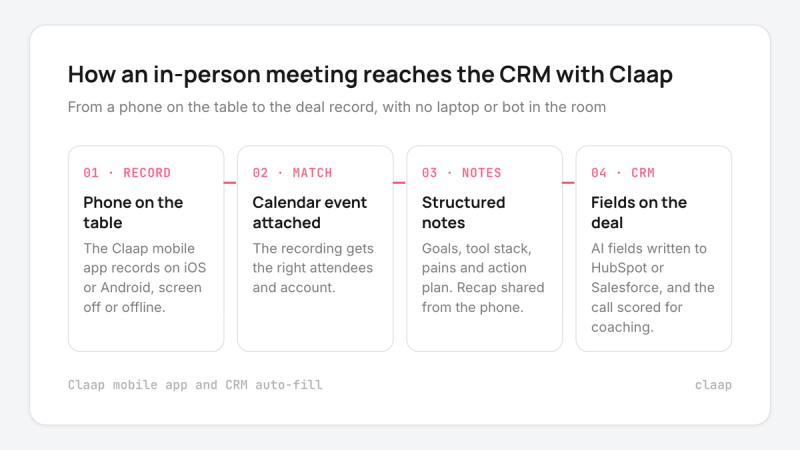
- Use a recording app on your phone, placed on the table where the buyer can see it.
- Start it before the small talk ends, and say the consent sentence while the phone is in view.
- Pick an app that matches the recording to the calendar event, so the notes attach to the right meeting and account.
Field reps have extra constraints (no signal, back-to-back visits, no laptop). Our guide to sales call recording apps for field sales reps compares the apps that handle them.
How to record a sales demo
A demo recording is worth more than a discovery recording, because the buyer will want it later.
- Record the shared screen together with the voice, so anyone replaying the demo sees exactly what the buyer saw.
- Offer the recording to the buyer at the start: "I'll send you the recording so you can share it with your team." It turns consent into a favor.
- Mark the moments the buyer reacted to (a question, an objection, a feature they asked to see twice) so the follow-up can point to them.
- Send the recording, or the two minutes that matter, to the people who missed the demo.
What to say to get consent
Say it at the start, say why, and offer to stop. Three lines built from what our own team says on calls:
- Discovery call: "Quick thing before we start: I'm recording so I can listen instead of typing, and send you a recap after. Are you OK with that?"
- Demo: "I'll record the demo so I can send it to you and your team afterwards. Fine with you?"
- In person: "Do you mind if I put my notetaker on the table? It lets me focus on the conversation."
Keep it short. Our co-founder gives prospects the same advice on sales calls: a long explanation makes buyers suspicious, and a short reason plus the offer to share the recording works better.
The law sets the floor. In the US, federal law allows recording with one party's consent, but about 11 states, including California, Florida, Illinois, Pennsylvania and Washington, require every party's consent, according to the Reporters Committee for Freedom of the Press. When participants sit in different states, follow the strictest rule. In Europe, the GDPR's transparency rules require you to tell people why you record and how long you keep it. Our guide to one-party consent states has the state list. This is general guidance, and your legal team has the final word.
Bot or no bot: which to use
- Use bot-free recording when the buyer hosts the meeting, because their meeting settings decide whether your bot gets in at all.
- Use bot-free recording with cautious buyers, such as public-sector teams, because a recorder in the participant list is what made them uneasy on our calls.
- Use a visible bot when your reps forget to disclose, because the bot's name and chat message announce the recording even when the rep doesn't.
- Choose audio-only capture when buyers dislike video recording, since a desktop app or phone app records the conversation without the camera.
This advice is wrong if your reps skip the consent sentence. If you cannot make that habit stick, keep the visible bot.
What to do with the recording after the meeting
The value of a recording comes in the hour after the meeting.
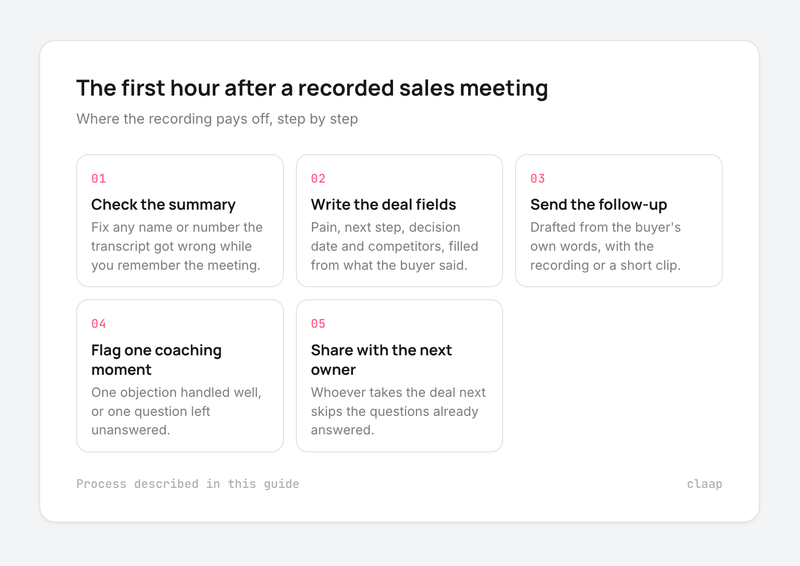
- Check the summary within the hour. Fix any name or number the transcript got wrong while you still remember the meeting.
- Write the deal fields from the call. Pain, next step, decision date and competitors belong in the CRM, filled from what the buyer said.
- Send the follow-up email the same day, drafted from the buyer's own words, with the demo recording or a short clip attached.
- Flag one moment for coaching. One objection handled well, or one question left unanswered, is enough for the next one-to-one.
- Share it with whoever takes the deal next. A Customer Success Manager who listens to the discovery call skips the questions the buyer already answered.
Where Claap fits
A quick note: Claap is our product. We describe what it does from our own pricing page and help center, and you can do every step above with other tools.
Claap records Zoom, Google Meet and Microsoft Teams meetings automatically from your calendar, without a bot from the desktop app or Chrome extension, or with a visible bot when you want one. In-person meetings record from the Claap mobile app on iOS and Android, and dialer calls from Aircall, Ringover and lemlist import next to your meetings, so every channel lands on one record per deal.
After the meeting, Claap writes the summary, fills HubSpot or Salesforce fields, drafts the follow-up email and scores the call against your sales methodology.
On Claap's pricing page, the plans that matter here are:
- Basic: free, with the Chrome extension and the meeting bot.
- Pro: $32 per seat per month billed yearly, adding the Mac desktop app and dialer imports.
- Business: $60 per seat per month billed yearly, adding CRM auto-fill, the follow-up email and call scoring.
- Enterprise: on quote.
Takeaways
- Small teams can start free with native Zoom recording or a browser extension, and add a CRM-connected tool once the notes need to reach the deal.
- Teams whose buyers host the calls, or sell to cautious buyers, should default to bot-free recording and a spoken consent sentence.
- Teams that cannot make the consent sentence a habit should keep the visible bot, because an unannounced recording costs more than an awkward participant name.
Frequently asked questions
Is it legal to record a sales meeting without permission?
It depends on where each participant is. US federal law and most states allow recording with one party's consent, but about 11 states, including California and Florida, require everyone's consent, according to the Reporters Committee for Freedom of the Press. In Europe, GDPR requires telling participants that you record and why. The safe habit is to say it at the start of every meeting and offer to stop.
What is the best way to record a sales meeting?
Record from your calendar with an auto-record rule, so every external meeting is captured without anyone pressing a button. Use a desktop app or browser extension for video calls, your dialer's recording for phone calls and a phone app for in-person meetings. Then send all of them to one place connected to your CRM.
Is there a free tool to record sales meetings?
Yes. Zoom's computer recording works on free accounts, and Claap's free Basic plan includes the Chrome extension and the meeting bot. Google Meet recording needs a paid Google Workspace edition.
Should I use a meeting bot or record without one?
Record without a bot when the buyer hosts the meeting or is likely to be uneasy with a recorder in the call. Keep a visible bot when your reps tend to forget to announce the recording, because the bot's name and chat message do it for them.
How do I record an in-person sales meeting?
Use a recording app on your phone, placed on the table where the buyer can see it, and say the consent sentence before the meeting starts. Pick an app that attaches the recording to the calendar event and sends the notes to your CRM.
What should I do with a sales meeting recording?
Check the summary within the hour, write the deal fields in your CRM from what the buyer said, send the follow-up email the same day and flag one moment for coaching. Share the recording with whoever takes the deal next.