Best sales call recording apps for field sales reps
Six apps that record a sales meeting in a room, compared on bot-free capture, no-signal recording, CRM write-back and the real price of each setup.

Updated 16 October 2026.
Field sales call recording apps overview
- Siro is best for in-home and door-to-door sales teams that sell at the customer's kitchen table and want coaching on every appointment.
- Gong is best for enterprise teams already running Gong on video calls that want face-to-face meetings in the same deal record.
- Claap is best for B2B field reps who need each in-person meeting written to HubSpot or Salesforce without typing it up that evening.
- Fireflies is best for small teams that want cheap transcripts of field meetings and a few CRM notes.
- Otter is best for individual reps who want a transcript on their phone and rarely need the CRM.
- Plaud is best for reps who want a wearable recorder that works with no phone signal and are fine syncing it later.
For field reps, a recording app is worth it only when the meeting reaches the CRM before the rep is back in the car. An app that leaves a transcript to sort out that evening moves the write-up to a later hour, and the field day still never reaches the pipeline.
Sales reps spend only a third of their time on revenue-generating work, and logging customer information is one of the jobs that takes the rest, according to Salesforce's State of Sales report.
Field reps pay that tax twice. Their best conversations happen in a room, where no meeting bot can join, so the notes depend on memory and a phone screen.
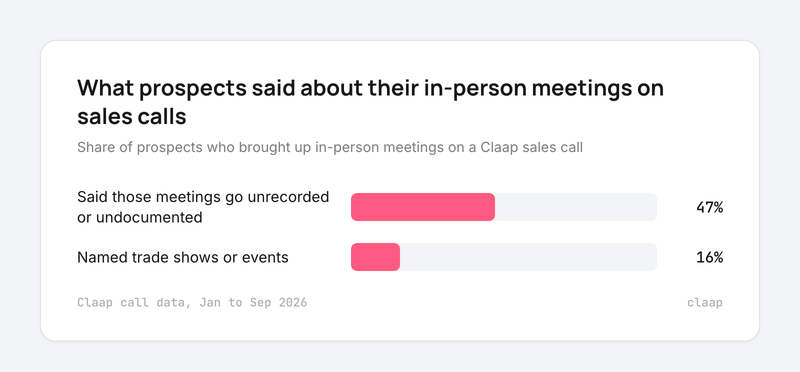
We see it on our own sales calls: 47% of the prospects who brought up in-person meetings described them as the conversations their team does not record or write up (Claap call data, January to September 2026).
So we compared the six apps that come up most when sales teams look for a way to record a meeting in a room. We looked at how each one captures the meeting, whether it keeps recording with no signal, what reaches the CRM, and what the setup really costs.
Field sales recording apps at a glance
Prices below are for the cheapest plan that records an in-person meeting and gets it to your CRM, per seat per month, billed yearly.
| Tool | Best for | How it records in person | Records with no signal | CRM write-back | Price to do the job | G2 rating |
|---|---|---|---|---|---|---|
| Siro | In-home and door-to-door sales | Phone or tablet app | Yes | Salesforce autofill, HubSpot, API | On request | 5.0 (26 reviews) |
| Gong | Enterprise teams on Gong | Mobile app, audio only | Not documented | Salesforce, HubSpot, Dynamics | On request, per user plus a platform fee | 4.7 (6,700+ reviews) |
| Claap | B2B field reps on HubSpot or Salesforce | iOS and Android app, no bot | Yes, offline mode | Auto-filled fields on Business | $60 (Business) | 4.6 (480+ reviews) |
| Fireflies | Cheap transcripts for small teams | iOS and Android app | Not documented | CRM notes from Pro | $10 (Pro) | 4.7 (753 reviews) |
| Otter | Individual reps | iOS and Android app | Not documented | Salesforce and HubSpot, capped by user count | $19.99 (Business, up to 5 CRM users) | 4.4 (505 reviews) |
| Plaud | Reps who want a wearable recorder | NotePin device, 64 GB of storage | Yes | No CRM integration listed | $159 device, 300 free minutes a month | 4.6 on G2, as shown on Plaud's site |
Sources: each vendor's pricing page and help center, G2 product pages (ratings read 7 to 16 October 2026), and Claap call data for Claap's offline mode.
Why in-person meetings go unrecorded
On Claap sales calls from January to September 2026, 47% of the prospects who raised in-person meetings said those meetings are the ones their team does not capture, and 16% brought up trade shows or events as a separate blind spot (Claap call data, January to September 2026).
- The laptop is the problem in the room. A bot cannot join a meeting across a table, and opening a laptop changes the conversation. A sales enablement manager at a B2B software company put it this way:
- "When it's a in-person meeting, is there something that like a app or something that can be used to record the conversation in person? [...] I think that's a big chunk of what gets missed out of. Because it may be awkward to just keep the laptop on."
- A recording nobody files is lost too. At trade shows, reps fall back on their own phones, and the audio stays there. A sales lead at a digital marketing agency said (translated from French):
- "When we're in a meeting, at trade shows for example, it's a bit weird to say 'Hold on, I'm turning on my camera, log in.' So we couldn't capture the information. They recorded themselves here and there at the trade shows, but none of them uploaded the audio."
- Reps cannot run the meeting and take notes at the same time. A transformation director at an engineering consulting group, whose team holds most of its meetings in person, said (translated from French):
- "They have an in-person meeting, they talk and they take notes. So it's often very hard to run the meeting and take notes."
What that means for the choice of app:
- Pick an app that records from a phone placed on the table, because a laptop or a bot is exactly what field teams avoid.
- Pick an app that keeps recording with the screen off and with no signal, because a basement meeting room or a rural site is a normal day for a field rep.
- Pick an app that writes the meeting to the CRM when your managers forecast from the CRM, because a transcript nobody files leaves the deal invisible.
How we built this comparison
We scored each app on the criteria from the table above, plus what reviewers say.
Our own input comes from Claap sales calls, where prospects describe how their field teams work today. We quote buyers by role and company type only.
Important note: Speakwise, an iPhone recorder that markets itself for field sales, has no G2 reviews yet, so we left it out of this selection. We also left out field sales CRMs such as SPOTIO, which plan routes and log visits but do not record the conversation.
A quick note: Claap is our product. To keep this comparison fair, we relied on third-party reviews and linked every major claim to its source.
The 6 best sales call recording apps for field sales reps
1. Siro, best for in-home and door-to-door sales teams
Siro is the pick for teams that sell inside the customer's home, such as home improvement, home services or telecom, because it is built around the appointment and the coaching that follows it.
Who Siro works best for
In-home and door-to-door sales teams who want every appointment recorded and scored. B2B teams can use it too, though its examples and benchmarks come from home services.
Siro overview
- Reps record every appointment on their phone or tablet, even without signal, and Siro turns it into notes, follow-ups and coaching, according to Siro's website.
- Siro also records cell phone calls, video calls and call center conversations, with real-time support and scorecards.
- A Salesforce opportunity can be autofilled from the conversation.
Siro pricing
Siro does not publish prices; its website asks you to book a demo.
Siro integrations
- CRM: Salesforce autofill and a HubSpot integration that matches each conversation to its opportunity (Siro's HubSpot guide).
- API: a public API for a custom CRM integration, which Siro's developer docs estimate at 4 to 8 hours of work for a developer.
Siro pros and cons
Pros:
- Built for appointments in a home, with coaching designed around them.
- CRM matching of each recording to its opportunity.
Cons:
- No public pricing, so you need a sales call to know the cost.
- Its focus on home services means fewer B2B examples and benchmarks.
What G2 reviewers say about Siro
Siro holds a 5.0 rating from 26 reviews on G2, a small base next to the other tools here.
2. Gong, best for enterprise teams already running Gong on video calls
Gong is the pick when your company already records video calls in Gong and wants face-to-face meetings in the same deal timeline; buying Gong only to record field meetings is hard to justify at its price.
Who Gong works best for
Enterprise sales teams with a revenue operations team that already forecast and review deals in Gong, and that have some reps in the field.
Gong overview
- The Gong mobile app records spontaneous face-to-face meetings that are not in your calendar, according to Gong's help center.
- In-person recordings are audio only, and the help center warns that a noisy room lowers the quality.
- Recording on mobile needs the "Manually schedule and upload" permission in your user profile.
- Before uploading, you can link the recording to an account, an opportunity or contacts; contact association works on iOS only.
Gong pricing
Gong's pricing page says licenses are priced per user, with a platform fee based on the number of users. Vendr puts the median Gong contract at $55,359 a year, across 593 purchases (Vendr, March 2026).
Gong integrations
- CRM: Salesforce, HubSpot and Microsoft Dynamics.
- Conferencing: Zoom, Google Meet and Microsoft Teams.
Gong pros and cons
Pros:
- Field meetings land in the same deal record as every video call.
Cons:
- Mobile recording depends on an admin permission.
What G2 reviewers say about Gong
Gong holds a 4.7 rating from more than 6,700 reviews on G2.
3. Claap, best for B2B field reps who need each in-person meeting in the CRM
Claap is the pick when your field reps sell to businesses, your managers live in HubSpot or Salesforce, and you want the in-person meeting to fill the same CRM fields as a video call.
Who Claap works best for
B2B sales teams of account executives, account managers and trade show staff who split their week between client sites and video calls, and who want one workspace for both.
Claap overview
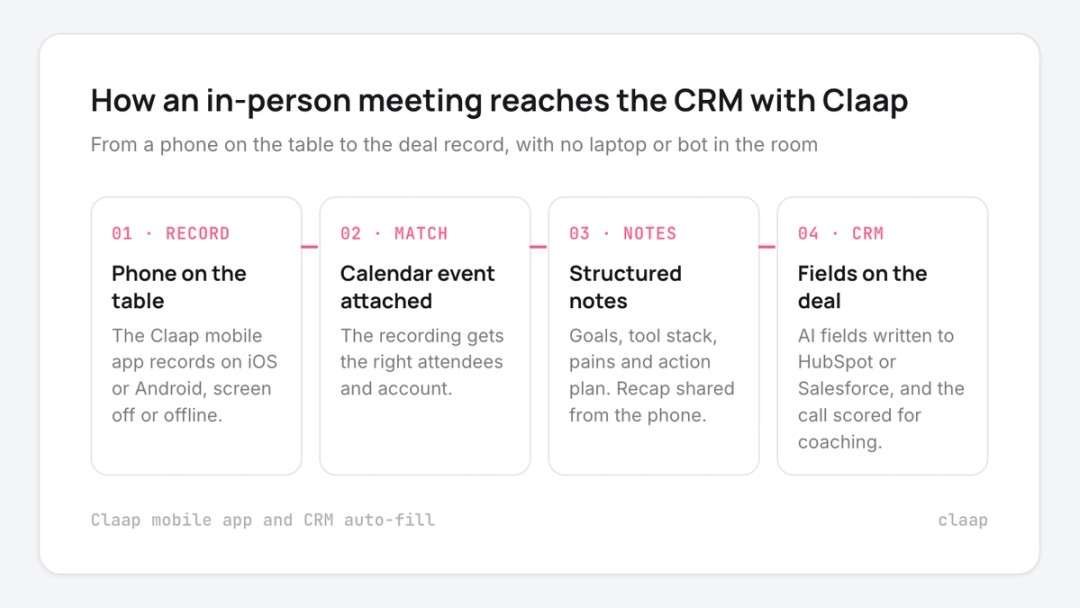
- The Claap mobile app records the meeting from a phone on the table, on iOS and Android, with no laptop or bot in the room (Claap help center).
- The recording is matched to the calendar event, so the right attendees and account are attached.
- The app keeps recording with the screen off, and its offline mode records with no internet connection (Claap call data, April 2026).
- Claap writes structured notes with the buyer's goals, current tool stack, pains and action plan, and you share the recap from your phone, according to Claap's help center.
- The meeting gets the same AI fields, call scoring and follow-up email draft as a remote call, and the fields are written to HubSpot or Salesforce with CRM auto-fill.
Claap pricing
Claap's pricing page lists:
- Basic: free.
- Pro: $32 per seat per month, billed yearly, with transcription and AI summaries.
- Business: $60 per seat per month, billed yearly, with CRM auto-fill, AI coaching and call scoring.
- Enterprise: on quote.
To write field meetings to the CRM, plan on Business.
Claap integrations
- CRM: HubSpot and Salesforce, standard and custom properties on contacts, companies or accounts, and deals or opportunities.
- Meetings and calls: in-person meetings from the mobile app, plus video calls and phone calls in the same workspace.
- AI agents: Claude and other AI agents can read your calls through Claap's MCP server.
Claap pros and cons
Pros:
- The in-person meeting reaches the CRM fields with no typing.
- One workspace and one set of scorecards for field meetings and video calls.
- Published prices and a free plan.
Cons:
- In-person recordings are audio only.
- CRM auto-fill and call scoring start at Business.
- No route planning or visit check-ins: pair it with a field sales CRM if you need them.
What G2 reviewers say about Claap
Claap holds a 4.6 rating from more than 480 reviews on G2.
4. Fireflies, best for small teams that want cheap transcripts of field meetings
Fireflies is the pick when you mainly want a searchable transcript and summary of each field meeting at a low price, and CRM notes are a bonus.
Who Fireflies works best for
Small sales teams and founders who already use Fireflies on video calls and want their in-person meetings in the same notebook.
Fireflies overview
- The Fireflies mobile app records an in-person meeting with one tap, with pause and resume, and saves it to your notebook, according to the Fireflies guide.
- Conversation intelligence and team analytics come with the Business plan.
Fireflies pricing
Fireflies' pricing page lists a free plan, Pro at $10 and Business at $19 per seat per month billed annually, and Enterprise at $39, annual only.
Fireflies integrations
- CRM: HubSpot and Salesforce. Fireflies' HubSpot guide lists Pro or higher for syncing full transcripts, and Business or higher for integration rules (Fireflies HubSpot guide).
- Conferencing: Zoom, Google Meet, Microsoft Teams and Webex.
Fireflies pros and cons
Pros:
- Low price per seat.
- Field meetings and video calls in one searchable place.
Cons:
- HubSpot integration rules need the Business plan.
- Sales coaching features are lighter than in sales-specific tools.
What G2 reviewers say about Fireflies
Fireflies holds a 4.7 rating from 753 reviews on G2.
5. Otter, best for individual reps who want a transcript on their phone
Otter is the pick for a rep who wants a reliable transcript of a client meeting on their phone, without a team rollout.
Who Otter works best for
Individual reps and very small teams. The CRM integration is capped by user count below Enterprise, which limits it for larger field teams.
Otter overview
- Otter has iOS and Android apps on every plan, and records with the phone's microphone, Bluetooth or AirPods, according to Otter's pricing page.
- Each recording is capped at 30 minutes on Basic, 90 minutes on Pro and 4 hours on Business (Otter pricing).
Otter pricing
Otter's pricing page lists Basic free with 300 minutes a month, Pro at $8.33 and Business at $19.99 per user per month billed annually, and Enterprise on request.
Otter integrations
- CRM: Salesforce and HubSpot, limited to 1 user on Pro and 5 users on Business, and unlimited on Enterprise (Otter pricing).
- Conferencing: Zoom, Google Meet and Microsoft Teams.
Otter pros and cons
Pros:
- Cheapest paid plan in this list.
Cons:
- A 90-minute cap per recording on Pro cuts long site visits (Otter pricing).
- CRM integration caps make it hard to roll out to a whole field team.
What G2 reviewers say about Otter
Otter holds a 4.4 rating from 505 reviews on G2.
6. Plaud, best for reps who want a wearable recorder that works with no signal
Plaud is the pick when a rep wants a dedicated device that records all day without draining the phone, and is fine with syncing and processing notes later.
Who Plaud works best for
Individual reps on long site visits or trade show days who want hands-free capture and do their CRM updates themselves.
Plaud overview
- The Plaud NotePin records up to 20 hours continuously and stores audio on 64 GB of local storage, according to Plaud's product page.
- The NotePin S records with no internet connection and syncs to the Plaud app later, which then transcribes and summarizes, according to Plaud's support center.
- Plaud transcribes in 112 languages (Plaud).
Plaud pricing
The NotePin costs $159 and includes 300 free transcription minutes a month, according to Plaud's product page. Pro and Unlimited plans add more minutes.
Plaud integrations
- CRM: no CRM integration is listed on Plaud's product page.
- Exports: notes and transcripts come out of the Plaud app and Plaud Web.
Plaud pros and cons
Pros:
- Records with no signal and no phone battery drain.
- Wearable, so nothing sits on the table.
Cons:
- A device to buy, charge and carry for every rep.
- Recordings wait for a sync before they become notes.
- Nothing reaches the CRM without a manual step.
What G2 reviewers say about Plaud
Plaud's website shows a 4.6 rating on G2 and a 4.7 Trustscore from more than 2,000 Trustpilot reviews.
How to roll out recording for a field team
- Ask for consent at the start of every meeting. Recording laws differ by state and country; our sales call recording guide covers the consent rules.
- Start the recording from the calendar event, so the meeting is linked to the right account and attendees without a manual step.
- Put the phone on the table between the speakers, since in-person recordings are audio and distance lowers the quality.
- Map the fields before the first meeting. Decide which CRM properties the meeting should fill (next step, decision date, competitor) so managers see field deals next to every other deal in their pipeline tracking.
- Review the first ten field recordings with each rep, so the habit sticks before you scale it.
This advice is wrong if your field team sells to consumers at the door with no CRM opportunity behind each visit. Then a coaching-first tool such as Siro fits better than a CRM-first one.
Takeaways
- Selling in homes: pick Siro, because its coaching and benchmarks are built for in-home appointments.
- Already on Gong: use Gong's mobile app, because field meetings then join the same deal record.
- B2B field reps on HubSpot or Salesforce: pick Claap, because the in-person meeting fills the CRM fields like a video call.
- Small budget, transcripts first: start with Fireflies or Otter, and skip them if you need CRM fields for a whole team.
- No signal and long days on site: pick Plaud, and budget time for the sync and the manual CRM update.
For the wider market, including dialers and video-call recorders, see our roundup of the best sales call recording software, or the Claap sales call recording platform.
Frequently asked questions
What is the best app for recording sales calls in person?
It depends on where the meeting has to end up. Siro fits in-home sales teams, Gong fits enterprise teams already on Gong, and Claap fits B2B field reps who need each in-person meeting written to HubSpot or Salesforce.
Can I record my sales calls and in-person meetings?
Yes, with consent. Some US states require every participant to agree to the recording, so the safe habit is to ask at the start of every meeting and keep the request on the recording.
Can a field sales recording app work without signal?
Some can. Siro and Claap record with no signal on the phone, and Plaud's NotePin S records on the device and syncs to its app later.
Do I need a separate recording device for field sales?
No. A phone app on the table is enough for most meetings. A wearable such as Plaud helps on long site visits, but the recording then needs a sync before it becomes notes.
What is the best mobile app for sales reps?
For recording, pick an app that runs on both iOS and Android, records from the table without a bot and sends the meeting to your CRM. For route planning and visit logging, a field sales CRM such as SPOTIO covers what recording apps do not.
How do in-person recordings get into the CRM?
The app matches the recording to the calendar event, then writes the meeting's fields to the CRM record. In Claap this runs automatically on the Business plan once auto-fill is on for HubSpot or Salesforce.