Best sales call transcription software: a buyer's guide for 2026
A buyer's guide to sales call transcription: what a sales-grade transcript needs, a trial checklist, eight tools compared honestly, and how to analyze transcripts with Claude or ChatGPT.


The best sales call transcription software is the one that captures every channel your reps sell on (video meetings, dialer calls, in-person meetings) and files each transcript on the right contact and deal. For most B2B sales teams that means a sales-focused tool such as Claap, Gong, Avoma, Modjo or Attention, not a generic note taker. Otter, Fireflies and Fathom are cheaper and good at notes, but they are built for meetings in general, not for the deal record.
This guide covers what separates a sales-grade transcript from a plain one, a checklist to run during a trial, an honest look at eight tools with prices checked on each vendor's site in October 2026, and how to analyze your transcripts with Claude or ChatGPT once you have them.
What a year of sales calls on Claap shows
We measured every completed recording on Claap over the last 12 months: more than 513,000 hours of conversation. Two numbers change how you should judge a transcription tool.
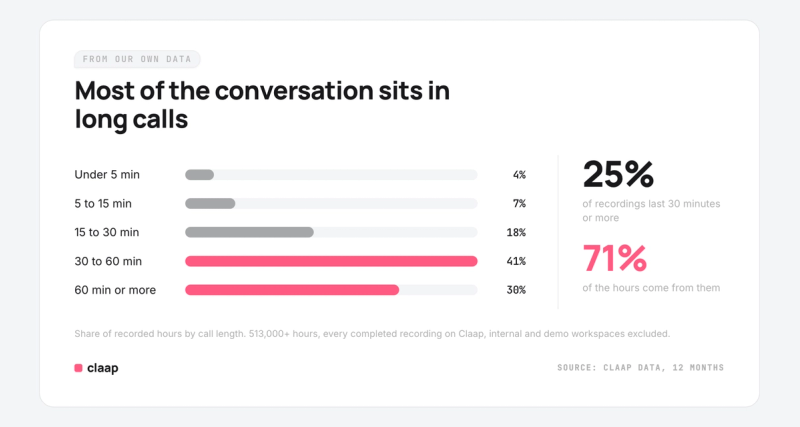
- Calls of 30 minutes or more are 25% of recordings but 71% of the hours. Most of what buyers tell your team sits in long discovery calls and demos. Nobody reads a 45-minute transcript end to end, so search across calls, and a transcript that takes you to the exact moment, matter more than a neat summary of one call.
- Dialer calls are 29% of recordings, though only 5% of the hours. They are short and numerous, and phone-led teams make a lot of them. If your reps prospect on the phone, a tool that only joins Zoom, Meet and Teams misses a large share of their conversations.
What buyers say on our own sales calls points the same way. The complaints that come back are about a channel the tool does not reach, about transcripts they cannot get out of the tool, and, outside English, about language detection.
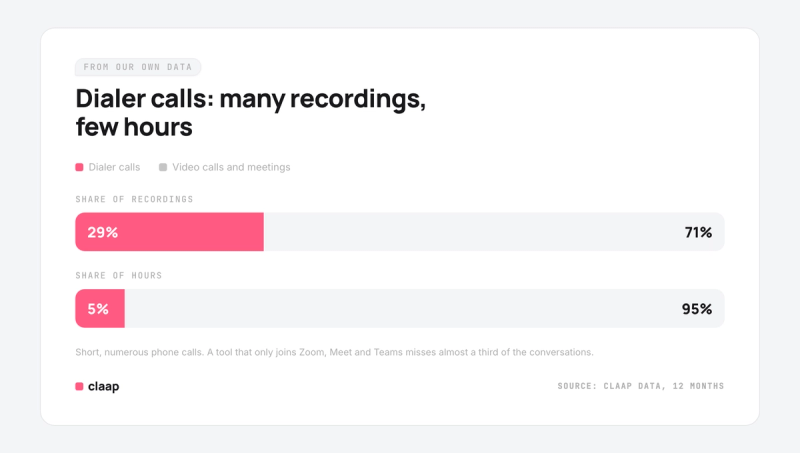
Method: completed recordings from 30 September 2025 to 29 September 2026, internal, demo and test workspaces excluded (1.66 million recordings across about 6,650 workspaces), aggregated with no customer identified. Internal and external meetings are mixed, and dialer calls come from about 120 phone-led workspaces.
What makes a transcript "sales-grade"
Any transcription engine turns speech into text. The text is not the hard part any more. What decides whether a sales team actually uses the transcripts is everything around them.
Speaker labels you can trust
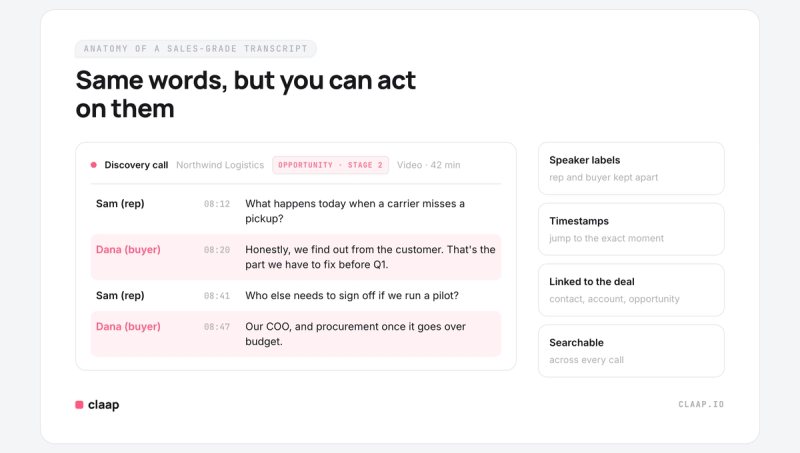
A discovery call transcript that reads as one block of text is close to useless. You need to know whether the budget figure came from the prospect or from your rep. Look for automatic speaker separation, the ability to rename a speaker when the tool guesses wrong, and a timeline of who spoke when. Talk time per participant is the quickest way to spot a demo where the rep never stopped talking.
Linked to the contact and the deal
A transcript that lives in a separate app gets read once, by the rep who was on the call. A transcript attached to the CRM contact and the open deal gets read by the manager in pipe review, by the next rep who inherits the account, and by any AI agent you point at the deal. Ask how the tool matches a call to a record: meetings are usually matched by attendee email, phone calls by phone number.
“It is a black box. I never know what I'm going to get. So I'm going to check this most recent deal to see if [...] at least the transcription is there.”
Heard on a recorded call · Revenue lead, UK sports-tech company
Search across every call
"Which prospects brought up our competitor last month?" is a question you can only answer with search across all transcripts, not inside one call at a time. Check whether search covers the whole workspace and whether it is keyword only or also semantic.
The languages your buyers speak
If you sell in more than one market, check that the tool detects the language on its own and that its summaries and AI features work in that language, not only in English. Some tools transcribe dozens of languages but run part of their analysis in English only.
Bot or bot-free capture
Most note takers join the call as a visible participant. That is transparent, but some prospects drop the bot or ask what it is, and it does not help in a meeting room. Bot-free capture records from the rep's own computer instead. The best setup lets each team choose: bot-free by default, a visible bot when you prefer everyone to see the recording.
In-person meetings are the hardest case, and buyers feel it:
“[For an] in-person meeting, you have to have a recording device. [...] We try to use our phone, but if you get a call in, it interrupts [...] the recording, it shuts it off, or sometimes even notifications shut it off. [...] That's been a real big pain for us.”
Heard on a recorded call · Owner, US small business
Dialer calls, not just video meetings
For outbound and inside sales teams, most conversations happen on the phone. If the transcription tool only covers Zoom, Meet and Teams, half of the pipeline never gets a transcript. Check for native integrations with your dialer (Aircall, Ringover and the like), and check what happens when a call is too short or the number does not match a contact.
An evaluation checklist for your trial
Run the trial on real calls, not on a demo account. These are the questions worth answering before you sign.
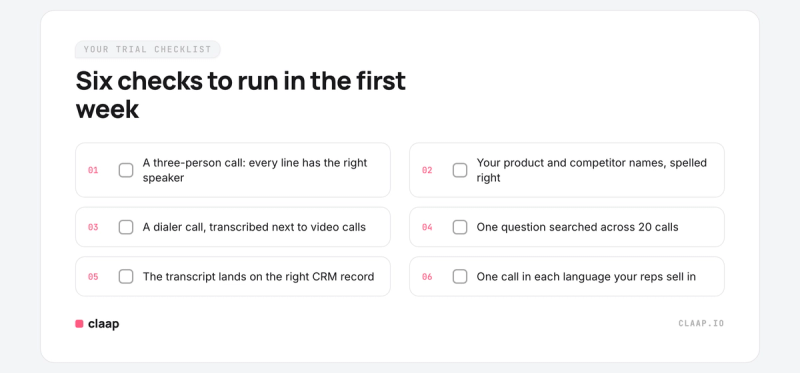
- Coverage: does it capture video meetings, dialer calls and in-person meetings, or only one of them?
- Capture mode: can you record without a bot, with a bot, or both?
- Accuracy on your vocabulary: are your product names, competitor names and acronyms spelled right? Is there a custom glossary to fix them?
- Speakers: are the prospect and the rep separated correctly on a call with four people?
- CRM: does the transcript or summary land on the contact and the deal in HubSpot or Salesforce, and on which plan?
- Search: can a manager search every call in the workspace?
- Languages: does it handle the languages your team sells in, including the AI features?
- Access for AI: can Claude, ChatGPT or your own agent read the transcripts directly, through an MCP connector or an API, without anyone exporting files?
- Permissions: do private calls stay private, in the app and through the connector?
- Price: is the price public, per seat, and does it include the features above or sell them as add-ons?
Test coverage first, on the platform your buyers actually use. A gap there does not get fixed after you sign:
“A bunch of them won't use Zoom. They'll only use Teams. We've literally been trying to connect Teams to [our call recorder] since November. And it still doesn't work.”
Heard on a recorded call · Sales leader, US ed-tech scale-up
The best sales call transcription software, compared
Claap publishes this guide, so it comes first. The order of the others is not a ranking: each one is the better pick for a specific kind of team, and we say which.
Claap
Claap records and transcribes every sales conversation: online meetings bot-free through the Chrome extension or the Mac desktop app (with a visible bot if you prefer), dialer calls from Aircall, Ringover, Allo and lemlist VoIP, and in-person meetings on the mobile app. Transcripts come speaker by speaker, timestamped, in 99+ languages detected automatically, with a custom glossary for your product terms. On Business, each call is attached to its contact and deal in HubSpot, Salesforce, Attio or Pipedrive, and Claap fills your CRM fields from what was said.
Where it differs most is what happens after the transcript. The Claap MCP connector is on every plan, including the free one, so Claude or ChatGPT can search your calls, pull a full transcript, or read a view where every call has already been scored on your own AI fields.
Better pick if: you want every channel on the deal record and your transcripts open to your own AI tools. Limits to know: CRM sync starts on Business, the desktop app is Mac only, and Claap does not place phone calls itself: calls come in through your dialer. See pricing for what each plan includes.
Gong
Gong is the incumbent for large revenue teams, with transcription in more than 70 languages and a deep platform built around deals and forecasting. It does not publish prices: licenses are priced per user, plus a platform fee based on the number of users. Gong's MCP server is read-only and its tools return AI-generated insights rather than raw transcripts.
Better pick if: you run a large sales organization with the budget for a platform fee and want one mature system for calls, deals and forecasting.
Avoma
Avoma publishes its prices: from $19 per recorder seat per month on annual billing, with conversation intelligence as a $29 add-on. Transcription covers 70+ languages with speaker identification, and viewers are free. Its MCP connector requires the Organization or Enterprise plan, or the API add-on.
Better pick if: you want transparent, modular pricing and can live with paying for the analysis layer separately.
Modjo
Modjo is a European conversation intelligence tool, quote only, that describes itself as "optimal from 3 sales reps". It connects to HubSpot, Salesforce, Dynamics 365, Pipedrive, Sellsy and Zoho, translates transcripts into six languages, and has an MCP connector listed in Claude's and Dust's directories.
Better pick if: your CRM is Sellsy or Dynamics 365, or you want a European vendor with a sales-only focus.
Attention
Attention records meetings, calls and emails and runs AI agents on them for follow-ups, CRM filling and coaching scorecards. Pricing is not public. Its MCP server returns raw transcripts and call moments and includes write and admin tools.
Better pick if: you want the vendor's own agents to do the follow-up work, and you are comfortable with quote-based pricing.
Otter, Fireflies and Fathom: the generalist note takers
These three are meeting note takers first. They are cheap or free to start, quick to set up, and good at summaries. Fathom's free plan includes unlimited recordings and transcriptions. Otter Business is $19.99 per user per month on annual billing, and Fireflies Business is $19.
The tradeoff is depth on the sales side. Their language coverage is narrower (Otter lists six languages; Fireflies calls English its primary language with 100+ others in beta), CRM sync sits on paid tiers at Otter and Fathom, and none of them is built around dialer calls or deal records. Better pick if: you are a founder or a small team that needs notes from video calls, not a pipeline system. If you only need generic transcription, our roundup of AI transcription tools covers more options.
Comparison table
Facts read on each vendor's own website, as of October 2026. Prices are per seat per month on annual billing.
| Tool | Public price | Transcription languages (vendor's figure) | MCP connector for AI tools |
|---|---|---|---|
| Claap | €0 Basic, €24 Pro, €48 Business, Enterprise on quote | 99+ (Pro and up) | Every plan, read and write |
| Gong | Quote only: per user plus a platform fee | 70+ | Read-only, returns insights, not raw transcripts |
| Avoma | From $19, plus $29 for conversation intelligence | 70+ | Organization or Enterprise plan, or API add-on |
| Modjo | Quote only, "optimal from 3 sales reps" | Not published; translation into 6 languages | Yes, reads calls, deals and transcripts |
| Attention | Quote only | Not published | Yes, raw transcripts plus write and admin tools |
| Otter | Free, $8.33 Pro, $19.99 Business | 6 | Not covered here |
| Fireflies | Free, $10 Pro, $19 Business, $39 Enterprise | English primary, 100+ in beta | Not covered here |
| Fathom | Free, $15 Team, $25 Business | Not published on the pricing page | Not covered here |
How to analyze sales calls with AI transcription
A transcript is raw material. The value comes from the questions you ask of it. Here is how to do it by hand with Claude or ChatGPT, and where the by-hand method breaks.
Prompts to run on a single transcript
Paste or attach one transcript, give the model a line of context (what you sell, who the buyer is, which deal stage), then ask one of these:
- Deal summary: "Summarize this discovery call for the account executive who will run the demo. List the pain in the prospect's own words, the budget and timeline if mentioned, and who else is involved in the decision. Quote the transcript for each point."
- Qualification: "Score this call against MEDDIC. For each letter, say what we learned, quote the passage, and mark it as confirmed, partial or missing. End with the three questions the rep should ask next."
- Objections: "List every objection the prospect raised, how the rep answered, and whether the answer landed. Suggest a better answer where it did not."
- Coaching: "Act as a sales manager. Give the rep two things to keep and two things to change, each tied to a timestamp in the call."
- Follow-up: "Draft a follow-up email that recaps the next steps both sides agreed on. Do not add anything that was not said on the call."
Two habits make these prompts far more reliable: ask the model to quote the transcript for every claim, so you can check it, and keep the speaker labels in the text you paste. For more, see our list of prompts for sales calls.
Where copy-paste stops working
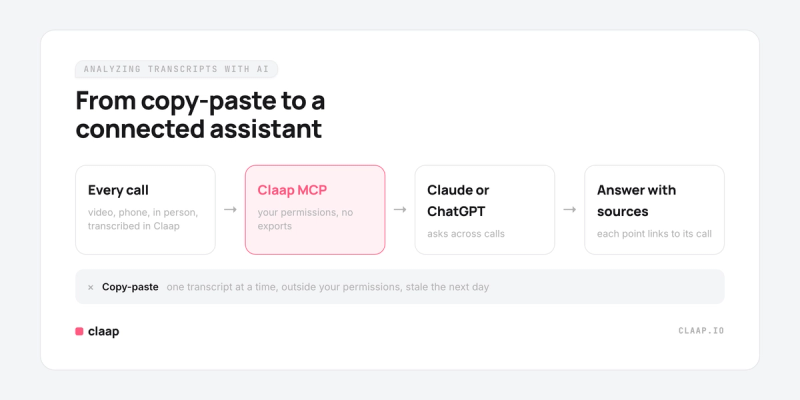
One call at a time works for one deal. It breaks the moment the question is about the pipeline: "What are the top objections this quarter?", "Which open deals have no identified champion?". You cannot paste 500 transcripts into a chat, so the model answers from the handful you gave it, and the answer sounds just as confident either way.
Claap's help center documents this on the same question. Pointed at a raw folder of transcripts, an agent sampled three calls out of 528 and returned an average it had never measured. Pointed at a SPICED view, it read all 263 scored calls and the value stored for each one.
Giving the LLM your transcripts directly, with Claap MCP
Claap's MCP connector plugs Claude, ChatGPT or any MCP-compatible client into your workspace. You add the endpoint, sign in with OAuth, and the client installs the tools. Then you ask in plain language:
- "Pull the full transcript of yesterday's call with Acme" fetches that recording's transcript.
- "Find every call where a prospect mentioned a security review" runs a keyword or semantic search across the transcripts you can access.
- "Which open deals have no identified champion?" reads a deal view, where each row already holds the value Claap extracted from the calls.
- "Create an AI field scoring objection handling on every discovery call" sets the field up for you, so the next question reads a column instead of re-reading transcripts.
The connector inherits your Claap permissions, so private spaces and personal recordings stay out of reach, and every write runs as you and is logged against your account.
So, which LLM is best for sales call transcript analysis?
Claude and ChatGPT both handle a single transcript well, and both connect to Claap's MCP connector. In practice the model matters less than what it can read. A strong model reading three pasted calls will lose to an average one reading a scored view of every call. Pick the assistant your team already uses, and spend the effort on giving it complete, structured data.
Where to start
If your team sells on the phone and on video, start by listing every channel your reps use and check each tool against the checklist above. To see how Claap handles transcription on calls, meetings and in-person conversations, read our page on sales call transcription. If you also need recordings synced to the CRM, our guide to sales call recording covers that side.
Frequently asked questions
What is the best sales call transcription software?
For a B2B sales team, the best option is a sales-focused tool that captures video meetings, dialer calls and in-person meetings and attaches each transcript to the contact and the deal in your CRM. Claap, Gong, Avoma, Modjo and Attention are built for that. Generalist note takers like Otter, Fireflies and Fathom are cheaper but are built for meetings in general, not for the pipeline.
What is the difference between call transcription and conversation intelligence?
Transcription turns a call into text, speaker by speaker. Conversation intelligence works on that text: it scores calls, extracts fields like budget or next steps, fills the CRM and shows trends across the pipeline. Most sales-focused tools do both, while generic transcription tools stop at the text.
Can I transcribe sales calls without a bot joining the meeting?
Yes. Some tools record from the rep's own computer instead of adding a participant to the call. Claap does this with its Chrome extension and its Mac desktop app on Zoom, Google Meet and Microsoft Teams, and offers a visible bot for teams that prefer everyone to see the recording.
How do I analyze sales call transcripts with Claude or ChatGPT?
For one call, paste the transcript with its speaker labels, give one line of context about the deal, and ask a specific question, such as a MEDDIC score with a quote for each point. For questions across many calls, connect the assistant to your call data through an MCP connector, so it reads every call instead of the few you pasted.
What is the best LLM for sales call transcript analysis?
Claude and ChatGPT both analyze a single transcript well, and both connect to Claap through its MCP connector. What matters more than the model is what it can read: a model reading a scored view of every call gives better pipeline answers than a stronger model reading three pasted transcripts.
Can phone calls from a dialer be transcribed?
Yes, if the tool integrates with your dialer. Claap imports calls from Aircall, Ringover, Allo and lemlist VoIP from the Pro plan, transcribes them and matches them to the contact by phone number. Calls need to be recorded in the dialer to be imported.
How much does sales call transcription software cost?
Prices range from free note takers to quote-only platforms with a platform fee. As of October 2026, Claap costs €0, €24 or €48 per seat per month on annual billing, Avoma starts at $19 plus $29 for conversation intelligence, and Gong, Modjo and Attention quote on request.