

Pipedrive AI note-taker: which one writes into your deals?
Almost every AI note-taker connects to Pipedrive. What matters is what it writes into the deal: a note, field updates you approve, or fields filled automatically.


Updated November 18, 2026
Pipedrive AI note-takers at a glance
- Pipedrive Nova is best for teams that want a note-taker included in their Pipedrive plan and approve every CRM update after the meeting.
- Fireflies is best for teams that mainly want the summary and transcript filed on the contact and the deal, on a small budget.
- tl;dv is best for teams that want notes, recordings and key moments synced to Pipedrive contacts, deals and activities.
- Noota is best for teams that need data hosted in Europe and are fine reviewing suggested fields before they are saved.
- Claap is best for sales teams that want deal, person and organization fields filled after every meeting, from their own questions.
Almost every AI note-taker connects to Pipedrive; what separates them is what they write into the deal: a note someone has to read, suggested field updates to approve after each meeting, or fields filled automatically from questions you defined.
On our own sales calls, about one buyer team in five that already used an AI note-taker raised it: the tool left CRM fields to the reps, or the team asked for fields filled from the call (22%, Claap call data, January to November 2026).
A note is something you read. A field is something you filter: it is what lets you sort the pipeline by decision date or list every deal where a competitor came up.
This guide compares the main tools on that one question, with their limits, so you know which one to install based on what your team wants to see in Pipedrive the day after a meeting.
Which AI note-taker integrates with Pipedrive?
Pipedrive Nova, Fireflies, tl;dv, Noota and Claap all integrate directly with Pipedrive and send it a summary of every meeting. Claap writes typed values (date, number, option, text) into Pipedrive deal, person and organization fields after each meeting with no manual approval, from AI fields you define. Nova and Noota suggest field values that you approve before they are saved, and tl;dv's Marketplace listing says it updates fields from what was said on the call.
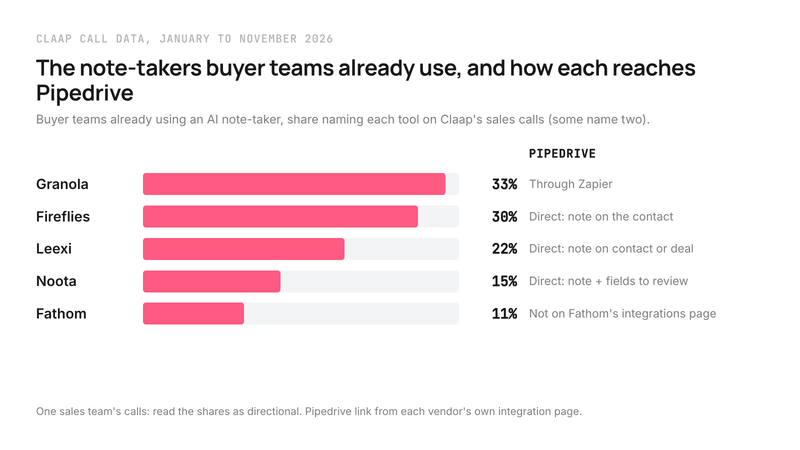
Three tools that often come up go through a middleman. Granola, the note-taker buyer teams named most on our calls, sends notes to Pipedrive via Zapier, according to Granola's integrations page. Fathom's integrations page lists HubSpot and Salesforce, and no Pipedrive. Fellow links its notes to Pipedrive records "through Zapier", according to Fellow's Pipedrive page.
A connector you build yourself is one more part that can break:
- The person in charge of AI tools at an investment firm of about sixty people said (translated from French): "We had built an integration more or less by hand, with Zapier [...] The link between [our note-taker] and [the CRM] wasn't there. So in fact we have a year and a half of data. That is stuck in [the tool]."
- A customer success automation lead at a European SaaS company, who connected his note-taker to the CRM through an automation tool, said: "We still have to rely on [the automation tool] in the process, which [...] can lead to some malfunctionings because sometimes [it] simply doesn't work."
| Tool | What reaches Pipedrive | Fields | Entry price for the Pipedrive sync |
|---|---|---|---|
| Pipedrive Nova | Summary saved as a note once approved | Suggested for deal, person, organization; you approve each one | Included in every Pipedrive plan |
| Fireflies | Activity and note on the contact, transcript and recording links | Not described on its listing | Pro, $10 per seat per month billed yearly |
| tl;dv | Notes on the contact, recordings under activities | Listing says key moments map to custom fields | Free to start, according to its listing |
| Noota | Note on the contact or deal, contacts and deals created | Suggested on Business, you review them | Pro, €19 per user per month billed yearly |
| Claap | Note activity per external attendee, linked to people, deals, organizations | Written automatically from AI fields, replace or append | Business, $60 per seat per month billed yearly |
Sources: Pipedrive's help center, Fireflies' Pipedrive Marketplace listing and pricing page, tl;dv's Pipedrive Marketplace listing, Noota's Pipedrive page and pricing page, Claap's help center and pricing page.
What each tool actually writes into the Pipedrive deal
- A note on the record. The summary, often the transcript and a link to the recording, attached to the contact or the deal. Fireflies, tl;dv and Leexi do it, so does Claap, and Nova saves its summary as a note once you approve it.
- Suggested fields, to approve. The tool proposes a value for a field, you check it and save it. That is how Nova works, and how Noota works on its Business plan.
- Fields written automatically. You define the question once, the tool answers it after every meeting and writes the answer into the field. That is what Claap's AI fields do with Pipedrive.
The summary arrives, but the per-deal view is often missing. A sales tooling lead at a Nordic software company, whose note-taker was connected to HubSpot, put it this way: "We have a deal in Hubspot, so it's hard to like, go like, see all the calls that are connected to a specific deal, for instance."
If only the rep reads their own deals, a note is often enough. If a manager runs the pipeline with filters and reports, they need filled fields, and every approval a rep forgets leaves a gap in the report.
Pipedrive Nova: included in Pipedrive, with an approval after every meeting
Nova is the default pick for a Pipedrive team getting started: it is included at no extra cost in every plan, for every user, according to Pipedrive's help center.
- It joins Google Meet, Zoom and Microsoft Teams meetings as a visible participant, or records your computer's audio with the Nova Companion desktop app, in-person meetings included.
- After the meeting, it writes a summary, lists follow-up actions and suggests updates for deal, person and organization fields, custom fields included.
- It shows the current value next to the suggested one and flags a field that changed in the meantime.
Pipedrive is upfront about the limit: no Nova suggestion is applied automatically, its help center says. Every update waits for a rep to open Nova and approve it. Suggestions come from meeting transcripts only; synced emails are left out.
Pick Nova if your team opens Nova after every meeting, because it costs nothing extra and stays inside Pipedrive.
Fireflies, tl;dv and Leexi: the summary on the contact and the deal
Fireflies records meetings and automatically logs an activity and a note under the Pipedrive contact: call details, AI-generated notes, a link to the transcript and the recording, according to Fireflies' Pipedrive Marketplace listing. Its help center also covers logging notes under a lead or a deal. The Pro plan, which includes integrations, costs $10 per seat per month billed yearly, according to Fireflies' pricing page.
tl;dv sends summaries and transcripts as notes on the contact, files recordings under activities and creates missing contacts, according to tl;dv's Pipedrive Marketplace listing. The same listing says key moments can map to custom Pipedrive fields and that deal stages and fields update from what was said on the call; that is the vendor's claim, so test it on your own fields during the trial.
Leexi also sends its summaries to a Pipedrive contact, organization or deal record, according to Leexi's Pipedrive page.
Choose any of these if your main need is to stop copy-pasting the summary, because the note lands in the right place on a small budget.
Noota: fields to review, data in Europe
Noota creates missing contacts and deals and logs the summary as a note in Pipedrive from its Pro plan. From the Business plan, it also fills fields such as the stage or the next action, which you review before saving, according to Noota's Pipedrive page. Data stays hosted in Europe, according to the same page.
Pro costs €19 and Business €39 per user per month billed yearly, according to Noota's pricing page.
Claap: AI fields written into Pipedrive fields
A quick note: Claap is our product. Every Claap fact below comes from Claap's own help center, pricing page and product team.
Claap records meetings and, after each processed meeting, creates one note activity per external attendee, with the date, duration, participants, overview, AI insights and a link to the recording, attached to the Pipedrive people, deals and organizations matched by attendee email, according to Claap's help center. The details are on the Claap Pipedrive integration page.
Since November 2026, AI fields also write into Pipedrive fields:
- An admin links an AI field to a person, organization or deal field, standard or custom.
- Text, number, date, single option and multiple options are supported; a phone number or an address is written as text, a monetary value as a number.
- Each field runs in replace or append mode, and the "Auto-sync generated fields in the CRM" toggle writes after every meeting.
- AI fields can also be appended to the activity note Claap already creates.
The limits:
- The feature is turned on workspace by workspace: ask the Claap team to switch it on for yours.
- Some existing Pipedrive connections have to be reconnected before the field list shows up.
- Pipedrive leads are not supported, and on activities only the note can be written.
- The Pipedrive integration is on the Business plan, at $60 per seat per month billed yearly ($75 monthly), according to Claap's pricing page.
The same idea works beyond Pipedrive: a question written once, asked on every call, with an answer you can filter. The CRM auto-complete page covers it for every CRM, and our roundup of AI tools that auto-fill the CRM puts it next to the other tools.
How to choose your AI note-taker for Pipedrive
Start from what your manager looks at in Pipedrive on Monday morning.
- They read the notes on deals. Pick Nova if your team is fine approving after every meeting, because it is included; otherwise Fireflies or tl;dv, because the note arrives on its own.
- They filter the pipeline by field. Choose a tool that writes the fields. Avoid relying on suggestions to approve when your reps run back-to-back meetings, because in our view approvals are the first thing they skip.
- They want their own criteria (MEDDIC, a dated next step, the competitor). Start with three AI fields in Claap, because each one maps to a column you already filter on.
- Your data has to stay in Europe. Look at Noota first, because its European hosting is written on its Pipedrive page.
This advice does not apply if most of your conversations happen on the phone: a video meeting note-taker does not hear those calls, and the dialer decides what reaches Pipedrive. Our guide to Pipedrive call recording covers that case, and the Pipedrive call recording page shows what Claap does there.
Frequently asked questions
Can Claap fill Pipedrive fields after a meeting?
Yes. An admin links an AI field to a Pipedrive person, organization or deal field, standard or custom, and Claap writes the value after each meeting, replacing or appending. The feature is turned on per workspace, some connections have to be reconnected, and Pipedrive leads are not supported.
Is Pipedrive Nova free?
Nova is included at no extra cost in every Pipedrive plan, for every user. It suggests field updates after each meeting, and none is applied without your approval.
Does Fireflies fill Pipedrive fields?
Fireflies logs an activity and a note on the Pipedrive contact, with AI-generated notes and links to the transcript and the recording. Its Pipedrive Marketplace listing does not describe writing to deal fields.
Which AI note-taker keeps data in Europe?
Noota says it hosts recordings, transcripts and summaries in Europe. For any tool, ask where the audio and the transcript are stored, and for how long.
How much does an AI note-taker for Pipedrive cost?
Nova is included in every Pipedrive plan, according to Pipedrive's help center. Fireflies Pro costs $10 per seat per month billed yearly, according to Fireflies' pricing page, and Noota Pro €19 (Business €39 for fields), according to Noota's pricing page. On Claap, the Pipedrive integration is on the Business plan, at $60 per seat per month billed yearly, according to Claap's pricing page.
Do I have to approve fields before they reach Pipedrive?
With Nova and Noota, yes: each suggested value waits for a review. With Claap, fields are written automatically once the sync toggle is on, and append mode adds to a field without erasing what a rep typed.