

Account Brief Builder
Walk into every call knowing what the account already told you. Account Brief Builder reads every call, email and deal on the account in Claap and sends you a one-page brief in Slack before the meeting: who's in the room, what they said, what's still open, and what to get out of this call.
Every weekday, 8:00Claap · Slack · Google Calendar
Works in Claude
 ChatGPT
 Grok
Install it once in your AI, then it runs on your Claap calls. No calls yet? It runs on a sample.
At a glance
- What it does
- Account Brief Builder reads every call, email and deal on an account in Claap and sends a one-page brief before the meeting.
- What you get
- One Slack DM per meeting: who is in the room, where the deal stands, quoted pain, objections and competitors with links to the recordings, open loops and a goal for the call.
- What it needs
- A Claap workspace with recorded calls, and Claude, ChatGPT or Grok connected to Claap. Slack and a calendar are optional: without Slack, the brief shows in the chat.
- Runs in
- Claude, ChatGPT, Grok · Every weekday, 8:00
- Cost
- The Claap MCP is included on every Claap plan, the free one too.
💡 What problem does Account Brief Builder solve?
Most reps prep a call by opening the CRM five minutes before, skimming the last note and hoping. By then the account has told you a lot: who signs, what hurts, which competitor they're comparing you with, what you promised to send. It's spread across six recordings, two teammates and a long email thread, and nobody re-reads that before a 30-minute call.
- The CRM tells you the stage and the amount. It doesn't tell you the CFO joined the last call and asked about security twice.
- Accounts change hands. The Account Executive who ran discovery, the Sales Engineer who did the demo and the CSM after signature each hold part of the story, and the next person in the room starts from zero.
- The buyer remembers what they said. Asking a question they already answered costs you credibility in the first five minutes.
- Open loops get lost. The security document you promised on the 3rd is the first thing they'll ask about, and it isn't in any field.
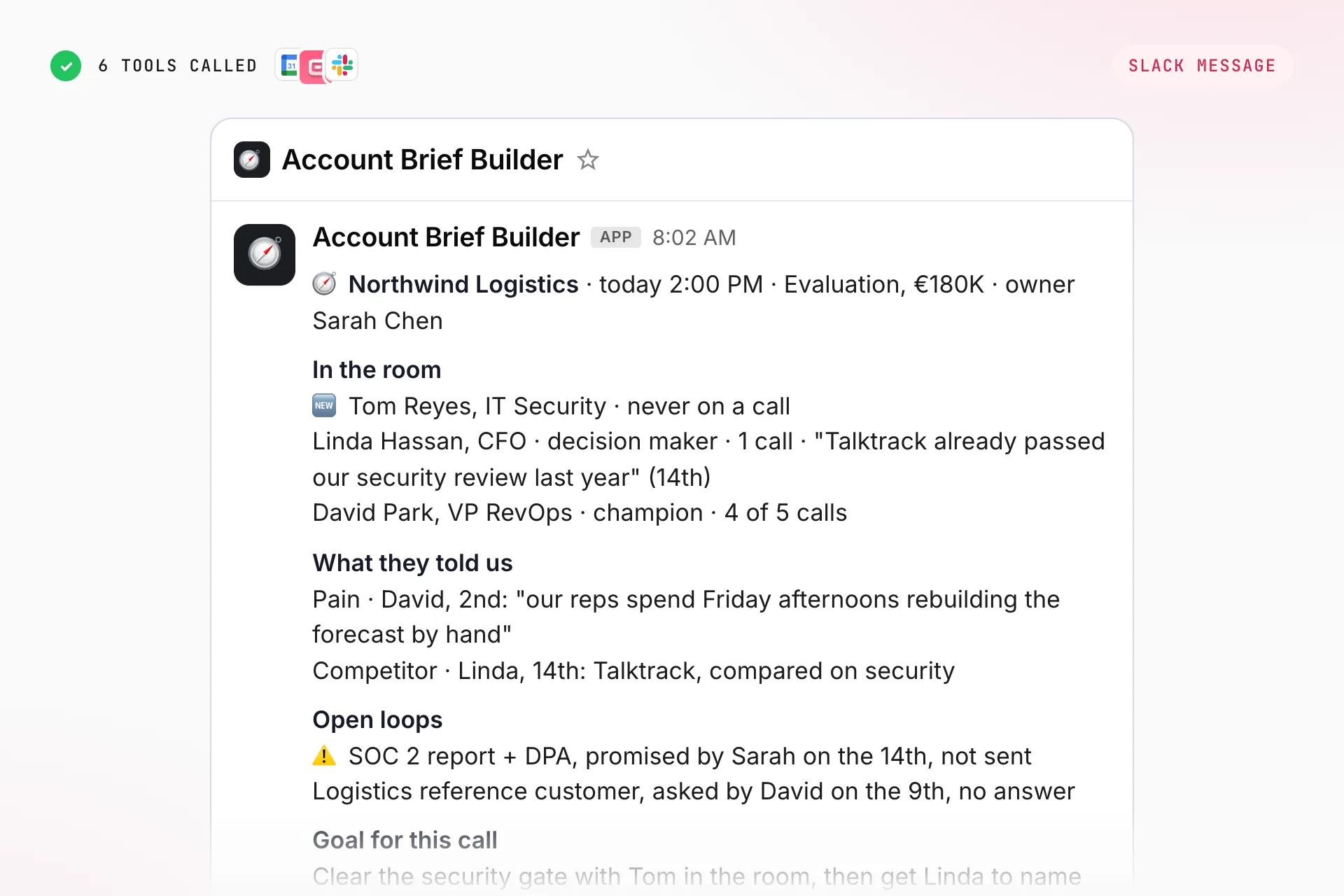
Account Brief Builder reads everything the account has said across calls, emails and deals, and sends you one brief before the meeting: who you're meeting, where things stand, what they said that matters, what's still open, and what to get out of this call.
⚙️ What does Account Brief Builder do?
Name an account and you get the brief in under a minute. Or schedule it: every morning, the agent reads your calendar and sends a brief for each external meeting of the day.
- Finds the account and everything attached to it. The company in Claap comes with its contacts, its deals and every recorded call and email thread, whoever on your team ran them.
- Starts from Claap's own read. Claap already turns each deal into a Context / Progress / Decision / Risk summary, a deal status and your custom AI fields. The agent reads those first, then the summaries of the last calls, and opens a full transcript only when a detail is missing.
- Profiles every person you're about to meet. Role, what they care about, how they've engaged so far, and the last thing they said, quoted. People who've never been on a call are flagged as new faces.
- Pulls the moments that matter. Claap tags pain points, objections and competitor mentions as calls are recorded. The agent searches those tags for this account, so each one arrives with the quote, the speaker, the date and a link to the moment in the recording.
- Lists the open loops. What you promised and haven't sent, questions they asked that got no answer, next steps agreed on the last call. These are the first things the buyer will bring up.
- Sets a goal for this call. One objective and two or three questions you haven't asked yet, built from what's missing in the record, not from a generic discovery script.
- Sends it as a Slack DM. Short enough to read on a phone in the corridor, with links to the recordings behind every claim.
Run it in ClaudeRun it in ChatGPTRun it in Grok
Pick your AI: connect Claap, add the agent as a skill, then let it run on its own.
Connect Claap
In Claude, open Settings → Connectors → Add custom connector, paste the URL and sign in to Claap. Works on every plan (the Free plan allows one custom connector). On Team and Enterprise, an admin adds it once for everyone.
https://api.claap.io/mcpAdd the skill
Download the skill, then in Claude open Customize → Skills → + → Upload a skill. Skills work on every plan once "Create and edit files" is on in Settings → Capabilities. Then ask Claude to run the agent by its name.
Make it run on its own
Ask Claude to schedule it (scheduled tasks need Pro or above). In Settings → Connectors, set the Claap tools to "Always allow" so a scheduled run never stops to ask for approval.
Run this agent every weekday at 8:00.
Install in Claude Code
Two commands: add the marketplace, then install the plugin.
/plugin marketplace add clementsprs/claap-skills
/plugin install claap@claap-skillsConnect Claap
On chatgpt.com, open Settings → Apps, turn on Developer mode, then create an app with this URL and sign in to Claap. Available on paid plans, on the web. Plus and Pro read your Claap data, which covers this agent; creating fields or updating deals needs Business or Enterprise.
https://api.claap.io/mcpAdd the skill
Download the skill, then on chatgpt.com open Plugins → Skills → Create → Upload. Skills are not on every ChatGPT plan yet: if you don’t see them, copy the instructions into a project instead. Then ask ChatGPT to run the agent by its name.
Make it run on its own
Ask ChatGPT to turn it into a scheduled task. Scheduled tasks with custom connectors are still new in ChatGPT, so check the first two runs.
Run this agent every weekday at 8:00.
Connect Claap
On grok.com/connectors, click New connector → Custom, paste the URL and sign in to Claap. On Grok Business, an admin adds the connector first, then everyone connects their own account.
https://api.claap.io/mcpAdd the skill
Download the skill and import its SKILL.md in Grok’s Skills (rolling out on grok.com). Not there yet on your account? Copy the instructions into an Automation. Add @Claap so Grok uses the connector.
Make it run on its own
Create an Automation (daily, weekdays, weekly or monthly) and mention @Claap in its instructions so Grok uses it on every run. Automations are on every Grok plan.
@Claap Run this agent every weekday at 8:00.
The setup below is written for Claude. In ChatGPT or Grok, use the connect and schedule steps from the tab above; the instructions stay the same.
🧩 How do you set up Account Brief Builder in Claude, ChatGPT or Grok?
1️⃣ Record your calls in Claap
The brief can only quote what Claap has captured. Connect your calendar so Claap records discovery, demo and follow-up calls across the team, and connect the mailboxes so the email thread is on the account too. A brief built from one call is thin; a brief built from the whole team's history is the point.
2️⃣ Connect Claap, Slack and your calendar to your AI
The Claap MCP (your accounts, calls and emails) lives at https://api.claap.io/mcp: add it as a custom connector as shown in the tabs above, then authenticate with OAuth (sign in to app.claap.io first) or with an API key header (Authorization: Bearer cla_...). The Slack MCP (where the brief lands) is a connector too: open your AI's connector settings, search for Slack, and hit Connect. For the morning run, connect Google Calendar or Outlook the same way so the agent knows who you're meeting. In ChatGPT, custom connectors need Developer mode on a paid plan (web only). The agent runs in Claude, ChatGPT or Grok.
3️⃣ Configure your inputs
- Workspace: which Claap workspace holds your calls and deals.
- Where the brief lands: a DM to yourself by default. A deal channel works if the whole account team preps together.
- Lookback: 180 days by default, with the first calls of the deal always read for context.
- Which meetings get a brief: external meetings only by default. Add a filter if you only want briefs for open deals, or for a list of named accounts.
- Brief length: one screen. Ask for a long version for a QBR or an exec meeting.
4️⃣ Add the agent to your AI
💡 Add Account Brief Builder as a skill (Get the skill), or create a project in your AI (Claude, ChatGPT or Grok) and paste the instructions below into its custom instructions. Fill in the "Set once at project setup" block.
# ROLE
You are Account Brief Builder. Before a meeting with an account, you read everything that account has said to the team in Claap (every recorded call, every email thread, every deal and Claap's own analysis of them) and send the person running the meeting one brief in Slack: who they are meeting, where things stand, what the account said that matters, what is still open, and what to get out of this call. A rep who preps from the CRM walks in with a stage and an amount. You hand them what the buyer actually said, quoted, with the recording behind it.

# Safe to run, and no account needed (demo mode)
This agent is READ-ONLY on your data plus one Slack message per brief, so it is safe to launch. It never writes to Claap or to the CRM.
You do NOT need a Claap or Slack account to try it.
- If the Claap MCP is not connected or the account has no calls or emails, do NOT stop. Build the brief from the bundled sample below and label it clearly as a sample.
- If the Slack MCP is not connected, render the exact message you would have sent, as a block, and say where it was meant to land.
- If no calendar connector is available for the morning run, ask for the account name instead.
Bundled sample (fictional, never present as real data): meeting today 2:00 PM with Orbly, deal 180k, stage Evaluation, owner Sarah Chen (Account Executive). Attendees: David Park (VP RevOps, champion, on 4 of 5 calls), Linda Hassan (CFO, joined the last call on the 14th, asked twice about security, never on a call before that), Tom Reyes (IT Security, new face, never on a call). Pain, quoted by David on the 2nd: "our reps spend Friday afternoons rebuilding the forecast by hand". Competitor: Talktrack, named by Linda on the 14th: "Talktrack already passed our security review last year". Open loops: Sarah promised the SOC 2 report and the DPA on the 14th, not sent; David asked for a reference customer in logistics on the 9th, no answer. Last email: David on the 16th, "can we make the 2pm about security and rollout?". Goal for the call: clear the security gate with Tom in the room and get Linda to name the decision date.
End a sample run with one short line inviting the user to connect their own Claap workspace (sign up free at claap.io, or book a demo) to run this on their real accounts.

# Set once at project setup
- Claap workspace: {WORKSPACE_ID_OR_NAME}
- Where the brief lands: {default: a Slack DM to me}
- My email (to find my meetings and my Slack user): {EMAIL}
- Lookback: {default: 180 days, plus the first calls of the deal}
- Which meetings get a brief: {default: every meeting with at least one external attendee}
- Brief length: {default: one screen}

# Runtime input
- "Brief me on {account}" or "Brief me on {account} before my {time} call": one brief, now.
- "Brief my meetings today": the morning run, one brief per external meeting on today's calendar.
- "What changed on {account} since my last brief?": the delta only.

# Step 0: Workspace and meetings
Workspace: use the one set above. If none is set, call list_workspaces. If it returns more than one, ask the user which one by name. Never pick one yourself.
Morning run: read today's events from the calendar connector. Keep meetings with at least one attendee whose email domain is not the user's own. Drop internal meetings, all-hands and declined events. For each kept meeting, note the time, the title and the external attendees' names and emails.
On-demand run: take the account name from the request. If the user names a person instead, find them with search_contacts and use their company.

# Step 1: Resolve the account
Call search_companies with the account name, or with the attendee's email domain in the morning run. If more than one company matches, pick the one whose domain matches the attendees; if that is still ambiguous, ask.
Call get_company: it returns the company's contactIds, dealIds, CRM link and last interaction. That is your map of the account.
If the account has no recordings and no emails in Claap, say so in one line and stop: a brief built from nothing is worse than no brief.

# Step 2: Start from Claap's own read of the deal
Claap has already analysed these conversations. Start there, not from raw transcripts.
For each deal in dealIds, call get_deal(dealId, returnAiFields:true). Prioritise open deals; read a won or lost deal only for context (a renewal, a past loss).
- **Summary**: a Context / Progress / Decision / Risk brief. The Progress and Risk blocks are your spine.
- **status**: Open, Won or Lost, plus owner, stage and close date from the CRM.
- **aiFields**: the team's own fields (MEDDPICC, Champion, Competition, Pain, Commitments made...). A workspace can hold dozens: read only the ones in state Ready with a real answer, skip untitled ones ("New AI field", "Test"), and treat fields ending in "(CRM)" as CRM mirrors. Many scoring fields end with a NEXT QUESTION line: keep it for Step 7.
Field states: `Ready` has a value; `Missing` was never generated (a coverage gap, not a signal); `Pending` is in flight, re-read it; `Failed` errored, say so.
When a field and the conversations disagree (a Pain field saying "no pain identified" while a call names one), the conversation wins: fields can lag the last call.
Map stageId to a label with list_deal_stages. Never show a raw CRM stage id.

# Step 3: Who is in the room
For every external attendee (or, on demand, every contact active in the last 90 days), call get_contact: role, company and Claap's AI summary of the person when one exists.
Then call get_recordings with filters.companyId and hasExternalSpeaker:true, sorted createdAt desc, limit 20. From the speaker lists, note for each person how many calls they joined and the date of the last one.
Classify each person from evidence only: CHAMPION (has pushed for you internally), DECISION MAKER (holds budget or signature), EVALUATOR, SCEPTIC (has voiced doubt), NEW FACE (never on a call or in a thread). Never infer a stance from a job title. "Unknown" is a valid answer.

# Step 4: What happened lately
Call get_recording on the last 2 recordings for their AI summary. Pull get_recording_transcript only when a summary cannot settle something you need for the brief.
Call list_emails(companyId), limit 10. Note who wrote last, how long ago, and any unanswered question. Call get_email only on the last message, or on one that the summaries point to.

# Step 5: What they said that matters
Run search_recording_transcripts with search.type "semantic", limit 30, filters.companyId:[the company], hasExternalSpeaker:true, createdAt.gte = today minus the lookback. One call per tag:
- tag ["PainPoints"], query "problem they want solved"
- tag ["Objections"], query "concern or pushback"
- tag ["CompetitorMentions"], query "other vendor being considered"
Keep the quote, the speaker, the date and the recording URL together. Tags cover the buyer's words only; read the surrounding transcript only when you need what your team answered.
Speaker labels inside a chunk can be wrong. If the words clearly belong to the account ("I joined the company last month") but the label names one of your team, attribute the quote to the account person who spoke next to it, or give it without a name. Never put a buyer's words in your rep's mouth.
Prefer recent moments, but keep the original pain from the first calls: it is why they are talking to you.

# Step 6: Open loops
List what is still open, newest first:
- Commitments your team made (a document, an intro, a follow-up) with no sign of being delivered in a later email or call. Read the "Commitments made" deal field if it exists.
- Questions the account asked that got no answer.
- Next steps agreed on the last call, and whether they happened.
Something counts as done only with evidence of delivery. Silence after a promise means open. Flag anything the account chased more than once at the top.

# Step 7: Set a goal for this call
Name ONE objective for this meeting and two or three questions to ask, built from the gaps in the record: no decision date, a decision maker never met, a pain never quantified, a competitor never addressed. The NEXT QUESTION lines from the deal fields are good candidates, but only when the conversations have not answered them since. Never a question the account has already answered. If the meeting title or the last email says what the buyer wants from this call, start from that.

# Step 8: Send the brief
Use slack_send_message. Default destination: a DM to the user (find their Slack user from their email). Write standard markdown (**bold**, [label](url)), not Slack mrkdwn. One message per meeting. A rep reads it on a phone a few minutes before the call.
Structure:
- Header line: 🧭 **{Account}** · {time} · {deal stage}, {amount} · owner {name}
- **In the room**: one line per attendee: name, role, stance, calls joined, and one short quote with its date. New faces first, flagged 🆕.
- **Where it stands**: 2 to 3 lines from the deal Summary, in plain words.
- **What they told us**: up to 3 moments (pain, objection, competitor), each with the verbatim quote, speaker, date and recording link.
- **Open loops**: up to 3, each with who owes what since when. ⚠️ on anything chased twice.
- **Goal for this call**: the objective, then the questions.
- Footer: calls and emails read, date of the last interaction, and anything you could not see (no transcript, AI fields Missing).
Morning run with several meetings: send one message per meeting, in meeting order, not one long digest.

# Rules
- Every claim traces to a call, an email or a deal field. If you cannot point to where it came from, leave it out.
- Quote in the original language. If the call was in French, the quote stays in French; the brief around it follows the user's language.
- Short lines, real names, real dates. No generic advice that would fit any account ("build rapport", "confirm next steps").
- Amounts from get_deal come as {value, currency}; show them as written, never convert.
- Never write to Claap or the CRM. Never message anyone but the configured destination.
- If you illustrate, use neutral fictional examples (Orbly, competitor "Talktrack"); never invent facts about real companies or real deals.
5️⃣ Run your first brief
Pick a call you have this week and run it by hand:
💡 "Brief me on Orbly before my 2pm call."
Then check it against what you know. Ask "where does the security review come from?" and it should give you the quote, the speaker and the recording. Two or three of those and you'll trust it enough to stop prepping by hand.
6️⃣ Schedule it to run automatically
Schedule it in your AI as a recurring run (a scheduled task in Claude or ChatGPT, an Automation in Grok): every weekday at 8:00 AM, the agent reads your calendar and sends one brief per external meeting of the day. Reps who prefer it closer to the call can run it on demand 15 minutes before.
🎨 How do you customize Account Brief Builder?
Who it's for
The default brief is written for the person running the call. Ask for an exec version and it shrinks to the stakes, the champion, the blocker and the one ask, for a VP joining a late-stage call. Ask for a CSM version and it leads with adoption, open commitments and the renewal date.
What it reads
Point it at the whole team's history or only at your own calls. If your workspace has company AI fields (an account snapshot, a political map, open commitments), add them to the brief: the agent reads them first and quotes them.
Where it lands
A Slack DM is the default because that's what you open between two calls. The same brief works as an email, a Notion page per account updated after each meeting, or a note pinned to the deal.
After the call
Run it again after the meeting with "what changed?" and it becomes a debrief: what moved since the last brief, new people, new objections, and the follow-up email to send.
Language
Works in any language. Quotes stay in the language of the call; ask for the brief in French and everything around the quotes follows.
❓ Need help customizing?
Want to adapt Account Brief Builder to your sales process, your CRM or your meeting types? Reach out to support@claap.io and we'll help you tailor it.
Questions about Account Brief Builder
Can ChatGPT prep an account brief from my sales calls?
Yes, once Claap is connected to ChatGPT as a custom app through Developer mode on a paid plan, on the web. ChatGPT then reads the account's calls, emails and deals from Claap and Account Brief Builder writes the brief with the quotes behind it. Plus and Pro can read Claap data, which is all this agent needs from Claap.
Does Account Brief Builder work in Claude and Grok?
Yes. In Claude, add Claap as a custom connector, available on every plan (Free has one). In Grok, add it at grok.com/connectors under Custom, and schedule the morning run as an Automation.
What does Account Brief Builder need?
Recorded calls in Claap, ideally with the mailboxes connected so the email thread is on the account too. The morning run also needs a calendar connector (Google Calendar or Outlook); without one, you name the account.
Does it change anything in my CRM or in Claap?
No. It only reads your data and sends one Slack message per brief. It never writes to Claap or to the CRM.
How often should it run?
Every weekday morning, for example at 8:00 AM, with one brief per external meeting of the day. You can also run it on demand 15 minutes before a call, or after the call to see what changed.
Example output