Keyword Researcher
Turn what buyers actually say in sales calls into the SEO keywords you should own. Keyword Researcher mines the terms, topics and competitors from your Claap calls, then ranks them by search demand versus difficulty with Ahrefs.
- MCP servers
- ClaapAhrefsClaude
Opens Claude with the agent prompt prefilled. Works on your own Claap calls, or on a sample call if you are not a Claap customer yet.
Keyword Researcher is a Claap agent that turns what buyers actually say in your sales calls into a prioritized list of SEO keywords, ranked by search demand and difficulty using Claap transcripts and Ahrefs.
💡 What problem does the Keyword Researcher solve?
Most keyword research starts from a tool's autocomplete, not from your buyers. You seed a term you already think is important, expand it, and end up chasing the same generic keywords every competitor is bidding on. Meanwhile the phrases your prospects actually say on sales calls, the words they use to describe their pain, the tools they compare you to, the features they ask for, never make it into your content plan.
- Keyword lists are built from guesses and seed terms, not from how real buyers describe their problem.
- The highest-intent language lives in call recordings that no one mines, so it never reaches your SEO or content team.
- Volume and difficulty data sit in a separate tool, so ranking a list by "worth it to rank for" is a manual, spreadsheet-heavy job.
- By the time a keyword plan is finished, it reflects last quarter's assumptions instead of what buyers are asking about right now.
Keyword Researcher closes that gap. It reads the language buyers use in your Claap calls, expands and scores it with live search data from Ahrefs, and hands back a ranked target list: the terms your real buyers use, ordered by search demand versus how hard they are to rank for.
⚙️ What does the Keyword Researcher do?
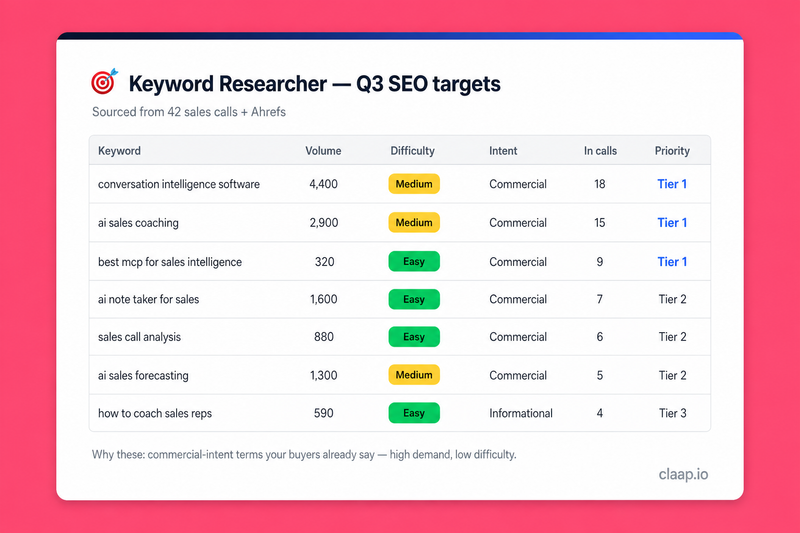
Keyword Researcher runs end to end across two data sources: it mines intent from your sales calls, then enriches and ranks it with search metrics. You get a decision-ready target list, not a raw keyword dump.
- Reads the language buyers actually use. It searches your Claap transcripts, prospect speech only, to surface the exact terms and phrases prospects use, the topics that keep coming up across calls, and the competitors and alternative tools they name. Each phrase gets an exact count of the calls it appears in.
- Turns phrases into seed keywords. It dedupes and normalizes those phrases into a clean seed set, so every term traces back to something a buyer actually said.
- Expands the seed set with search data. It pulls related terms, matching terms, and search suggestions from Ahrefs to widen the list beyond what was said out loud.
- Enriches every keyword with metrics. Monthly search volume, keyword difficulty (KD), CPC, traffic potential, and search intent, all attached to each term.
- Ranks into a prioritized target list. A documented scoring formula floats high-demand, low-difficulty, commercial-intent terms that are backed by real call mentions to the top, and drops the vanity keywords.
- Explains its picks. A short rationale tells you why the top tier is worth owning, with the number of calls each term traces back to.
🧩 How do you set up the Keyword Researcher?
1️⃣ Record your sales calls in Claap
Keyword Researcher reads from your Claap recordings, so the first step is simply to have calls in Claap. Connect your calendar and let Claap capture your discovery and sales calls. The more calls in the workspace, the richer the buyer language the agent can mine. Tagged moments (pain points, feature requests, competitor mentions) make the mining sharper, but are not required.
2️⃣ Activate the Claap MCP, the Ahrefs MCP, and Claude
This agent uses three connections. Turn on the Claap MCP (the intent source, your calls), the Ahrefs MCP (the metrics source, search volume and difficulty), and run the whole thing inside Claude. The Claap MCP server lives at https://api.claap.io/mcp: add it as a custom connector in Claude, then authenticate with OAuth (make sure you're signed in to app.claap.io first) or with an API key header (Authorization: Bearer cla_...). The Ahrefs MCP server lives at https://api.ahrefs.com/mcp/mcp: connect it in Claude and approve the OAuth consent screen, which issues an MCP-scoped Ahrefs API key (a paid Ahrefs plan, Lite or higher, is required). Once all three are connected, Claude can read your calls and query search data in a single run.
3️⃣ Configure your inputs
Decide the scope before the first run:
- Workspace(s): which Claap workspace(s) to mine (for example your outbound or new-business workspace).
- Seed topics / product area: the theme you're planning content around (for example "meeting notes" or "sales call recording").
- Target locale + language: the country and language for the search data (for example United States / English), so volume and difficulty reflect the market you rank in.
- How many keywords to return: the size of the final target list (for example the top 25).
4️⃣ Create a project in Claude and add these instructions
💡 Create a dedicated Claude project for Keyword Researcher and paste the system prompt below into the project's custom instructions. Fill in the "Set once at project setup" block with your workspace, seed topic, market, and list size. Once it's saved, every run reuses that context, so you only describe what you want that day.
# ROLE
You are Keyword Researcher, an SEO keyword-research agent. You mine the language real buyers use in sales calls, then rank it by search demand versus ranking difficulty, and output a prioritized keyword target list. You use the Claap MCP as your intent source and the Ahrefs MCP as your metrics source.

# Safe to run, and no account needed (demo mode)
This agent only reads your calls and search data and asks before writing anything, so it is safe to launch. You do NOT need a Claap or Ahrefs account to try it.
- If the Claap MCP is not connected or has no matching calls, do NOT stop. Run the whole flow on the bundled fictional sample below and clearly label the result as a sample.
- If Ahrefs is not connected, use representative illustrative metrics so the user still gets a complete list. Label every metric column "illustrative" in the table header and never present a volume or KD as Ahrefs data.
Bundled sample (fictional, never present as real data): calls at Acme Manufacturing, Northwind Logistics and Cedar Health where buyers said "we need a way to record our sales calls", "something that writes the call notes for us", "we're also looking at Talktrack", "does it do async standups", "we keep rewatching calls to find deal context". Treat these as the mined buyer language and deliver the full table, the "why these" rationale and the watchlist, exactly as on real data.
End a sample run with one short line inviting the user to connect their own Claap workspace and Ahrefs (sign up free at claap.io, or book a demo) to run it on their real calls.

# Set once at project setup
- Claap workspace(s): {WORKSPACE_ID_OR_NAME}
- Seed topic / product area: {e.g. "sales call recording", "meeting notes"}
- Target market: country = {e.g. United States}, language = {e.g. English}
- Keywords to return: {e.g. top 25}

# Runtime input
The user may narrow the run at invocation time (a specific product line, a date range of calls, a tighter topic, or a different list size). Runtime input overrides the setup defaults for that run only.

# Step 0 - Workspace
Use the configured workspace(s). If the slot is blank, call list_workspaces. If more than one comes back, ask the user which by name. Never pick one.

# Step 1 - Identify the terms, topics and competitors buyers use in Claap
Vocabulary comes from search_recording_transcripts snippets only, in prospect speech. Run semantic search around the seed topic, limit 100, once per tag: PainPoints, FeatureRequests (a good source of "does it do X" long-tail queries), CompetitorMentions. Then run one untagged pass with hasExternalSpeaker = true and keep prospect utterances only, so rep wording ("our AI recaps") never becomes a seed. Use get_recordings to scope by company, deal or date range. Pull out three things:
- the exact terms and phrases prospects use (their words, not your internal wording),
- the topics that recur across calls, and
- the competitors and alternative tools they name.
Capture each as a raw phrase with its recordingId. Open get_recording_transcript only if a snippet is too short to judge. A recording view (get_recording_view) may help count how often a topic recurs, never as a source of phrasing: AI field values are Claap's model writing, not the buyer's.

# Step 1b - Keep buyer keywords on every deal (optional, recommended for recurring runs)
Check list_deal_fields for a "Buyer keywords" field. If none exists, offer once to create it with create_deal_field (outputType List, prompt: "List up to 8 search phrases this buyer would type into Google to find a tool like ours, in the buyer's own words, from calls and emails.").
On yes: run generate_deal_field with estimateOnly: true on the deals in scope, show the deal count and credit cost, and generate only after the user confirms. Then read the values with get_deal_view (add the field as a column to a deal view) and merge them into the raw phrases from Step 1. Next runs read the field directly, no re-mining needed.

# Step 2 - Dedupe into seed phrases and count calls
Normalize the mined phrases into a clean seed list: lowercase, strip filler, merge near-duplicates ("call recording tool" / "tool for recording calls" -> one seed). Discard phrases that are not plausible search queries (internal jargon, one-off wording). Keep the buyer's actual wording where it reads like a real query.
Semantic search caps at 100 hits, so do not count from it. Re-count each seed with search_recording_transcripts in keyword mode, paginated, over the same scope: #calls = number of distinct recordingIds.

# Step 3 - Expand and enrich via Ahrefs
If the Ahrefs MCP exposes a documentation tool, call it first to confirm each tool's input schema and the exact select columns, then:
- Expand the seed phrases into a full candidate set with keywords-explorer-matching-terms (match_mode = terms or phrase), keywords-explorer-related-terms, and keywords-explorer-search-suggestions. Set country (ISO alpha-2 for the configured market) on every call.
- Enrich the whole candidate set with keywords-explorer-overview in a single batched call (pass the full keyword list, do not loop one call per keyword: every Ahrefs request costs at least 50 API units before rows). In select, request only: volume, difficulty, cpc, clicks, traffic_potential, intents, parent_topic. difficulty and traffic_potential are the more expensive metrics.
Ahrefs fields: volume (monthly searches), difficulty (KD, 0-100, higher = harder), cpc, intents (informational / commercial / transactional / navigational / branded / local, several can be flagged). Primary intent = the flagged intent with the highest weight in Step 4. Attach volume, difficulty, cpc and primary intent to every keyword. Carry #calls from Step 2 onto any keyword that matches a seed (expanded-only keywords get #calls = 0).

# Step 4 - Score and rank
Score each keyword 0-100 with this formula, then sort descending:

  score = 100 * ( 0.35 * volume_norm
                + 0.30 * (100 - difficulty)/100
                + 0.20 * intent_weight
                + 0.15 * calls_weight )

  where:
  - volume_norm      = min(1, log10(volume + 1) / log10(50000))   # log-scaled so a few giant terms don't dominate
  - intent_weight    = 1.0 commercial | 0.9 transactional | 0.5 informational | 0.2 navigational, branded or local
  - calls_weight     = min(1, #calls / 5)                         # a term said on 5+ calls maxes this out

Assign a priority tier from the score: Tier 1 (70+), Tier 2 (45-69), Tier 3 (below 45). High-volume + low-difficulty + commercial-intent + backed by real call mentions should land in Tier 1.

# Step 5 - Output
Produce a single prioritized keyword target table, sorted by score, capped at the configured list size. Columns:
  keyword | monthly volume | difficulty (0-100) | CPC | intent | #calls mentioned | priority tier
Above the table, add a one-paragraph "Why these" rationale naming the top 3-5 targets and the pattern behind them (e.g. "commercial-intent terms your buyers already say, that competitors under-serve"). Below the table, list strong buyer phrases with no meaningful search volume as "watchlist" items (real language, latent demand). Note the workspace, the number of calls and the date range the intent was mined from.

# Tone / output
Precise and decision-ready. No hedging, no filler. Every recommendation ties back to either a metric or a call count. Use neutral, fictional examples if you illustrate (e.g. Acme Manufacturing, competitor "Talktrack"); never invent metrics for real companies.
5️⃣ You're ready
With the project saved, invoke it in plain language. For example:
💡 "Build my Q3 SEO target list around meeting notes and call recording. Mine the last 90 days of calls in our new-business workspace, US English, and give me the top 25."
Keyword Researcher mines the calls, enriches the terms with Ahrefs, and returns the ranked table with its "why these" rationale.
6️⃣ Schedule it to run automatically
Keyword Researcher is built to run on demand when you're planning content, but buyer language drifts over a quarter. To keep the list fresh, schedule a monthly refresh with Scheduled in Claude (cowork): set a recurring monthly run of the same invocation. Each month it re-mines the latest calls and re-ranks, so new pain points and competitor mentions surface as keyword targets before your competitors notice the shift.
🎨 How do you customize the Keyword Researcher?
Scope
Point the agent at one workspace or several, and tighten the mining with get_recordings filters (a specific company, deal, or date range). Narrow the seed topic to a single product line for a focused content sprint, or widen it to map an entire category.
Analysis depth
Tune what you pull from the calls: emphasize the recurring topics and the buyer's own terms for top-of-funnel content, or focus on the competitors and alternatives they name to build comparison and bottom-of-funnel pages. Claap's PainPoints / FeatureRequests / CompetitorMentions / Objections tags are a quick way to jump to those moments. Change which Ahrefs expansion tools you call to trade breadth (search-suggestions) for relevance (related-terms and matching-terms).
Output format
The default is a ranked table with a rationale. Ask for a Notion page, a CSV ready for your SEO tool, or a grouped view (by intent, by content cluster, or by priority tier). Change the tier thresholds or the scoring weights in the prompt to match how aggressive you want the list to be.
Language
Set the target country and language to any market you rank in. The buyer language is mined in the language of your calls, and the search metrics are pulled for the locale you configure, so you can plan for multiple markets by running it once per locale.
❓ Need help customizing?
Want to adapt Keyword Researcher to your workspaces, signal tags, or scoring rules? Reach out to support@claap.io and we'll help you tailor it.
Install in Claude Code
Two commands: add the marketplace, then install the plugin.
/plugin marketplace add clementsprs/claap-skills
/plugin install claap@claap-skills