Sales Deck Builder
Build a fully branded, prospect-specific sales deck in 1 minute — pulling pain points, quotes, and pricing context from every Claap call.
- MCP servers
- ClaapClaudeGoogle Drive
Opens Claude with the agent prompt prefilled. Works on your own Claap calls, or on a sample call if you are not a Claap customer yet.
The Sales Deck Builder is a Claap agent that builds a branded, prospect-specific sales deck in about a minute, pulling pain points, quotes and pricing context from your Claap calls.
💡 What problem does the Sales Deck Builder solve?
After a discovery call, reps spend 2-3 hours building a follow-up deck. Without automation:
- Decks arrive late and miss the momentum from the conversation.
- Content is generic because reps don't have time to pull real quotes and pain points from the call.
- Branding is inconsistent across reps, with different formats, fonts, and slide structures.
- Context gets lost between the conversation and what ends up on slides.
This agent turns a Claap recording into a fully branded, hyper-personalized sales deck in minutes — not hours.
⚙️ What does the Sales Deck Builder do?
This AI agent automatically:
- Pulls the full transcript from Claap recordings with a prospect (discovery, demo, or negotiation).
- Extracts key deal signals: pain points, current stack, objections, decision criteria, timeline, stakeholders.
- Generates a complete slide deck with prospect-specific content:
- 📋 Company context — what we understood about their situation, from the call, not a template.
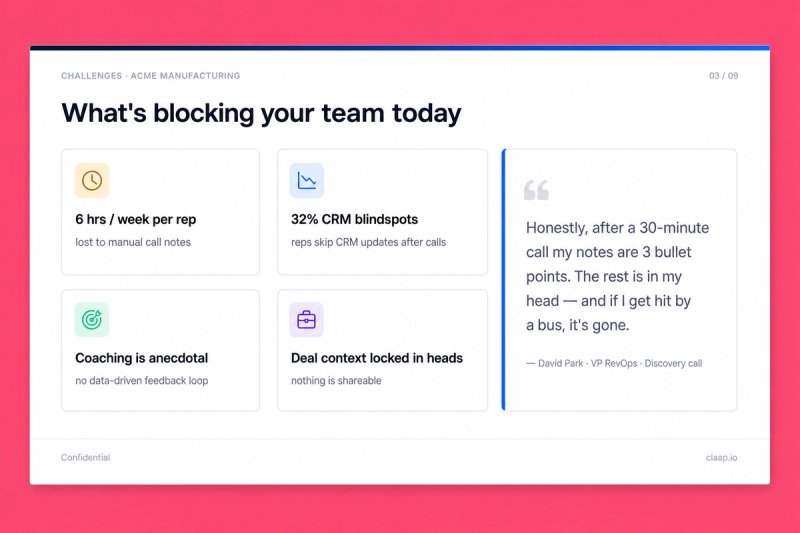
- 🎯 Challenges — their specific pain points, with real quotes from the transcript.
- 🔧 Current stack mapping — tools they use today and where the gaps are.
- 💰 Cost of inaction — what it costs them to stay on their current setup.
- 💡 Solution mapping — how your product solves each challenge.
- 📊 Before/after comparison with projected metrics.
- 💵 Pricing tailored to their team size and needs.
- 📅 Next steps with timeline.
- Applies your company's branding (colors, fonts, layout, logo) via a reusable design system skill.
- Publishes as a shareable link via Google Slides, PPTX, or any presentation tool.
We use this agent after every discovery call. A fully branded business case deck for a prospect is ready in under 1 minute.
🧩 How do you set up the Sales Deck Builder?
1️⃣ Record your sales calls in Claap
Store your recordings in a consistent channel (e.g., "Sales meetings"). The agent will pull transcripts directly from these recordings.
2️⃣ Activate the Claap MCP + Google Drive MCP in Claude
Connect Claap as an MCP server in Claude Desktop or Claude Code. Then connect Google Drive as an MCP server. This lets the agent upload the generated .pptx with convertToGoogleFormat: true and return a native Google Slides link in one step — no manual upload, no format loss.
3️⃣ Create your branding skill
The branding skill teaches the AI your company's visual identity so every deck looks on-brand. Three ways: extract from an existing deck (fastest), extract from your website (Chrome extension), or extract from Figma via Dev Mode MCP.
📘 How to build a Brand Skill
The branding skill is a reusable design-system document the AI applies to every output. Pick whichever extraction path matches what you already have:
Option A — Extract from an existing deck (fastest)
Grab our extract-branding-theme skill from GitHub. Upload any on-brand .pptx you already have — current pitch deck, investor deck, brand template — and the skill reverse-engineers the full design system (theme colors, typography, layout grid, masters, brand assets) into a structured branding_template.json. Drop that JSON into your Claude project as your branding reference and every future deck inherits it.
For decks that also reference product UI (screenshots, component mockups), pair it with our claap-design-system skill — same repo, complementary layer covering component composition and interaction patterns.
Option B — Extract from your website with the Claude Chrome extension (best results)
Install the Claude Chrome extension and navigate to your homepage. The extension reads the live rendered page (computed styles, actual fonts, real colors after CSS cascade), which produces far richer results than a URL-only scrape.
With your website open in the active tab, ask Claude:
Extract the full design system from this page:
- Color palette: backgrounds (dark/light/neutrals), accents, text colors, gradients. Capture exact hex or HSL values.
- Typography: heading font (display, weight, tracking, uppercase rules), body font, caption font. Include exact families, weights, sizes, line-heights.
- Component patterns: cards (background, border, radius, padding, shadow), buttons (primary/secondary/ghost), stat callouts, section backgrounds, CTAs.
- Logo: exact URL to the SVG or PNG file.
- Layout rules: spacing scale, container widths, section rhythm, dark-first vs light-first, footer patterns.
- Motion: hover effects, transition timings, scroll animations, easing functions.

Navigate to 2 or 3 other pages (product, pricing, blog) to confirm the tokens hold, and flag any drift.

Then generate a reusable skill file I can save as my branding reference. Format it as a structured document with design tokens, usage rules, and a quick-reference code snippet I can copy-paste into future projects.
The extension inspects the rendered DOM + CSS, producing a complete design system document. Save it as a skill in your Claude project.
Fallback if you can't install the extension: use Claude's WebFetch on your homepage URL. Expect less accurate token extraction — raw HTML misses the computed styles that define your actual visual identity.
Option C — Extract from Figma via the Dev Mode MCP (most precise)
If you have a Figma design-system file, use Figma's official Dev Mode MCP to let Claude read your variables, text styles, and components directly — no guessing from rendered canvas.
1. Enable the Dev Mode MCP in Figma
- Open the Figma desktop app (the MCP runs locally; not available in the browser app).
- Go to Figma menu → Preferences → Enable Dev Mode MCP Server.
- Figma starts a local MCP server (default endpoint:
http://127.0.0.1:3845/sse).
2. Add the Figma MCP in Claude
- In Claude Desktop or Claude Code, add a new MCP server pointing to the local endpoint shown in Figma's Preferences pane.
- Approve the connection in Claude.
3. Share the file or frame with Claude
- In Figma, right-click the frame or component you want to extract → Copy link to selection.
- In Claude, paste the link and ask:
Read this Figma frame via the Dev Mode MCP and extract the full design system:
- Variables: color tokens, spacing tokens, radius tokens, shadow tokens (exact names and values)
- Text styles: heading display, body, captions with exact font families, weights, sizes, line-heights, letter-spacing
- Component patterns: cards, buttons, callouts, section layouts — their structure and variants
- Layout grids and breakpoints
- Effects and motion styles (if defined in the file)

Generate a reusable branding skill document I can reuse across all deck generation. Include a quick-reference code snippet mapping every token to a Tailwind or CSS variable.
The Dev Mode MCP returns the exact token values defined in your design system, so the skill is as precise as the file itself.
4️⃣ Create your deck structure skill
The deck-structure skill defines the slide order, what content lives on each slide, and the verbatim-quote rules. Save it alongside the branding skill in your Claude project so every deck inherits both visual and structural consistency. Here's the canonical 9-slide template we use after every discovery call:
- Cover — prospect company name, logo, and a one-line value statement in their words.
- Company context — what we understood about their situation, headcount, stack, and current priorities (1-3 bullets, sourced from the transcript).
- Challenges — their top 3 pain points, each with one verbatim prospect quote from the recording.
- Current stack mapping — tools they use today, where the gaps are, and what those gaps cost them.
- Cost of inaction — quantified impact of staying on the current setup (hours, $, deals lost).
- Solution mapping — your product mapped feature-by-feature to each challenge from slide 3.
- Before / after — projected metrics with at least one champion quote.
- Pricing — tailored to their team size, with the discount logic spelled out.
- Next steps — explicit timeline with owners on both sides.
Drop this as a Markdown file into your Claude project. The agent reads it as the slide contract and refuses to ship a deck that doesn't include a verbatim quote on the Challenges and Before/After slides.
5️⃣ Create a project in Claude and add these instructions
You're a sales enablement specialist who creates hyper-personalized sales decksfrom real customer conversations.Your mission: generate a fully branded, prospect-specific slide deck using theClaap MCP as your primary data source. Every slide must be grounded in what wasactually said during the call -- no generic templates.# Runtime input- [COMPANY] → required, the prospect's company name. If not provided, ask which company before starting.# Data sourcingUse the Claap MCP to gather prospect intelligence:1. Search for the company: use search_companies or search_recording_transcripts with [COMPANY] to find all related recordings2. Pull transcripts: use get_recording_transcript for each relevant recording3. If multiple calls exist (discovery + demo + negotiation), aggregate signals across all conversations for a complete pictureExtract from transcripts:- Company context: size, industry, tech stack, CRM, current tools- Pain points: direct quotes from prospects (verbatim, not paraphrased)- Stakeholders: names, roles, decision-making authority- Budget signals: pricing reactions, competitive mentions, timeline- Next steps: what was agreed on the call- Strategic goals: company initiatives mentionedSupplement with web search for company background if needed.# Deck generationApply the branding skill for visual consistency (colors, fonts, layout, logo). Follow the deck structure skill for slide order and content format.For each slide:- Use real data from the transcript, not placeholder text- Include at least one verbatim prospect quote in the Challenges slide- Calculate stats from real numbers mentioned in the call (team size, volume, hours spent on manual tasks)- Include a champion quote on the final slide# Output formatGenerate as a .pptx file (PowerPoint) using python-pptx or pptxgenjs. Apply the branding skill tokens: background colors, font families, accent colors, slide layout rules.Then use the Google Drive MCP to upload the .pptx with convertToGoogleFormat: true. Drive auto-converts the PPTX into a native Google Slides presentation and returns a shareable link.Fallback outputs if the Drive MCP is unavailable:- Return the .pptx file directly- Generate a React artifact (interactive HTML deck)6️⃣ You're ready
After any call, say: "Build a sales deck for [Company Name]" 👏. The agent pulls the Claap transcript, extracts signals, and generates your deck. You can iterate on specific slides or ask for a different output format.
🎨 How do you customize the Sales Deck Builder?
Deck structure
Swap, add, or reorder slides by editing the deck-structure skill — the agent always follows whatever order you define there. Common variations: drop the Cost-of-Inaction slide on small deals, add an Integration Architecture slide for technical buyers, or insert a Champion Quote slide between Solution Mapping and Before/After for executive audiences.
Output format
Default output is .pptx uploaded to Google Drive with auto-conversion to native Google Slides. Alternative outputs the agent supports out of the box: Gamma (paste the structured Markdown), Canva (export via the deck-structure JSON), or a React artifact for inline preview before you commit to a format.
Multi-call context
For enterprise deals with multiple touchpoints, the agent aggregates signals across all conversations with a company — not just the latest call.
Language
Works in any language. Specify in your prompt: "Generate the deck in French" or "Generate in the prospect's language". The CRM-connected flow can auto-detect language from a deal property.
❓ Need help customizing?
Contact us at support@claap.io.
Example output
Install in Claude Code
Two commands: add the marketplace, then install the plugin.
/plugin marketplace add claap-marketing/claap-skills
/plugin install claap@claap-skills