Vidyard Pricing in 2026: Costs, Features, and Best Alternatives
Wondering how much Vidyard costs? This guide breaks down Vidyard’s pricing, features, and whether it's worth it.


Vidyard costs $0 on Free, $59/user/month on Starter billed annually, about $99/user/month on Teams, and custom pricing on Enterprise as of June 2026. You can use Vidyard to create, host, and analyze videos for sales, marketing, and customer communication.
In this article, we’ll explore Vidyard’s features and pricing to see if it's worth your money.
What is Vidyard?

Vidyard is a video hosting and analytics platform designed for business users. It allows teams to create, manage, and distribute videos easily. You can connect it with your favourite CRMs, which makes it an attractive choice for sales and marketing.
Key features of Vidyard
In particular, Vidyard’s main features are the following:
- Video creation & hosting: Record, store, and share videos with ease.
- AI Script Generator: Automates video scripting for efficiency.
- Video analytics: Track viewer engagement and measure success.
- Custom branding: Personalize the video player to match your brand.
- Integrations: Connect with Salesforce, HubSpot, and more on higher-tier plans.
Vidyard's strengths
- Ease of Use: Vidyard is designed to be user-friendly, with an intuitive interface that allows teams to create and share videos without technical expertise.
- Advanced Analytics: The platform shows you exactly how people engage with your videos, allowing businesses to measure the success of their video content.
- Scalability: Vidyard is suitable for both small businesses and large enterprises, by offering flexible plans to meet different needs. As you expand, you won't need to switch platforms.
- Sales & Marketing Integrations: Connects with CRM and marketing tools on higher-tier plans.
How much does Vidyard cost in 2026?
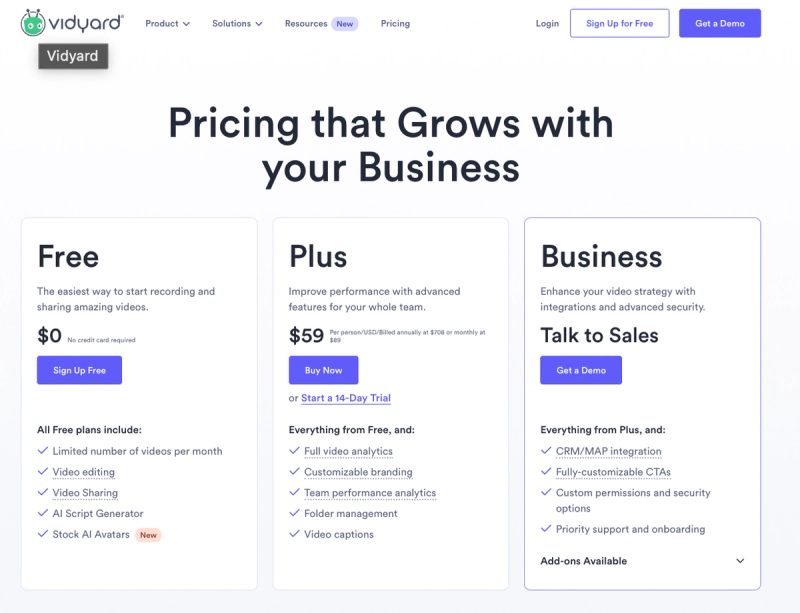
Vidyard offers four pricing tiers tailored to individuals, small teams, growing teams, and enterprises: Free, Starter, Teams, and Enterprise. Here's what each plan includes:
Free plan ($0/month)
- Best for individuals or small teams testing video as a communication tool.
- Features:some text
- 5 recorded videos per month and 15 AI videos lifetime.
- Video recording length: Up to 30 minutes per video.
- Basic video editing and video sharing.
- Browser extension, mobile & desktop apps.
- AI Script Generator for automated video content.
- Basic workflow integrations (LinkedIn, Slack, Outlook, Gmail).
Starter plan ($59/user/month billed annually)
- Best for small businesses needing unlimited video creation, advanced analytics, and branding.
- Everything in the Free Plan, plus:some text
- Unlimited video recording and hosting.
- Unlimited recording length.
- Advanced analytics: Track video performance and audience engagement.
- Custom branding: Personalize the video player with your logo.
- Advanced folder management for better organization.
- CRM and marketing integrations are not included here. Teams is the tier to review if you need Salesforce, HubSpot, or other CRM/MAP sync.
- Automatic captions for improved accessibility.
Teams plan (about $99/user/month)
- Best for growing businesses needing CRM integrations, interactive CTAs, and more advanced team workflows.
- Everything in the Starter Plan, plus:some text
- CRM/MAP integrations, including Salesforce and HubSpot.
- Fully customizable CTAs (Call-to-Action) for interactive video engagement.
- More advanced team controls for managing video workflows.
- Priority support & onboarding for smoother implementation.
- Optional add-ons may be available, including Video Agent and custom AI avatar capabilities.
Enterprise plan (custom pricing)
- Best for larger organizations needing security, governance, API access, and custom support.
- Everything in Teams, plus:some text
- SSO and custom security or permission controls.
- API access and unlimited integrations.
- Custom AI avatars and advanced enterprise configuration.
- Custom pricing based on team size and requirements.
Vidyard pricing: total cost example
Let’s say you run a small business with 5 employees who need access to Vidyard. After reviewing the pricing, you decide to go with the Starter Plan. You choose the annual billing option.
Here’s what your annual cost would be:
- Cost per user per month (Starter Plan, billed annually): $59/user
- Number of users: 5
- Annual cost per user: $59 × 12 = $708
- Total cost for 5 users per year: 5 × $708 = $3,540
So, for a small business using the Starter Plan, the total annual cost would be $3,540. If that same 5-seat team needs CRM sync through Teams at about $99/user/month, the annual cost is about $5,940.
Is Vidyard’s pricing worth it?
Your team size and needs will determine if Vidyard fits your budget. But is it worth the cost?
Pros
Vidyard’s pricing is flexible, which is great if you’re just getting started with video or if you’re looking for a tool that can grow with your business. The Free Plan is useful, letting you record, host, and share videos.
The Starter Plan ($59/user/month billed annually) gives you unlimited videos, custom branding, and analytics, which is solid if you’re serious about using video for sales or marketing. It’s not cheap, but it does offer more advanced features than basic tools like Loom. And if you’re running a larger team, the Teams and Enterprise plans come with CRM integrations, better security, and advanced controls, which could be worth it if you rely heavily on video.
Vidyard also integrates well with tools like Salesforce, HubSpot, and LinkedIn, so if you’re already using tools, it can make your life easier. Just remember that CRM and marketing automation integrations sit on higher-tier plans, not the entry Starter plan.
Cons
Vidyard is significantly more expensive than many of its competitors, which is its biggest downside. While the Free Plan is useful, the jump to $59 per user per month for the Starter Plan hurts, especially when tools like Loom or Claap offer similar functionalities at a lower price. For small businesses with multiple users, costs can add up quickly. For example, a team of 5 using the Starter Plan would pay $3,540 per year, and a team that needs CRM sync on Teams could pay about $5,940 per year.
Furthermore, some features only come with expensive plans. For example, the free plan is limited to 5 recorded videos per month, and advanced features like CTAs and CRM integrations are only available at higher prices.
If you're watching your budget, Vidyard might not be the best choice. While it’s a powerful platform, you should probably have a look at Claap or Loom. They offer similar features for less money.
If you're looking for Vidyard alternatives, you should first refer to this article.
Vidyard doesn't fit in your budget? Claap is your best affordable alternative
You need something cheaper than Vidyard? Claap might be your answer. Many teams want good video features without high costs. Let's explore what Claap has to offer and how it compares to Vidyard.
What is Claap?
Claap is a conversation intelligence platform for sales teams in the AI agent era. It captures every sales conversation and turns it into follow-ups, CRM updates, coaching, and context for your own AI agents.
Claap helps sales teams Record meetings, Enrich the CRM, Activate AI agents through built-in agents and MCP, and Coach at scale. More than just a meeting recorder, Claap automates note-taking, integrates seamlessly with CRMs, and provides AI-driven coaching to help teams improve performance and close more deals efficiently.
It automatically records meetings on Google Meet, Zoom, and Microsoft Teams, generating AI-powered summaries and structured insights for sales calls, customer research, and deal tracking. Sales managers can provide feedback directly on calls, while sales reps save time by eliminating manual CRM updates.
Claap’s best features
- AI Meeting Summaries & Coaching: Get automatic, structured call summaries and actionable feedback to refine sales pitches and improve team performance.
- CRM Integration & Workflow Automation: Seamlessly sync meeting insights with Salesforce, HubSpot, and other CRMs, eliminating manual updates and streamlining sales processes.
- AI-Powered Video Editing: Effortlessly trim recordings, remove silences, and create shareable video clips directly from transcripts.
- Sales Analytics & Reporting: Track key deal insights, customer objections, and competitor mentions with AI-driven analytics to enhance strategic sales planning.
Claap pricing
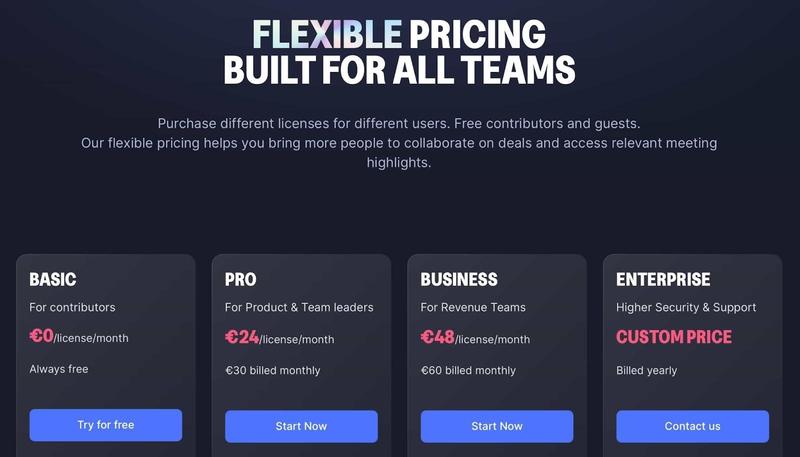
Claap offers flexible pricing plans based on team size and needs:
- Free Plan: 10 videos + 300 minutes of recording
- Paid plans: Built for teams that need more recording capacity, CRM enrichment, deal insights, and coaching features.
- Enterprise Plan: Contact Claap to see how the software can be tailored to your needs.
If you're looking for a platform with a different approach to meeting intelligence and sales coaching, Claap is a strong option to consider. Trusted by 10,000+ sales reps, Claap focuses on speed, adoption, and fair pricing instead of legacy tooling. Claap offers a FREE trial with unlimited access to all premium features!
Conclusion
Vidyard is a powerful video platform that offers a range of pricing options to suit different needs. If you’re looking for advanced video analytics, CRM integrations, and scalable features, it’s a strong choice. However, Vidyard isn't cheap, especially for smaller teams. The Starter Plan gives you good value, but if you need CRM integrations, CTAs, Enterprise security, or custom features, you'll have to pay more.
That’s where Claap comes in. If you need a more budget-friendly option that still gives you AI-driven insights, seamless CRM integrations, and flexible video collaboration tools, Claap might be better. If you want to save money while still getting good video tools, Claap is your best bet.
Frequently asked questions
How much does Vidyard cost in 2026?
Vidyard costs $0 on Free, $59/user/month on Starter billed annually, about $99/user/month on Teams, and custom pricing on Enterprise as of June 2026.
Is there a free Vidyard plan?
Yes. Vidyard has a Free plan with 5 recorded videos per month, 15 AI videos lifetime, and recordings up to 30 minutes per video.
What is the difference between Vidyard Starter and Teams?
Starter is the entry paid plan for unlimited video recording, hosting, branding, and analytics. Teams adds higher-tier capabilities such as CRM and marketing automation integrations and customizable CTAs.
Does Vidyard's free plan include CRM integration?
No. Vidyard's Free plan does not include CRM integration, and CRM/MAP integrations are positioned on the Teams tier rather than the Starter plan.
What is a cheaper Vidyard alternative?
Claap is a cheaper Vidyard alternative for sales teams that want conversation intelligence, meeting recording, CRM enrichment, coaching, and video collaboration without legacy-tool pricing.

![Learn how sales videos can help you win more deals [Tips, Techniques & Examples]](https://cdn.sanity.io/images/gb4upfg4/staging/4fa75cfa344cd19baf7441ee052b6bf048026d48-1536x864.jpg?w=800&h=450&fit=crop&auto=format&q=75)