


Sales pipeline management: stages, reviews and metrics
A stage in your CRM is what a rep typed, and a pipeline review that never checks it against the last call is guessing. Here is how to set stages a buyer can confirm, run the weekly review from call evidence, and learn from closed deals.


Updated 19 October 2026.
Sales pipeline management overview
- Sales pipeline management is tracking every open deal through your sales stages, deciding what moves each one forward, and cleaning out deals that stopped moving.
- A good stage has an exit criterion the buyer confirmed on a call, such as a named decision maker or an agreed next meeting.
- A good pipeline review starts from the deals that went quiet and checks each stage against the last conversation.
- Claap shows HubSpot or Salesforce deals with an AI status and an AI deal summary written from its calls and emails, as described on its pipeline management page.
Manage your pipeline from what buyers said on the last call, and treat every stage field as a claim to check.
A stage in the CRM is what a rep typed after the meeting. Non-selling tasks such as administrative work and meeting preparation take 70% of a sales rep's time, according to the sixth edition of Salesforce's State of Sales report, published in 2024.
Among buyers who described their pipeline process on calls with Claap's sales team, 28% said their pipeline did not match what was happening in their deals (Claap call data, January to October 2026).
Why pipeline stages drift away from what buyers said
The drift we hear about on calls comes in three shapes:
- Deals parked at the wrong stage. The deal says negotiation, and the buyer has not finished discovery.
- Close dates in the past. The deal still counts in this quarter's pipeline, and nobody has touched it in weeks.
- A CRM that nobody fills in. Managers review a pipeline built from names and amounts, with nothing from the conversations.
Two buyers described it on recorded calls with us:
- "We realized that there were a lot of deals that were put in a stage that was really advanced. For instance, negotiation, trial activation, while in reality [...] they were in reality at the early stage of the conversation. So they still have to complete the discovery." The person running pipeline reviews at a messaging software company.
- "The red flag was when we have a lot of opportunities. And I'm telling you, a lot of them that were untouched with closing date back in the days." A sales leader at an AI content software company.
What sales pipeline management covers
- Structure: the stages a deal goes through and the rule for leaving each one.
- Inspection: a regular review of every open deal, its stage, its next step and its close date.
- Learning: looking back at won and lost deals to change the stages, the qualification or the pitch.
Sales pipeline stages with exit criteria a buyer can confirm
The column that matters is the exit criterion: something the buyer said or agreed to, which you can find in the call.
| Stage | Exit criterion (said or agreed by the buyer) | Evidence to check before moving the deal |
|---|---|---|
| Prospecting | The buyer agreed to a first meeting | A meeting on the calendar with the right person |
| Qualification | The buyer described a problem and who it affects | The pain in their words on the discovery call |
| Discovery and demo | The buyer named the decision maker and the decision process | Names and steps mentioned on a call or in an email |
| Proposal | The buyer agreed on scope and a decision date | The scope and date restated by the buyer |
| Negotiation | The buyer is discussing terms, legal or procurement | A call or email with legal, procurement or the economic buyer |
| Closed won or lost | Signature, or a clear no with a reason | The signed order, or the reason in the buyer's words |
Start with the stages you already have when they are close to these, because renaming stages breaks every report built on them. Change the exit criteria first.
How to run a weekly pipeline review from call evidence
- Sort open deals by days since the last activity. The deals that went quiet need a decision first.
- Check each stage against the last call. If the buyer never said the exit criterion, move the deal back.
- Confirm the next step with a date the buyer agreed to.
- Check the close date. A date in the past, or one the buyer never mentioned, gets updated or the deal leaves this quarter.
- Decide: advance, hold or close lost. Every deal leaves the review with one of the three.
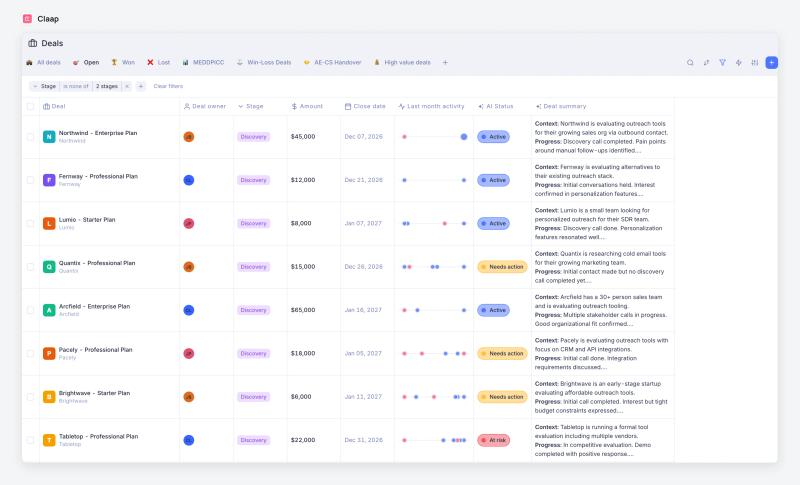
Pick a deal view sorted by last activity when your team runs more than a handful of deals per rep, because a review in deal-name order spends the hour on the deals that are already fine. Skip the line-by-line read-out of amounts: the CRM already shows them, and the time is better spent on the deals where the stage and the calls disagree.
Sales pipeline metrics worth tracking
- Days since last activity is the metric to watch first: it is the one the weekly review sorts by.
- Stage conversion rate shows which exit criterion is too loose: a stage that almost every deal passes is a stage nobody checks.
- Time in stage tells you where deals wait, so the next review knows where to look.
- Pipeline coverage comes last: use it only after the review has cleaned out stalled deals, because a stale pipeline inflates it.
Learn from closed deals, won and lost
For each closed deal, record why it was won or lost in the buyer's words, then compare the reasons with your exit criteria.
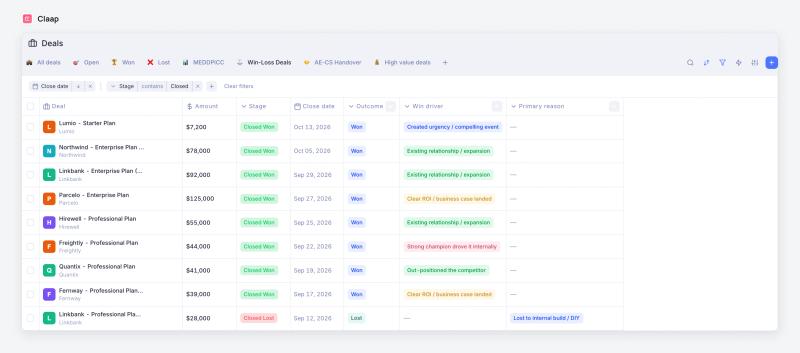
Turn your most common win driver into an exit criterion, because your won deals already proved it. If lost deals cluster on a reason like "lost to an internal build", add a qualification question that surfaces it before the proposal.
Where Claap fits in your pipeline
A quick note: Claap is our product, and every claim about it below links to its source.
Claap records your sales calls and meetings and connects them to the deals in your CRM. After each call, it writes typed values into your standard and custom Salesforce or HubSpot properties, on the rules you set, according to Claap's CRM auto-complete page. The Deals view, according to Claap's help center:
- lists the deals synced from HubSpot or Salesforce;
- shows an AI status and an AI deal summary (context, progress, decision, risk) built from the calls, emails and CRM properties;
- adds an activity timeline with one dot per day of meetings, recordings and emails, so quiet deals stand out.
Saved views like "Inactive deals" or "Deals closing this month" prepare the weekly review, and a Kanban board grouped by stage or AI status lets you drag a deal to another stage and update it in the CRM, according to Claap's help center. The Deals view is included in the Business plan, at $60 per seat per month billed yearly, according to Claap's pricing page.
Choose Claap when your reps run most deals over recorded calls and your stages drift from what buyers said. This approach is wrong if your deals close in a single call, as in high-volume transactional sales: there is no call history to check against, and simple stage rules in the CRM do the job.
Takeaways
- Move a deal back when the buyer never said its exit criterion, whatever the rep's confidence.
- Add your most common win driver to the exit criteria each quarter.
For field-level cleanup, see the CRM data hygiene checklist. For turning a clean pipeline into a forecast, see this sales forecast example.
Frequently asked questions
What is the difference between a sales funnel and a sales pipeline?
A sales pipeline is a snapshot of open deals by stage, used to decide what each deal needs this week. A sales funnel shows how many prospects make it through each step over a period. The pipeline drives deal decisions, and the funnel drives process changes.
What are the 5 stages of a sales pipeline?
A common version is prospecting, qualification, discovery and demo, proposal, and negotiation, followed by closed won or lost. The names matter less than the exit criteria: each stage should end with something the buyer said or agreed to, such as naming the decision maker or agreeing on a decision date.
What does CRM pipeline mean?
A CRM pipeline is the sales pipeline as your CRM stores it: deals, their stages, amounts, owners and close dates in HubSpot, Salesforce or Pipedrive. It is only as accurate as what gets entered, which is why teams connect call recordings to it.
How often should you review your sales pipeline?
Weekly works for most B2B teams, with a short daily check on deals that went quiet. The review should start from the deals with the oldest last activity and end with a decision on each one.
How do you find stalled deals in a pipeline?
Sort open deals by days since the last meeting, call or email, and by time in the current stage. Deals that sit at the top of both lists, or whose close date has passed, are stalled and need a decision.