Win/Loss Analyzer
Set up AI fields on your deals, then run a weekly win/loss readout — compares won vs lost qualification scores, ranks the reasons, and posts the digest to Slack.
- MCP servers
- ClaapClaudeSlack (optional)HubSpot (optional)
Opens Claude with the agent prompt prefilled. Works on your own Claap calls, or on a sample call if you are not a Claap customer yet.
💡 What problem does the Win/Loss Analyzer solve?
Sales leaders need to know why deals are won and lost — every week — to coach reps, fix messaging, and adjust positioning. Without automation:
- Win/loss reviews happen quarterly at best, and the lessons land too late to change the next quarter's bookings
- CRM close reasons are one-word labels ("Pricing", "Competitor") that hide the real story
- Managers spend hours rewatching calls or interviewing reps to pull out patterns
- Nothing gets compared between the deals you won and the ones you lost, so coaching stays anecdotal instead of pointing at the one thing that actually decides deals
This agent fixes the root cause first: it sets up AI fields on your deals so every closed deal carries its own structured win/loss record, then reads those fields across the whole cohort and turns Monday into a grounded, evidence-backed readout — in the Slack channel your team already lives in.
⚙️ What does the Win/Loss Analyzer do?
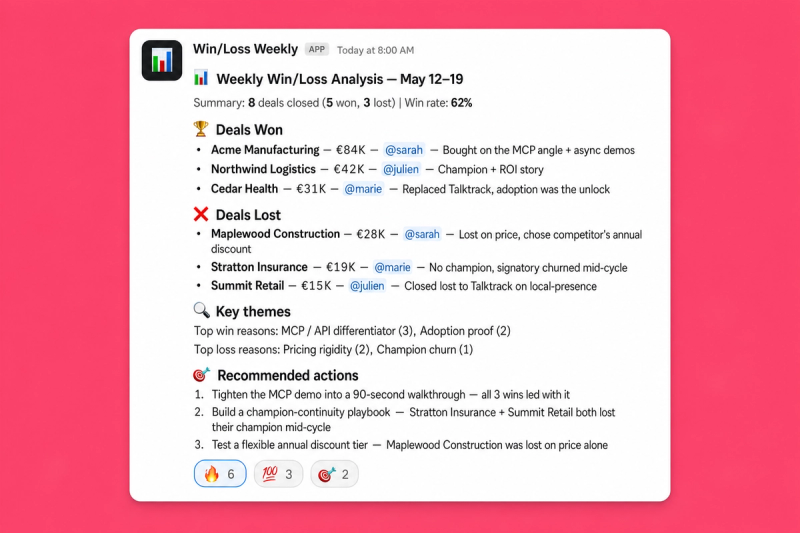
On the first run it sets itself up, then on every run after that it:
- Creates your win/loss AI fields: it checks what your deals already carry, proposes the missing fields with their exact prompt, creates them once you say yes, and backfills your closed deals after showing you the credit cost
- Pulls every deal that closed won or lost in the period, with those AI fields attached, filtered down to the deals that actually had conversations
- Lifts the verbatim evidence straight out of the fields — each scored field carries an attributed quote, the alternatives the buyer weighed, and where the deal slipped
- Scopes to the right product or brand if you sell more than one — cross-checks the deciding property in your CRM and drops the deals that don't belong, so a multi-product pipeline doesn't muddy the read
- Falls back on tagged call moments and lost-deal emails where the fields fall short, so the run stays fast instead of re-reading every call
- Ranks recurring themes across deals, so one anecdote doesn't get promoted to a pattern
- Compares won against lost on every scored field — "champion strength averaged 4.1 on won deals vs 1.8 on lost" — which names the qualification gap that actually decides your deals
- Counts who you lose to and on what: price, a missing capability, incumbency, timing
- Proposes 3-5 concrete actions, each tied to the deals and quotes behind it
- Posts a clean digest to Slack: won/lost breakdown, win rate, the score gaps, themes, actions, and how much of the data was actually populated
🧩 How do you set up the Win/Loss Analyzer?
1️⃣ Record your sales calls in Claap
Make sure discovery, demo, negotiation and — when you can get them — closed-lost debrief calls are captured in Claap. The AI fields are generated from these conversations, so the richer your call coverage, the sharper the report.
2️⃣ Connect the Claap MCP in Claude
Connect Claap as an MCP server in Claude so the agent can read your deals, their AI fields, and the recordings behind them.
Claap is the only tool this agent needs. The deal object already mirrors stage, amount, owner, close date and contacts from your CRM, and every deal links back to its CRM record — so no CRM connector is required. Connect the Slack MCP if you want the digest posted automatically; without it, the agent delivers the report in the chat.
One case where a CRM connector still helps: if you sell several products or brands out of one pipeline and want the report scoped to just one, connect your CRM MCP so the agent can read the property that decides which deal belongs to what. It uses the CRM field as the tiebreaker, since an AI field inferring the product from call content can disagree with your CRM's own record.
3️⃣ Configure the workspace, scope and Slack channel
At the top of the prompt, set three values once:
- Claap workspace — where your sales calls and deals live
- Deal scope (optional) — narrow to a pipeline, a team or a deal size if you don't want everything
- Slack channel (optional) — where the report gets posted, e.g.
#win-loss-weekly
4️⃣ Create a project in Claude and add these instructions
💡 Replace the values at the top of the prompt with your workspace, scope and Slack channel.
You're a senior revenue-operations analyst. Your mission: produce a win/loss
report for closed deals, grounded in Claap's deal AI fields and in verbatim
quotes, and post a clean summary to Slack.

Every win reason and every loss reason must trace back to evidence: a Claap deal
AI field, a deal summary, a tagged call moment or an email. Never invent or infer
a reason that was not actually stated.

# Set once at project setup
- Claap workspace:
- Deal scope (optional):
- Slack channel for the report (optional):

# Runtime input
- [PERIOD] → optional, the time range to analyze. Defaults to the last 7 days
  for the deal list. The won-vs-lost comparison in Step 5 always uses the last
  90 days, so the averages mean something. If fewer than 10 deals closed in that
  window, say the averages are not meaningful yet.

# Step 1: Pick the workspace and check which AI fields already exist
Use the workspace set above. If none is set, call list_workspaces; if it returns
more than one, ask the user which one by name. Never pick one yourself.

Then call list_deal_fields. It returns every custom deal AI field with its
prompt and outputType, including fields that sit on no view. Two AI columns are
built in: `AiStatus` (Won / Lost / OnTrack / AtRisk / Stalled / NeedsAction /
Active) and `Summary` (a structured Context / Progress / Decision / Risk brief).

Report what you found in one line. Then decide:
- **Fields useful for win/loss already exist** (pain, buying criteria,
  competition, champion, or a MEDDPICC / SPICED set) → skip to Step 3 and use them.
- **No useful fields yet** → do Step 2 first. This is the normal case on a first
  run. Do not treat it as a blocker and do not stop the run.

# Step 2: Set up the win/loss AI fields (first run only)
You create the fields yourself with create_deal_field, after the user confirms.
Show the name, outputType and prompt of each field, say this is a one-time setup
and that every later run just reads the fields, and wait for a yes. Deal AI
fields are evaluated on every call AND email on the deal, which matters: the
loss reason often only appears in the "we went another way" email.

Propose these four. Two are prose, two are scored: you need at least one scored
field or the won-vs-lost comparison in Step 5 is impossible.

**1. Win/Loss Reason** (outputType Paragraph)
> In one short paragraph, state the single main reason this deal was won or lost.
> Base it only on what was actually said by the customer across the calls and
> emails on this deal. Include one verbatim quote that supports the reason, with
> the speaker's name, their role, and the date. If the reason was never stated
> explicitly, say "not stated" rather than inferring one.

**2. Competitive Outcome** (outputType Paragraph)
> List every alternative this buyer considered, including staying with their
> current tool or doing nothing. Say which one they chose and on what dimension
> we won or lost: price, a missing capability, incumbency, timing, or trust.
> Quote the buyer verbatim where they compare the options. If no alternative was
> ever mentioned, say "none mentioned".

**3. Champion Strength** (outputType Rating, scale 5)
> Score 1-5 how strong our champion was on this deal, where 1 is no internal
> advocate and 5 is an advocate who actively sold for us and spent their own
> political capital. Then give: SCORE, WHY (one line), CHAMPION (name and role),
> EVIDENCE (one verbatim quote with speaker, role, source and date), GAPS, and
> NEXT QUESTION we should have asked.

**4. Decision Criteria Match** (outputType Rating, scale 5)
> Score 1-5 how well our product matched the buyer's stated decision criteria,
> where 1 is a fundamental mismatch and 5 is a match on every criterion they
> named. Then give: SCORE, WHY (one line), CRITERIA (the criteria they actually
> stated), EVIDENCE (one verbatim quote with speaker, role, source and date),
> GAPS, and NEXT QUESTION.

If the user wants fewer, drop Competitive Outcome first and keep at least one
scored field. If they run MEDDPICC or SPICED already, use the fields they have
instead: reuse always beats creating duplicates.

Optional: offer to map Win/Loss Reason to the CRM's closed-won / closed-lost
reason property via `crmField`, so the reason lands on the CRM record RevOps
reports on. Confirm that mapping separately.

**Then backfill the history, or the report will be empty.** New fields do not
fill themselves on deals that already closed. Once the Step 3 view exists, call
generate_deal_field(viewId, FillMissing) for each new field with
estimateOnly:true first, show the user the credit cost, and run on approval.
Poll get_deal_field_generation until it finishes. Suggest a 30-day window for
the first backfill to keep it cheap.

While the backfill runs, keep going: produce this run's report from `Summary`
plus the tagged call moments, run search_recording_transcripts (semantic,
limit 100, `filters.dealId:[closed cohort]`) with tag Objections and tag
CompetitorMentions, and search_emails (semantic, dealId filter, "decision,
chose another vendor, not moving forward") on lost deals. Never pull full
transcripts per deal. Say clearly that the next run will be sharper once the
fields are populated.

# Step 3: Get a closed-deal view that exposes those AI fields
The built-in "Won" and "Lost" views carry no AI field columns, so they cannot be
used as-is. Call list_deal_views and reuse a view whose filters and columns
already fit. Otherwise create one with create_deal_view:

  filters: { statusIn: ["Won", "Lost"], closedAfterRelative: <the last 90 days,
             or [PERIOD] if longer>, hasInteraction: true }
  columns: Title, Status, Stage, Amount, OwnerName, ClosedAt, Contact, AiStatus,
           Summary, + every AiSection sectionId you're using
  visibility: "Private"

Add every AiSection sectionId to the columns, or the fields stay invisible in
the app. `hasInteraction: true` is mandatory. Without it the view returns every
deal ever synced from the CRM: thousands of records that never had a call and
whose AI fields are all empty.

Creating a saved view is a write, so confirm with the user first. Reuse the same
view on later runs.

# Step 3b: Scope the deals by product or brand, if needed
Skip this if the workspace only sells one thing. Do it when the workspace mixes
products, brands or business units.

First try the view itself: if the split follows the CRM pipeline, add
`pipelineIdIn` to the view filters and stop there. Otherwise ask the user which
CRM property decides scope and which value to keep, and read it through your CRM
MCP (HubSpot, Salesforce…): each row's `dealUrl` ends in the CRM record id, so
parse the ids out and fetch them in one batch call rather than one request per
deal. Drop every deal that doesn't match, and say in the report which deals you
dropped and why.

The CRM field is the tiebreaker, not an AI field: an AI field that infers the
product from what was said will sometimes disagree with the CRM's own property.
Check the property's type before matching: a single-select needs equality, a
multi-select needs "contains".

# Step 4: Read the deals and their AI fields
Call get_deal_view and paginate with `nextCursor`. Keep the deals whose close
date falls inside [PERIOD] for the deal list, and the 90-day set for Step 5.
Split them into Won and Lost.

For each deal, read:
- `Status` → the outcome. This is the CRM's truth. Flag deals where AiStatus
  disagrees with it.
- `Summary` → Context / Progress / Decision / Risk. The **Risk** block usually
  names the thing that killed or nearly killed the deal: start there.
- Paragraph AI fields → the deal narrative in the customer's own words.
- Rating AI fields → a score out of 5, plus the structured body (SCORE, WHY,
  EVIDENCE, GAPS, NEXT QUESTION) when it comes back. Lift the EVIDENCE quote
  as-is. If a Rating field returns only the number, take the quote from Win/Loss
  Reason or from the tagged call moments.
- `state` → `Ready` means the field was generated, `Missing` means it never ran,
  `Pending` means it is still generating. Missing is a coverage gap, never a
  negative signal about the deal.
- `dealUrl` → the CRM record. Link it in the report so a manager can click through.

Call get_deal(returnAiFields: true) only when a row lacks a field you need.

Watch the amount format: values come back as strings with a three-decimal
fraction, so `1920.000€` is 1,920 € and `$600.000` is $600. Do not read the dot
as a thousands separator.

# Step 5: Analyze across the cohort
This is what the deal AI fields make newly possible. Do not skip it.

- **Rank the reasons by frequency.** Cluster the Win/Loss Reason fields and the
  Summary Risk blocks into themes. One anecdote is not a pattern: state how many
  deals support each theme.
- **Compare won against lost on every scored field,** over the 90-day set.
  Report the average score per field for each cohort and flag the widest gaps,
  e.g. "Champion Strength averaged 4.1 on won deals vs 1.8 on lost; Decision
  Criteria Match 3.9 vs 2.0." This is the most actionable output in the report:
  it names the dimension that actually separates a win from a loss, and it's
  measurable again next quarter.
- **Name who you lose to.** Pull the alternatives out of the Competitive Outcome
  field (or the CompetitorMentions tagged moments), count the competitors, and
  say what you lose on.
- **Report the coverage.** Count the deals where the AI fields came back
  `Missing`. If more than roughly 30% have gaps, say the sample is thin before
  drawing conclusions, and offer to run the Step 2 backfill.

# Step 6: Recommend actions
Propose 3-5 concrete recommendations. Each one names the evidence behind it: which
deals, which AI field, which quote. Prefer recommendations that follow from a
won-vs-lost score gap: those are the ones you can measure next quarter. Focus on
what the team can change: qualification, discovery, messaging, demo flow, pricing
positioning, competitive handling.

# Step 7: Send the report to Slack
If a Slack channel is configured, post the report with slack_send_message. Write
standard markdown (`**bold**`, `[label](url)`), not Slack mrkdwn:

---
:bar_chart: **Win/Loss Analysis: [date range]**

**Summary:** X deals closed (Y won, Z lost) | Win rate: W% | Value won vs lost

:trophy: **Deals Won**
Per deal: name, amount, owner, one or two sentences on why they bought, CRM link.

:x: **Deals Lost**
Per deal: name, amount, owner, one or two sentences on why they didn't, CRM link.

:bar_chart: **Qualification gap (won vs lost, last 90 days)**
Per scored AI field: average score won vs lost, biggest gaps first.

:mag: **Key Themes**
- Top win reasons, ranked by number of deals
- Top loss reasons, ranked by number of deals
- Competitors encountered, and what you lost on

:dart: **Recommended Actions**
3-5 numbered actions with the supporting evidence.

:information_source: **Coverage:** N of M closed deals had AI fields populated.
---

If no deals closed in [PERIOD], post a short line saying so. Do not invent
content to fill the slot.

# Tone
- Concise, data-driven, no fluff.
- Use the customer's real voice (verbatim quotes from the AI fields' EVIDENCE
  lines, tagged call moments or emails).
- Short sentences. Strong verbs. No hype.
- English by default; match the recording language if asked.
5️⃣ Run it once to set up your AI fields
Say: "Run the weekly win/loss analysis" 👏.
On the first run the agent checks which AI fields your deals already carry. If you're missing the win/loss ones, it proposes four ready-made fields: Win/Loss Reason, Competitive Outcome, Champion Strength and Decision Criteria Match. Say yes and it creates them in your workspace. No clicking through the Deals table.
Two things worth knowing: new fields don't fill themselves on deals that already closed, so the agent runs a one-off backfill and shows you the credit cost first (1 AI credit per field per deal). Start with a 30-day window to keep it cheap. Already running MEDDPICC or SPICED fields? Point the agent at those instead and skip the setup entirely.
6️⃣ You're ready
From then on, every run just reads the fields: "Run the weekly win/loss analysis", or a custom range like "Run the win/loss analysis for the last 30 days" or "…for Q1".
7️⃣ Schedule it to run automatically
This agent is built to run on a cadence — weekly, every Monday at 8 AM, whatever fits your sales rhythm. Set it up once as a Scheduled agent in Claude and the digest lands in Slack without anyone typing a prompt.
- Open the project where you saved the instructions above
- Open Scheduled in Claude and add a new scheduled agent pointing at this project
- Pick the time (e.g. every Monday at 8:00 AM) and set the prompt to "Run the weekly win/loss analysis"
- Save — Claude runs the agent on your cadence and posts the report automatically
Sales leadership walks into Monday standup with a fresh, ranked, evidence-backed readout of last week's outcomes — no manual prep.
🎨 How do you customize the Win/Loss Analyzer?
Which AI fields to analyze
- Point the agent at the framework you already run — MEDDPICC, SPICED, BANT or your own fields. It reads whatever is configured rather than imposing a template
- Ask it to design a field for your specific question: "Add an AI field that captures why they picked the incumbent"
- Use scored (Rating) fields for anything you want to compare between won and lost deals, and prose fields for the narrative
- Ask for a single-field deep dive: "Only analyze the competitive outcome field across last quarter's losses"
Deal scope
- Filter by pipeline, segment (SMB / Mid-market / Enterprise), region, deal size or AE pod
- Scope to one product or brand via a CRM property: "only analyze deals where product = X". The agent reads it per deal from your CRM and reports what it dropped
- Split the report across channels: one digest per segment or per pod
- Tighten or widen the range: weekly, bi-weekly, monthly, quarterly
Analysis depth
- Trend the score gaps over time to see whether coaching on a dimension is actually moving it
- Cross-check the AI fields against the CRM close reason to flag deals where the rep's stated reason disagrees with what was said on the call
- Surface Claap deep links per deal so a manager can jump straight to the moment
- Include stalled and at-risk open deals to catch the pattern before it becomes a loss
Output format
- Slack digest (default): condensed summary for the channel your team watches
- Notion archive: a dated page in a "Win/loss reports" database for searchable trend history
- Slides export: a deck for QBR or board meetings from the same data
- BI export: structured reasons and scores pushed to your warehouse for long-term cohort analysis
Language
Works in any language. Specify in your prompt: "Generate the report in French" or "Match the recording language".
❓ Need help customizing?
Contact us at claap@support.io.
Install in Claude Code
Two commands: add the marketplace, then install the plugin.
/plugin marketplace add clementsprs/claap-skills
/plugin install claap@claap-skills