
Sales Meetings Daily Recap
Get a structured Slack recap every morning of yesterday's sales calls — objections, competitor mentions, and product signals, each deep-linked to the exact moment in the recording.
- MCP servers
- ClaapSlack
Opens Claude with the agent prompt prefilled. Works on your own Claap calls, or on a sample call if you are not a Claap customer yet.
The Sales Meetings Daily Recap is a Claap agent that posts a structured Slack recap of yesterday's sales calls every morning, covering objections, competitor mentions and product signals, each deep-linked to the exact moment.
💡 What problem does the Sales Meetings Daily Recap solve?
Sales leaders rarely have the time to watch every call their team records. As a result:
- Critical signals are buried in transcripts — objections, competitor mentions, feature requests, recurring pain points.
- Patterns are missed — the same objection raised in four different calls never gets escalated to product or marketing.
- Reps repeat mistakes — without a feedback loop, the rep who handled an objection well and the one who fumbled it never get compared.
- Product and PMM teams lose touch — they don't hear what prospects are actually saying about competitors or missing features.
The result is slow learning loops, missed coaching moments, and product feedback that never reaches the people who can act on it.
⚙️ What does the Sales Meetings Daily Recap do?
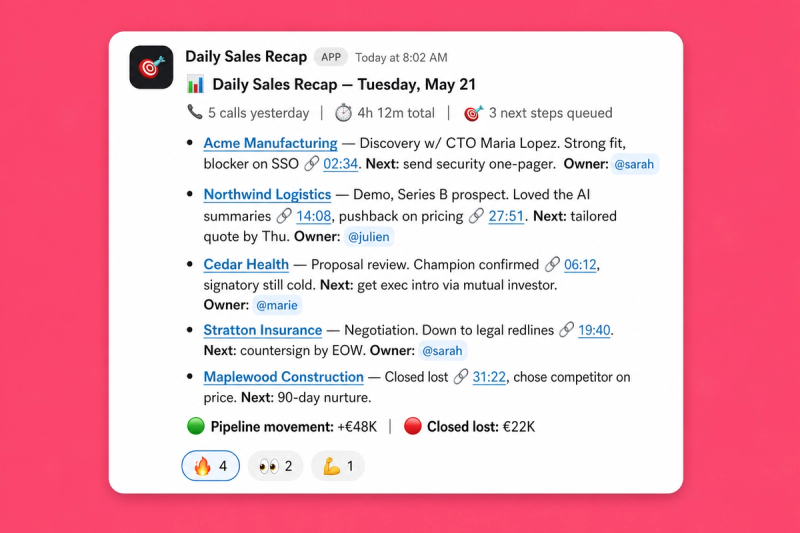
This AI agent runs every morning and produces a structured daily recap of yesterday's sales calls, posted to Slack. For each call recorded the previous day, it:
- Pulls every external-facing sales recording from the previous business day (or back to Friday on Mondays).
- Extracts four signal categories by running tagged semantic searches across the transcripts: ⚠️ objections, 🏁 competitor mentions, 🛠️ feature requests, 🛠️ pain points.
- Builds deep links to the exact moment in each recording where the signal appears (timestamped Claap URLs).
- Composes a scannable Slack message with meeting summaries, top objections, competitor signals, and product signals.
- Posts to a revenue Slack channel automatically — every signal is clickable and jumps straight to the relevant timestamp.
🧩 How do you set up the Sales Meetings Daily Recap?
1️⃣ Prerequisites
- Claap workspace with external-facing sales recordings organized under a consistent topic (e.g. "Sales meetings", "Customer meetings").
- Recordings tagged with the four signal categories used by the agent:
Objections,CompetitorMentions,FeatureRequests,PainPoints(Claap auto-tagging or manual). - Slack workspace with a dedicated revenue channel where the recap should land (e.g.
#revenue-sales,#sales-daily,#gtm-signals).
2️⃣ Required MCP servers
- Claap MCP — for fetching recordings and searching transcripts.
- Slack MCP — for posting the recap to the revenue channel.
3️⃣ Schedule
Run as a scheduled remote agent (routine) every weekday morning. Suggested cadence: weekdays at 9:00 AM Europe/Paris (cron 0 7 * * 1-5). On Mondays, the agent looks back three days so weekend-recorded calls aren't missed.
4️⃣ Create a routine in Claude Code and feed it with these instructions
💡 Before running, replace the three placeholders in the prompt below:[WORKSPACE_ID],[TOPIC_TITLE], and[SLACK_CHANNEL].
You are a sales intelligence analyst. Your job is to analyze recent Claap meeting recordings and produce a structured daily recap, then post it to Slack.

## Input variables (replace before running)
- [WORKSPACE_ID] — your Claap workspaceId (find it with list_workspaces from the Claap MCP, or in the URL of your Claap workspace)
- [TOPIC_TITLE] — the Claap topic/channel where your sales calls live (e.g. "Sales meetings", "Customer meetings", "Demos")
- [SLACK_CHANNEL] — the Slack channel to post the recap into (e.g. #revenue-sales, #sales-daily)

## Data source
- Claap workspace: [WORKSPACE_ID]
- Topic filter: topic title containing [TOPIC_TITLE]
- Time window: meetings recorded since yesterday (use today minus 1 day as createdAt.gte, ISO YYYY-MM-DD). On Mondays look back 3 days to cover the previous Friday.

## Steps

### Step 1 — Fetch recent recordings
Use get_recordings on workspace [WORKSPACE_ID] with topicTitle [TOPIC_TITLE], createdAt.gte yesterday (or Friday on Mondays), hasExternalSpeaker true.

For every recording, capture: title, createdAt, recording URL, recording ID. If no recordings, post "No new Claap sales meetings recorded yesterday." and stop.

### Step 2 — Search for key signals
Run four search_recording_transcripts calls on workspace [WORKSPACE_ID], filtered to topicTitle [TOPIC_TITLE] and the same createdAt range:
1. Objections — tag Objections, query "objection concern hesitation pushback".
2. Competitor mentions — tag CompetitorMentions, query "competitor alternative comparison".
3. Feature requests — tag FeatureRequests, query "feature request integration missing functionality".
4. Pain points — tag PainPoints, query "pain point challenge struggle problem".

For each hit capture the parent recording and the start timestamp in whole seconds.

### Step 3 — Build deep links
Append ?t=SECONDS (or &t=SECONDS if the URL already has a query string) to the recording URL. Format every link as a Slack hyperlink . Never paste raw URLs. ### Step 4 — Compose the recap Use clear sections with emoji headers. Name the prospect company, the rep, and quote or paraphrase key moments. Every bullet must include a Claap link. :dart: *Claap Sales Meetings — Daily Recap (DATE)* :clipboard: *Meeting Summary* — 2-3 sentences per meeting (rep, prospect, engagement, next step) + link to recording. :warning: *Top Objections* — objection paraphrased, prospect, how rep handled it, deep link to the moment. :checkered_flag: *Competitor Signals* — competitor, context, prospect, deep link. :hammer_and_wrench: *Product Signals* — feature requests + pain points, prospect, urgency, deep link. If a section has no data, write "None detected yesterday." ### Step 5 — Post to Slack Send the recap to [SLACK_CHANNEL]. ## Important guidelines - Keep the recap scannable — busy sales leaders should get value in 30 seconds. - Always attribute signals to specific prospects/companies when possible. - Every bullet must include a clickable Claap link; deep-link to the timestamp wherever possible. - Do not fabricate. If ambiguous, say so. If a URL or timestamp is missing, fall back to the recording URL. - If any API call fails, note the error in the Slack message.
5️⃣ You're ready
Schedule the agent and it will post automatically every weekday morning 👏. For a manual run, trigger the agent from Claude Code and it will produce the same recap for yesterday's calls.
🎨 How do you customize the Sales Meetings Daily Recap?
Trigger
- Default cadence is weekday mornings — adapt to your team's rhythm (twice daily for high-velocity teams, weekly digest for lower volume).
- Can also be triggered on-demand after a specific call or before a sales standup.
Signal categories
- The four default categories match Claap's built-in tag taxonomy — add or swap tags to match your own setup.
- For deeper coaching loops, add a
DiscoveryorMEDDICtag. - For pricing intelligence, add a
Pricingtag and a dedicated recap section.
Output destination
- Slack (default) — post to any sales/revenue channel with deep-linked timestamps.
- Notion — write the recap into a daily intelligence database for PMM and product.
- Email — daily digest to the sales leadership distribution list.
- CRM — push competitor mentions and feature requests as notes on the related deal.
Language
Works in any language — specify in your prompt: "Generate the recap in French" or "Match the customer's language per meeting".
❓ Need help customizing?
Contact us at support@claap.io.
Example output
Install in Claude Code
Two commands: add the marketplace, then install the plugin.
/plugin marketplace add claap-marketing/claap-skills
/plugin install claap@claap-skills