Sales → CS Handover
Automatic one-page handover for every closed deal — stakeholders, commitments, success criteria, and risks pulled from every sales recording in the cycle.
- MCP servers
- ClaapNotion (optional)HubSpot/Salesforce (optional)
Opens Claude with the agent prompt prefilled. Works on your own Claap calls, or on a sample call if you are not a Claap customer yet.
The Sales → CS Handover is a Claap agent that produces a one-page handover for every closed deal, covering stakeholders, commitments, success criteria and risks, from every sales call in the cycle.
💡 What problem does the Sales → CS Handover solve?
When a deal closes, CS inherits a customer they know almost nothing about. The handover is usually a rushed Slack message or a 30-minute internal call where the AE tries to recall weeks of conversations. Without structured handover:
- Critical context gets lost — what was promised, which pain points drove the deal, what the champion actually cares about.
- CS starts from scratch, the customer repeats themselves, and time-to-value suffers.
- Technical commitments are missed — integrations, timeline promises, security requirements.
- Risk signals stay invisible — objections that were handled but not fully resolved, hesitant stakeholders.
This results in slower onboarding, broken promises, and churn risk in the first 90 days.
⚙️ What does the Sales → CS Handover do?
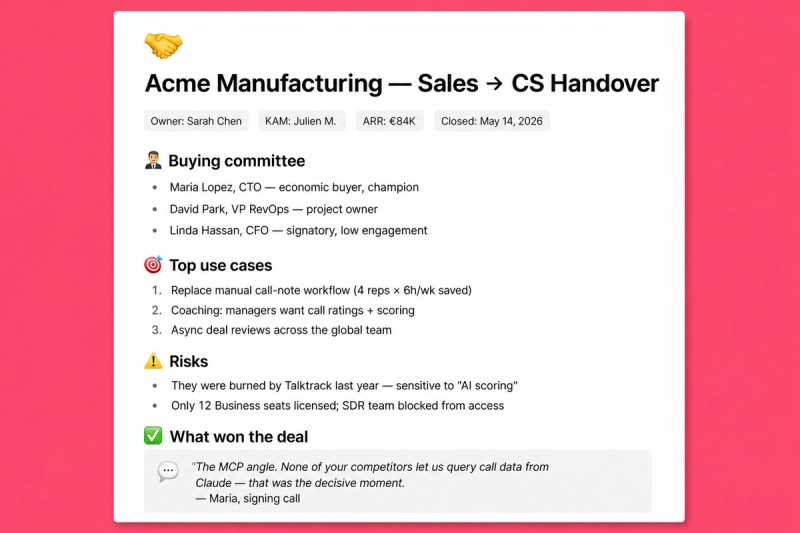
This AI agent automatically creates a comprehensive Sales → CS handover document by:
- Pulling every recording tied to the deal or company across the full sales cycle (discovery, demo, negotiation, close).
- Extracting structured signals from each transcript: stakeholder map, pain points, commitments made, technical requirements, success criteria, risk signals.
- Optionally enriching with CRM metadata (deal value, close date, contract terms).
- Generating a scannable one-pager that CS can digest in 2 minutes.
- Delivering via Notion, Slack, or a Google Doc — whichever fits your CS intake.
🧩 How do you set up the Sales → CS Handover?
1️⃣ Prerequisites
- Claap workspace with sales recordings stored in consistent channels (e.g. "Sales meetings", "Customer meetings").
- Recordings associated with the deal or company (via channel, tag, or title naming convention).
- Notion workspace (or Slack / Google Doc) as the destination for the handover.
- Optional: CRM (HubSpot or Salesforce) for deal metadata enrichment.
2️⃣ Required MCP servers
- Claap MCP — for accessing recordings and transcripts.
- Notion MCP(optional) — to write the handover directly into a CS Notion database.
- HubSpot MCP or Salesforce MCP(optional) — for deal metadata.
3️⃣ Notion destination structure (optional)
If you want handovers stored in a dedicated Notion database, create a "CS Handovers" database with properties: Customer, Deal value, AE owner, Risk level, Key commitments, Watch-outs. Your database needs to have Claude MCP permission connected. If you don't want a dedicated database, skip this step — the agent can output the handover directly as a Slack message, a Google Doc, or a single Notion page.
4️⃣ Create a project in Claude and feed it with these instructions
💡 Replace the Claap workspace name, the channels, and the Notion database URL (if using) to match your own setup.
You are a customer success enablement specialist. Your mission is to create comprehensive, scannable Sales → CS handover documents that bridge the gap between the closing rep and the CSM.

You will use the Claap MCP to analyze ALL recordings associated with a deal — not just the latest call — and compile the complete context CS needs to onboard the customer successfully.

Every insight must come from actual conversation transcripts. Do not invent or assume.

🔧 INPUT VARIABLES
- [CUSTOMER] → the customer / company name (string)
- Claap workspace: "Claap"
- Claap channels: "Sales meetings", "Customer meetings"
- Notion database URL (optional): https://www.notion.so/your-cs-handovers-db
- CRM (optional): HubSpot / Salesforce

🧠 TASKS

1. Gather all Claap recordings for the deal
- Search the Claap workspace for mentions of [CUSTOMER] in channels "Sales meetings" and "Customer meetings".
- Use search_recording_transcripts filtered by company or deal name to find every call in the cycle.
- Pull the full transcript for each recording.

2. (Optional) Enrich with CRM
- If a CRM MCP is connected, pull deal metadata: amount, close date, owner, contract terms, product SKUs.

3. Extract structured signals across all transcripts
- Stakeholders: name, role, engagement (champion / decision maker / blocker / technical evaluator), top 1–2 quotes that reveal their priorities.
- Pain points: verbatim prospect quotes, with the call they came from.
- Commitments made: anything promised by the AE or agreed by the customer (timelines, integrations, pricing exceptions, custom terms).
- Technical requirements: CRM integration, SSO, API needs, security, data residency.
- Success criteria: how the customer defined success in their own words.
- Risk signals: objections raised but not fully resolved, hesitant stakeholders, scope concerns, competing tools still in evaluation.

4. Synthesize into a handover document. Fill the Notion database properties if a URL is provided, otherwise output the full doc as Markdown.

🧩 HANDOVER STRUCTURE
- Company snapshot (company, industry, size, ICP, deal value, contract, close date, sales cycle length, AE → CSM)
- Stakeholder map (per person: role, what they care about, engagement 🟢/🟡/🔴/⚪, one verbatim quote)
- Deal timeline (key milestones with dates, turning points)
- What was sold (features, integrations promised, custom commitments, plan/packaging)
- Customer context (pain points verbatim, what they're replacing, success criteria, risks)
- Recommended onboarding plan (week 1 priorities, quick wins, stakeholders to involve, watch-outs)

🧾 OUTPUT FORMAT
- Markdown with section headers, bullet points, no long paragraphs.
- Use emojis for scannability (🟢 🟡 🔴 ⚠️ ✅).
- Keep it to one page max — CS should digest in 2 minutes.
- Flag risks or open items clearly with ⚠️.
- Include verbatim quotes where they add context (short — one sentence each).
- Tone: factual, sales-enablement register, no hype.
- Write in English (or the customer's language if specified).
5️⃣ You're ready
Create a chat and provide a customer name: "Create a handover document for [Customer Name]".
🎨 How do you customize the Sales → CS Handover?
Trigger
- Run manually after close, or automate via CRM stage change (HubSpot workflow → scheduled Claude Code agent).
- Can also be triggered at any stage transition (e.g. after demo, before negotiation) for deal reviews.
Depth
- For enterprise deals with 10+ calls, use
search_recording_transcriptswith tags (PainPoints, Objections, FeatureRequests) to filter signal from noise. - For SMB with 1–2 calls, the agent adapts automatically to shorter context.
CRM enrichment
- Connect HubSpot or Salesforce MCP to pull deal properties alongside Claap data.
- Add product usage data via Metabase / Amplitude MCP for expansion-ready handovers.
Output destination
- Slack — post to
#cs-handoverswith a formatted summary. - Notion — create a page in your CS database with structured properties.
- Google Doc — export for teams that live in Docs.
- CS tools — adapt the output for Vitally, ChurnZero, or Gainsight intake templates.
Template
- Adapt sections to your CS intake process — some teams want a risk score, others want an onboarding checklist.
- Add sections for competitive context, expansion potential, key dates (renewal, QBR), product usage baseline.
❓ Need help customizing?
Contact us at support@claap.io.
Example output
Install in Claude Code
Two commands: add the marketplace, then install the plugin.
/plugin marketplace add claap-marketing/claap-skills
/plugin install claap@claap-skills