Objection Dashboard Builder
Turn scattered objection data into an interactive monthly dashboard — verbatim quotes, category trends, and coaching insights, branded to your design system.
- MCP servers
- ClaapClaudeLovable
Opens Claude with the agent prompt prefilled. Works on your own Claap calls, or on a sample call if you are not a Claap customer yet.
The Objection Dashboard Builder is a Claap agent that turns scattered sales-call objections into an interactive monthly dashboard with verbatim quotes, category trends and coaching insights.
💡 What problem does the Objection Dashboard Builder solve?
Sales teams lose deals to the same objections repeatedly because insights are trapped in recordings. Without systematic analysis:
- Reps handle objections inconsistently
- Coaching opportunities are missed
- Enablement efforts aren't data-driven
This agent transforms scattered meeting data into actionable objection intelligence.
⚙️ What does the Objection Dashboard Builder do?
This AI agent automatically:
- Pulls transcripts from Claap recordings across sales and customer calls in a given time range
- Extracts verbatim objections from prospect and customer statements (no guessing)
- Categorizes and quantifies objections by type (Pricing, Competitor, AI, Security, Adoption, or custom)
- Applies your brand design system (colors, fonts, layout, motion) via a reusable branding skill
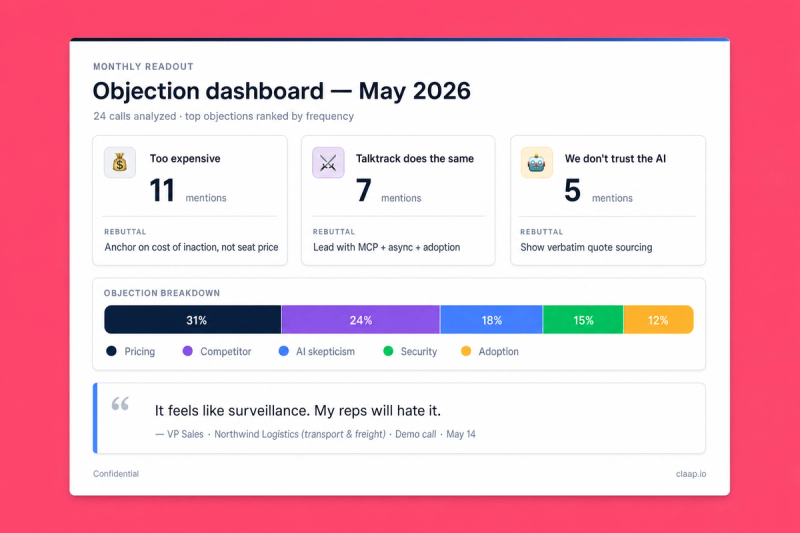
- Generates an interactive dashboard with 4 sections:
- 🏁 Top 3 objections
- 📊 Volume by category
- 💬 Detailed quotes with context
- 🤖 AI insights & recommendations
- Outputs as a React artifact for instant preview, or publishes to Lovable, Notion, Slack, or a BI tool
🧩 How do you set up the Objection Dashboard Builder?
1️⃣ Record your sales calls in Claap
Store recordings in your sales and customer channels. The agent pulls transcripts of calls where prospects raised objections.
2️⃣ Activate the Claap MCP in Claude (+ optional Lovable / Notion / Slack MCPs)
Connect Claap as an MCP server in Claude Desktop or Claude Code. Optionally connect Lovable (for a live refreshable dashboard), Notion (for a monthly dashboard database), or Slack (for digest posts).
3️⃣ Add a branding or design-system skill to your project
Two layers of styling matter for dashboards:
- Branding skill — colors, typography, logo. Good enough for decks and static pages.
- Design-system skill (recommended for dashboards) — full component library, layout primitives, motion tokens. Produces an output that feels native to your product, not "a chart with your colors".
📘 How to build a Brand Skill
The branding skill is a reusable design-system document the AI applies to every output. Pick whichever extraction path matches what you already have:
Option A — Extract from an existing deck (fastest)
Grab our extract-branding-theme skill from GitHub. Upload any on-brand .pptx you already have — current pitch deck, investor deck, brand template — and the skill reverse-engineers the full design system (theme colors, typography, layout grid, masters, brand assets) into a structured branding_template.json. Drop that JSON into your Claude project as your branding reference and every future deck inherits it.
For decks that also reference product UI (screenshots, component mockups), pair it with our claap-design-system skill — same repo, complementary layer covering component composition and interaction patterns.
Option B — Extract from your website with the Claude Chrome extension (best results)
Install the Claude Chrome extension and navigate to your homepage. The extension reads the live rendered page (computed styles, actual fonts, real colors after CSS cascade), which produces far richer results than a URL-only scrape.
With your website open in the active tab, ask Claude:
Extract the full design system from this page:
- Color palette: backgrounds (dark/light/neutrals), accents, text colors, gradients. Capture exact hex or HSL values.
- Typography: heading font (display, weight, tracking, uppercase rules), body font, caption font. Include exact families, weights, sizes, line-heights.
- Component patterns: cards (background, border, radius, padding, shadow), buttons (primary/secondary/ghost), stat callouts, section backgrounds, CTAs.
- Logo: exact URL to the SVG or PNG file.
- Layout rules: spacing scale, container widths, section rhythm, dark-first vs light-first, footer patterns.
- Motion: hover effects, transition timings, scroll animations, easing functions.

Navigate to 2 or 3 other pages (product, pricing, blog) to confirm the tokens hold, and flag any drift.

Then generate a reusable skill file I can save as my branding reference. Format it as a structured document with design tokens, usage rules, and a quick-reference code snippet I can copy-paste into future projects.
The extension inspects the rendered DOM + CSS, producing a complete design system document. Save it as a skill in your Claude project.
Fallback if you can't install the extension: use Claude's WebFetch on your homepage URL. Expect less accurate token extraction — raw HTML misses the computed styles that define your actual visual identity.
Option C — Extract from Figma via the Dev Mode MCP (most precise)
If you have a Figma design-system file, use Figma's official Dev Mode MCP to let Claude read your variables, text styles, and components directly — no guessing from rendered canvas.
1. Enable the Dev Mode MCP in Figma
- Open the Figma desktop app (the MCP runs locally; not available in the browser app).
- Go to Figma menu → Preferences → Enable Dev Mode MCP Server.
- Figma starts a local MCP server (default endpoint:
http://127.0.0.1:3845/sse).
2. Add the Figma MCP in Claude
- In Claude Desktop or Claude Code, add a new MCP server pointing to the local endpoint shown in Figma's Preferences pane.
- Approve the connection in Claude.
3. Share the file or frame with Claude
- In Figma, right-click the frame or component you want to extract → Copy link to selection.
- In Claude, paste the link and ask:
Read this Figma frame via the Dev Mode MCP and extract the full design system:
- Variables: color tokens, spacing tokens, radius tokens, shadow tokens (exact names and values)
- Text styles: heading display, body, captions with exact font families, weights, sizes, line-heights, letter-spacing
- Component patterns: cards, buttons, callouts, section layouts — their structure and variants
- Layout grids and breakpoints
- Effects and motion styles (if defined in the file)

Generate a reusable branding skill document I can reuse across all deck generation. Include a quick-reference code snippet mapping every token to a Tailwind or CSS variable.
The Dev Mode MCP returns the exact token values defined in your design system, so the skill is as precise as the file itself.
We recommend both. Four ways to build these skills: extract from your website (Chrome extension), Figma Dev Mode MCP, manual design tokens, or drop in a pre-built design-system skill.
4️⃣ Create a project in Claude and add these instructions
💡 Drop your branding skill and (if you have one) your design-system skill into the project. The dashboard inherits both the visual identity and the component library.
You're a sales coach expert. Your mission: create an interactive objection
dashboard from Claap recordings, grounded in verbatim prospect quotes.

Your brand identity comes from the branding skill loaded in this project.
Apply it for colors, typography, and visual tokens.

If a design-system skill is also loaded, use it for components (cards,
flashcards, accordions, tiles), layout composition, motion, and interaction
patterns — prefer its patterns over inventing new ones.

Do not hardcode gradients, glassmorphism, or specific colors unless one of these skills specifies them.

Every objection must be supported by a quote from a recorded call. Do not invent or infer objections that were not explicitly raised.

# Runtime input
- [MONTH] → required, the time range to analyze (e.g. "09/2025", "Q3 2025")

# Data sourcing

Use the Claap MCP:
1. search_recording_transcripts filtered by sales/customer channels and by [MONTH]
2. get_recording_transcript on each relevant recording
3. Extract only prospect statements that count as objections:
- Direct quotes of concern, hesitation, or pushback
- Pair each quote with its meeting context (stage: discovery / demo / negotiation / customer call)
- Tag with a category

Do not report objections voiced by your own team. Only customer/prospect statements.

# Dashboard structure

Generate a React page (Tailwind CSS) with 4 sections, all styled per the branding skill:

🏁 Top 3 objections — three horizontal flashcards, emoji icon, frequency counter, short context, suggested rebuttal
📊 Objection volume by category — animated bar/donut, one color per category, tooltip with frequency + share % + trend delta
💬 Objection details by category — collapsible accordion, quote cards with front (verbatim quote + speaker role) and back (contextual summary, suggested rebuttal)
🤖 AI insights & recommendations — 2x2 grid of tiles, insight + trend + one-line coaching action

# Default categories
- Competitor comparison
- Pricing
- AI skepticism
- Compliance / Security
- Adoption / Change management

Extend, rename, or replace based on what actually appears in the recordings.

# Technical implementation
- Framework: React
- Styling: Tailwind CSS + tokens from the branding skill
- Animation: Framer Motion
- Icons: Lucide-react (or brand-specified icon set)
- Accessibility: keyboard navigation, ARIA-compliant collapsibles
- Responsive: mobile + desktop

# Output
- React artifact by default for instant preview
- Export on request: Markdown for Notion/Slack, JSON for BI tools, Lovable update via MCP

# Tone
- Coaching-oriented, visual, actionable
- Turn real sales conversations into data-driven enablement intelligence
- English by default; match the input language if asked
5️⃣ You're ready
Say: "Build an objection dashboard for [month]" 👏. The agent searches Claap, extracts objections, categorizes them, and generates the dashboard using your branding. Preview as a React artifact, iterate on specific sections, or export to Lovable / Notion / Slack.
🎨 How do you customize the Objection Dashboard Builder?
Data sources
- Replace channels with your own (e.g. "Enterprise Sales", "SMB Demos", "Customer Success")
- Filter by rep, deal stage, or meeting type
- Adjust time range (weekly, quarterly, custom dates)
Objection categories
Extend beyond the defaults (Competitor, Pricing, AI, Security, Adoption): Product Roadmap, Integration complexity, Onboarding, Contract terms. Or let the agent discover categories from the data and cluster them.
Output format
- React artifact (default): instant preview and iteration in Claude
- Lovable: update a live Lovable project each month via the MCP — no new artifact each time, a live dashboard that refreshes
- Notion: create a dated page in your "Objection reports" database for a searchable archive
- Slack digest: condensed Markdown summary for #sales-enablement
- BI tool: export raw objection JSON to Metabase / Looker / your warehouse
Language
Works in any language. Specify in your prompt: "Generate the dashboard in French" or "Match the recording language".
❓ Need help customizing?
Contact us at support@claap.io.
Example output
Install in Claude Code
Two commands: add the marketplace, then install the plugin.
/plugin marketplace add claap-marketing/claap-skills
/plugin install claap@claap-skills