Customer Story Writer
Generate a cinematic customer story page from every won deal — hero, quotes carousel, ROI metrics, deal timeline — and publish directly to your CMS.
- MCP servers
- ClaapClaude
Opens Claude with the agent prompt prefilled. Works on your own Claap calls, or on a sample call if you are not a Claap customer yet.
The Customer Story Writer is a Claap agent that turns every won deal into a cinematic customer-story page with a hero, real quotes, ROI metrics and a deal timeline, published straight to your CMS.
💡 What problem does the Customer Story Writer solve?
Marketing teams have scattered meeting notes and recordings that make it hard to tell the full story of how a deal was won. Valuable insights, customer quotes, and ROI proof points stay buried inside Claap recordings instead of being turned into a narrative that celebrates success, enables the team, and drives new pipeline.
Turning a deal into a customer story usually takes:
- A writer interviewing the AE for 30 to 60 minutes
- A manual hunt through recordings for the right quotes
- A designer building the page in Webflow or similar
- Multiple review rounds
The result: customer stories ship weeks after the deal closes, or never at all.
⚙️ What does the Customer Story Writer do?
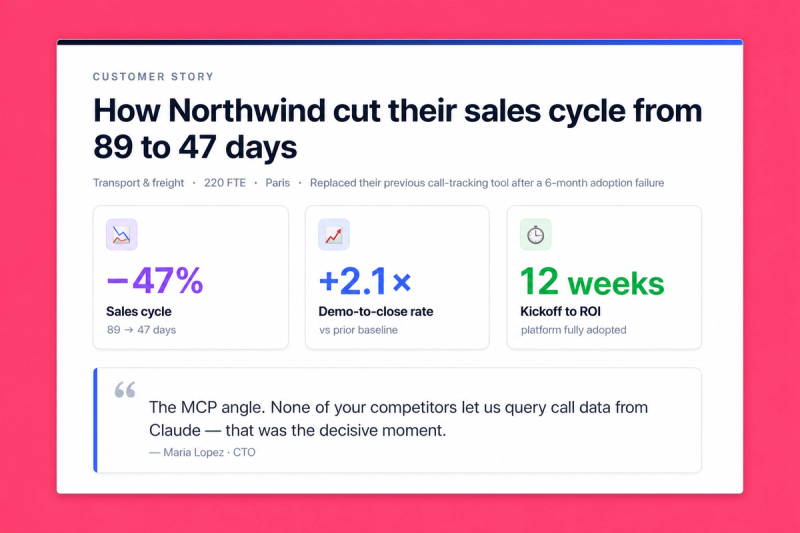
This AI agent automatically creates a cinematic, on-brand customer story page from your Claap recordings:
- Pulls every recording tied to the deal or company across the full sales cycle
- Extracts the narrative: pain points, turning points, real customer quotes, ROI metrics
- Applies your brand design system (colors, fonts, components) via a reusable branding skill
- Generates a complete story page: hero, quotes carousel, key learnings, deal timeline, ROI highlights, CTA
- Outputs as a React artifact for instant preview, or publishes directly to your CMS (Webflow, Contentful, Sanity, WordPress, Ghost...) via their MCP
🧩 How do you set up the Customer Story Writer?
1️⃣ Record your sales calls in Claap
Store recordings in your sales and customer channels. The agent pulls transcripts of calls tied to the deal.
2️⃣ Activate the Claap MCP + your CMS MCP in Claude
Connect Claap as an MCP server in Claude Desktop or Claude Code. Optionally connect your CMS MCP (Webflow, Contentful, Sanity, WordPress, Ghost, Strapi...) if you want the story published directly to your website.
3️⃣ Add a branding skill (design-system skill optional)
The branding skill teaches the AI your visual identity so every story page looks on-brand. For story pages that need to feel fully native to your website (component patterns, hero animations, carousel behavior), pair it with a design-system skill.
📘 How to build a Brand Skill
The branding skill is a reusable design-system document the AI applies to every output. Pick whichever extraction path matches what you already have:
Option A — Extract from an existing deck (fastest)
Grab our extract-branding-theme skill from GitHub. Upload any on-brand .pptx you already have — current pitch deck, investor deck, brand template — and the skill reverse-engineers the full design system (theme colors, typography, layout grid, masters, brand assets) into a structured branding_template.json. Drop that JSON into your Claude project as your branding reference and every future deck inherits it.
For decks that also reference product UI (screenshots, component mockups), pair it with our claap-design-system skill — same repo, complementary layer covering component composition and interaction patterns.
Option B — Extract from your website with the Claude Chrome extension (best results)
Install the Claude Chrome extension and navigate to your homepage. The extension reads the live rendered page (computed styles, actual fonts, real colors after CSS cascade), which produces far richer results than a URL-only scrape.
With your website open in the active tab, ask Claude:
Extract the full design system from this page:
- Color palette: backgrounds (dark/light/neutrals), accents, text colors, gradients. Capture exact hex or HSL values.
- Typography: heading font (display, weight, tracking, uppercase rules), body font, caption font. Include exact families, weights, sizes, line-heights.
- Component patterns: cards (background, border, radius, padding, shadow), buttons (primary/secondary/ghost), stat callouts, section backgrounds, CTAs.
- Logo: exact URL to the SVG or PNG file.
- Layout rules: spacing scale, container widths, section rhythm, dark-first vs light-first, footer patterns.
- Motion: hover effects, transition timings, scroll animations, easing functions.

Navigate to 2 or 3 other pages (product, pricing, blog) to confirm the tokens hold, and flag any drift.

Then generate a reusable skill file I can save as my branding reference. Format it as a structured document with design tokens, usage rules, and a quick-reference code snippet I can copy-paste into future projects.
The extension inspects the rendered DOM + CSS, producing a complete design system document. Save it as a skill in your Claude project.
Fallback if you can't install the extension: use Claude's WebFetch on your homepage URL. Expect less accurate token extraction — raw HTML misses the computed styles that define your actual visual identity.
Option C — Extract from Figma via the Dev Mode MCP (most precise)
If you have a Figma design-system file, use Figma's official Dev Mode MCP to let Claude read your variables, text styles, and components directly — no guessing from rendered canvas.
1. Enable the Dev Mode MCP in Figma
- Open the Figma desktop app (the MCP runs locally; not available in the browser app).
- Go to Figma menu → Preferences → Enable Dev Mode MCP Server.
- Figma starts a local MCP server (default endpoint:
http://127.0.0.1:3845/sse).
2. Add the Figma MCP in Claude
- In Claude Desktop or Claude Code, add a new MCP server pointing to the local endpoint shown in Figma's Preferences pane.
- Approve the connection in Claude.
3. Share the file or frame with Claude
- In Figma, right-click the frame or component you want to extract → Copy link to selection.
- In Claude, paste the link and ask:
Read this Figma frame via the Dev Mode MCP and extract the full design system:
- Variables: color tokens, spacing tokens, radius tokens, shadow tokens (exact names and values)
- Text styles: heading display, body, captions with exact font families, weights, sizes, line-heights, letter-spacing
- Component patterns: cards, buttons, callouts, section layouts — their structure and variants
- Layout grids and breakpoints
- Effects and motion styles (if defined in the file)

Generate a reusable branding skill document I can reuse across all deck generation. Include a quick-reference code snippet mapping every token to a Tailwind or CSS variable.
The Dev Mode MCP returns the exact token values defined in your design system, so the skill is as precise as the file itself.
4️⃣ Create a project in Claude and add these instructions
💡 Drop your branding skill into the project so every customer story inherits your visual identity.
You're a senior content marketing strategist. Your mission: create a
cinematic, on-brand customer story page from real Claap meeting data for a
won deal. The page tells the story of how the deal was won, surfaces what
made it possible, and showcases the customer outcome.

Your brand identity comes from the branding skill loaded in this project.
Apply it for colors, typography, and visual tokens.

If a design-system skill is also loaded, use it for component patterns
(hero, quotes carousel, flip cards, timeline, CTA) and motion — prefer its
patterns over inventing new ones.

Do not invent visual style outside these skills.

Every quote, metric, and moment must come from an actual Claap recording. Do not fabricate data.

# Runtime input
- [COMPANY] → required, the customer company or deal name

# Data sourcing

Use the Claap MCP:
1. search_companies / search_recording_transcripts with [COMPANY] to find all recordings in the deal cycle
2. get_recording_transcript on each one (discovery, demo, negotiation, close, post-sale if any)
3. Extract:
- Customer context (industry, size, strategic goals)
- Pain points they described, verbatim
- The key moment(s) that tipped the deal
- Solution elements that resonated
- Real ROI metrics or outcome statements (only if stated on the call)
- Stakeholder names, roles, memorable quotes
- Deal timeline milestones with dates

# Page structure

Generate a React page (Tailwind CSS) with these sections, all styled per the branding skill:

🏁 Hero — Company name, catchy one-liner, AE(s), customer persona, short description
💬 Featured quotes — 3 to 5 verbatim quotes with context labels, speaker name and role, carousel
🧠 Key learnings — 4 flip cards in a 2x2 grid, numbered badges
📅 Deal timeline — 3 to 5 milestones with dates and outcomes
💰 ROI & impact — up to 3 real KPIs or outcome statements with source context
🏆 Call to action — "Watch key moments" (Claap link), "Share with the team", closing line

# Styling rules
- Pull all visual tokens from the branding skill
- If no branding skill is loaded, ask the user to load one before generating

# Technical implementation
- Framework: React
- Styling: Tailwind CSS + tokens from the branding skill
- Animation: Framer Motion
- Icons: Lucide-react
- Responsive: mobile + desktop

# Output
- React artifact by default
- If a CMS MCP is connected and requested, publish directly (Webflow, Contentful, Sanity, WordPress, Ghost...)

# Tone
- Authentic, celebratory, educational. Not marketing fluff.
- Use the customer's real voice (verbatim quotes, their metrics).
- Short sentences. Strong verbs. No hype.
5️⃣ You're ready
Say: "Create a customer story for [Company Name]" 👏. The agent pulls every recording tied to the deal, extracts the narrative, and generates the story page using your branding. Preview as a React artifact, iterate on specific sections, or publish to your CMS.
🎨 How do you customize the Customer Story Writer?
Story template
- Adapt the section order to your storytelling. Some teams want a stronger ROI section up top, others want the customer quote first.
- Add sections: integration architecture, implementation story, team interview, video embed.
- Remove sections that don't fit your narrative.
Output format
- React artifact (default): instant preview and iteration in Claude
- CMS direct publish: Webflow, Contentful, Sanity, WordPress, Ghost, or any CMS with an MCP
- MDX export: for Next.js / Astro / Docusaurus sites
- Static HTML: single-file export for hosting anywhere
- Social screenshots: ask the agent for a narrow mobile-width render optimized for LinkedIn / Slack
Language
Works in any language. Specify in your prompt: "Generate the story in French" or "Match the customer's language".
❓ Need help customizing?
Contact us at support@claap.io.
Example output
Install in Claude Code
Two commands: add the marketplace, then install the plugin.
/plugin marketplace add claap-marketing/claap-skills
/plugin install claap@claap-skills