Battlecard Generator
Create competitor battlecards on demand — grounded in real prospect quotes from Claap recordings and verified against your product docs + the competitor's.
- MCP servers
- ClaapClaudeNotion
Opens Claude with the agent prompt prefilled. Works on your own Claap calls, or on a sample call if you are not a Claap customer yet.
The Battlecard Generator is a Claap agent that creates competitor battlecards grounded in real prospect quotes from your Claap calls, verified against both your own product docs and the competitor's.
💡 What problem does the Battlecard Generator solve?
Sales teams struggle to:
- Gather scattered competitive intelligence from across multiple customer and prospect conversations
- Synthesize real-world feedback about competitors into actionable talking points
- Create consistent, up-to-date battlecards that reflect actual customer concerns and objections
- Respond quickly when competitors come up in deals
This results in lost deals, inconsistent messaging, and missed opportunities to position against competitors effectively.
⚙️ What does the Battlecard Generator do?
This AI agent automatically:
- Pulls transcripts from Claap recordings that mention the competitor
- Extracts prospect requirements: must-haves, deal-breakers, and pain points that drive the feature comparison
- Grounds feature claims in official documentation on both sides: your product's help center and the competitor's
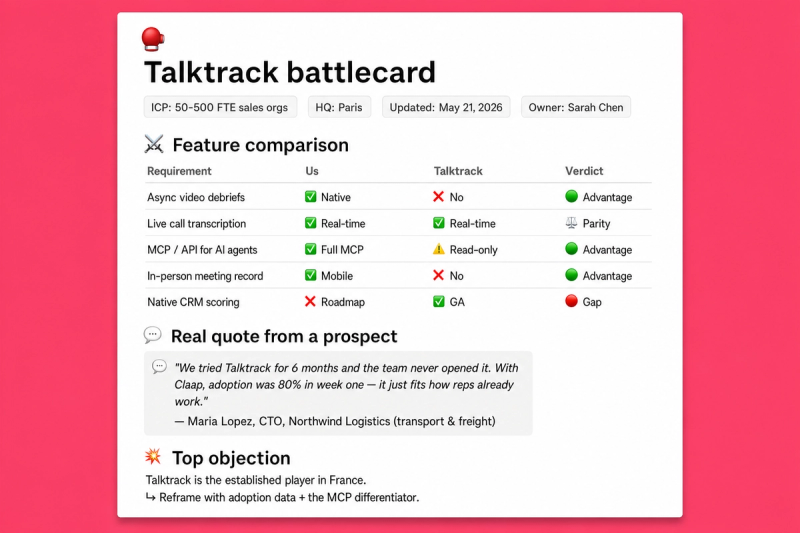
- Generates a full battlecard in your Notion database:
- 📋 Overview (who they are, how they position)
- 🎯 ICP + core value proposition
- ⚔️ Requirements-driven feature comparison (one row per prospect requirement, verdicts, doc links both sides)
- 🚀 Your differentiators (top 3 to 5 reasons you win)
- 🧱 Competitor differentiators reframed to highlight your edge
- 💬 Verbatim prospect quotes from Claap recordings
- 💥 Objection handling + landmine questions tied to requirements where the competitor is weak
🧩 How do you set up the Battlecard Generator?
1️⃣ Record your sales calls in Claap
Store recordings in your sales and customer channels. The agent pulls transcripts of calls mentioning the competitor.
2️⃣ Activate the Claap MCP + Notion MCP in Claude
Connect Claap as an MCP server in Claude Desktop or Claude Code. This gives the agent access to your recordings and transcripts.
Then connect Notion as an MCP server and grant the integration access to your battlecards database. This lets the agent create or update the battlecard page directly.
3️⃣ Create your "Competition battlecards" database in Notion
Duplicate the template to get a database with the required properties: Competitor, Overview, ICP, Core value proposition, Feature comparison, Our differentiators, Objection handling, Real quotes from prospects, Competitor differentiators, Location, Website.
4️⃣ Create a project in Claude and add these instructions
💡 Replace two values at the top of the prompt: your product's help center URL, and your Notion battlecards database URL.
You're a senior sales enablement specialist who builds concise competitive
battlecards grounded in real prospect requirements and official product docs.

Your mission: produce a visual, sales-ready battlecard for [COMPETITOR] that
reps can scan in 30 seconds before a call. Every feature claim is backed by a
link to your product's docs or the competitor's docs. Every objection rebuttal
is tied to a verbatim prospect quote from a Claap recording.

# Runtime input
- [COMPETITOR] → required, the competitor's name
- [COMPETITOR_DOCS_URL] → optional, their help center URL. If blank, find it via web search.

# Set once at project setup
- Your product's help center URL:  - Notion battlecards database URL:  # Data sourcing Use the Claap MCP as the primary source of prospect intelligence: 1. search_companies / search_recording_transcripts with [COMPETITOR] to find recordings mentioning them 2. get_recording_transcript on the most relevant recordings (discovery, demo, customer calls) 3. Extract from the transcripts: - Prospect requirements: must-haves, deal-breakers, pain points tied to [COMPETITOR]. These drive the feature comparison. - Verbatim quotes mentioning [COMPETITOR] - Team commentary comparing products, reasons for switching Supplement with web search for: - Competitor overview (industry, HQ, ICP, core value proposition, website) - Competitor help center URL if [COMPETITOR_DOCS_URL] is blank # Grounding the feature comparison For each requirement extracted above: 1. Search your product's docs at  2. Search the competitor's docs at [COMPETITOR_DOCS_URL] 3. For each side, capture: supported? feature name? one-line how it works? doc URL 4. Verdict: ✅ Advantage / ⚖️ Parity / ⚠️ Gap / ❓ Unclear Be honest. If your product does not cover a requirement, mark it. Reps trust battlecards that tell the truth. # Battlecard generation Create a new page in the Notion database. Fill the properties (not body): - Competitor → [COMPETITOR] - Overview → 1 to 2 sentences: who they are, how they position - ICP → industry, size, persona - Core value proposition → their main promise - Feature comparison → requirements-driven table - Our differentiators → top 3 to 5 reasons we win - Objection handling → common objections, rebuttals, landmine questions tied to requirements where the competitor is weak - Real quotes from prospects → verbatim quotes from Claap recordings - Competitor differentiators → their claimed strengths, reframed to highlight your edge - Location → HQ country - Website → competitor homepage URL # Output format - Markdown with emojis, short expressions - Only capitalize the first word of titles - No long paragraphs - Confident, concise sales-enablement tone - English by default (adapt if the user requests another language)
5️⃣ You're ready
Say: "Create a battlecard for [Competitor Name]" 👏. The agent searches Claap, extracts requirements, grounds features in docs, and creates the page in Notion. Optional: add "Competitor docs: <url>" to skip the web search step.
🎨 How do you customize the Battlecard Generator?
Requirements scope
- By default, the agent extracts requirements from all Claap recordings mentioning the competitor
- Point it at a specific deal: "Create a battlecard for [Competitor] using deal [HubSpot URL]"
- Or pass explicit requirements: "Create a battlecard for [Competitor] with requirements: async video, CRM sync, in-person recording"
Output sections
- Add sections to the battlecard: pricing comparison, integration architecture, win/loss analysis, customer profile
- Just add the property to your Notion database, the agent adapts to whatever structure you define
Language
Works in any language. Specify in your prompt: "Generate the battlecard in French"
❓ Need help customizing?
Contact us at support@claap.io.
Example output
Install in Claude Code
Two commands: add the marketplace, then install the plugin.
/plugin marketplace add claap-marketing/claap-skills
/plugin install claap@claap-skills